
ഉൽപ്പന്നം കഴിഞ്ഞുview
The PowerVision PowerEgg X is a versatile aerial drone offering dual-mode functionality: a handheld gimbal mode for stabilized ground shots and a drone mode for aerial photography and videography. It captures stunning 4K60FPS footage and incorporates advanced technologies like SyncVoice for audio recording, visual obstacle avoidance, and precision landing. This manual provides essential information for setting up, operating, maintaining, and troubleshooting your PowerEgg X Wizard drone.
പ്രധാന സവിശേഷതകൾ
- Stunning 4K60FPS footage: Capture high-definition aerial footage with crystal-clear detail and smooth motion at 60 frames per second.
- Dual-mode functionality: Enjoy the versatility of two modes in one device, with a handheld gimbal mode for stabilized shots on the ground and a drone mode for soaring through the air.
- Intelligent features for creative shooting: Use slow-motion and time-lapse effects to add creative flair to your footage, and take advantage of the SyncVoice patent technology to add audio to your aerial shots.
- Advanced obstacle avoidance and landing protection: With visual sensors that detect obstacles and landing conditions, the PowerEgg X can avoid collisions and land with precision and safety.
- Long-range transmission and flight control: Control the drone and transmit real-time video up to 6 kilometers away, with wind resistance up to level 5 for stable, controlled flight. Plus, use the intelligent app editor to easily create and share your videos with the world.
പാക്കേജ് ഉള്ളടക്കം
- PowerEgg X Drone Body
- കൺട്രോളർ
- Flight Battery (x2)
- വാട്ടർപ്രൂഫ് ഭവന നിർമ്മാണം
- Waterproof Arm Set
- Propellers (multiple sets)
- ചാർജിംഗ് കേബിളുകൾ
- ക്യാമറ ബോഡിയും ആക്സസറികളും
- ക്യാമറ കിറ്റ്
All components included in the PowerVision PowerEgg X Wizard package.
സജ്ജമാക്കുക
1. ബാറ്ററി ഇൻസ്റ്റാളേഷൻ
Ensure the flight battery is fully charged before use. Carefully insert the battery into the designated compartment on the drone body until it clicks securely into place.
2. Propeller Installation and Unfolding
Attach the propellers according to the markings (A and B) on the propellers and motor arms. Ensure they are securely fastened. Before flight, gently unfold all four propeller arms until they lock into position.
3. Gimbal Protector Removal
Before powering on the drone, carefully remove the gimbal protector from the camera. Failure to do so may damage the gimbal.
4. Controller Setup and App Connection
Download the official PowerVision app on your smartphone. Mount your smartphone securely onto the controller. Connect your smartphone to the controller using the provided RC cable. Power on the controller, then power on the drone. Follow the on-screen instructions in the app to establish a connection and perform any necessary calibrations.

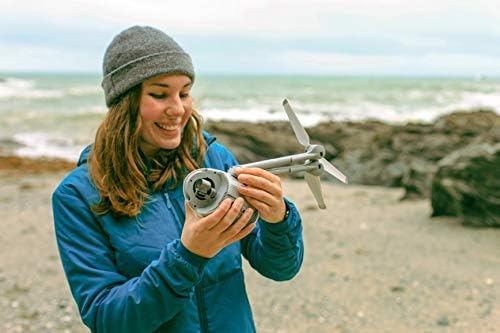
Hand holding the PowerEgg X in handheld mode, showing the camera and sensors.

Controller with a smartphone mounted, displaying the PowerVision app interface.
Operating the PowerEgg X
ഫ്ലൈറ്റ് മോഡുകൾ
- Handheld Gimbal Mode: Attach the drone body to the handheld grip for stabilized ground-level video recording.
- Drone Mode: Attach the propeller arms and waterproof floats (if applicable) for aerial flight.
അടിസ്ഥാന ഫ്ലൈറ്റ് നിയന്ത്രണങ്ങൾ
Use the joysticks on the controller to control the drone's movement (throttle, yaw, pitch, roll). Refer to the app's 'Learn to Fly' section for detailed instructions and practice.
ഇന്റലിജന്റ് ഫ്ലൈറ്റ് സവിശേഷതകൾ
- SyncVoice: Record real-time audio via your smartphone's microphone and automatically synchronize it with your aerial footage.
- Visual Obstacle Avoidance: The drone uses visual sensors to detect and avoid obstacles in its flight path.
- Landing Protection & Precision Landing: The drone automatically checks the landing area for safety and uses image-matching technology for accurate return to its takeoff point.
ക്യാമറ ഓപ്പറേഷൻ
The PowerEgg X captures video at 4K60FPS. Utilize the intelligent app editor for slow-motion and time-lapse effects. Photos can be captured in JPEG and RAW formats.

PowerEgg X in handheld mode with a tripod mount, showing its versatility.

PowerEgg X drone flying over water with floats, viewതാഴെ നിന്ന് എഡിറ്റ് ചെയ്തു.
Official PowerVision video showcasing the PowerEgg X's all-weather capabilities and versatile use.
മെയിൻ്റനൻസ്
1. ബാറ്ററി പരിചരണം
Always use the official PowerVision charger for flight batteries. Store batteries in a cool, dry place away from direct sunlight. Do not overcharge or completely discharge batteries.
2. പ്രൊപ്പല്ലർ മാറ്റിസ്ഥാപിക്കൽ
Inspect propellers for any damage before each flight. Replace bent, cracked, or chipped propellers immediately using the provided spare sets and tools. Ensure correct propeller type (A or B) is installed on the corresponding motor arm.
3 വൃത്തിയാക്കലും സംഭരണവും
Wipe the drone body and camera lens with a soft, dry cloth after each use. Avoid using harsh chemicals. Store the drone and all accessories in the provided carrying case in a cool, dry environment.
ട്രബിൾഷൂട്ടിംഗ്
- Drone fails to power on: ബാറ്ററി പൂർണ്ണമായും ചാർജ്ജ് ചെയ്തിട്ടുണ്ടെന്നും ശരിയായി ചേർത്തിട്ടുണ്ടെന്നും ഉറപ്പാക്കുക.
- ആപ്പ് കണക്ഷൻ പ്രശ്നങ്ങൾ: Verify the smartphone is securely connected to the controller via the RC cable. Restart the app, controller, and drone.
- അസ്ഥിരമായ ഫ്ലൈറ്റ്: Perform IMU and compass calibration as instructed in the app. Check propellers for damage and replace if necessary. Avoid flying in strong winds.
- Gimbal error: Ensure the gimbal protector is removed before powering on. Check for any obstructions around the gimbal.
- No video feed/recording: Ensure an SD card is inserted into the drone (if required for direct recording) and formatted correctly. Check app settings for video resolution and storage location.
സ്പെസിഫിക്കേഷനുകൾ
| ഫീച്ചർ | വിശദാംശങ്ങൾ |
|---|---|
| ബ്രാൻഡ് | പവർവിഷൻ |
| മോഡലിൻ്റെ പേര് | PowerEgg X Wizard |
| മോഡൽ നമ്പർ | PXW10 |
| പ്രത്യേക ഫീച്ചർ | വാട്ടർപ്രൂഫ് |
| വീഡിയോ ക്യാപ്ചർ റെസല്യൂഷൻ | 4K |
| ബാറ്ററി ശേഷി | 3500 മില്ലിamp മണിക്കൂറുകൾ |
| പരമാവധി പരിധി | 6 കിലോമീറ്റർ |
| ഇനത്തിൻ്റെ ഭാരം | 1.06 ഔൺസ് (30 ഗ്രാം) |
| ഉൽപ്പന്ന അളവുകൾ | 7"L x 4"W x 4"H |
| കണക്റ്റിവിറ്റി ടെക്നോളജി | USB, Wi-Fi |
| പിന്തുണയ്ക്കുന്ന ഇമേജ് ഫോർമാറ്റ് | JPEG, റോ |
| പ്രവർത്തന താപനില | 32 ഡിഗ്രി ഫാരൻഹീറ്റ് |
വാറൻ്റിയും പിന്തുണയും
For warranty information, technical support, or service inquiries, please refer to the official PowerVision webസൈറ്റിൽ ബന്ധപ്പെടുക അല്ലെങ്കിൽ അവരുടെ ഉപഭോക്തൃ സേവനവുമായി നേരിട്ട് ബന്ധപ്പെടുക. വാറന്റി ക്ലെയിമുകൾക്കായി നിങ്ങളുടെ വാങ്ങൽ രസീത് സൂക്ഷിക്കുക.