
ആമുഖം
Thank you for choosing the Udreamer Voksun 3-Speed Precision Turntable. This high-fidelity vinyl record player is designed to provide an exceptional audio experience with its magnetic cartridge, belt-drive system, and dual 15-watt speakers. It also features Bluetooth connectivity for versatile audio streaming. This manual will guide you through the setup, operation, and maintenance of your new turntable to ensure optimal performance and longevity.
ഉൽപ്പന്നം കഴിഞ്ഞുview
ഘടകങ്ങളും നിയന്ത്രണങ്ങളും
Familiarize yourself with the various parts of your turntable:

Figure 1: Turntable Components Overview
- 45 RPM Record Adapter: Used for playing 7-inch records with a large center hole.
- ടേൺടേബിൾ പ്ലാറ്റർ: റെക്കോർഡുകൾ സ്ഥാപിക്കുന്ന കറങ്ങുന്ന പ്ലാറ്റ്ഫോം.
- Tonearm Counterweight: Balances the tonearm for proper tracking force.
- Tonearm Holder: Secures the tonearm when not in use.
- ലിഫ്റ്റ് ലിവർ: Raises and lowers the tonearm gently onto the record.
- ടോണെർം: കാട്രിഡ്ജും സ്റ്റൈലസും പിടിക്കുന്നു.
- 33/45/78 RPM Speed Selector: Adjusts the platter speed to match your record.
- Pitch Adjust Switch: പ്ലേബാക്ക് വേഗത മികച്ചതാക്കുന്നു.
- Power Switch/Volume Control/Bluetooth Control: Multi-function knob for power, volume, and mode selection.
- Stylus Needle: രേഖയുടെ ആഴങ്ങൾ വായിക്കുന്ന സൂചി.
സജ്ജമാക്കുക
1 അൺപാക്ക് ചെയ്യുന്നു
Carefully remove all components from the packaging. Ensure all parts listed in the Product Overview section are present. Retain packaging for future transport or storage.
2. Belt Installation
The belt is pre-stored in the groove on the back of the iron turntable. To install:
- Hold up the turntable platter and rotate it 90 degrees.
- Locate the belt in the groove and carefully place it onto the drive shaft.
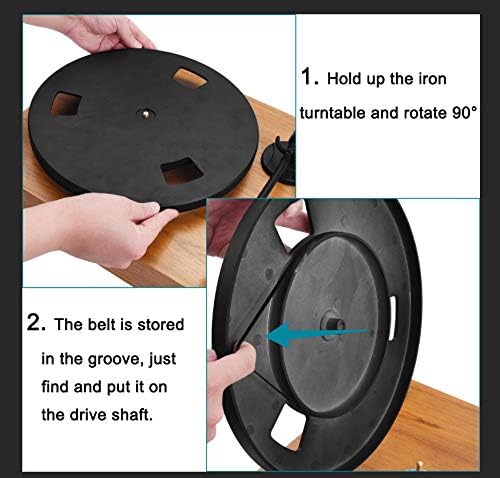
Figure 2: Belt Installation Steps
3 സ്പീക്കർ കണക്ഷൻ
Connect the included dual 15-watt speakers to the turntable using the provided speaker cables. Ensure the left speaker is connected to the 'SP-L' output and the right speaker to the 'SP-R' output on the rear of the turntable.
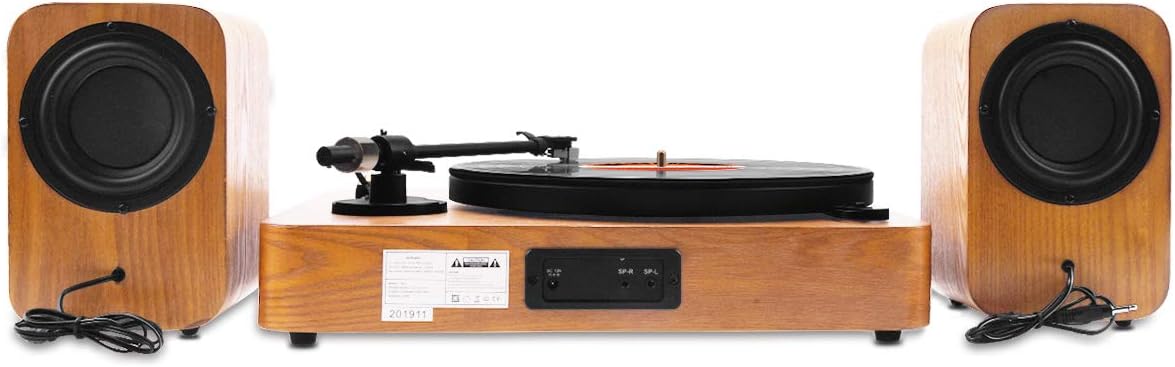
Figure 3: Rear Connections for Speakers
4. പവർ കണക്ഷൻ
Connect the power adapter to the DC input on the rear of the turntable, then plug it into a suitable wall outlet.
പ്രവർത്തന നിർദ്ദേശങ്ങൾ
1. ഒരു റെക്കോർഡ് പ്ലേ ചെയ്യുന്നു
- Place a record on the turntable platter. If playing a 7-inch record, use the 45 RPM adapter.
- Select the appropriate speed (33, 45, or 78 RPM) using the speed selector knob.
- Gently release the tonearm from its holder.
- Lift the tonearm using the lift lever.
- റെക്കോർഡിന്റെ ആവശ്യമുള്ള സ്റ്റാർട്ടിംഗ് ഗ്രൂവിന് മുകളിൽ ടോൺആം സ്ഥാപിക്കുക.
- ലിഫ്റ്റ് ലിവർ ഉപയോഗിച്ച് ടോൺആം പതുക്കെ താഴ്ത്തുക. സ്റ്റൈലസ് റെക്കോർഡുമായി സമ്പർക്കം സ്ഥാപിക്കുകയും പ്ലേബാക്ക് ആരംഭിക്കുകയും ചെയ്യും.
- വോളിയം കൺട്രോൾ നോബ് ഉപയോഗിച്ച് വോളിയം ക്രമീകരിക്കുക.
- To stop playback, lift the tonearm using the lift lever, return it to the tonearm holder, and secure it.
2. Speed and Pitch Adjustment
The turntable supports three playback speeds: 33, 45, and 78 RPM. Use the speed selector knob to choose the correct speed for your record. The pitch adjust switch allows for minor adjustments to the playback speed, which can be useful for fine-tuning or correcting slight variations in record pressings.

Figure 4: Speed and Pitch Controls
3. ബ്ലൂടൂത്ത് മോഡ്
The turntable features a built-in Bluetooth receiver, allowing you to stream music wirelessly from your smartphone, tablet, or other Bluetooth-enabled devices through the turntable's speakers.
- ടർടേബിൾ ഓണാക്കുക.
- Rotate the Power/Volume/Bluetooth Control knob to select Bluetooth mode. The indicator light will typically change to a blue flashing light, indicating it's in pairing mode.
- On your external device, enable Bluetooth and search for available devices. Select 'Voksun Turntable' (or similar) from the list.
- Once paired, the indicator light will become solid blue, and you can begin streaming audio.

ചിത്രം 5: ബ്ലൂടൂത്ത് കണക്റ്റിവിറ്റി
4. Operational Videos
Video 1: Demonstrates the Voksun turntable in operation, showcasing its features and sound quality. This video provides a practical overview of the product's functionality.
Video 2: Shows the turntable playing a record, highlighting its ease of use and immediate functionality right out of the box.
മെയിൻ്റനൻസ്
1. വൃത്തിയാക്കൽ
Regularly dust the turntable and speakers with a soft, dry cloth. Avoid using harsh chemicals or abrasive cleaners, as these can damage the finish. For records, use a dedicated record cleaning brush and solution to remove dust and static before each play.
2. സ്റ്റൈലസ് കെയർ
The stylus is a delicate component. Clean it periodically with a soft brush designed for stylus cleaning, brushing gently from back to front. Avoid touching the stylus with your fingers. A worn or damaged stylus can harm your records and degrade sound quality. Replace the stylus when necessary.

Figure 6: Audio-Technica Stylus
ട്രബിൾഷൂട്ടിംഗ്
| പ്രശ്നം | സാധ്യമായ കാരണം | പരിഹാരം |
|---|---|---|
| ശക്തിയില്ല | പവർ അഡാപ്റ്റർ ബന്ധിപ്പിച്ചിട്ടില്ല അല്ലെങ്കിൽ ഔട്ട്ലെറ്റ് പ്രവർത്തിക്കുന്നില്ല. | Ensure power adapter is securely connected to the turntable and a live power outlet. |
| സ്പീക്കറുകളിൽ നിന്ന് ശബ്ദമില്ല | Speakers not connected, volume too low, or incorrect mode. | Check speaker cable connections. Increase volume. Ensure turntable is not in Bluetooth pairing mode if playing records. |
| Skipping records | വൃത്തികെട്ട റെക്കോർഡ്, തേഞ്ഞ സ്റ്റൈലസ്, അല്ലെങ്കിൽ അസ്ഥിരമായ പ്രതലം. | Clean the record. Inspect and replace stylus if worn. Place turntable on a stable, level surface. |
| ബ്ലൂടൂത്ത് കണക്റ്റ് ചെയ്യുന്നില്ല | Turntable not in pairing mode, device too far, or interference. | Ensure turntable is in Bluetooth pairing mode. Move device closer to the turntable. Restart both devices. |
സ്പെസിഫിക്കേഷനുകൾ
| ഫീച്ചർ | വിശദാംശങ്ങൾ |
|---|---|
| ബ്രാൻഡ് | ഉഡ്രീമർ |
| മോഡലിൻ്റെ പേര് | 3-Speed Precision |
| മെറ്റീരിയൽ | എഞ്ചിനീയറിംഗ് വുഡ് |
| നിറം | വാൽനട്ട് |
| വേഗത | 33, 45, 78 ആർപിഎം |
| മോട്ടോർ തരം | എസി മോട്ടോർ |
| വൈദ്യുതി ഉപഭോഗം | 15 വാട്ട്സ് |
| കണക്റ്റിവിറ്റി ടെക്നോളജി | വയർലെസ് (ബ്ലൂടൂത്ത്) |
| അനുയോജ്യമായ ഉപകരണങ്ങൾ | സ്പീക്കർ |
| നിർമ്മാതാവ് | VOKSUN |
| യു.പി.സി | 744678239309 |
| ASIN | B083FPMH78 |
വാറൻ്റിയും പിന്തുണയും
Your Udreamer Voksun 3-Speed Precision Turntable comes with a standard manufacturer's warranty. Please refer to the warranty card included in your product packaging for specific terms and conditions. For technical support, troubleshooting assistance, or to inquire about replacement parts, please contact Udreamer customer service through the retailer where you purchased the product or visit the official Udreamer webസൈറ്റ്.