
1. ആമുഖം
Thank you for choosing the BIG Sound Wireless Bluetooth Speaker KTS-1118A. This portable speaker offers versatile audio playback options, including Bluetooth wireless connectivity, wired input, USB/SD card support, and FM radio. This manual provides essential information for setting up, operating, and maintaining your speaker to ensure optimal performance.
2. പാക്കേജ് ഉള്ളടക്കം
- 1 x KTS-1118A Wireless Bluetooth Speaker
- 1 x USB ചാർജിംഗ് കേബിൾ

Image: The KTS-1118A speaker shown alongside its retail packaging, highlighting its compact design and integrated handle.
3. ഉൽപ്പന്ന സവിശേഷതകൾ
- വയർലെസ് ബ്ലൂടൂത്ത് കണക്റ്റിവിറ്റി: Seamlessly connect to compatible devices.
- വയർഡ് കണക്റ്റിവിറ്റി: Supports RCA and other multi-port connections.
- Subwoofer Speaker Type: Delivers enhanced bass audio.
- ഒന്നിലധികം ഉപകരണ അനുയോജ്യത: Works with smartphones, tablets, laptops, and music players.
- USB/SD കാർഡ് പ്ലേബാക്ക്: Direct audio playback from external storage.
- എഫ്എം റേഡിയോ പ്രവർത്തനം: Built-in radio tuner for local broadcasts.
- പോർട്ടബിൾ ഡിസൈൻ: എളുപ്പത്തിലുള്ള ഗതാഗതത്തിനായി സംയോജിത ഹാൻഡിൽ.
- നീണ്ടുനിൽക്കുന്ന നിർമ്മാണം: Made from plastic material.
4. Controls and Ports Overview

ചിത്രം: ക്ലോസ്-അപ്പ് view of the speaker's top control panel, displaying various buttons and input ports.
Familiarize yourself with the speaker's control panel and ports:
- USB പോർട്ട്: For connecting USB flash drives for audio playback.
- SD കാർഡ് സ്ലോട്ട്: For inserting SD memory cards for audio playback.
- AUX ഇൻപുട്ട്: 3.5mm jack for wired audio connection from external devices.
- DC 5V ചാർജിംഗ് പോർട്ട്: സ്പീക്കറിന്റെ ആന്തരിക ബാറ്ററി ചാർജ് ചെയ്യുന്നതിനുള്ള മൈക്രോ യുഎസ്ബി പോർട്ട്.
- MIC ഇൻപുട്ട്: മൈക്രോഫോൺ ബന്ധിപ്പിക്കുന്നതിനുള്ള 6.35mm ജാക്ക്.
- വൈദ്യുതി സ്വിച്ച്: സ്പീക്കർ ഓൺ/ഓഫ് ടോഗിൾ ചെയ്യുന്നു.
- മോഡ് ബട്ടൺ: Switches between Bluetooth, FM Radio, USB/SD, and AUX input modes.
- പ്ലേ/താൽക്കാലികമായി നിർത്തുക ബട്ടൺ: Plays or pauses audio playback; initiates FM auto-scan.
- മുൻഭാഗം/ശബ്ദം കുറയ്ക്കൽ ബട്ടൺ: Skips to the previous track; decreases volume when held.
- അടുത്തത്/വോളിയം അപ്പ് ബട്ടൺ: Skips to the next track; increases volume when held.
- LED സൂചകം: Displays charging status and operational mode.
5. സജ്ജീകരണം
5.1 സ്പീക്കർ ചാർജ് ചെയ്യുന്നു
- Connect the supplied USB charging cable to the DC 5V port on the speaker.
- USB കേബിളിന്റെ മറ്റേ അറ്റം ഒരു USB പവർ അഡാപ്റ്ററുമായി (ഉൾപ്പെടുത്തിയിട്ടില്ല) അല്ലെങ്കിൽ ഒരു കമ്പ്യൂട്ടറിന്റെ USB പോർട്ടുമായി ബന്ധിപ്പിക്കുക.
- ചാർജ് ചെയ്യുമ്പോൾ LED ഇൻഡിക്കേറ്റർ പ്രകാശിക്കുകയും പൂർണ്ണമായി ചാർജ് ചെയ്യുമ്പോൾ അത് ഓഫാകുകയോ നിറം മാറുകയോ ചെയ്യും.
5.2 പവർ ഓൺ/ഓഫ്
- To power on the speaker, slide the Power Switch to the 'ON' position.
- To power off the speaker, slide the Power Switch to the 'OFF' position.
6. പ്രവർത്തന നിർദ്ദേശങ്ങൾ
6.1 ബ്ലൂടൂത്ത് മോഡ്
- സ്പീക്കർ ഓൺ ചെയ്യുക. മിന്നുന്ന LED സൂചിപ്പിക്കുന്ന ബ്ലൂടൂത്ത് ജോടിയാക്കൽ മോഡിലേക്ക് ഇത് യാന്ത്രികമായി പ്രവേശിക്കും.
- നിങ്ങളുടെ മൊബൈൽ ഉപകരണത്തിൽ (സ്മാർട്ട്ഫോൺ, ടാബ്ലെറ്റ്, ലാപ്ടോപ്പ്) ബ്ലൂടൂത്ത് പ്രവർത്തനക്ഷമമാക്കുക.
- ഇതിനായി തിരയുക available Bluetooth devices and select "KTS-1118A" from the list.
- ജോടിയാക്കിക്കഴിഞ്ഞാൽ, സ്പീക്കർ ഒരു സ്ഥിരീകരണ ശബ്ദം പുറപ്പെടുവിക്കും, LED ഇൻഡിക്കേറ്റർ മിന്നുന്നത് നിർത്തും.
- ഇപ്പോൾ നിങ്ങളുടെ ഉപകരണത്തിൽ നിന്ന് സ്പീക്കറിലൂടെ ഓഡിയോ പ്ലേ ചെയ്യാൻ കഴിയും.
6.2 എഫ്എം റേഡിയോ മോഡ്
- അമർത്തുക മോഡ് എഫ്എം റേഡിയോ പ്രോംപ്റ്റ് കേൾക്കുന്നത് വരെ ആവർത്തിച്ച് ബട്ടൺ അമർത്തുക.
- അമർത്തുക പ്ലേ/താൽക്കാലികമായി നിർത്തുക button once to initiate an automatic scan for FM stations. The speaker will save all found stations.
- ഉപയോഗിക്കുക മുമ്പത്തെ ഒപ്പം അടുത്തത് സംരക്ഷിച്ച സ്റ്റേഷനുകൾക്കിടയിൽ നാവിഗേറ്റ് ചെയ്യാനുള്ള ബട്ടണുകൾ.
6.3 യുഎസ്ബി/എസ്ഡി കാർഡ് പ്ലേബാക്ക്
- Insert a USB flash drive or an SD card (pre-loaded with MP3 audio files) into the respective port.
- The speaker will automatically switch to USB/SD mode and begin playing audio.
- ഉപയോഗിക്കുക പ്ലേ/താൽക്കാലികമായി നിർത്തുക, മുമ്പത്തെ, ഒപ്പം അടുത്തത് പ്ലേബാക്ക് നിയന്ത്രിക്കുന്നതിനുള്ള ബട്ടണുകൾ.
6.4 AUX ഇൻപുട്ട് മോഡ്
- 3.5mm ഓഡിയോ കേബിളിന്റെ ഒരു അറ്റം (ഉൾപ്പെടുത്തിയിട്ടില്ല) സ്പീക്കറിലെ AUX ഇൻപുട്ട് പോർട്ടുമായി ബന്ധിപ്പിക്കുക.
- കേബിളിന്റെ മറ്റേ അറ്റം നിങ്ങളുടെ ബാഹ്യ ഉപകരണത്തിന്റെ ഓഡിയോ ഔട്ട്പുട്ട് ജാക്കുമായി ബന്ധിപ്പിക്കുക.
- അമർത്തുക മോഡ് button until the speaker enters AUX mode.
- Control audio playback from your connected device.
6.5 മൈക്രോഫോൺ ഇൻപുട്ട്
- Connect a microphone (not included) to the MIC input port.
- The microphone audio will be mixed with the current playback. Adjust the main volume as needed.
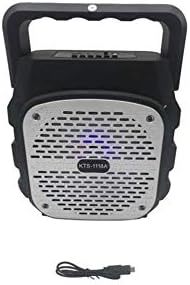
ചിത്രം: മുൻഭാഗം view of the KTS-1118A speaker, showcasing its grille and the included USB charging cable.
7. പരിപാലനം
- വൃത്തിയാക്കൽ: സ്പീക്കറിന്റെ പുറംഭാഗം വൃത്തിയാക്കാൻ മൃദുവായതും ഉണങ്ങിയതുമായ തുണി ഉപയോഗിക്കുക. അബ്രസീവ് ക്ലീനറുകളോ ലായകങ്ങളോ ഉപയോഗിക്കരുത്.
- സംഭരണം: നേരിട്ടുള്ള സൂര്യപ്രകാശത്തിൽ നിന്നും കടുത്ത താപനിലയിൽ നിന്നും മാറി തണുത്തതും വരണ്ടതുമായ സ്ഥലത്ത് സ്പീക്കർ സൂക്ഷിക്കുക.
- വെള്ളം ഒഴിവാക്കുക: This speaker is not waterproof. Keep it away from water and moisture.
- ശ്രദ്ധയോടെ കൈകാര്യം ചെയ്യുക: സ്പീക്കർ താഴെയിടുകയോ ശക്തമായ ആഘാതങ്ങൾക്ക് വിധേയമാക്കുകയോ ചെയ്യുന്നത് ഒഴിവാക്കുക.
8. പ്രശ്നപരിഹാരം
| പ്രശ്നം | സാധ്യമായ കാരണം | പരിഹാരം |
|---|---|---|
| സ്പീക്കർ പവർ ഓൺ ചെയ്യുന്നില്ല. | ബാറ്ററി തീർന്നു. പവർ സ്വിച്ച് ഓഫ് ആണ്. | സ്പീക്കർ പൂർണ്ണമായും ചാർജ് ചെയ്യുക. പവർ സ്വിച്ച് 'ഓൺ' സ്ഥാനത്താണെന്ന് ഉറപ്പാക്കുക. |
| സ്പീക്കറിൽ നിന്ന് ശബ്ദമില്ല. | വോളിയം വളരെ കുറവാണ്. തെറ്റായ മോഡ് തിരഞ്ഞെടുത്തു. ഓഡിയോ ഉറവിടം പ്ലേ ചെയ്യുന്നില്ല. | Increase the speaker volume and device volume. Press the Mode button to select the correct input. Ensure your audio source is playing and connected properly. |
| ബ്ലൂടൂത്ത് ജോടിയാക്കൽ പരാജയപ്പെട്ടു. | സ്പീക്കർ ജോടിയാക്കൽ മോഡിലല്ല. ഉപകരണ ബ്ലൂടൂത്ത് ഓഫാണ്. Speaker connected to another device. | Ensure speaker is powered on and in Bluetooth mode (flashing LED). നിങ്ങളുടെ ഉപകരണത്തിൽ ബ്ലൂടൂത്ത് ഓണാക്കുക. Disconnect from other devices or restart the speaker. |
| മോശം എഫ്എം റേഡിയോ സ്വീകരണം. | ദുർബലമായ സിഗ്നൽ. | Reposition the speaker to improve signal reception. |
9 സ്പെസിഫിക്കേഷനുകൾ
- മോഡൽ: KTS-1118A
- കണക്റ്റിവിറ്റി ടെക്നോളജി: Wired/Wireless (Bluetooth, RCA)
- സ്പീക്കർ തരം: സബ് വൂഫർ
- മെറ്റീരിയൽ: പ്ലാസ്റ്റിക്
- അനുയോജ്യമായ ഉപകരണങ്ങൾ: Laptop, Smartphone, Tablet, Music Players
- പ്രത്യേക സവിശേഷതകൾ: ബ്ലൂടൂത്ത്, വയർലെസ്
- നിറം: Silver (grille) / Black (body)
- നിർമ്മാതാവ്: മറ്റുള്ളവ
- ആദ്യം ലഭ്യമായ തീയതി: 15 ജനുവരി 2020
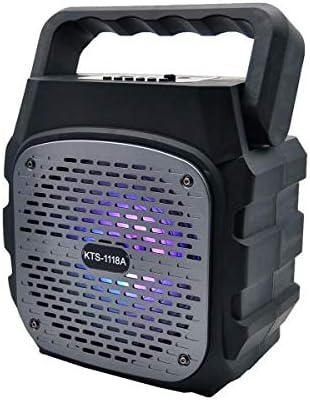
Image: The KTS-1118A speaker displaying its integrated LED lighting feature.
10. വാറൻ്റിയും പിന്തുണയും
Specific warranty details for the BIG Sound Wireless Bluetooth Speaker KTS-1118A may vary depending on your region and point of purchase. Please refer to the documentation provided at the time of purchase or contact your retailer for warranty information.
For technical assistance or further inquiries, please contact the customer support of your retailer or the manufacturer.