
1. ആമുഖം
Thank you for choosing the Fortte TEZAUR Computer Desk. This manual provides essential information for the safe assembly, operation, and maintenance of your new desk. Please read these instructions carefully before beginning assembly and retain them for future reference.
The Fortte TEZAUR desk is designed for daily use in a home office or gaming setup, offering a functional and ergonomic workspace. It features a rectangular design with a black matte finish combined with orange accents, and includes a single drawer for storage.
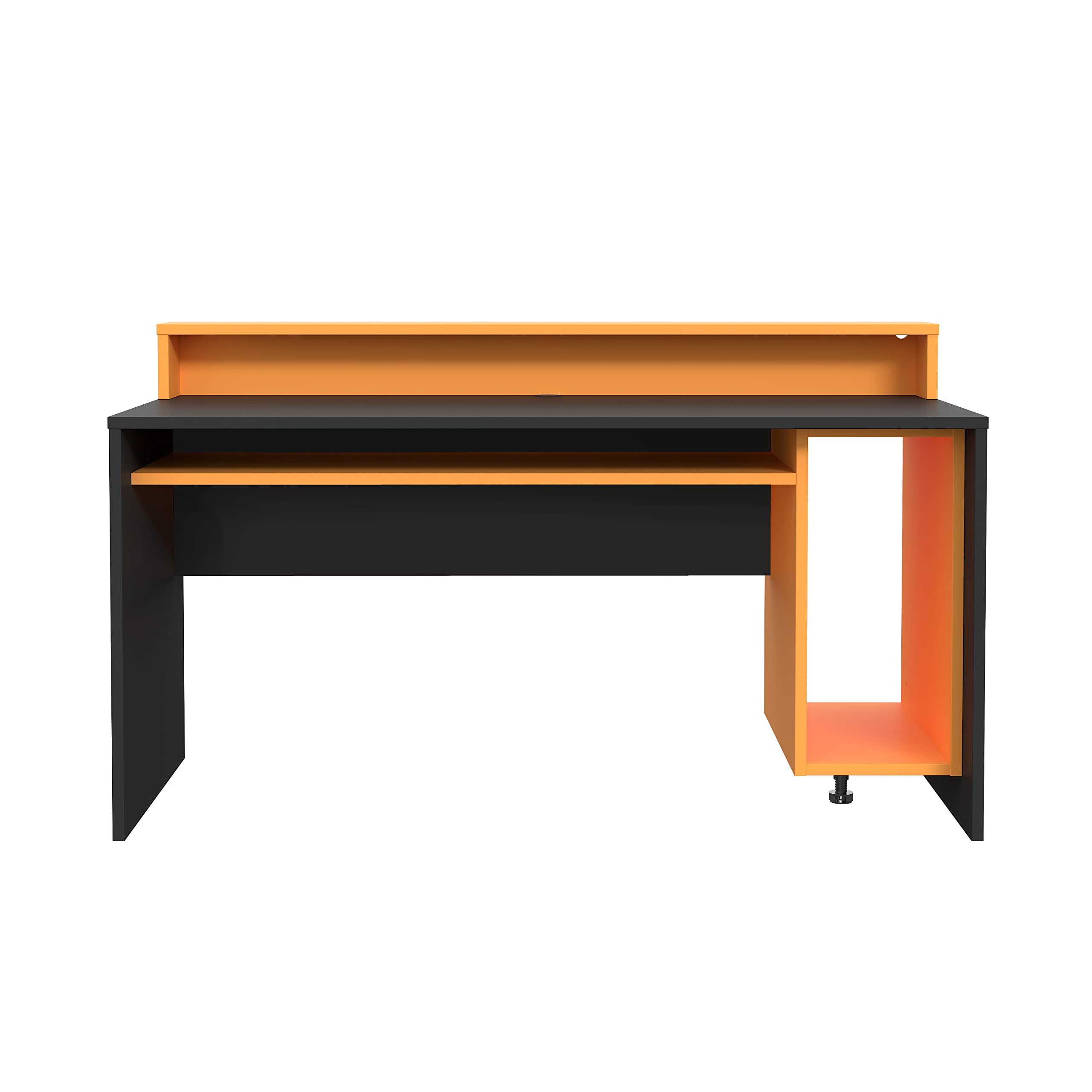
Figure 1: Fortte TEZAUR Computer Desk in a typical setup.
2. പാക്കേജ് ഉള്ളടക്കം
Your Fortte TEZAUR Computer Desk is typically shipped in multiple packages. Please ensure all packages are received and inspect them for any signs of damage before opening. If any parts are missing or damaged, please contact customer support immediately.

Figure 2: Product may be shipped in multiple packages.
The packages should contain all necessary components for assembly, including:
- Desk panels (tabletop, side panels, back panel, drawer components)
- Monitor stand/raised platform components
- Hardware pack (screws, dowels, cam locks, drawer slides, etc.)
- അസംബ്ലി നിർദ്ദേശങ്ങൾ (ഈ മാനുവൽ)
3. സജ്ജീകരണവും അസംബ്ലി നിർദ്ദേശങ്ങളും
Assembly of the Fortte TEZAUR Computer Desk requires basic household tools and can typically be completed by one or two adults. Please follow the step-by-step diagrams provided in the separate assembly guide included with your product. Ensure you have sufficient space for assembly and protect your floor surface.
3.1 ആവശ്യമായ ഉപകരണങ്ങൾ (ഉൾപ്പെടുത്തിയിട്ടില്ല)
- ഫിലിപ്സ് ഹെഡ് സ്ക്രൂഡ്രൈവർ
- ചുറ്റിക (ഡോവലുകൾക്ക്)
- Measuring tape (optional, for placement)
3.2 അസംബ്ലി നുറുങ്ങുകൾ
- ആരംഭിക്കുന്നതിന് മുമ്പ് എല്ലാ ഭാഗങ്ങളും ഹാർഡ്വെയറും തിരിച്ചറിയുക.
- Do not overtighten screws to avoid damaging the wood-based material.
- പോറലുകൾ ഉണ്ടാകാതിരിക്കാൻ മൃദുവും വൃത്തിയുള്ളതുമായ ഒരു പ്രതലത്തിൽ കൂട്ടിച്ചേർക്കുക.
- Ensure all connections are secure before using the desk.
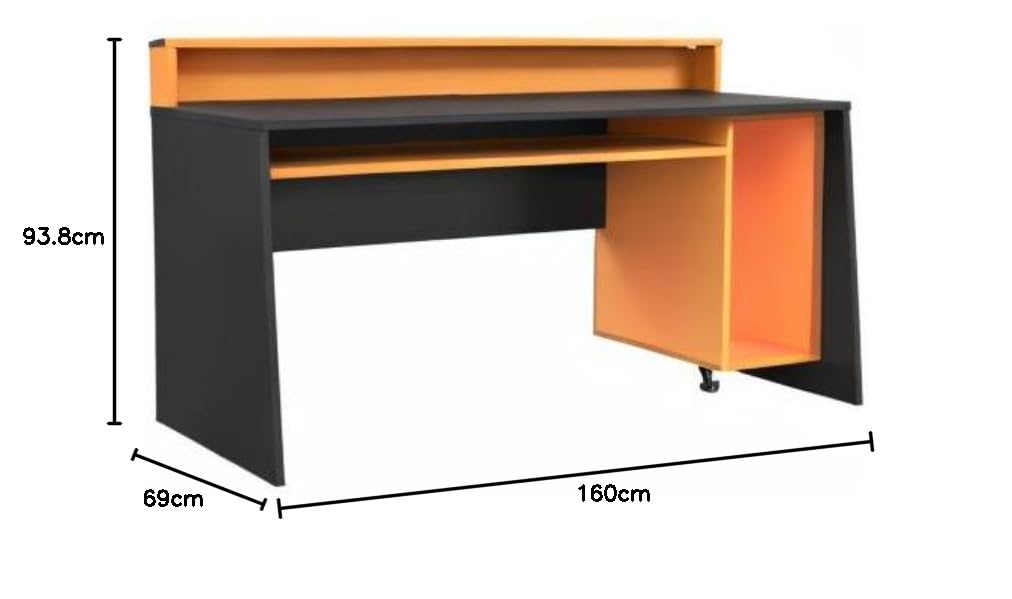
ചിത്രം 3: നിങ്ങളുടെ സ്ഥലം ആസൂത്രണം ചെയ്യുന്നതിനുള്ള മേശയുടെ അളവുകൾ.
4. പ്രവർത്തന നിർദ്ദേശങ്ങൾ
The Fortte TEZAUR Computer Desk is designed for optimal functionality and comfort. Here are some key features and usage guidelines:
- എർഗണോമിക് ഡിസൈൻ: The desk features a raised platform, ideal for placing a monitor at an ergonomic viewഉയരം കുറയ്ക്കുക, കഴുത്തിനും കണ്ണിനും ആയാസം കുറയ്ക്കുക.
- സംഭരണം: An open compartment provides ample storage space, and a single drawer offers concealed storage for personal items or office supplies.
- കേബിൾ മാനേജുമെന്റ്: A cable grommet is integrated into the compartment for easy and organized cable routing, keeping your workspace tidy.
- ഭാരം ശേഷി: The maximum load on the tabletop is 40 kg. The monitor stand can support up to 10 kg, and the compartment can hold up to 5 kg. Do not exceed these limits to ensure stability and longevity of the desk.

Figure 4: Detail of the monitor stand and storage compartment.
5. പരിപാലനം
To ensure the longevity and appearance of your Fortte TEZAUR Computer Desk, follow these maintenance guidelines:
- വൃത്തിയാക്കൽ: മേശയുടെ പ്രതലങ്ങൾ മൃദുവായ, ഡി-ടച്ച് ഉപയോഗിച്ച് തുടയ്ക്കുക.amp തുണി. ഫിനിഷിന് കേടുവരുത്തുന്ന കഠിനമായ രാസവസ്തുക്കൾ, അബ്രസീവ് ക്ലീനറുകൾ, അല്ലെങ്കിൽ പോളിഷുകൾ എന്നിവ ഉപയോഗിക്കുന്നത് ഒഴിവാക്കുക.
- ചോർച്ച: Immediately wipe up any spills to prevent staining or damage to the wood-based material.
- ചൂടും ഈർപ്പവും: Avoid placing hot items directly on the surface. Use coasters or protective pads. Keep the desk away from excessive moisture or direct sunlight to prevent warping or fading.
- പരിശോധനകൾ: എല്ലാ സ്ക്രൂകളും ഫിറ്റിംഗുകളും ഇറുകിയതാണെന്ന് ഉറപ്പാക്കാൻ ഇടയ്ക്കിടെ പരിശോധിക്കുക. ആവശ്യമെങ്കിൽ വീണ്ടും മുറുക്കുക.
6. പ്രശ്നപരിഹാരം
If you encounter any issues with your Fortte TEZAUR Computer Desk, refer to the following common troubleshooting tips:
- മേശ ഇളകിയിരിക്കുന്നു: Ensure all screws and fittings are securely tightened. Check that the desk is placed on a level surface. Adjust any leveling feet if present.
- ഡ്രോയർ സുഗമമായി സ്ലൈഡ് ചെയ്യുന്നില്ല: Verify that the drawer slides are correctly installed and aligned. Ensure no obstructions are in the drawer tracks. Lubricate slides with a silicone-based spray if needed.
- വിട്ടുപോയ ഭാഗങ്ങൾ: Double-check all packaging materials. If parts are genuinely missing, contact customer support with your purchase details and the specific part numbers from the assembly guide.
- Surface damage during assembly: If minor scratches or chips occur, furniture repair pens or touch-up kits can be used. For significant damage, contact customer support.
7 സ്പെസിഫിക്കേഷനുകൾ

Figure 5: Fortte TEZAUR Computer Desk, alternative view.
| ഫീച്ചർ | വിശദാംശങ്ങൾ |
|---|---|
| ബ്രാൻഡ് | ഫോർട്ട് |
| മോഡൽ നമ്പർ | TZRB212-C913 |
| നിറം | Black matte combined with orange |
| ഉൽപ്പന്ന അളവുകൾ (W x H x D) | 160 x 93.8 x 69 സെ.മീ |
| മെറ്റീരിയൽ | Engineered wood, Metal, Wood-based materials, Melamine |
| പ്രത്യേക സവിശേഷതകൾ | Ergonomic, Cable management grommet, Damage-resistant ABS edge |
| ഡ്രോയറുകളുടെ എണ്ണം | 1 |
| ശുപാർശ ചെയ്യുന്ന ഉപയോഗം | Work, Gaming |
| ടാബ്ലെറ്റ് ലോഡ് ശേഷി | 40 കി.ഗ്രാം |
| Monitor Stand Load Capacity | 10 കി.ഗ്രാം |
| Compartment Load Capacity | 5 കി.ഗ്രാം |
8. വാറൻ്റിയും പിന്തുണയും
For information regarding warranty coverage, claims, or technical support, please refer to the warranty card included with your product or contact Forte customer service directly. Keep your proof of purchase for any warranty-related inquiries.
Contact information for Forte customer support can typically be found on the manufacturer's webസൈറ്റ് അല്ലെങ്കിൽ ഉൽപ്പന്ന പാക്കേജിംഗിൽ.