
ആമുഖം
This manual provides comprehensive instructions for the Doro 6040 Senior Mobile Phone, model 7826. Designed for ease of use, this phone features a clear display, large buttons, and essential functions to keep you connected. Please read this manual carefully to ensure proper operation and maintenance of your device.
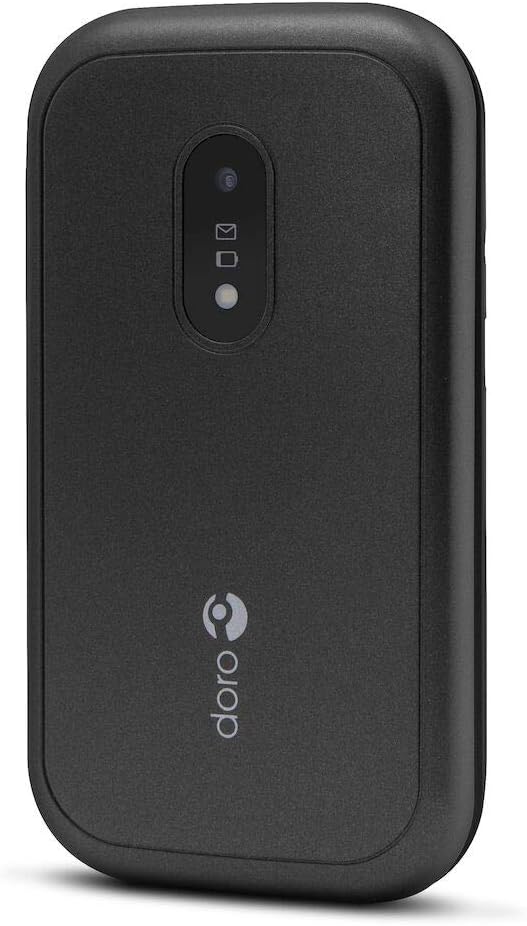
Figure 1: Doro 6040 Senior Mobile Phone (Rear View)
This image displays the rear of the Doro 6040 mobile phone, featuring its black casing. Visible elements include the rear camera lens, indicators for messages and notifications, and the Doro brand logo positioned vertically on the lower part of the phone's back.
ബോക്സിൽ എന്താണുള്ളത്
പാക്കേജ് തുറക്കുമ്പോൾ, എല്ലാ ഘടകങ്ങളും അവിടെ ഉണ്ടെന്ന് ഉറപ്പാക്കുക:
- ഡോറോ 6040 മൊബൈൽ ഫോൺ
- ബാറ്ററി (ലിഥിയം അയോൺ)
- അഡാപ്റ്റർ (ചാർജർ)
- ദ്രുത സജ്ജീകരണ ഗൈഡ്
സജ്ജമാക്കുക
1. ബാറ്ററി ഇൻസ്റ്റാളേഷൻ
- ഫോണിന്റെ പിൻ കവർ ശ്രദ്ധാപൂർവ്വം നീക്കം ചെയ്യുക.
- Insert the Lithium Ion battery into the battery compartment, ensuring the gold contacts align with those in the phone.
- സുരക്ഷിതമായി സ്ഥലത്ത് ക്ലിക്ക് ചെയ്യുന്നതുവരെ പിൻ കവർ മാറ്റിസ്ഥാപിക്കുക.
2. സിം കാർഡ് ഇൻസ്റ്റാളേഷൻ
The Doro 6040 uses a MicroSIM card.
- ബാറ്ററി നീക്കം ചെയ്ത ശേഷം, സിം കാർഡ് സ്ലോട്ട് കണ്ടെത്തുക.
- Insert your MicroSIM card into the designated slot, ensuring the cut corner aligns correctly.
- ബാറ്ററിയും ബാക്ക് കവറും വീണ്ടും ഇൻസ്റ്റാൾ ചെയ്യുക.
3. ഫോൺ ചാർജ് ചെയ്യുന്നു
ആദ്യ ഉപയോഗത്തിന് മുമ്പ്, ഫോണിന്റെ ബാറ്ററി പൂർണ്ണമായും ചാർജ് ചെയ്യുക.
- പവർ outട്ട്ലെറ്റിലേക്ക് അഡാപ്റ്റർ ബന്ധിപ്പിക്കുക.
- Plug the charging cable into the phone's charging port.
- സ്ക്രീനിലെ ബാറ്ററി ഇൻഡിക്കേറ്റർ ചാർജിംഗ് പുരോഗതി കാണിക്കും. ബാറ്ററി നിറഞ്ഞു കഴിഞ്ഞാൽ ചാർജർ വിച്ഛേദിക്കുക.
4. പവർ ഓൺ/ഓഫ്
- പവർ ഓൺ ചെയ്യാൻ: സ്ക്രീൻ പ്രകാശിക്കുന്നത് വരെ പവർ ബട്ടൺ അമർത്തിപ്പിടിക്കുക.
- പവർ ഓഫ് ചെയ്യാൻ: പവർ ബട്ടൺ അമർത്തിപ്പിടിക്കുക, തുടർന്ന് ഓപ്ഷനുകളിൽ നിന്ന് "പവർ ഓഫ്" തിരഞ്ഞെടുക്കുക.
പ്രവർത്തന നിർദ്ദേശങ്ങൾ
കോളുകൾ ചെയ്യലും സ്വീകരിക്കലും
- ഡയൽ ചെയ്യാൻ: Enter the phone number using the keypad and press the green call button.
- ഉത്തരം നൽകാൻ: ഫോൺ റിംഗ് ചെയ്യുമ്പോൾ പച്ച കോൾ ബട്ടൺ അമർത്തുക.
- കോൾ അവസാനിപ്പിക്കാൻ: ചുവന്ന എൻഡ് കോൾ ബട്ടൺ അമർത്തുക.
- Answering by opening: The phone supports answering calls by simply opening the flip.
Contacts (Phonebook)
- Navigate to the "Contacts" menu.
- Use the navigation keys to scroll through your contacts.
- To call a contact, select their name and press the green call button.
Messaging (SMS/MMS)
- Go to the "Messages" menu to read or compose new messages.
- The phone supports both Short Message Services (SMS) and Multimedia Messaging System (MMS).
ക്യാമറ
- പ്രധാന മെനുവിൽ നിന്ന് ക്യാമറ ആക്സസ് ചെയ്യുക.
- Point the camera at your subject and press the capture button to take a photo.
- The phone features a 2 MP rear camera with a built-in flash.
എമർജൻസി ബട്ടൺ
The Doro 6040 is equipped with an emergency button on the back, which can be activated if configured. Refer to the Quick Setup Guide for instructions on setting up emergency contacts and functions.
അധിക സവിശേഷതകൾ
- ഫ്ലാഷ്ലൈറ്റ്: An integrated flashlight is available for convenience.
- അലാറം പ്രവർത്തനം: റിമൈൻഡറുകൾക്കോ വേക്ക്-അപ്പ് കോളുകൾക്കോ വേണ്ടി അലാറങ്ങൾ സജ്ജമാക്കുക.
- കാൽക്കുലേറ്റർ: A basic calculator is included for simple arithmetic.
- കലണ്ടർ: Keep track of dates and appointments.
- ബ്ലൂടൂത്ത്: Connect to compatible Bluetooth devices (version 3.0).
മെയിൻ്റനൻസ്
- വൃത്തിയാക്കൽ: Use a soft, dry cloth to clean the phone's exterior. Avoid using liquid cleaners or aerosols.
- ബാറ്ററി കെയർ: To prolong battery life, avoid exposing the phone to extreme temperatures. Charge the battery regularly, but avoid overcharging.
- സംഭരണം: ഫോൺ ദീർഘനേരം സൂക്ഷിക്കുകയാണെങ്കിൽ, ബാറ്ററി ഭാഗികമായി ചാർജ്ജ് ചെയ്തിട്ടുണ്ടെന്ന് (ഏകദേശം 50%) ഉറപ്പാക്കുക, തണുത്തതും വരണ്ടതുമായ സ്ഥലത്ത് സൂക്ഷിക്കുക.
- സോഫ്റ്റ്വെയർ അപ്ഡേറ്റുകൾ: Keep your phone's software updated if prompted, to ensure optimal performance and security.
ട്രബിൾഷൂട്ടിംഗ്
If you encounter issues with your Doro 6040, refer to the following common problems and solutions:
| പ്രശ്നം | സാധ്യമായ കാരണം / പരിഹാരം |
|---|---|
| ഫോൺ പവർ ഓൺ ആകുന്നില്ല. | Battery may be depleted. Charge the phone for at least 30 minutes. Ensure battery is correctly installed. |
| കോളുകൾ വിളിക്കാനോ സ്വീകരിക്കാനോ കഴിയില്ല. | Check if the SIM card is properly inserted. Ensure you have network coverage. Contact your service provider. |
| Audio quality is poor during calls. | Adjust the call volume. Move to an area with better network signal. Ensure the speaker/microphone is not obstructed. |
| Difficulty finding contacts in phonebook. | Scrolling through contacts using only up/down keys can be slow. Ensure contacts are saved correctly. |
| Ringtone volume is low (custom tones). | Custom ringtones via microSD or Bluetooth may have lower volume than pre-installed tones. Adjust phone volume settings. |
| ഫോൺ മരവിക്കുന്നു അല്ലെങ്കിൽ പ്രതികരിക്കുന്നില്ല. | സോഫ്റ്റ് റീസെറ്റ് നടത്താൻ ബാറ്ററി നീക്കം ചെയ്ത് വീണ്ടും ചേർക്കുക. |
സ്പെസിഫിക്കേഷനുകൾ
| ഫീച്ചർ | വിശദാംശങ്ങൾ |
|---|---|
| മോഡലിൻ്റെ പേര് | Doro 6040 (Model 7826) |
| ഉൽപ്പന്ന അളവുകൾ | 2.24 x 0.79 x 4.17 ഇഞ്ച് (57 x 20 x 106.7 മിമി) |
| ഇനത്തിൻ്റെ ഭാരം | 4.2 ഔൺസ് (118 ഗ്രാം) |
| പ്രദർശിപ്പിക്കുക | 2.8 Inches, 320 x 240 pixels resolution |
| ബാറ്ററി ശേഷി | 1000 mAh ലിഥിയം അയോൺ |
| Talk Time (2G) | 6.8 മണിക്കൂർ |
| Standby Time (2G) | 420 മണിക്കൂർ |
| പിൻ ക്യാമറ | 2 MP with built-in flash |
| സിം കാർഡ് തരം | MicroSIM (Single SIM capacity) |
| കണക്റ്റിവിറ്റി | Bluetooth 3.0, 2G Cellular Technology |
| ഹെഡ്ഫോൺ ജാക്ക് | 3.5 മി.മീ |
| ഓപ്പറേറ്റിംഗ് സിസ്റ്റം | Android (Note: This is from the product data, but for a feature phone, it's likely a highly customized or simplified version, not full Android OS as on smartphones.) |
| മെമ്മറി സ്റ്റോറേജ് കപ്പാസിറ്റി | 1.58 MB |
| നിറം | കറുപ്പ് |
| ഫീച്ചറുകൾ | Calculator, Calendar, Alarm function, Integrated flashlight, SMS, MMS, Emergency button. |
വാറൻ്റിയും പിന്തുണയും
വാറൻ്റി വിവരങ്ങൾ
The Doro 6040 Senior Mobile Phone comes with a രണ്ട് വർഷത്തെ വാറൻ്റി against factory defects. Please retain your proof of purchase for warranty claims.
ഉപഭോക്തൃ പിന്തുണ
For further assistance, technical support, or warranty inquiries, please contact Doro customer service. Refer to the contact information provided in your Quick Setup Guide or visit the official Doro webസൈറ്റ്.
For online resources and frequently asked questions, you may visit the Doro Support Page.