
TechniSat DIGITRADIO 371 CD BT
TechniSat DIGITRADIO 371 CD BT User Manual
Stereo Digital Radio with CD Player, Bluetooth, and USB
1. ആമുഖം
Thank you for choosing the TechniSat DIGITRADIO 371 CD BT. This versatile stereo digital radio system offers a wide range of audio entertainment options, including DAB+ digital radio, FM radio, a CD player, Bluetooth audio streaming, and USB playback. This manual provides detailed instructions to help you set up, operate, and maintain your device for optimal performance.
2. പ്രധാന സുരക്ഷാ നിർദ്ദേശങ്ങൾ
- ഉപകരണം പ്രവർത്തിപ്പിക്കുന്നതിന് മുമ്പ് എല്ലാ നിർദ്ദേശങ്ങളും ശ്രദ്ധാപൂർവ്വം വായിക്കുക.
- ഭാവി റഫറൻസിനായി ഈ മാനുവൽ സൂക്ഷിക്കുക.
- തീയോ വൈദ്യുതാഘാതമോ തടയാൻ ഉപകരണം മഴയിലോ ഈർപ്പത്തിലോ തുറന്നുകാട്ടരുത്.
- ശരിയായ വായുസഞ്ചാരം ഉറപ്പാക്കുക. വായുസഞ്ചാര ദ്വാരങ്ങളൊന്നും തടയരുത്.
- സുസ്ഥിരവും പരന്നതുമായ പ്രതലത്തിൽ ഉപകരണം സ്ഥാപിക്കുക.
- നിർമ്മാതാവ് വ്യക്തമാക്കിയ അറ്റാച്ച്മെൻ്റുകൾ/ആക്സസറികൾ മാത്രം ഉപയോഗിക്കുക.
- ഇടിമിന്നലുള്ള സമയത്തോ ദീർഘനേരം ഉപയോഗിക്കാത്ത സമയത്തോ ഉപകരണം അൺപ്ലഗ് ചെയ്യുക.
- എല്ലാ സേവനങ്ങളും യോഗ്യതയുള്ള സേവന ഉദ്യോഗസ്ഥർക്ക് റഫർ ചെയ്യുക.
- The device may only be operated within the specified environmental conditions.
3. പാക്കേജ് ഉള്ളടക്കം
പാക്കേജിൽ എല്ലാ ഇനങ്ങളും ഉണ്ടോ എന്ന് ദയവായി പരിശോധിക്കുക:
- TechniSat DIGITRADIO 371 CD BT unit
- വിദൂര നിയന്ത്രണം
- ഉപയോക്തൃ മാനുവൽ (ഈ പ്രമാണം)
- 2 AAA ബാറ്ററികൾ (വിദൂര നിയന്ത്രണത്തിനായി)
4. ഉൽപ്പന്നം കഴിഞ്ഞുview
4.1 ഫ്രണ്ട് പാനൽ

The front panel features a clear color display, control buttons for mode selection, information, menu navigation, and preset access. Two rotary knobs are provided for volume control and tuning/entering selections.
4.2 പിൻ പാനൽ
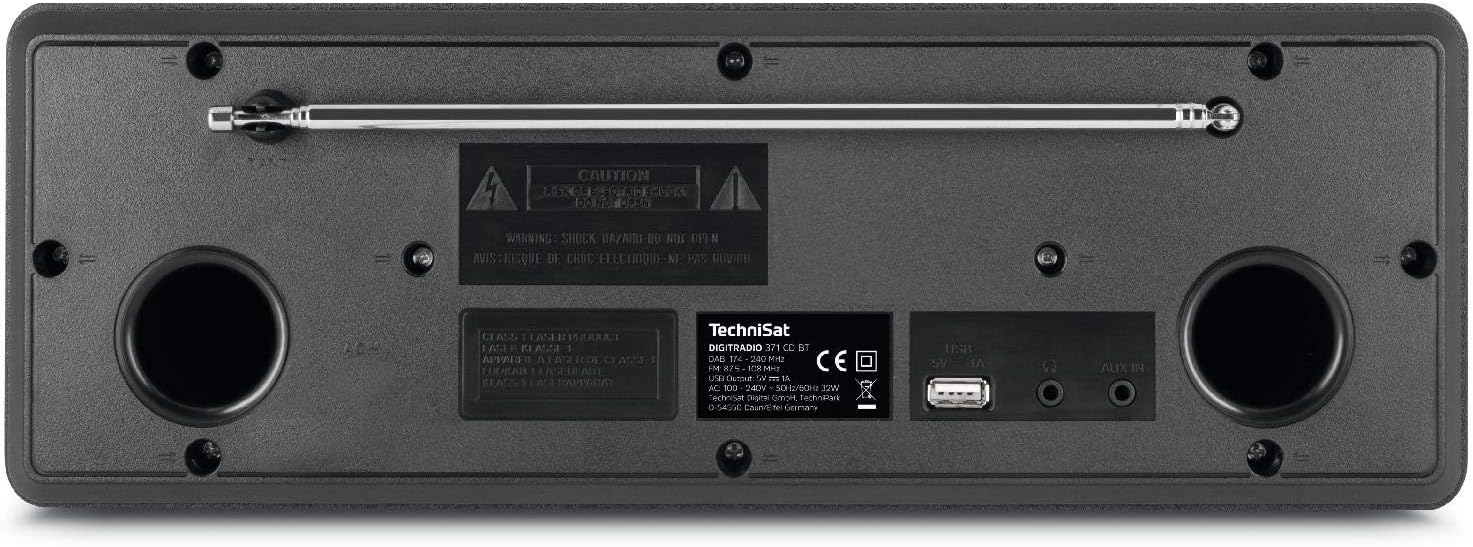
The rear panel includes the telescopic antenna for radio reception, a USB port for MP3 playback and device charging, and a 3.5mm AUX input for connecting external audio sources.
4.3 വിദൂര നിയന്ത്രണം

The included remote control provides convenient access to all functions of the DIGITRADIO 371 CD BT, including power, mode selection, volume, tuning, and preset management.
5. സജ്ജീകരണം
5.1 പവർ കണക്ഷൻ
- ഉപകരണം സ്ഥിരതയുള്ള പ്രതലത്തിൽ സ്ഥാപിച്ചിട്ടുണ്ടെന്ന് ഉറപ്പാക്കുക.
- Connect the power cable to the AC inlet on the rear of the unit.
- Plug the other end of the power cable into a standard wall outlet (230V).
5.2 ആന്റിന ക്രമീകരണം
For optimal DAB+ and FM radio reception, fully extend the telescopic antenna located on the rear of the unit. Adjust its position and angle to achieve the best signal quality.
5.3 Initial Power On and Scan
- Press the Power button on the front panel or remote control to turn on the device.
- Upon first use, the radio will typically initiate an automatic scan for DAB+ stations. This process may take a few minutes.
- Once the scan is complete, the first available DAB+ station will begin playing.
6. പ്രവർത്തന നിർദ്ദേശങ്ങൾ
6.1 മോഡ് തിരഞ്ഞെടുക്കൽ
അമർത്തുക മോഡ് button on the front panel or remote control to cycle through available modes: DAB+, FM, CD, Bluetooth, and AUX.
6.2 DAB+ റേഡിയോ
- Select DAB+ mode using the മോഡ് ബട്ടൺ.
- If an automatic scan has not been performed or you wish to rescan, navigate to the menu and select 'Full Scan'.
- ഉപയോഗിക്കുക TUNING/ENTER knob or the navigation buttons on the remote to browse available stations. Press പ്രവേശിക്കുക ഒരു സ്റ്റേഷൻ തിരഞ്ഞെടുക്കാൻ.
- ഒരു സ്റ്റേഷൻ പ്രീസെറ്റായി സംരക്ഷിക്കാൻ, അമർത്തിപ്പിടിക്കുക പ്രീസെറ്റ് button, then select a preset number (1-20) and confirm.
6.3 എഫ്എം റേഡിയോ
- ഉപയോഗിച്ച് FM മോഡ് തിരഞ്ഞെടുക്കുക മോഡ് ബട്ടൺ.
- To automatically scan for stations, press the സ്കാൻ ചെയ്യുക button on the remote or navigate through the menu.
- To manually tune, rotate the TUNING/ENTER മുട്ട്.
- ഒരു സ്റ്റേഷൻ പ്രീസെറ്റായി സംരക്ഷിക്കാൻ, അമർത്തിപ്പിടിക്കുക പ്രീസെറ്റ് button, then select a preset number (1-20) and confirm.
6.4 സിഡി പ്ലെയർ
- ഉപയോഗിച്ച് സിഡി മോഡ് തിരഞ്ഞെടുക്കുക മോഡ് ബട്ടൺ.
- Gently insert an audio CD or MP3 CD into the CD slot. The device will automatically load and begin playback.
- Use the playback control buttons (Play/Pause, Skip Forward/Backward) on the front panel or remote control.
6.5 ബ്ലൂടൂത്ത് ഓഡിയോ സ്ട്രീമിംഗ്
- ഉപയോഗിച്ച് ബ്ലൂടൂത്ത് മോഡ് തിരഞ്ഞെടുക്കുക മോഡ് button. The display will show 'Pairing'.
- On your Bluetooth-enabled device (e.g., smartphone, tablet), search for available Bluetooth devices and select 'DIGITRADIO 371 CD BT'.
- Once paired, you can stream audio from your device to the DIGITRADIO 371 CD BT.
6.6 യുഎസ്ബി പ്ലേബാക്കും ചാർജിംഗും
- MP3 അടങ്ങിയ യുഎസ്ബി ഫ്ലാഷ് ഡ്രൈവ് ചേർക്കുക fileപിൻ പാനലിലെ USB പോർട്ടിലേക്ക് s.
- Select USB mode (if available, otherwise it may automatically switch).
- Use the navigation and playback controls to browse and play MP3 files.
- The USB port also provides a charging function for compatible devices like smartphones.
6.7 AUX ഇൻപുട്ട്
- Connect an external audio device (e.g., MP3 player) to the 3.5mm AUX IN jack on the rear panel using an appropriate audio cable (not included).
- ഉപയോഗിച്ച് AUX മോഡ് തിരഞ്ഞെടുക്കുക മോഡ് ബട്ടൺ.
- Audio from the external device will now play through the DIGITRADIO 371 CD BT speakers. Control playback from the external device.
6.8 അലാറം ക്ലോക്കും സ്ലീപ്പ് ടൈമറും
- അലാറം ക്ലോക്ക്: Access the alarm settings via the മെനു button. Follow the on-screen prompts to set alarm time, source (buzzer, radio), and volume.
- സ്ലീപ്പ് ടൈമർ: Access the sleep timer settings via the മെനു button. Set a duration after which the radio will automatically turn off.
7. പരിപാലനം
7.1 വൃത്തിയാക്കൽ
- വൃത്തിയാക്കുന്നതിന് മുമ്പ് എല്ലായ്പ്പോഴും പവർ ഔട്ട്ലെറ്റിൽ നിന്ന് ഉപകരണം അൺപ്ലഗ് ചെയ്യുക.
- പുറംഭാഗങ്ങൾ തുടയ്ക്കാൻ മൃദുവായതും ഉണങ്ങിയതുമായ തുണി ഉപയോഗിക്കുക.
- അബ്രാസീവ് ക്ലീനറുകൾ, മെഴുക് അല്ലെങ്കിൽ ലായകങ്ങൾ എന്നിവ ഉപയോഗിക്കരുത്, കാരണം അവ ഫിനിഷിന് കേടുവരുത്തും.
- For the display, use a soft, lint-free cloth.
7.2 സിഡി പ്ലെയർ കെയർ
- വിരലടയാളം ഒഴിവാക്കാൻ സിഡികൾ അവയുടെ അരികുകളിൽ പിടിക്കുക.
- സിഡികൾ മൃദുവായ, ലിന്റ് രഹിത തുണി ഉപയോഗിച്ച് വൃത്തിയാക്കുക, മധ്യഭാഗത്ത് നിന്ന് പുറത്തേക്ക് തുടയ്ക്കുക.
- Do not use scratched or damaged CDs, as they may harm the player mechanism.
8. പ്രശ്നപരിഹാരം
| പ്രശ്നം | സാധ്യമായ കാരണം | പരിഹാരം |
|---|---|---|
| ശക്തിയില്ല | പവർ കേബിൾ ബന്ധിപ്പിച്ചിട്ടില്ല; പവർ ഔട്ട്ലെറ്റ് സജീവമല്ല | പവർ കേബിൾ കണക്ഷൻ പരിശോധിക്കുക; മറ്റൊരു ഔട്ട്ലെറ്റ് പരീക്ഷിക്കുക. |
| മോശം റേഡിയോ സ്വീകരണം | ആന്റിന നീട്ടിയിട്ടില്ല; ദുർബലമായ സിഗ്നൽ ഏരിയ | Fully extend and adjust antenna; Try repositioning the unit |
| സിഡി പ്ലേ ചെയ്യുന്നില്ല | CD inserted incorrectly; CD is dirty or scratched | Reinsert CD correctly; Clean or replace CD |
| ബ്ലൂടൂത്ത് കണക്റ്റ് ചെയ്യുന്നില്ല | Device not in pairing mode; Bluetooth disabled on external device | Ensure radio is in Bluetooth mode; Enable Bluetooth on your device and search again |
| No sound from AUX | Cable not connected; Incorrect mode selected | Check AUX cable connection; Select AUX mode |
9 സ്പെസിഫിക്കേഷനുകൾ
- മോഡൽ നമ്പർ:
- DIGITRADIO 371 CD BT (0000/2948)
- അളവുകൾ (W x H x D):
- 34.5 x 12.3 x 21 സെ.മീ
- ഭാരം:
- 2.7 കിലോഗ്രാം
- ഊർജ്ജ സ്രോതസ്സ്:
- Wired, internal power supply
- വാല്യംtage:
- 230 വോൾട്ട്
- വാട്ട്tage:
- 10 watts (speaker output)
- സ്പീക്കർ എണ്ണം:
- 2 (സ്റ്റീരിയോ)
- റേഡിയോ ട്യൂണർ:
- DAB+, FM
- കണക്റ്റിവിറ്റി:
- Bluetooth (reception), USB (MP3 playback, charging), 3.5mm AUX In, 3.5mm Headphone Jack
- ഡിസ്പ്ലേ:
- 2.4 inch color display (dimmable)
- സിഡി പ്ലെയർ:
- Plays Audio CDs, MP3 CDs, CD-R, CD-RW
- ഫീച്ചറുകൾ:
- Alarm clock, Sleep timer, Station memory (20x DAB+/20x FM), EQ Predefined
- OSD ഭാഷകൾ:
- ഇംഗ്ലീഷ്, ജർമ്മൻ, ഫ്രഞ്ച്, ഇറ്റാലിയൻ
10. വാറൻ്റിയും പിന്തുണയും
For warranty information, please refer to the warranty card included with your product or contact your local TechniSat dealer or customer support. If you encounter any issues not covered in the troubleshooting section, please visit the official TechniSat webസഹായത്തിനായി സൈറ്റ് അല്ലെങ്കിൽ അവരുടെ ഉപഭോക്തൃ സേവനവുമായി ബന്ധപ്പെടുക.
Ask a question about this manual
Ask about setup, troubleshooting, compatibility, parts, safety, or missing instructions. Manuals+ will review the question and use this page’s manual context to help answer it.