
1. ആമുഖം
This manual provides detailed instructions for the assembly, operation, and maintenance of your Bush Business Furniture Move 40 Series Electric Height Adjustable Standing Desk. Please read this manual thoroughly before assembly and use to ensure safe and efficient operation.

Image 1.1: The Move 40 Series Electric Height Adjustable Standing Desk in use.
2 സുരക്ഷാ വിവരങ്ങൾ
To prevent injury or damage to the desk, observe the following safety guidelines:
- Do not place objects on the desk that exceed the maximum weight capacity of 176 പൗണ്ട് (79.8 കി.ഗ്രാം).
- Ensure the work area is clear of obstacles to prevent interference with the desk's movement.
- Always use the desk on a stable, level surface.
- Follow all manufacturer's instructions for proper assembly and use.
- Keep hands and clothing clear of moving parts during height adjustments.
- The desk is equipped with an anti-collision sensor. If an object is detected during movement, the desk will stop to prevent damage.
3. പാക്കേജ് ഉള്ളടക്കം
Verify that all components are present before beginning assembly. Refer to the included assembly guide for a complete list of parts.
- Desktop surface (Hansen Cherry)
- Electric height-adjustable base (Silver Base)
- Control panel with memory presets
- Power cord (10-foot)
- അസംബ്ലി ഹാർഡ്വെയറും ഉപകരണങ്ങളും
- അസംബ്ലി ഗൈഡ്
4. സജ്ജീകരണവും അസംബ്ലിയും
Assembly of this desk requires two people. All necessary assembly tools are included. Follow the detailed instructions provided in the separate Assembly Guide for proper setup and use.
പ്രധാന അസംബ്ലി പോയിന്റുകൾ:
- Ensure all electrical connections are secure before plugging into a power outlet.
- Properly route cables through the integrated wire management grommet(s) to maintain a tidy workspace and prevent interference with desk movement.

Image 4.1: Wire management grommet for cable organization.
5. പ്രവർത്തന നിർദ്ദേശങ്ങൾ
The Move 40 Series desk features an electric control panel for easy height adjustment and memory presets.
ഉയരം ക്രമീകരിക്കൽ:
- മേശ ഉയർത്താൻ, അമർത്തിപ്പിടിക്കുക Up arrow (^) നിയന്ത്രണ പാനലിലെ ബട്ടൺ.
- മേശ താഴ്ത്താൻ, അമർത്തിപ്പിടിക്കുക Down arrow (v) നിയന്ത്രണ പാനലിലെ ബട്ടൺ.
- The desk will move smoothly at a speed of 1.25 inches per second within the height range of 28 മുതൽ 48 ഇഞ്ച് വരെ.
മെമ്മറി പ്രീസെറ്റുകൾ:
The control panel allows you to save up to four preferred height settings (1, 2, 3, 4).
- മുകളിലേക്കും താഴേക്കുമുള്ള അമ്പടയാളങ്ങൾ ഉപയോഗിച്ച് നിങ്ങൾക്ക് ആവശ്യമുള്ള ഉയരത്തിലേക്ക് ഡെസ്ക് ക്രമീകരിക്കുക.
- അമർത്തുക "എം" ബട്ടൺ. ഡിസ്പ്ലേ ഫ്ലാഷ് ചെയ്യും.
- Within 3 seconds, press the desired preset number (1, 2, 3, അല്ലെങ്കിൽ 4) to save the current height.
- To recall a saved height, simply press the corresponding preset number.

Image 5.1: Control panel for height adjustment and memory presets.
Sit-Stand Reminders:
You can set a custom alert to remind you to change between sitting and standing positions. Refer to the full Assembly Guide for detailed instructions on setting this feature.
Ergonomic Posture Guidelines:
Maintaining proper posture is crucial for comfort and health. The following image illustrates recommended ergonomic positions for both sitting and standing.

Image 5.2: Ergonomic tips for sit-to-stand desk usage.
6. പരിപാലനം
To ensure the longevity and proper function of your desk:
- Clean the desk surface with a damp തുണി. കഠിനമായ രാസവസ്തുക്കളോ ഉരച്ചിലുകളുള്ള ക്ലീനറുകളോ ഒഴിവാക്കുക.
- എല്ലാ ഫാസ്റ്റനറുകളും കണക്ഷനുകളും സുരക്ഷിതമാണെന്ന് ഉറപ്പാക്കാൻ പതിവായി പരിശോധിക്കുക.
- Keep the electric components dry and free from dust.
- The thermally fused laminate desktop is designed to resist scratches and stains, but proper care will extend its appearance.
7. പ്രശ്നപരിഹാരം
If you encounter issues with your desk, consider the following common solutions:
- മേശ അനങ്ങുന്നില്ല: Check if the power cord is securely plugged into both the desk and a working electrical outlet.
- Movement stops unexpectedly: The anti-collision sensor may have been triggered. Remove any obstructions and try adjusting the height again.
- Uneven movement: Ensure the desk is on a level surface and that the weight distribution on the desktop is balanced.
- For more complex issues, refer to the comprehensive troubleshooting section in your Assembly Guide or contact customer support.
8 സ്പെസിഫിക്കേഷനുകൾ
| ബ്രാൻഡ് | ബുഷ് ഫർണിച്ചർ |
| മോഡലിൻ്റെ പേര് | 40 നീക്കുക |
| മോഡൽ നമ്പർ | M4S6030HCSK |
| ഉൽപ്പന്ന അളവുകൾ | 59.45"W x 29.37"D x 28.17"H (minimum) |
| ഉയരം പരിധി | 28 - 48 ഇഞ്ച് |
| ഭാരം ശേഷി | 176 പൗണ്ട് (79.8 കി.ഗ്രാം) |
| ലിഫ്റ്റിംഗ് മെക്കാനിസം | ഇലക്ട്രിക് |
| ടോപ്പ് മെറ്റീരിയൽ | Thermally Fused Laminate (Engineered Wood) |
| അടിസ്ഥാന മെറ്റീരിയൽ | 16-gauge Alloy Steel |
| പ്രത്യേക സവിശേഷതകൾ | Adjustable Height, Electric, Anti-Collision Sensor, Memory Presets |
| ആവശ്യമായ അസംബ്ലി | അതെ (2 പേർ ശുപാർശ ചെയ്തു) |
| സർട്ടിഫിക്കേഷനുകൾ | Meets or exceeds ANSI/BIFMA quality standards, UL Listed |
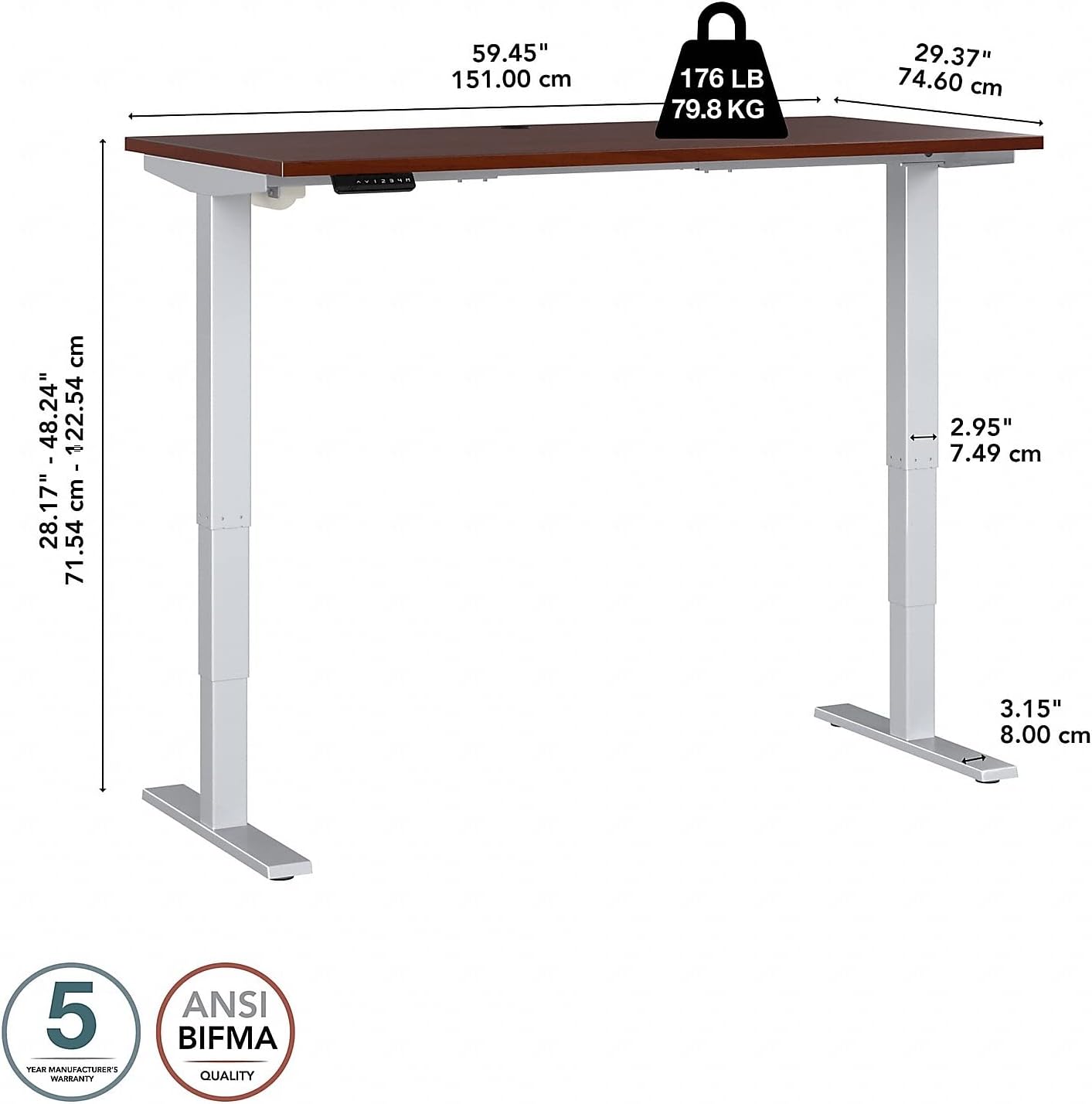
Image 8.1: Desk dimensions and weight capacity.
9. വാറൻ്റിയും പിന്തുണയും
Your Bush Business Furniture Move 40 Series Electric Height Adjustable Standing Desk is backed by a 5 വർഷത്തെ നിർമ്മാതാവിന്റെ വാറന്റി. സാധാരണ ഉപയോഗത്തിലുള്ള മെറ്റീരിയലുകളിലെയും ജോലികളിലെയും വൈകല്യങ്ങൾ ഈ വാറന്റി ഉൾക്കൊള്ളുന്നു.
For warranty claims, technical support, or replacement parts, please contact Bush Business Furniture customer service. Refer to your purchase documentation or the manufacturer's webബന്ധപ്പെടാനുള്ള വിവരങ്ങൾക്കുള്ള സൈറ്റ്.
10. ഉൽപ്പന്ന വീഡിയോ കഴിഞ്ഞുview
ഒരു വിഷ്വൽ ഓവറിനായി ഔദ്യോഗിക ഉൽപ്പന്ന വീഡിയോ കാണുകview of the Move 40 Collection's features and benefits.
വീഡിയോ 10.1: കഴിഞ്ഞുview of the Bush Business Furniture Move 40 Collection, showcasing its adjustable height, stable steel base, and various finish options.