
1. ഉൽപ്പന്നം കഴിഞ്ഞുview
The realme 6 Pro is a high-performance smartphone designed for advanced mobile computing and photography. It features a powerful Qualcomm Snapdragon 720G processor, a 90Hz Ultra Smooth Display, and a versatile 64MP AI Quad Camera system. This manual provides essential information for setting up, operating, maintaining, and troubleshooting your device.
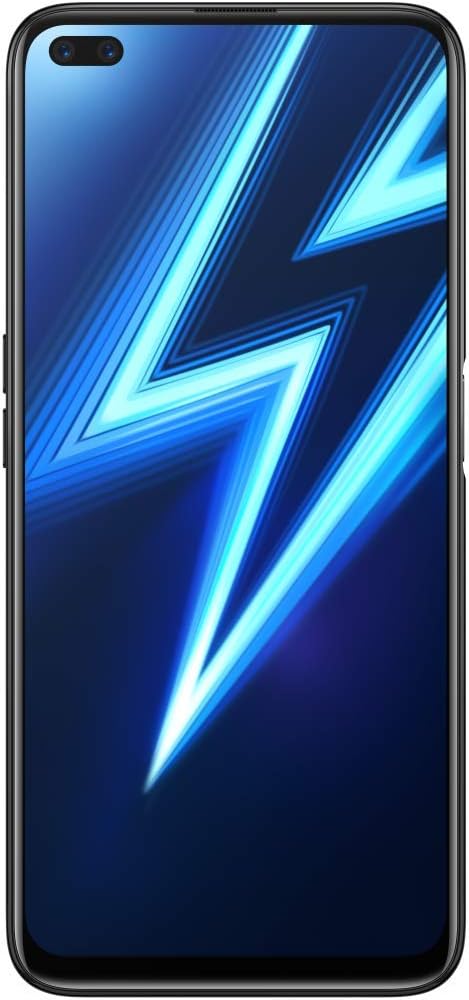
ചിത്രം 1.1: ഫ്രണ്ട് view of the realme 6 Pro smartphone, showing the dual in-display selfie cameras and the large display.
2. സജ്ജീകരണം
2.1 അൺബോക്സിംഗും പ്രാരംഭ പരിശോധനയും
Carefully unbox your realme 6 Pro and verify that all components are present. The standard package includes:
- realme 6 Pro സ്മാർട്ട്ഫോൺ
- Integrated Battery (pre-installed)
- FlashCharge Charger
- യുഎസ്ബി ടൈപ്പ്-സി കേബിൾ
- സിം എജക്ടർ ഉപകരണം
- ടിപിയു പ്രൊട്ടക്റ്റീവ് കേസ്
- Pre-applied Screen Protector Film
- ദ്രുത ആരംഭ ഗൈഡ്
2.2 സിം കാർഡും മൈക്രോ എസ്ഡി കാർഡും ഇൻസ്റ്റാൾ ചെയ്യൽ
The realme 6 Pro supports dual SIM cards and one MicroSD card simultaneously. Follow these steps to install them:
- ഉപകരണത്തിന്റെ വശത്ത് സിം കാർഡ് ട്രേ കണ്ടെത്തുക.
- ട്രേയുടെ അടുത്തുള്ള ചെറിയ ദ്വാരത്തിലേക്ക് സിം എജക്റ്റർ ഉപകരണം തിരുകുക, ട്രേ പുറത്തേക്ക് വരുന്നത് വരെ സൌമ്യമായി അമർത്തുക.
- Place your Nano-SIM cards into the designated slots (SIM1, SIM2) and your MicroSD card into its slot, ensuring the gold contacts face downwards.
- ട്രേ അതിന്റെ സ്ഥാനത്ത് ക്ലിക്കായി വരുന്നത് വരെ ശ്രദ്ധാപൂർവ്വം ഫോണിലേക്ക് വീണ്ടും തിരുകുക.

ചിത്രം 2.1: വശം view of the realme 6 Pro, showing the location of the SIM card tray and volume buttons.
2.3 പ്രാരംഭ ചാർജിംഗ്
Before first use, fully charge your realme 6 Pro. Use the provided FlashCharge charger and USB Type-C cable for optimal charging speed.
- ഫോണിന്റെ ചാർജിംഗ് പോർട്ടിലേക്ക് യുഎസ്ബി ടൈപ്പ്-സി കേബിൾ ബന്ധിപ്പിക്കുക.
- Connect the other end of the cable to the FlashCharge adapter.
- ഒരു പവർ ഔട്ട്ലെറ്റിൽ അഡാപ്റ്റർ പ്ലഗ് ചെയ്യുക.
- The device should fully charge in approximately 1 hour.
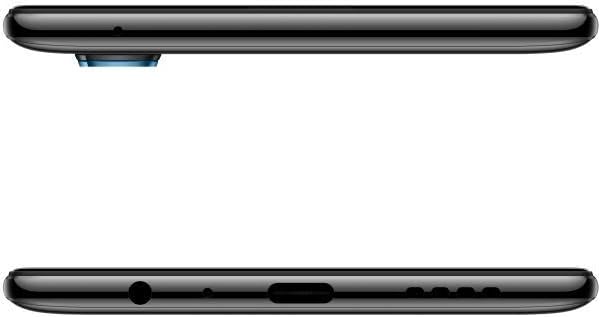
ചിത്രം 2.2: താഴെ view of the realme 6 Pro, illustrating the USB Type-C charging port and 3.5mm headphone jack.
2.4 പവർ ഓൺ/ഓഫ്
- പവർ ഓണാക്കാൻ: റിയൽമി ലോഗോ ദൃശ്യമാകുന്നതുവരെ പവർ ബട്ടൺ (വലതുവശത്ത് സ്ഥിതിചെയ്യുന്നത്) അമർത്തിപ്പിടിക്കുക.
- പവർ ഓഫ് ചെയ്യാൻ: പവർ ബട്ടൺ അമർത്തിപ്പിടിക്കുക, തുടർന്ന് സ്ക്രീനിലെ ഓപ്ഷനുകളിൽ നിന്ന് "പവർ ഓഫ്" തിരഞ്ഞെടുക്കുക.
- പുനരാരംഭിക്കാൻ: പവർ ബട്ടൺ അമർത്തിപ്പിടിക്കുക, തുടർന്ന് ഓപ്ഷനുകളിൽ നിന്ന് "പുനരാരംഭിക്കുക" തിരഞ്ഞെടുക്കുക.
3. പ്രവർത്തന നിർദ്ദേശങ്ങൾ
3.1 ഡിസ്പ്ലേയും നാവിഗേഷനും
Your realme 6 Pro features a 6.6-inch LCD display with a resolution of 1080 x 2400 pixels and a 90Hz refresh rate for smooth visuals. Navigation is primarily via touchscreen gestures and on-screen buttons.
- സ്പർശിക്കുക: Tap to select items or open applications.
- സ്വൈപ്പ്: Move your finger across the screen to scroll or navigate between screens.
- പിഞ്ച്: ചിത്രങ്ങൾ സൂം ഇൻ ചെയ്യാനോ ഔട്ട് ചെയ്യാനോ രണ്ട് വിരലുകൾ ഉപയോഗിക്കുക, web പേജുകൾ.
3.2 ക്യാമറ ഉപയോഗം
The realme 6 Pro is equipped with a 64MP AI Quad Camera system on the rear and dual 16MP selfie cameras on the front. To access the camera, tap the Camera icon on your home screen.

ചിത്രം 3.1: പിൻഭാഗം view of the realme 6 Pro, highlighting the 64MP AI Quad Camera setup.
Key Camera Features:
- പിൻ ക്യാമറകൾ: 64MP main sensor, with additional lenses for wide-angle, macro, and depth sensing.
- മുൻ ക്യാമറകൾ: Dual 16MP sensors for high-resolution selfies.
- ഷൂട്ടിംഗ് മോഡുകൾ: Includes Macro and Portrait modes for creative photography.
3.3 Biometric Features
The device supports facial recognition for secure unlocking. To set up facial recognition, navigate to ക്രമീകരണങ്ങൾ > സുരക്ഷ > ഫെയ്സ് അൺലോക്ക് കൂടാതെ സ്ക്രീനിലെ നിർദ്ദേശങ്ങൾ പാലിക്കുക.
3.4 കണക്റ്റിവിറ്റി
The realme 6 Pro offers various connectivity options:
- 4G LTE: അതിവേഗ മൊബൈൽ ഡാറ്റയ്ക്കായി.
- ബ്ലൂടൂത്ത്: വയർലെസ് ആക്സസറികളുമായി ബന്ധിപ്പിക്കുന്നതിന്.
- ജിപിഎസ്: നാവിഗേഷനും ലൊക്കേഷൻ സേവനങ്ങൾക്കുമായി ബിൽറ്റ്-ഇൻ ജിപിഎസ്.
- വൈഫൈ: ഇന്റർനെറ്റ് ആക്സസ്സിനായി വയർലെസ് നെറ്റ്വർക്കുകളിലേക്ക് കണക്റ്റുചെയ്യുക.
3.5 ബാറ്ററി മാനേജ്മെൻ്റ്
The realme 6 Pro is equipped with a 4300 mAh Lithium-ion battery. To optimize battery life:
- സ്ക്രീൻ തെളിച്ചം ക്രമീകരിക്കുക.
- പശ്ചാത്തലത്തിൽ പ്രവർത്തിക്കുന്ന ഉപയോഗിക്കാത്ത ആപ്ലിക്കേഷനുകൾ അടയ്ക്കുക.
- ആവശ്യമുള്ളപ്പോൾ പവർ സേവിംഗ് മോഡുകൾ പ്രാപ്തമാക്കുക.
- തീവ്രമായ താപനില ഒഴിവാക്കുക.
4. പരിപാലനം
4.1 നിങ്ങളുടെ ഉപകരണം വൃത്തിയാക്കൽ
To keep your realme 6 Pro in optimal condition:
- സ്ക്രീനും ബോഡിയും തുടയ്ക്കാൻ മൃദുവായ, ലിന്റ് രഹിത തുണി ഉപയോഗിക്കുക.
- കഠിനമായ രാസവസ്തുക്കളോ ഉരച്ചിലുകളോ ഉപയോഗിക്കുന്നത് ഒഴിവാക്കുക.
- The device is not water-resistant; avoid exposure to liquids.
4.2 സോഫ്റ്റ്വെയർ അപ്ഡേറ്റുകൾ
നിങ്ങളുടെ ഉപകരണത്തിൽ ഏറ്റവും പുതിയ ഫീച്ചറുകൾ, സുരക്ഷാ പാച്ചുകൾ, പ്രകടന മെച്ചപ്പെടുത്തലുകൾ എന്നിവ ഉണ്ടെന്ന് ഉറപ്പാക്കാൻ സോഫ്റ്റ്വെയർ അപ്ഡേറ്റുകൾ പതിവായി പരിശോധിച്ച് ഇൻസ്റ്റാൾ ചെയ്യുക. നിങ്ങൾക്ക് സാധാരണയായി ഈ ഓപ്ഷൻ ഇതിൽ കണ്ടെത്താനാകും ക്രമീകരണങ്ങൾ > സോഫ്റ്റ്വെയർ അപ്ഡേറ്റ്.
4.3 സ്റ്റോറേജ് മാനേജ്മെൻ്റ്
The realme 6 Pro comes with 128GB of internal storage. To manage your storage effectively:
- അനാവശ്യമായത് പതിവായി ഇല്ലാതാക്കുക fileകൾ, ഫോട്ടോകൾ, വീഡിയോകൾ.
- ഉപയോഗിക്കാത്ത ആപ്ലിക്കേഷനുകൾ അൺഇൻസ്റ്റാൾ ചെയ്യുക.
- ക്ലൗഡ് സ്റ്റോറേജ് സേവനങ്ങൾ ഉപയോഗിക്കുക.
- Expand storage using a MicroSD card (up to supported capacity).
5. പ്രശ്നപരിഹാരം
This section addresses common issues you might encounter with your realme 6 Pro.
| പ്രശ്നം | സാധ്യമായ പരിഹാരം |
|---|---|
| ഉപകരണം പവർ ഓണാക്കുന്നില്ല | ബാറ്ററി ചാർജ്ജ് ചെയ്തിട്ടുണ്ടെന്ന് ഉറപ്പാക്കുക. ചാർജർ കണക്റ്റ് ചെയ്ത് കുറച്ച് മിനിറ്റ് കാത്തിരുന്ന് വീണ്ടും പവർ ഓൺ ചെയ്യാൻ ശ്രമിക്കുക. പ്രതികരിക്കുന്നില്ലെങ്കിൽ, പവർ ബട്ടൺ 10-15 സെക്കൻഡ് അമർത്തിപ്പിടിച്ച് നിർബന്ധിതമായി റീബൂട്ട് ചെയ്യുക. |
| സ്ക്രീൻ പ്രതികരിക്കുന്നില്ല അല്ലെങ്കിൽ നിശ്ചലമാണ് | Perform a forced restart. If the issue persists, try clearing the cache partition (refer to advanced troubleshooting guides online) or consider a factory reset (കുറിപ്പ്: This will erase all data. Back up your device first.). |
| Cannot connect to Wi-Fi or Bluetooth | Toggle Wi-Fi/Bluetooth off and on. Restart the device. Ensure you are within range of the network/device. Check router settings for Wi-Fi. |
| മോശം ക്യാമറ നിലവാരം | Ensure camera lenses are clean. Check lighting conditions. Update camera software if available. Some specific camera modes or lenses may have different performance characteristics. |
| Fingerprint sensor issues | Ensure your finger is clean and dry. Re-register your fingerprints. If the issue persists, restart the device. |
6 സ്പെസിഫിക്കേഷനുകൾ
| ഫീച്ചർ | വിശദാംശങ്ങൾ |
|---|---|
| ബ്രാൻഡ് | റിയൽമി |
| മോഡലിൻ്റെ പേര് | REALME 6 PRO |
| ഓപ്പറേറ്റിംഗ് സിസ്റ്റം | realme UI Based on Android 10 |
| പ്രോസസ്സർ | Qualcomm Snapdragon 720G (Octa-Core, 2300 MHz) |
| റാം | 8 ജിബി |
| ആന്തരിക സംഭരണം | 128 GB (variant specific, this manual refers to 8GB/128GB) |
| ഡിസ്പ്ലേ വലിപ്പം | 6.6 ഇഞ്ച് |
| ഡിസ്പ്ലേ റെസല്യൂഷൻ | 1080 x 2400 പിക്സലുകൾ |
| പുതുക്കിയ നിരക്ക് | 90 Hz |
| പിൻ ക്യാമറ | 64 MP (Quad Camera setup) |
| മുൻ ക്യാമറ | 16 MP (Dual Camera setup) |
| ബാറ്ററി ശേഷി | 4300 mAh (ലിഥിയം-അയോൺ) |
| ചാർജിംഗ് | 30W FlashCharge (approx. 1 hour for full charge) |
| സിം കാർഡ് സ്ലോട്ടുകൾ | ഡ്യുവൽ സിം |
| SIM Card Format | Micro (Nano-SIM compatible) |
| കണക്റ്റിവിറ്റി | 4G LTE, Bluetooth, GPS, Wi-Fi |
| Biometric Features | മുഖം തിരിച്ചറിയൽ |
| അളവുകൾ | 16.4 x 7.6 x 0.9 സെ.മീ |
| ഭാരം | 199 ഗ്രാം |
7. വാറൻ്റിയും പിന്തുണയും
7.1 ഉൽപ്പന്ന വാറന്റി
The realme 6 Pro comes with a 2 വർഷത്തെ നിർമ്മാതാവിന്റെ വാറന്റി. Please retain your proof of purchase for warranty claims. The warranty covers manufacturing defects but does not cover damage caused by misuse, accidents, or unauthorized modifications.
7.2 ഉപഭോക്തൃ പിന്തുണ
For technical assistance, service, or further inquiries, please visit the official realme support website or contact their customer service. You may also find additional resources, including a detailed user manual in PDF format and a data transparency statement, on the product's support page.
Important Documents: