
ആമുഖം
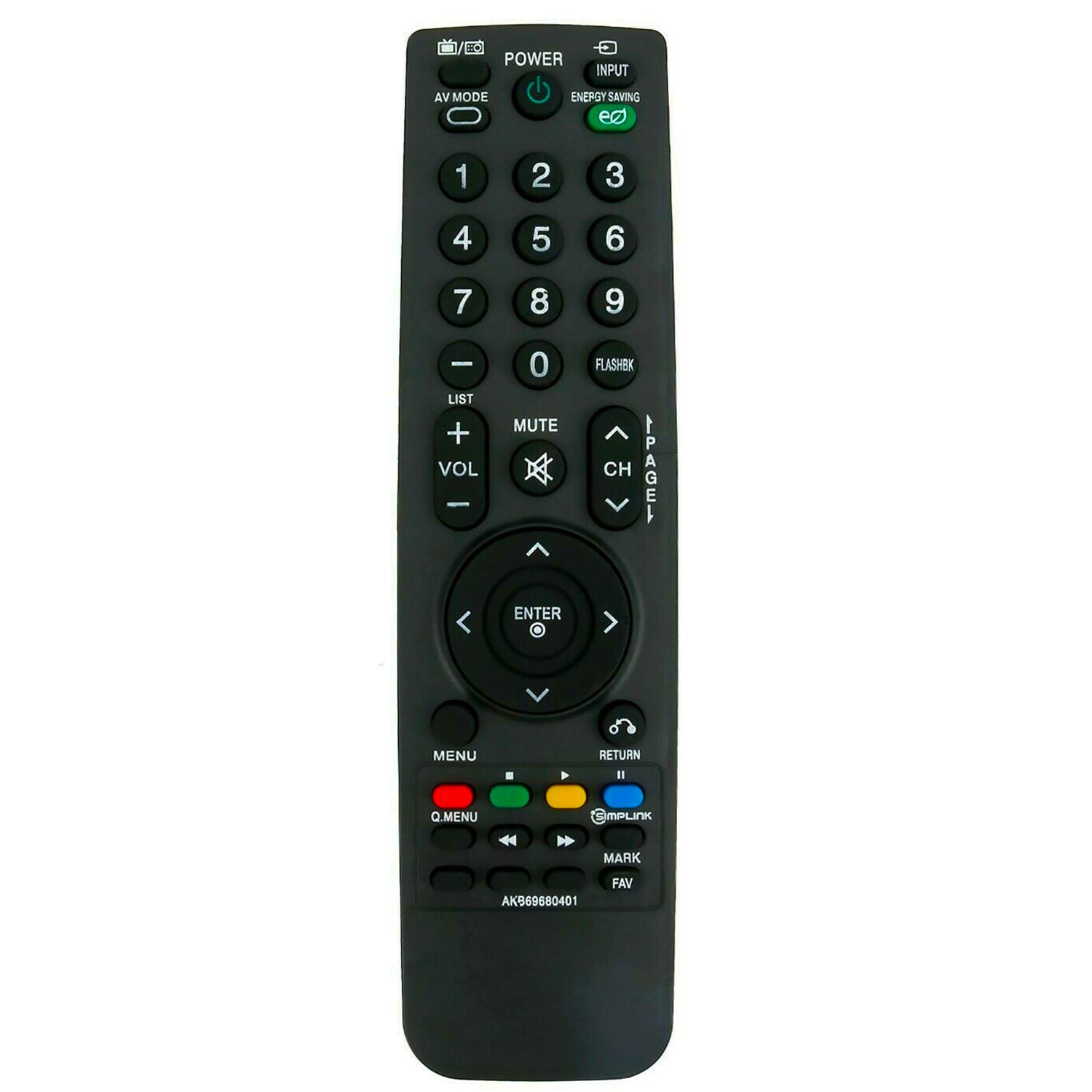
This manual provides instructions for the ALLIMITY AKB69680401 Replacement Remote Control, designed for use with various LG LCD TV models. This remote control functions as a direct replacement and requires no programming. Simply insert batteries to begin operation.
സജ്ജമാക്കുക
ബാറ്ററി ഇൻസ്റ്റാളേഷൻ
The remote control requires two AAA batteries for operation. Follow these steps to install the batteries:
- റിമോട്ട് കൺട്രോളിന്റെ പിൻഭാഗത്ത് ബാറ്ററി കമ്പാർട്ട്മെന്റ് കണ്ടെത്തുക.
- ബാറ്ററി കമ്പാർട്ട്മെന്റ് കവർ താഴേക്ക് നീക്കി അത് ഉയർത്തുക.
- കമ്പാർട്ടുമെന്റിനുള്ളിലെ അടയാളപ്പെടുത്തലുകളുമായി പോസിറ്റീവ് (+), നെഗറ്റീവ് (-) ടെർമിനലുകൾ ശരിയായി വിന്യസിക്കുന്നുണ്ടെന്ന് ഉറപ്പാക്കിക്കൊണ്ട് രണ്ട് പുതിയ AAA ബാറ്ററികൾ ഇടുക.
- സുരക്ഷിതമായി ക്ലിക്ക് ചെയ്യുന്നതുവരെ ബാറ്ററി കമ്പാർട്ട്മെന്റ് കവർ തിരികെ സ്ഥലത്തേക്ക് സ്ലൈഡുചെയ്ത് മാറ്റിസ്ഥാപിക്കുക.

Once batteries are installed, the remote control is ready for use without any additional programming.
പ്രവർത്തന നിർദ്ദേശങ്ങൾ
To operate your LG LCD TV with the ALLIMITY AKB69680401 remote control:
- Aiming the Remote: Point the remote control directly towards the infrared (IR) sensor on your television. Ensure there are no obstacles between the remote and the TV sensor that could block the signal.
- ബട്ടൺ പ്രവർത്തനങ്ങൾ: The remote features standard buttons for power, input selection, volume control, channel navigation, menu access, and numerical input. Press the corresponding button for the desired function.
- ഇൻഫ്രാറെഡ് സാങ്കേതികവിദ്യ: This remote uses infrared technology, which requires a clear line of sight to the TV's sensor.
അനുയോജ്യത
This replacement remote control is compatible with the following LG LCD TV models:
- 19LH20, 22LH20, 26LH20, 32LH20, 37LH20, 42LH20
- 19LU55, 22LU55, 26LU55
- 32LF11, 37LF11, 42LF11, 47LF11
- 32LH30, 37LH30, 42LH30, 47LH30
- 47LF21, 32CL20
- 22LH200C
- 19LH20-UA, 22LH20-UA, 26LH20-UA, 32LH20-UA, 37LH20-UA, 42LH20-UA
- 19LU55-UA, 22LU55-UA, 26LU55-UA
- 32LF11-UA, 37LF11-UA, 42LF11-UA, 47LF11-UA
- 32LH30-UA, 37LH30-UA, 42LH30-UA, 47LH30-UA
- 47LF21-UA, 32CL20-UA
- 22LH200C-UA
If your specific model is not listed, please contact ALLIMITY customer support for assistance in verifying compatibility.
സ്പെസിഫിക്കേഷനുകൾ
| മോഡൽ നമ്പർ | എകെബി69680401 |
| ബ്രാൻഡ് | അലിമിറ്റി |
| മെറ്റീരിയൽ | പ്ലാസ്റ്റിക് |
| കണക്റ്റിവിറ്റി ടെക്നോളജി | ഇൻഫ്രാറെഡ് (IR) |
| പവർ ഉറവിടം | 2 x AAA ബാറ്ററികൾ (ഉൾപ്പെടുത്തിയിട്ടില്ല) |
| പരമാവധി പരിധി | 10 മീറ്റർ |
| നിറം | കറുപ്പ് |
| കൺട്രോളർ തരം | ബട്ടൺ നിയന്ത്രണം |
| ബട്ടൺ അളവ് | 20 |
| ഇനത്തിൻ്റെ ഭാരം | 0.07 കിലോഗ്രാം |
ട്രബിൾഷൂട്ടിംഗ്
- റിമോട്ട് പ്രതികരിക്കുന്നില്ല:
- Ensure new batteries are correctly installed with proper polarity.
- ബാറ്ററികൾ തീർന്നിട്ടുണ്ടോയെന്ന് പരിശോധിക്കുക, ആവശ്യമെങ്കിൽ അവ മാറ്റിസ്ഥാപിക്കുക.
- Verify there are no obstructions between the remote control and the TV's infrared sensor.
- Confirm that the remote is pointed directly at the TV's sensor.
- ഭാഗിക പ്രവർത്തനം: If some buttons work but others do not, ensure the remote is compatible with your specific TV model. Refer to the Compatibility section.
If issues persist after following these steps, please contact ALLIMITY customer support for further assistance.
മെയിൻ്റനൻസ്
നിങ്ങളുടെ റിമോട്ട് കൺട്രോളിന്റെ ദീർഘായുസ്സും ശരിയായ പ്രവർത്തനവും ഉറപ്പാക്കാൻ:
- വൃത്തിയാക്കൽ: Wipe the remote control with a soft, dry cloth. Do not use abrasive cleaners, solvents, or harsh chemicals.
- സംഭരണം: നേരിട്ടുള്ള സൂര്യപ്രകാശത്തിൽ നിന്നും കടുത്ത താപനിലയിൽ നിന്നും മാറി, വരണ്ട സ്ഥലത്ത് റിമോട്ട് സൂക്ഷിക്കുക.
- ബാറ്ററി കെയർ: ചോർച്ച തടയാൻ റിമോട്ട് കൺട്രോൾ ദീർഘനേരം ഉപയോഗിക്കുന്നില്ലെങ്കിൽ ബാറ്ററികൾ നീക്കം ചെയ്യുക.
- തുള്ളികൾ ഒഴിവാക്കുക: തുള്ളികൾ ആന്തരിക ഘടകങ്ങളെ നശിപ്പിക്കുമെന്നതിനാൽ, ശാരീരിക ആഘാതത്തിൽ നിന്ന് റിമോട്ടിനെ സംരക്ഷിക്കുക.
പിന്തുണ
For any questions, compatibility inquiries, or technical support regarding your ALLIMITY AKB69680401 Replacement Remote Control, please contact the seller or ALLIMITY customer service via email. Provide your product model number and a detailed description of your issue for prompt assistance.