
1. ആമുഖം
Thank you for choosing the VEVOR TS-08 Portable Tennis Ball Machine. This manual provides essential information for the safe operation, setup, maintenance, and troubleshooting of your device. Please read this manual thoroughly before using the machine to ensure optimal performance and longevity.
2. സുരക്ഷാ നിർദ്ദേശങ്ങൾ
- പ്രവർത്തിക്കുന്നതിന് മുമ്പ് മെഷീൻ എല്ലായ്പ്പോഴും സ്ഥിരതയുള്ളതും നിരപ്പായതുമായ ഒരു പ്രതലത്തിൽ സ്ഥാപിച്ചിട്ടുണ്ടെന്ന് ഉറപ്പാക്കുക.
- Keep hands, hair, and loose clothing away from the ball dispensing mechanism during operation.
- Do not attempt to open or repair the machine yourself. Refer all servicing to qualified personnel.
- Use only standard tennis balls with the machine. Do not use wet, damaged, or non-standard balls, as this may cause jamming or damage.
- Keep children and pets at a safe distance from the machine during use.
- Charge the battery fully before initial use and after each session to maintain battery health.
- വൃത്തിയാക്കുന്നതിനോ അറ്റകുറ്റപ്പണികൾ നടത്തുന്നതിനോ മുമ്പ് വൈദ്യുതി വിതരണം വിച്ഛേദിക്കുക.
3. ഉൽപ്പന്നം കഴിഞ്ഞുview
The VEVOR TS-08 is a portable tennis ball machine designed for both professionals and beginners. It features a durable construction and an intelligent app control system.

Figure 1: Key Components of the VEVOR TS-08 Tennis Ball Machine. This image highlights the main parts: the ABS material casing, the removable hopper for ball storage, the ball dispenser outlet, the main body housing the internal mechanisms, and the rubber feet for stability.

ചിത്രം 2: മുൻഭാഗം view of the VEVOR TS-08, illustrating the ball dispenser opening where tennis balls are launched.
പ്രധാന സവിശേഷതകൾ:
- നീണ്ടുനിൽക്കുന്ന നിർമ്മാണം: Made from ABS plastic and polymer composite wheels for robustness.
- Removable Hopper: Large capacity, capable of holding up to 150 tennis balls, designed for easy storage and transport.
- പോർട്ടബിൾ ഡിസൈൻ: Equipped with wheels and a retractable handle for effortless movement.
- ദീർഘകാല ബാറ്ററി: Integrated 16AH battery provides approximately 6 hours of operation on a full charge.
- ആപ്പ് നിയന്ത്രണം: Intelligent control via a dedicated Android application for various training modes and settings.
4. സജ്ജീകരണം
4.1 അൺപാക്കിംഗ്
Carefully remove all components from the packaging. Verify that all parts are present according to the packing list. Retain packaging for future storage or transport.
4.2 Assembling the Hopper
Attach the removable hopper to the main body of the machine. Ensure it is securely seated to prevent dislodging during operation.
4.3 ബാറ്ററി ചാർജ് ചെയ്യുന്നു
Before first use, fully charge the machine's internal battery. Connect the charger to the machine's charging port and plug it into a standard power outlet. A full charge typically takes approximately 8 hours. The machine operates for about 6 hours on a full charge.

Figure 3: Battery specifications, indicating a 16AH capacity and an operational duration of 6-8 hours on a full charge.
4.4 ആപ്പ് ഇൻസ്റ്റാളേഷനും കണക്ഷനും
The VEVOR TS-08 is controlled via a smartphone application. Please note that the app currently supports Android systems only.
- Download the 'TennisSmash Remote' application from the Google Play Store.
- Ensure your machine is powered on and your smartphone's Bluetooth is enabled.
- Open the app and follow the on-screen instructions to pair your device with the tennis ball machine.
5. പ്രവർത്തന നിർദ്ദേശങ്ങൾ
5.1 Loading Tennis Balls
Open the hopper lid and carefully place up to 150 standard tennis balls into the hopper. Ensure balls are dry and free from debris.
5.2 പവർ ഓൺ/ഓഫ്
Locate the power switch on the machine and turn it to the 'ON' position. To power off, switch it to 'OFF'.
5.3 Using the App Control
Once connected via the 'TennisSmash Remote' app, you can control various aspects of the ball machine:

Figure 4: The 'TennisSmash Remote' app interface. This image displays controls for ball depth, line, cross-court shots, and various modes like random, fixed, and custom. It also shows sliders for adjusting serve speed, topspin, and backspin, along with a start/stop button.
- മോഡുകൾ: Select from five different modes, including 27 kinds of ball routes (e.g., Depth, Line, Cross, Random, Fix, Custom).
- സെർവ് വേഗത: Adjust the ball launch speed using the 'SPEED +' and 'SPEED -' buttons.
- സ്പിൻ: Apply topspin or backspin using the 'TOP SPIN +' and 'BACK SPIN +' controls.
- ആവൃത്തി: Adjust the interval between ball launches.
- ആരംഭിക്കുക/നിർത്തുക: Use the 'ON' button to start ball delivery and the 'START/STOP' button to pause or end the session.
5.4 മെഷീൻ പൊസിഷൻ ചെയ്യുന്നു
Place the machine on the tennis court according to your training requirements. The machine's wheels and retractable handle facilitate easy repositioning.
6. പരിപാലനം
6.1 വൃത്തിയാക്കൽ
Regularly wipe the exterior of the machine with a soft, damp cloth. Ensure no moisture enters the internal components. Keep the ball dispensing area clear of dust and debris.
6.2 ബാറ്ററി കെയർ
To prolong battery life, fully charge the battery after each use. If storing the machine for an extended period, charge the battery every 3 months to prevent deep discharge.
6.3 സംഭരണം
When not in use, detach the hopper and store the machine in a dry, cool place. The detachable hopper design helps save space during storage.
7. പ്രശ്നപരിഹാരം
| പ്രശ്നം | സാധ്യമായ കാരണം | പരിഹാരം |
|---|---|---|
| മെഷീൻ പവർ ഓൺ ചെയ്യുന്നില്ല. | Battery is depleted or power switch is off. | Ensure the power switch is in the 'ON' position. Charge the battery fully. |
| Balls are not dispensing. | Hopper is empty, balls are jammed, or dispenser is blocked. | Refill hopper. Power off the machine, clear any jammed balls or obstructions from the dispenser. |
| App cannot connect to the machine. | Bluetooth is off, machine is off, or app issue. | Ensure machine is powered on and Bluetooth is enabled on your Android device. Restart the app and try pairing again. |
| Inconsistent ball speed/spin. | Low battery, worn balls, or internal mechanism issue. | Charge the battery. Use new, dry tennis balls. If the problem persists, contact VEVOR support. |
| മെഷീൻ അപ്രതീക്ഷിതമായി നിർത്തി. | Overload protection activated (fuse). | The machine may have a protection fuse that can trip under heavy load. Turn off the machine, wait a few minutes, and restart. If a fuse needs replacement, consult the manufacturer. |
8 സ്പെസിഫിക്കേഷനുകൾ
| ഫീച്ചർ | സ്പെസിഫിക്കേഷൻ |
|---|---|
| മോഡൽ | ടിഎസ്-08 |
| ബ്രാൻഡ് | VEVOR |
| ഉൽപ്പന്ന അളവുകൾ (L x W x H) | 57.91 x 55.12 x 45.97 സെ.മീ |
| ഇനത്തിൻ്റെ ഭാരം | 24.6 കിലോഗ്രാം |
| മെറ്റീരിയൽ | അക്രിലോണിട്രൈൽ ബ്യൂട്ടാഡീൻ സ്റ്റൈറൈൻ (എബിഎസ്) |
| നിറം | ചാരനിറം |
| ഹോപ്പർ കപ്പാസിറ്റി | 150 Tennis Balls |
| ബാറ്ററി ശേഷി | 16AH |
| പ്രവർത്തന സമയം (പൂർണ്ണ ചാർജ്) | ഏകദേശം 6 മണിക്കൂർ |
| ചാർജിംഗ് സമയം | ഏകദേശം 8 മണിക്കൂർ |
| നിയന്ത്രണ രീതി | Smartphone App (Android only) |
| കായിക തരം | ടെന്നീസ് |
| നിർമ്മാണ തരം | Combination of ABS plastic and polymer composite wheels |
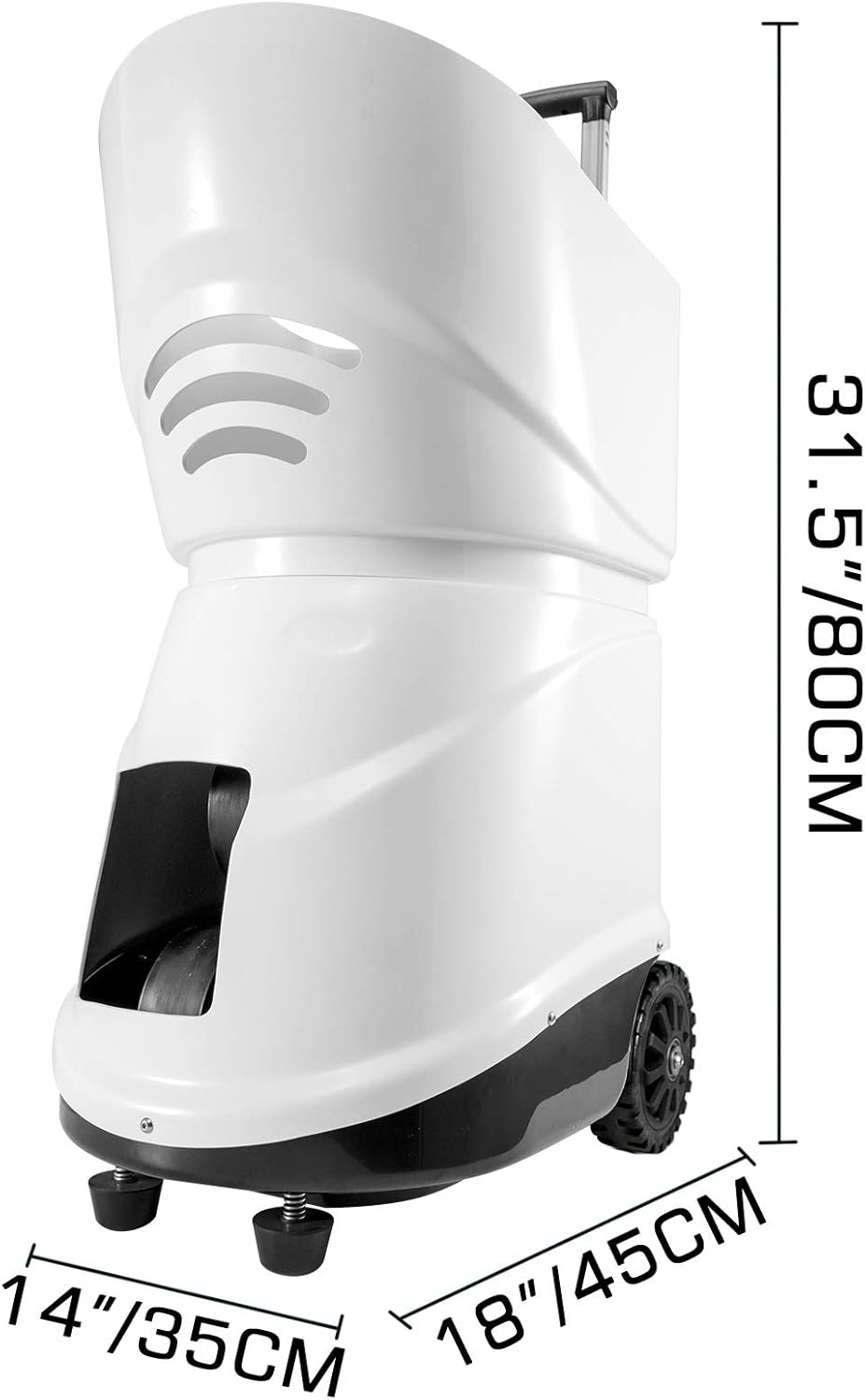
Figure 5: Physical dimensions of the VEVOR TS-08 tennis ball machine, showing its height, width, and depth.
9. വാറൻ്റിയും പിന്തുണയും
VEVOR ഉൽപ്പന്നങ്ങൾ ഈടുനിൽക്കുന്നതിനും പ്രകടനത്തിനുമായി രൂപകൽപ്പന ചെയ്തിരിക്കുന്നു. വാറന്റി വിവരങ്ങൾക്ക്, നിങ്ങളുടെ വാങ്ങലിനൊപ്പം ഉൾപ്പെടുത്തിയിരിക്കുന്ന ഡോക്യുമെന്റേഷൻ പരിശോധിക്കുക അല്ലെങ്കിൽ ഔദ്യോഗിക VEVOR സന്ദർശിക്കുക. website. If you encounter any issues or require technical assistance, please contact VEVOR customer support. Have your model number (TS-08) and purchase details ready when contacting support.
VEVOR Customer Support: Please refer to your product packaging or the VEVOR official webബന്ധപ്പെടാനുള്ള വിശദാംശങ്ങൾക്കുള്ള സൈറ്റ്.