
ആമുഖം
The SENTRY HPXBT960B Mini True Wireless Earbuds provide a convenient and cable-free audio experience. Designed for comfort and ease of use, these earbuds connect wirelessly to your devices via Bluetooth, offering integrated controls and a portable charging case for extended listening.
സുരക്ഷാ വിവരങ്ങൾ
- ശ്രവണ സംരക്ഷണം: കേൾവിക്ക് കേടുപാടുകൾ സംഭവിക്കുന്നത് തടയാൻ ദീർഘനേരം ഉയർന്ന ശബ്ദത്തിൽ കേൾക്കുന്നത് ഒഴിവാക്കുക.
- ഡ്രൈവിംഗ് സുരക്ഷ: Do not use earbuds while driving or operating machinery where the inability to hear ambient sounds could pose a danger.
- വാട്ടർ എക്സ്പോഷർ: These earbuds are not waterproof. Avoid exposure to water or excessive moisture.
- കുട്ടികൾ: Keep earbuds and small parts away from children to prevent choking hazards.
- നീക്കം ചെയ്യൽ: പ്രാദേശിക നിയന്ത്രണങ്ങൾ അനുസരിച്ച് ഉൽപ്പന്നവും അതിന്റെ ബാറ്ററിയും ഉത്തരവാദിത്തത്തോടെ നിർമാർജനം ചെയ്യുക.
പാക്കേജ് ഉള്ളടക്കം
- SENTRY HPXBT960B Mini True Wireless Earbuds (Left & Right)
- പോർട്ടബിൾ ചാർജിംഗ് കേസ്
- യുഎസ്ബി ചാർജിംഗ് കേബിൾ
- Extra Silicone Earpads (S/M/L)
- Optional Silicone Ear Hooks
ഉൽപ്പന്നം കഴിഞ്ഞുview
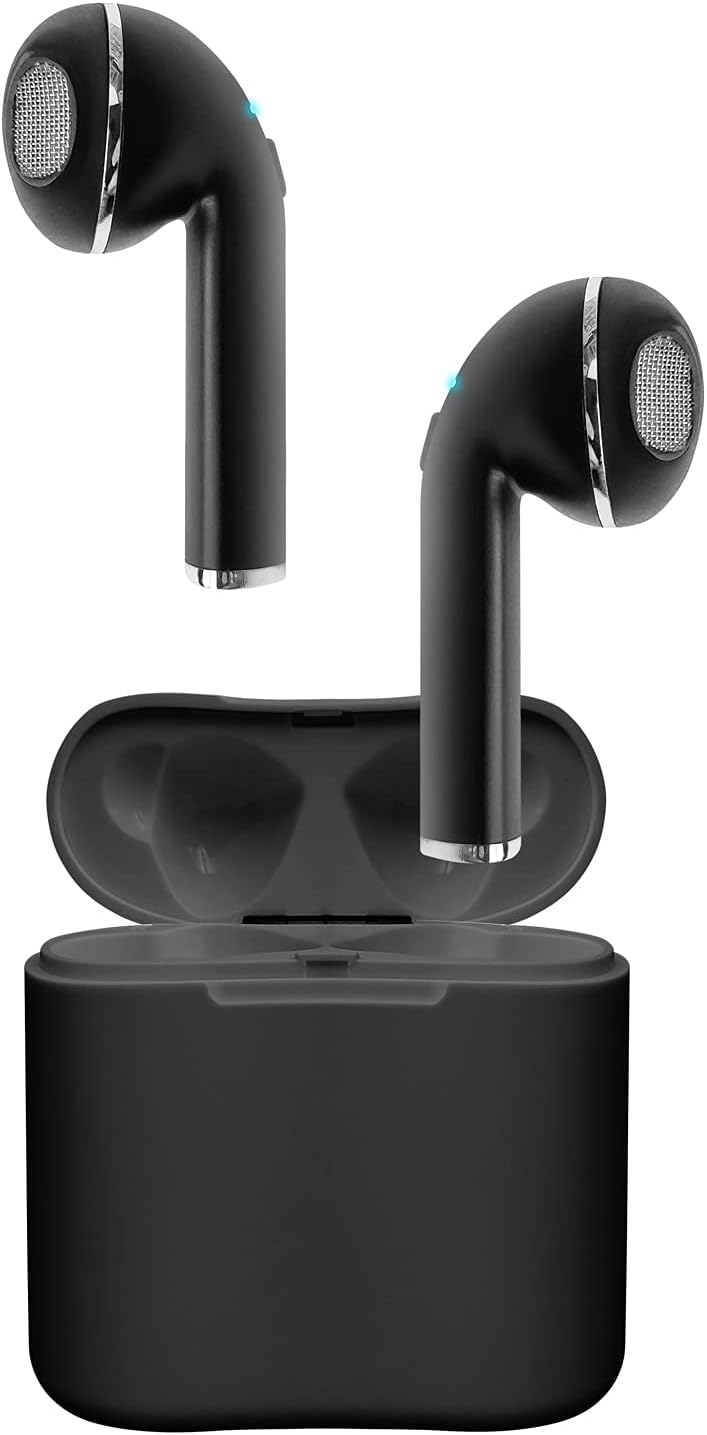
Image: The SENTRY HPXBT960B Mini True Wireless Earbuds in black, resting inside their open charging case. The earbuds feature a sleek design with visible ear tips and charging contacts.
The earbuds are designed for a comfortable in-ear fit. Each earbud features a touch-sensitive control area and a built-in microphone for hands-free communication. The portable charging case protects the earbuds and recharges them on the go.
സജ്ജമാക്കുക
1. ഇയർബഡുകളും കേസും ചാർജ് ചെയ്യുന്നു
- ചാർജിംഗ് കെയ്സിൽ ഇയർബഡുകൾ വയ്ക്കുക. ചാർജിംഗ് കോൺടാക്റ്റുകൾ വിന്യസിച്ചിട്ടുണ്ടെന്ന് ഉറപ്പാക്കുക.
- യുഎസ്ബി ചാർജിംഗ് കേബിൾ കേസിലെ ചാർജിംഗ് പോർട്ടിലേക്കും ഒരു പവർ സ്രോതസ്സിലേക്കും ബന്ധിപ്പിക്കുക.
- The indicator lights on the case and earbuds will show charging status. A full charge for the earbuds provides approximately 4 hours of playback at 50% volume. The charging case holds enough power for up to 2 full recharges, extending total playtime to about 12 hours.
2. നിങ്ങളുടെ ഉപകരണവുമായി ജോടിയാക്കുന്നു
- ഇയർബഡുകൾ ചാർജ്ജ് ചെയ്തിട്ടുണ്ടെന്ന് ഉറപ്പാക്കുക.
- Open the charging case. The earbuds will automatically enter pairing mode (indicated by flashing LED lights).
- നിങ്ങളുടെ ബ്ലൂടൂത്ത് പ്രാപ്തമാക്കിയ ഉപകരണത്തിൽ (ഉദാ: സ്മാർട്ട്ഫോൺ, ടാബ്ലെറ്റ്), ബ്ലൂടൂത്ത് ക്രമീകരണങ്ങളിലേക്ക് പോകുക.
- ഇതിനായി തിരയുക available devices and select "HPXBT960B" (or similar name) from the list.
- Once connected, the earbud indicator lights will stop flashing or show a solid light. You are now ready to use your earbuds.
Video: Official product video demonstrating the setup and features of the Sentry HPXBT960B Mini True Wireless Earbuds, including pairing and charging.
പ്രവർത്തന നിർദ്ദേശങ്ങൾ
ടച്ച് നിയന്ത്രണങ്ങൾ
The HPXBT960B earbuds feature touch controls for easy operation. Specific functions may vary slightly by device, but common controls include:
- പ്ലേ/താൽക്കാലികമായി നിർത്തുക: ഇയർബഡുകളിൽ ഏതെങ്കിലുമൊന്നിൽ ഒറ്റ ടാപ്പ് ചെയ്യുക.
- അടുത്ത ട്രാക്ക്: വലതുവശത്തെ ഇയർബഡിൽ രണ്ടുതവണ ടാപ്പ് ചെയ്യുക.
- മുമ്പത്തെ ട്രാക്ക്: ഇടതുവശത്തെ ഇയർബഡിൽ രണ്ടുതവണ ടാപ്പ് ചെയ്യുക.
- ഉത്തരം/അവസാന കോൾ: ഇൻകമിംഗ് കോളിലോ സജീവ കോളിലോ ഇയർബഡിൽ ഒറ്റ ടാപ്പ് ചെയ്യുക.
- കോൾ നിരസിക്കുക: ഇൻകമിംഗ് കോൾ വരുമ്പോൾ ഇയർബഡുകളിൽ ഏതെങ്കിലുമൊന്ന് 2 സെക്കൻഡ് അമർത്തിപ്പിടിക്കുക.
- വോയ്സ് അസിസ്റ്റന്റിനെ സജീവമാക്കുക: ഇയർബഡുകളിൽ ഏതെങ്കിലുമൊന്നിൽ മൂന്ന് തവണ ടാപ്പ് ചെയ്യുക.
കോളുകൾ ചെയ്യലും സ്വീകരിക്കലും
With the integrated microphone, you can make and receive calls hands-free. Ensure your earbuds are connected to your phone via Bluetooth. Audio will automatically route through the earbuds during a call.
മെയിൻ്റനൻസ്
- വൃത്തിയാക്കൽ: ഇയർബഡുകളും ചാർജിംഗ് കെയ്സും വൃത്തിയാക്കാൻ മൃദുവായതും ഉണങ്ങിയതും ലിന്റ് രഹിതവുമായ തുണി ഉപയോഗിക്കുക. അബ്രാസീവ് ക്ലീനറുകളോ ലായകങ്ങളോ ഉപയോഗിക്കരുത്.
- സംഭരണം: ഉപയോഗത്തിലില്ലാത്തപ്പോൾ, ഇയർബഡുകൾ ചാർജിംഗ് കേസിൽ സൂക്ഷിക്കുക, അതുവഴി അവയെ സംരക്ഷിക്കുകയും ചാർജ്ജ് ചെയ്ത് നിലനിർത്തുകയും ചെയ്യുക. നേരിട്ടുള്ള സൂര്യപ്രകാശത്തിൽ നിന്നും ഉയർന്ന താപനിലയിൽ നിന്നും അകന്ന് തണുത്തതും വരണ്ടതുമായ സ്ഥലത്ത് സൂക്ഷിക്കുക.
- ബാറ്ററി കെയർ: ബാറ്ററി ലൈഫ് വർദ്ധിപ്പിക്കാൻ, ഇയർബഡുകൾ പൂർണ്ണമായും ഡിസ്ചാർജ് ചെയ്യുന്നതും കേസ് ഇടയ്ക്കിടെ ചാർജ് ചെയ്യുന്നതും ഒഴിവാക്കുക. തുടർച്ചയായ ഉപയോഗത്തിലല്ലെങ്കിൽ പോലും അവ പതിവായി ചാർജ് ചെയ്യുക.
ട്രബിൾഷൂട്ടിംഗ്
| പ്രശ്നം | സാധ്യമായ പരിഹാരം |
|---|---|
| ഇയർബഡുകൾ ഓണാക്കുന്നില്ല | Ensure earbuds and charging case are fully charged. |
| ഇയർബഡുകളിൽ നിന്ന് ശബ്ദമില്ല | Check if earbuds are paired correctly. Adjust volume on both the earbuds and your connected device. |
| മോശം ശബ്ദ നിലവാരം അല്ലെങ്കിൽ വിച്ഛേദങ്ങൾ | നിങ്ങളുടെ ഉപകരണം 10 മീറ്റർ ബ്ലൂടൂത്ത് പരിധിക്കുള്ളിലാണെന്ന് ഉറപ്പാക്കുക. ഇയർബഡുകൾക്കും ഉപകരണത്തിനും ഇടയിലുള്ള തടസ്സങ്ങൾ ഒഴിവാക്കുക. മറ്റ് വയർലെസ് ഉപകരണങ്ങളിൽ നിന്നുള്ള ഇടപെടലുകൾ പരിശോധിക്കുക. |
| ഇയർബഡുകൾ ഉപകരണവുമായി ജോടിയാക്കുന്നില്ല | Turn off Bluetooth on your device, then turn it back on. Forget the device in your Bluetooth settings and attempt to re-pair. Ensure no other devices are currently connected to the earbuds. |
സ്പെസിഫിക്കേഷനുകൾ
- മോഡൽ: HPXBT960B
- ബ്രാൻഡ്: സെൻട്രി
- കണക്റ്റിവിറ്റി ടെക്നോളജി: ബ്ലൂടൂത്ത് 4.0
- വയർലെസ് ശ്രേണി: 10 മീറ്റർ വരെ (30 അടി)
- ഇയർബഡ് ബാറ്ററി ശേഷി: 35 mAh (ലിഥിയം-അയോൺ)
- ചാർജ്ജ് കേസ് ബാറ്ററി ശേഷി: 200 mAh (ലിഥിയം-അയോൺ)
- ഇയർബഡ് പ്ലേടൈം: 4 മണിക്കൂർ വരെ (50% വോളിയത്തിൽ)
- ആകെ പ്ലേടൈം (കേസിനൊപ്പം): 12 മണിക്കൂർ വരെ
- മൈക്രോഫോൺ: സംയോജിപ്പിച്ചത്
- നിയന്ത്രണ രീതി: സ്പർശിക്കുക
- ഇയർപാഡുകൾ: Extra Silicone Earpads (S/M/L), Optional Silicone Ear Hooks
- ഭാരം: 3.2 ounces (total product weight)
- നിറം: കറുപ്പ്
- മെറ്റീരിയൽ: പ്ലാസ്റ്റിക്
- ഉൽപ്പന്ന അളവുകൾ: 1 x 1 x 1 inches (per earbud, approximate)
വാറൻ്റി & പിന്തുണ
SENTRY products are manufactured with quality and care. For information regarding the product warranty, please refer to the documentation included with your purchase or visit the official SENTRY webസൈറ്റ്.
For further assistance, troubleshooting, or to contact customer support, please visit the ആമസോണിലെ സെൻട്രി സ്റ്റോർ or consult the manufacturer's official support channels.