
1. ആമുഖം
Thank you for choosing the Technical Pro FS2BT Rechargeable Camping Fan. This multi-purpose device is designed to enhance your outdoor experiences by providing cooling, illumination, and entertainment. It features an 8-inch fan, a 24-LED work lamp, an AM/FM radio, a built-in speaker, and multiple audio input options, all powered by an internal rechargeable battery.
This manual provides essential information for the safe and efficient operation, maintenance, and troubleshooting of your FS2BT unit. Please read it thoroughly before use and retain it for future reference.

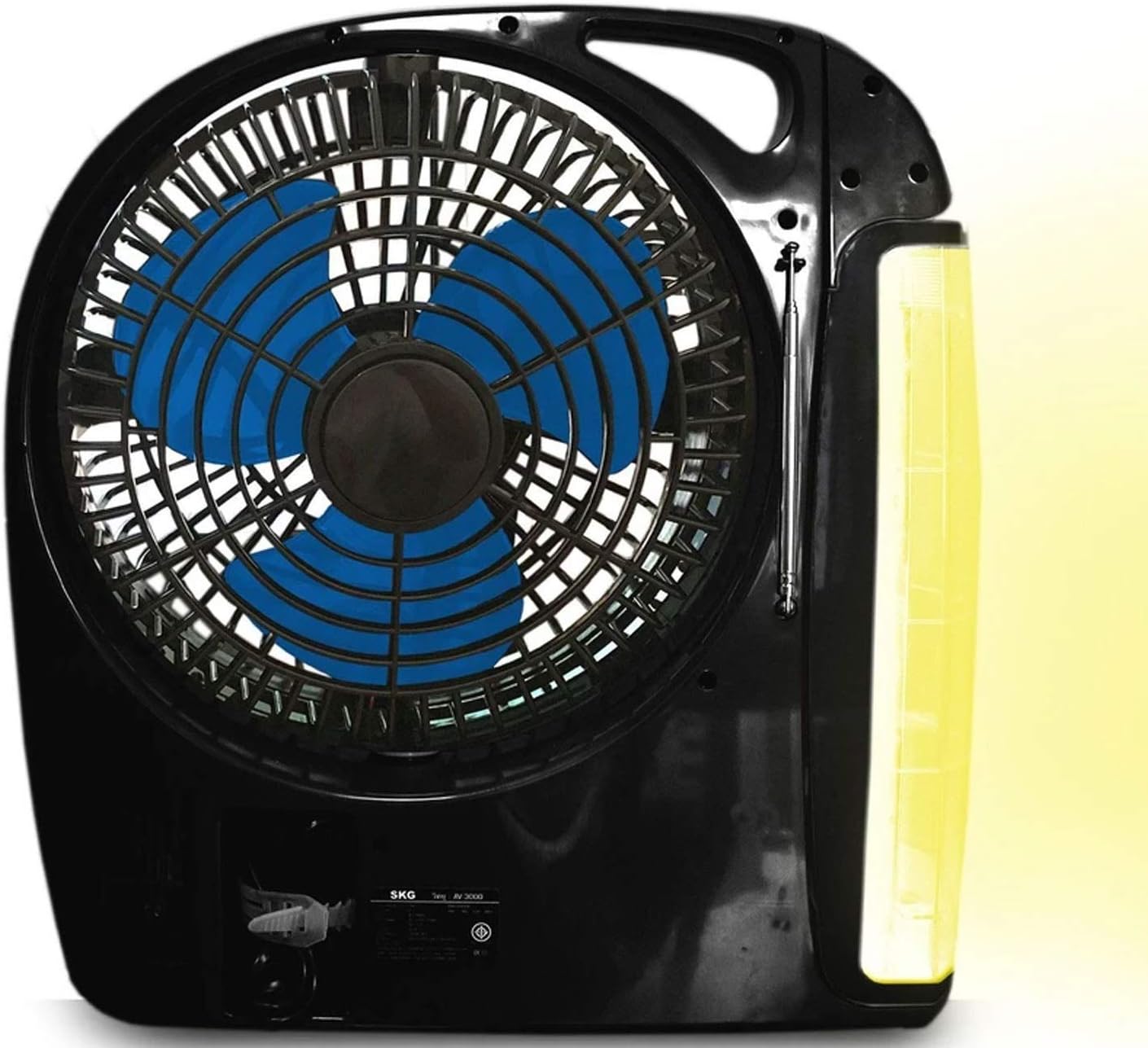
ചിത്രം 1.1: The Technical Pro FS2BT unit with its fan, LED work lamp, and control panel. The lamp is shown in an extended, rotating position.
2. സുരക്ഷാ നിർദ്ദേശങ്ങൾ
സുരക്ഷിതമായ പ്രവർത്തനം ഉറപ്പാക്കുന്നതിനും ഉപകരണത്തിന് കേടുപാടുകൾ സംഭവിക്കാതിരിക്കുന്നതിനും അല്ലെങ്കിൽ പരിക്കേൽക്കാതിരിക്കുന്നതിനും, ദയവായി ഇനിപ്പറയുന്ന സുരക്ഷാ മുൻകരുതലുകൾ പാലിക്കുക:
- Do not expose the unit to rain, moisture, or immerse it in water.
- നേരിട്ട് സൂര്യപ്രകാശത്തിൽ നിന്നും താപ സ്രോതസ്സുകളിൽ നിന്നും യൂണിറ്റ് അകറ്റി നിർത്തുക.
- Do not attempt to disassemble, repair, or modify the unit. Refer all servicing to qualified personnel.
- Ensure proper ventilation when operating the fan. Do not block the fan grille.
- Keep fingers and other objects away from the fan blades during operation.
- നിർദ്ദിഷ്ട ചാർജിംഗ് കേബിളും പവർ സ്രോതസ്സും മാത്രം ഉപയോഗിക്കുക.
- Fully charge the battery before first use and recharge regularly to maintain battery health.
- ഉപയോഗത്തിലില്ലാത്തപ്പോൾ തണുത്തതും ഉണങ്ങിയതുമായ സ്ഥലത്ത് യൂണിറ്റ് സൂക്ഷിക്കുക.
- ഈ ഉപകരണം ഒരു കളിപ്പാട്ടമല്ല. കുട്ടികളിൽനിന്നും നിന്നും ദൂരെ വയ്ക്കുക.
3. സജ്ജീകരണവും പ്രാരംഭ ചാർജിംഗും
Before using your Technical Pro FS2BT for the first time, it is recommended to fully charge the internal battery.
- അൺപാക്ക് ചെയ്യുന്നു: Carefully remove the unit from its packaging and inspect for any damage.
- പ്രാരംഭ ചാർജ്:
- Locate the retractable power cord on the unit.
- Extend the cord and plug it into a standard AC power outlet.
- The "CHARGE" indicator light (red) will illuminate, indicating that the unit is charging.
- അനുവദിക്കുക 8-10 മണിക്കൂർ for a full charge. The "POWER" indicator light (green) will illuminate when fully charged.
- പ്ലേസ്മെൻ്റ്: Place the unit on a stable, flat surface. Ensure there is adequate space around the fan for optimal airflow.
ചിത്രം 3.1: Detail of the control panel showing the charging indicators, power switch, and various function buttons.
4. പ്രവർത്തന നിർദ്ദേശങ്ങൾ
4.1. പവർ ഓൺ/ഓഫ്
Locate the main power switch on the control panel. Slide it to the "AC" position for wall power, or "DC" for battery power. Slide to "OFF" to power down the unit.
4.2. Fan Operation
- To activate the fan, slide the "FAN" switch to "LOW" or "HIGH" for desired speed.
- To turn off the fan, slide the "FAN" switch to "OFF".
- The fan head can be manually adjusted to direct airflow.
4.3. LED Work Lamp ഓപ്പറേഷൻ

ചിത്രം 4.1: The FS2BT unit demonstrating the adjustable LED work lamp in an extended position.
- The 24-LED work lamp can be folded out and rotated to various angles.
- എൽ ഓണാക്കാൻamp, slide the "LAMP" switch to the desired brightness setting (low or high).
- എൽ ഓഫ് ചെയ്യാൻamp, slide the "LAMP" switch to "OFF".
- എമർജൻസി ലൈറ്റിംഗ്: When the unit is plugged into an AC outlet and the power goes out, the lamp will automatically activate (if the lamp switch is in an ON position) to provide emergency lighting.
4.4. റേഡിയോ ഓപ്പറേഷൻ
- Extend the adjustable antenna for improved reception.
- Use the "RADIO" controls (buttons for AM/FM selection, tuning, and volume) on the control panel to select your desired station.
- The digital display will show the current frequency.
4.5. Audio Playback (Bluetooth, USB, TF Card)
The FS2BT features a built-in speaker and supports various audio input methods:
- ബ്ലൂടൂത്ത്: Activate Bluetooth on your mobile device and pair with "FS2BT". Once connected, you can stream audio wirelessly.
- യുഎസ് ബി ഫ്ളാഷ് ഡ്രെവ്: Insert a USB flash drive (up to 16GB) containing .mp3 audio files into the USB port. The unit will automatically detect and play the files.
- TF Card (Micro SD): Insert a TF card (up to 16GB) containing .mp3 audio files into the TF card slot. The unit will automatically detect and play the files.
- Use the playback controls (play/pause, skip track) on the unit to manage your audio.
5. പരിപാലനം
- വൃത്തിയാക്കൽ: Use a soft, dry cloth to clean the exterior of the unit. Do not use abrasive cleaners or solvents. For the fan grille, a soft brush can be used to remove dust.
- ബാറ്ററി കെയർ: To prolong the life of the internal rechargeable battery, avoid completely draining it. Recharge the unit fully after each use and at least once every three months if stored for extended periods.
- സംഭരണം: When not in use, store the FS2BT in a cool, dry place, away from direct sunlight and extreme temperatures. Ensure the retractable cord is properly stored in its compartment.
6. പ്രശ്നപരിഹാരം
| പ്രശ്നം | സാധ്യമായ കാരണം | പരിഹാരം |
|---|---|---|
| യൂണിറ്റ് പവർ ഓണാക്കുന്നില്ല. | ബാറ്ററി തീർന്നു; പവർ സ്വിച്ച് ഓഫാണ്. | Charge the unit for 8-10 hours. Ensure the power switch is set to "AC" or "DC". |
| ഫാൻ പ്രവർത്തിക്കുന്നില്ല. | Fan switch is OFF; Low battery. | Slide the "FAN" switch to "LOW" or "HIGH". Recharge the unit. |
| LED എൽamp is not illuminating. | Lamp switch is OFF; Low battery. | Slide the "LAMP" switch to a brightness setting. Recharge the unit. |
| മോശം റേഡിയോ സ്വീകരണം. | ആന്റിന നീട്ടിയിട്ടില്ല; ദുർബലമായ സിഗ്നൽ. | Fully extend the adjustable antenna. Try repositioning the unit. |
| USB/TF card audio not playing. | തെറ്റാണ് file format; Card/drive not inserted correctly; Card/drive capacity too large. | ഉറപ്പാക്കുക files are .mp3 format. Reinsert the card/drive. Use a card/drive up to 16GB. |
| ബ്ലൂടൂത്ത് കണക്റ്റ് ചെയ്യുന്നില്ല. | Bluetooth not enabled on device; Unit not in pairing mode. | Ensure Bluetooth is active on your device. Check the unit's display for pairing status. |
7 സ്പെസിഫിക്കേഷനുകൾ

ചിത്രം 7.1: Physical dimensions of the Technical Pro FS2BT unit.
| മോഡൽ നമ്പർ | TPFS2BT |
| അളവുകൾ (L x W x H) | 31.75 സെ.മീ x 11.43 സെ.മീ x 33.02 സെ.മീ (12.5" x 4.5" x 13") |
| ഭാരം | 2.47 കി.ഗ്രാം (5.45 പൗണ്ട്) |
| ബ്ലേഡ് മെറ്റീരിയൽ | പ്ലാസ്റ്റിക് |
| ബ്ലേഡുകളുടെ എണ്ണം | 3 |
| ഫാൻ വേഗത | 2 (താഴ്ന്ന, ഉയർന്ന) |
| എൽഇഡി എൽamp ബൾബുകൾ | 24 |
| എൽഇഡി എൽamp തെളിച്ചം | 2 ക്രമീകരണങ്ങൾ |
| പവർ ഉറവിടം | Rechargeable Lithium Ion Battery, AC Power |
| ബാറ്ററി ഉൾപ്പെടുത്തിയിട്ടുണ്ട് | അതെ (1 ലിഥിയം അയോൺ) |
| ചാർജ്ജ് സമയം | 8-10 മണിക്കൂർ |
| Playtime (Fan High) | 3-4 മണിക്കൂർ |
| Playtime (Light High) | 50 മണിക്കൂർ വരെ |
| Playtime (Speaker Medium) | 24 മണിക്കൂർ വരെ |
| ഓഡിയോ ഇൻപുട്ടുകൾ | Bluetooth, USB (max 16GB), TF Card (max 16GB) |
| റേഡിയോ ട്യൂണർ | Integrated Digital AM/FM |
| മെറ്റീരിയൽ തരം | പ്ലാസ്റ്റിക് |
8. വാറൻ്റിയും പിന്തുണയും
Technical Pro products are designed for reliability and performance. For specific warranty information, please refer to the warranty card included with your purchase or visit the official Technical Pro website. If you encounter any issues or require technical assistance, please contact Technical Pro customer support through their official channels.
Please have your model number (FS2BT) and purchase details ready when contacting support.