
1. ആമുഖവും അവസാനവുംview
The TELE System YM101 Portable Pulse Oximeter is a non-invasive device designed for spot-checking arterial hemoglobin oxygen saturation (SpO2) and pulse rate (PR) in adults and pediatric patients at home or in clinical settings. It also indicates the Perfusion Index (PI). This device is simple to operate and provides quick, reliable measurements.
The YM101 is particularly useful for individuals with conditions such as asthma, chronic bronchitis, COPD, or pneumonia, or simply for monitoring blood oxygen levels in patients experiencing fever, cough, or shortness of breath. This pulse oximeter is a certified medical device.
2 സുരക്ഷാ വിവരങ്ങൾ
- ഉപയോഗിക്കുന്നതിന് മുമ്പ് എല്ലാ നിർദ്ദേശങ്ങളും ശ്രദ്ധാപൂർവ്വം വായിക്കുക.
- This device is intended for non-invasive spot-checking of SpO2 and pulse rate. It is not intended for continuous monitoring.
- Consult a medical professional for interpretation of results. Self-diagnosis and self-treatment based on measurements can be dangerous.
- MRI അല്ലെങ്കിൽ CT പരിതസ്ഥിതിയിൽ ഉപകരണം ഉപയോഗിക്കരുത്.
- ജലത്തിൽ നിന്നും ഈർപ്പത്തിൽ നിന്നും ഉപകരണം അകറ്റി നിർത്തുക.
- Do not use the device on the same finger for more than 5 minutes to avoid discomfort or injury due to prolonged pressure.
- കുട്ടികൾക്ക് ലഭ്യമാകാതെ സൂക്ഷിക്കുക.
3. ഉൽപ്പന്ന ഘടകങ്ങൾ
The TELE System YM101 Pulse Oximeter consists of several key components:
- 1.5" LED Display: Shows SpO2, pulse rate, perfusion index, and bar graph.
- ബട്ടൺ: For power on/off and display mode changes.
- സെൻസർ: Integrated infrared sensor for measurement.
- MCU (Microcontroller Unit): Processes data.
- ബാറ്ററി കവർ: ബാറ്ററി കമ്പാർട്ട്മെന്റിനെ സംരക്ഷിക്കുന്നു.

ചിത്രം 3.1: പൊട്ടിത്തെറിച്ചു view of the YM101 Pulse Oximeter components.
4. സജ്ജീകരണം
Before first use, install the batteries:
- Open the battery cover located at the back of the device.
- Insert two (2) AAAA batteries according to the polarity indicators (+/-) inside the compartment. Note: Batteries are not included with the device.
- ബാറ്ററി കവർ സുരക്ഷിതമായി അടയ്ക്കുക.

ചിത്രം 4.1: വശം view of the YM101 Pulse Oximeter.
5. പ്രവർത്തന നിർദ്ദേശങ്ങൾ
അളവെടുക്കാൻ ഈ ഘട്ടങ്ങൾ പാലിക്കുക:
- Ensure the device has batteries installed.
- cl തുറക്കുകamp of the pulse oximeter.
- Insert one of your fingers (preferably the index finger) into the rubber opening of the oximeter, ensuring the nail is facing upwards towards the display.
- cl റിലീസ് ചെയ്യുകamp. The device will automatically power on and begin measurement.
- Keep your hand still during the measurement. The display will show your SpO2 percentage, pulse rate (BPM/PR), and Perfusion Index (PI). A bar graph will also indicate pulse intensity.
- To change the display orientation or brightness, briefly press the power button while the device is on. The 1.5" LED display offers 3 levels of brightness.
- The device can be set to alarm if SpO2 or bpmPR limits are exceeded. Refer to the full manual for alarm setting details.
- Remove your finger from the device. The oximeter will automatically power off after a few seconds of inactivity.

Figure 5.1: YM101 Pulse Oximeter in use, displaying readings.
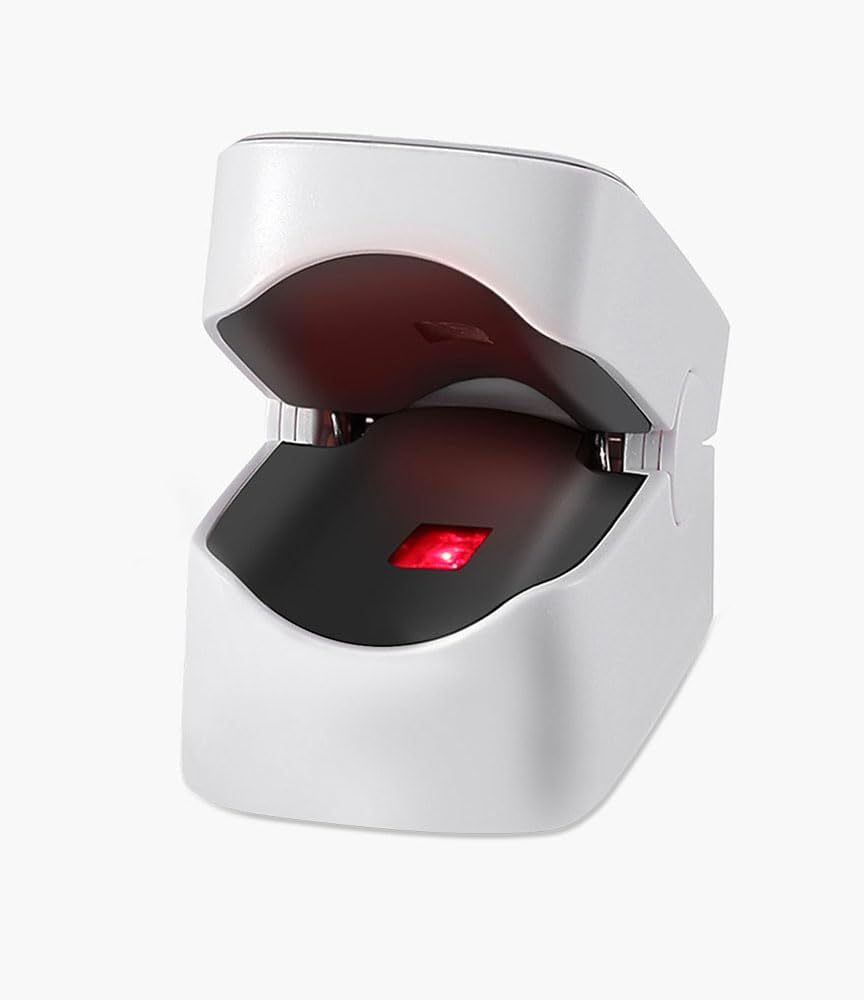
ചിത്രം 5.2: ആന്തരിക view of the YM101 Pulse Oximeter sensor.
6. പരിപാലനം
- വൃത്തിയാക്കൽ: മൃദുവായ തുണി ഉപയോഗിച്ച് ഉപകരണം തുടയ്ക്കുക dampened with alcohol (70% ethanol or isopropanol) before and after each use. Do not immerse the device in liquid.
- സംഭരണം: Store the oximeter in a cool, dry place, away from direct sunlight and extreme temperatures.
- ബാറ്ററി മാറ്റിസ്ഥാപിക്കൽ: ഡിസ്പ്ലേയിൽ ബാറ്ററി കുറവാണെന്ന് കാണിക്കുമ്പോൾ ബാറ്ററികൾ മാറ്റി വയ്ക്കുക. ഉപകരണം കൂടുതൽ നേരം ഉപയോഗിക്കുന്നില്ലെങ്കിൽ ബാറ്ററികൾ നീക്കം ചെയ്യുക.
- നീക്കം ചെയ്യൽ: Dispose of the device and batteries according to local environmental regulations.
7. പ്രശ്നപരിഹാരം
| പ്രശ്നം | സാധ്യമായ കാരണം | പരിഹാരം |
|---|---|---|
| No display after pressing power button | ബാറ്ററികൾ തീർന്നിരിക്കുന്നു അല്ലെങ്കിൽ തെറ്റായി ചേർത്തിരിക്കുന്നു. | ബാറ്ററികൾ മാറ്റിസ്ഥാപിക്കുക അല്ലെങ്കിൽ ശരിയായ പോളാരിറ്റി ഉപയോഗിച്ച് വീണ്ടും ചേർക്കുക. |
| Inaccurate or unstable readings | Finger not inserted properly; patient movement; cold finger; nail polish. | Reinsert finger correctly; remain still; warm the finger; remove nail polish. |
| "Finger Out" message | Finger not detected or removed. | Insert finger fully into the device. |
8 സ്പെസിഫിക്കേഷനുകൾ
- ബ്രാൻഡ്: TELE സിസ്റ്റം
- മോഡൽ: YM101
- ഡിസ്പ്ലേ: 1.5" LED, 3 brightness levels
- അളക്കൽ ശ്രേണി: SpO2: 70-100%
- കൃത്യത: SpO2: ±1% / Pulse Rate: ±1 bpm
- Indications/Measurements: SpO2%, Heart Rate (BPM/PR), Perfusion Index (PI), Bar Graph
- ഊർജ്ജ സ്രോതസ്സ്: 2 x AAAA batteries (not included)
- നിറം: വെള്ള
- അളവുകൾ: Approximately 57mm (Length) x 31mm (Width)
- നിർമ്മാതാവിൻ്റെ റഫറൻസ്: 96010001
- മാതൃരാജ്യം: ചൈന

Figure 8.1: Dimensions of the YM101 Pulse Oximeter.
9. വാറൻ്റിയും പിന്തുണയും
For warranty information, technical support, or service inquiries regarding your TELE System YM101 Pulse Oximeter, please refer to the warranty card included in your product packaging or visit the official TELE System website. You may also contact TELE System customer service directly for assistance.
നിർമ്മാതാവ്: TELE സിസ്റ്റം
ബ്രാൻഡ്: TELE സിസ്റ്റം
ബന്ധപ്പെടുക: Please refer to the contact information provided in your product packaging or on the official TELE System webസൈറ്റ്.