
1. ആമുഖം
This manual provides detailed instructions for the proper operation and maintenance of your WOUXUN KG-UV2D Dual Band Two-Way Radio. Please read this manual thoroughly before using the radio to ensure safe and efficient operation. Keep this manual for future reference.
2 സുരക്ഷാ വിവരങ്ങൾ
To prevent personal injury or property damage, observe the following safety precautions:
- സ്ഫോടനാത്മകമായ അന്തരീക്ഷത്തിൽ (ഉദാ: കത്തുന്ന വാതകങ്ങൾ, പൊടിപടലങ്ങൾ, ലോഹ പൊടികൾ) റേഡിയോ പ്രവർത്തിപ്പിക്കരുത്.
- ആന്റിന ഘടിപ്പിക്കാതെ പ്രക്ഷേപണം ചെയ്യരുത്.
- Use only WOUXUN approved batteries and chargers. Improper use may cause fire, explosion, or injury.
- റേഡിയോ ദീർഘനേരം നേരിട്ട് സൂര്യപ്രകാശം ഏൽക്കരുത് അല്ലെങ്കിൽ ചൂടാക്കൽ ഉപകരണങ്ങൾക്ക് സമീപം വയ്ക്കരുത്.
- ഇടപെടൽ ഒഴിവാക്കാൻ റേഡിയോ മെഡിക്കൽ ഉപകരണങ്ങളിൽ നിന്ന് അകറ്റി നിർത്തുക.
- റേഡിയോ വേർപെടുത്തുകയോ പരിഷ്കരിക്കുകയോ ചെയ്യരുത്. യോഗ്യതയുള്ള സാങ്കേതിക വിദഗ്ധർ മാത്രമേ അറ്റകുറ്റപ്പണികൾ നടത്താവൂ.
3. പാക്കേജ് ഉള്ളടക്കം
നിങ്ങളുടെ പാക്കേജിൽ എല്ലാ ഇനങ്ങളും ഉണ്ടെന്ന് ഉറപ്പാക്കുക:
- WOUXUN KG-UV2D Transceiver
- 7.4V 1700mAh ലിഥിയം-അയൺ ബാറ്ററി
- ആൻ്റിന
- Smart Desktop Charger (220 VAC)
- Quick Charge Clip
- Microphone/Headset
- English User Manual (Printed)
4. ഉൽപ്പന്നം കഴിഞ്ഞുview
The WOUXUN KG-UV2D is a robust dual-band two-way radio designed for reliable communication. It features a durable construction and an advanced menu system for various functions. Key features include:
- ഡ്യുവൽ ബാൻഡ് പ്രവർത്തനം: VHF (136-174 MHz), UHF (400-480 MHz) എന്നീ രണ്ട് ഫ്രീക്വൻസികളെയും പിന്തുണയ്ക്കുന്നു.
- Extended Receive Band: Capable of receiving 88-108 MHz (FM radio), 136-174 MHz, and 400-480 MHz.
- ഇരട്ട വാച്ച് പ്രവർത്തനം: Allows simultaneous monitoring of two frequencies (VV, VU, UU) with on-screen indication.
- DTMF എൻകോഡർ: വിപുലമായ സിഗ്നലിംഗിനും നിയന്ത്രണത്തിനും.
- CTCSS/DCS ടോണുകൾ: Programmable sub-audio and digital codes for selective calling.
- എമർജൻസി അലാറം: Dedicated button activates a loud alarm and flashing LEDs, transmitting a digital identification signal.
- VOX പ്രവർത്തനം: Voice-activated transmission with adjustable sensitivity.
- ബാക്ക്ലിറ്റ് എൽസിഡി ഡിസ്പ്ലേ: Clear display with blue illumination during transmission.
- പിസി പ്രോഗ്രാം ചെയ്യാവുന്നത്: Customize settings and channels via optional PC software and cable.
- Customizable Welcome Message: Personalize the radio's power-on display.
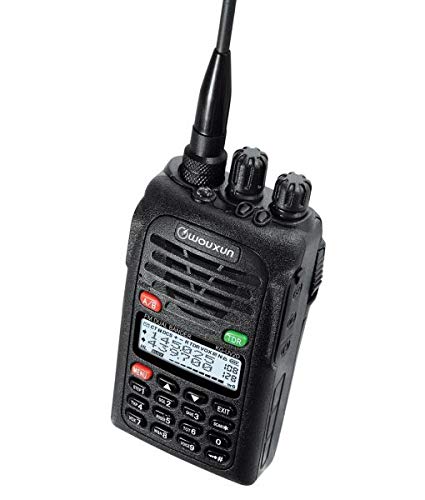
Image 1: The WOUXUN KG-UV2D Dual Band Two-Way Radio. This image shows the front of the radio, including the antenna, control knobs, speaker grille, LCD display, and keypad. The display shows frequency information, and the keypad includes numeric buttons and function keys.
5. സജ്ജീകരണം
5.1 ബാറ്ററി ഇൻസ്റ്റാളേഷൻ
- റേഡിയോയുടെ പിൻഭാഗത്തുള്ള ഗ്രൂവുകളുമായി ബാറ്ററി പായ്ക്ക് വിന്യസിക്കുക.
- ബാറ്ററി പായ്ക്ക് അതിന്റെ സ്ഥാനത്ത് ക്ലിക്ക് ആകുന്നതുവരെ മുകളിലേക്ക് സ്ലൈഡ് ചെയ്യുക.
- നീക്കം ചെയ്യാൻ, ബാറ്ററി റിലീസ് ലാച്ച് (ഉണ്ടെങ്കിൽ) അമർത്തി ബാറ്ററി താഴേക്ക് സ്ലൈഡ് ചെയ്യുക.
5.2 ആന്റിന അറ്റാച്ച്മെന്റ്
- റേഡിയോയുടെ മുകളിലുള്ള കണക്ടറിലേക്ക് ആന്റിന ഘടികാരദിശയിൽ സ്ക്രൂ ചെയ്ത് അത് ദൃഢമായി ഇരിക്കുന്നതുവരെ ഉറപ്പിക്കുക.
- അമിതമായി മുറുക്കരുത്.
5.3 പ്രാരംഭ ചാർജിംഗ്
ആദ്യ ഉപയോഗത്തിന് മുമ്പ്, ബാറ്ററി പൂർണ്ണമായും ചാർജ് ചെയ്യുക.
- Place the radio with the battery installed into the smart desktop charger.
- Ensure the charging indicator light on the charger illuminates (typically red).
- Charge for approximately 4-5 hours, or until the indicator light turns green, indicating a full charge.
6. അടിസ്ഥാന പ്രവർത്തനം
6.1 പവർ ഓൺ/ഓഫ്
തിരിക്കുക പവർ/വോളിയം നോബ് (top-left knob) clockwise to turn the radio on. Continue rotating to adjust the volume. Rotate counter-clockwise until a click is heard to turn the radio off.
6.2 Frequency/Channel Selection
- VFO മോഡ് (ഫ്രീക്വൻസി മോഡ്): Directly enter frequencies using the numeric keypad. Use the മുകളിലേക്ക്/താഴേക്ക് അമ്പടയാള കീകൾ to fine-tune the frequency.
- ചാനൽ മോഡ്: ഉപയോഗിക്കുക മുകളിലേക്ക്/താഴേക്ക് അമ്പടയാള കീകൾ to scroll through programmed memory channels.
- അമർത്തുക VFO/MR button (often labeled A/B or similar) to switch between VFO and Channel modes.
6.3 ട്രാൻസ്മിറ്റിംഗ് (PTT)
പ്രക്ഷേപണം ചെയ്യാൻ, അമർത്തിപ്പിടിക്കുക PTT (പുഷ്-ടു-ടോക്ക്) ബട്ടൺ on the side of the radio. Speak clearly into the microphone. Release the PTT button to stop transmitting and return to receive mode.
6.4 സ്വീകരിക്കുന്നു
When the radio is on and tuned to an active frequency or channel, you will hear incoming transmissions through the speaker. Adjust the പവർ/വോളിയം നോബ് for desired audio level.
7. വിപുലമായ സവിശേഷതകൾ
7.1 Dual Watch (TDR)
The Dual Watch function allows the radio to monitor two different frequencies or channels simultaneously. If a signal is detected on either frequency, the radio will switch to that frequency. To activate/deactivate, press the TDR button (often green, located near the display).
7.2 CTCSS/DCS ടോണുകൾ
CTCSS (Continuous Tone-Coded Squelch System) and DCS (Digital Coded Squelch) tones are used to filter out unwanted signals and allow for private group communication. These can be programmed via the radio's menu or PC software. Refer to the detailed menu section in the printed manual for specific programming steps.
7.3 VOX ഫംഗ്ഷൻ
VOX (Voice Operated Transmit) enables hands-free operation. When VOX is active, the radio will automatically transmit when it detects your voice. The sensitivity of the VOX function can be adjusted through the radio's menu.
7.4 എമർജൻസി അലാറം
Pressing the dedicated അടിയന്തര ബട്ടൺ (often red, labeled 'MENU' or 'EMG') will activate a loud audible alarm and cause the radio's LEDs to flash. It will also transmit a digital identification signal. Press the button again to deactivate the alarm.
7.5 പിസി പ്രോഗ്രാമിംഗ്
The WOUXUN KG-UV2D can be programmed using a computer and optional programming software/cable. This allows for easier management of memory channels, CTCSS/DCS settings, and other advanced parameters. Software is typically available for download from the manufacturer's webസൈറ്റ്.
8. പരിപാലനം
8.1 വൃത്തിയാക്കൽ
റേഡിയോയുടെ പ്രതലം മൃദുവായ, ഡി-ടച്ച് ഉപയോഗിച്ച് തുടയ്ക്കുക.amp തുണി. കഠിനമായ രാസവസ്തുക്കളോ അബ്രാസീവ് ക്ലീനറുകളോ ഉപയോഗിക്കരുത്. ഉപയോഗിക്കുന്നതിന് മുമ്പ് റേഡിയോ ഉണങ്ങിയെന്ന് ഉറപ്പാക്കുക.
8.2 ബാറ്ററി കെയർ
- എപ്പോഴും നിർദ്ദിഷ്ട ചാർജർ ഉപയോഗിക്കുക.
- ബാറ്ററി ടെർമിനലുകൾ ഷോർട്ട് സർക്യൂട്ട് ചെയ്യരുത്.
- റേഡിയോ കൂടുതൽ നേരം ഉപയോഗിക്കില്ലെങ്കിൽ, ബാറ്ററി നീക്കം ചെയ്ത് തണുത്തതും വരണ്ടതുമായ സ്ഥലത്ത് സൂക്ഷിക്കുക.
- ബാറ്ററിയുടെ ആയുസ്സ് വർദ്ധിപ്പിക്കുന്നതിന് ഇടയ്ക്കിടെ പൂർണ്ണമായും ഡിസ്ചാർജ് ചെയ്യുന്നത് ഒഴിവാക്കുക.
9. പ്രശ്നപരിഹാരം
| പ്രശ്നം | സാധ്യമായ കാരണം | പരിഹാരം |
|---|---|---|
| റേഡിയോ പവർ ഓൺ ചെയ്യുന്നില്ല | ബാറ്ററി ചാർജ് കുറവാണ് അല്ലെങ്കിൽ ശരിയായി ഇൻസ്റ്റാൾ ചെയ്തിട്ടില്ല. | Charge the battery. Reinstall the battery securely. |
| സംപ്രേഷണം ചെയ്യാൻ കഴിയില്ല | Incorrect frequency/channel. PTT button not pressed. Transmit power too low. | Verify frequency/channel. Press PTT firmly. Check transmit power settings. |
| Poor reception or no audio | Volume too low. Squelch level too high. Antenna not connected. Incorrect CTCSS/DCS. | Increase volume. Adjust squelch level. Ensure antenna is attached. Verify CTCSS/DCS settings. |
| കീപാഡ് പ്രതികരിക്കുന്നില്ല | കീപാഡ് ലോക്ക് സജീവമാണ്. | Deactivate keypad lock (refer to the printed manual for specific key combination). |
10 സ്പെസിഫിക്കേഷനുകൾ
| ഫീച്ചർ | സ്പെസിഫിക്കേഷൻ |
|---|---|
| ബ്രാൻഡ് | WOUXUN |
| മോഡൽ നമ്പർ | KG-UV2D |
| നിറം | കറുപ്പ് |
| ഫ്രീക്വൻസി റേഞ്ച് | VHF: 136-174 MHz; UHF: 400-480 MHz |
| ചാനലുകളുടെ എണ്ണം | 32 |
| വാല്യംtage | 7.4 വോൾട്ട് |
| ബാറ്ററി ശേഷി | 1700 mAh ലിഥിയം-അയോൺ |
| പ്രതിരോധം | 50 ഓം |
| ജല പ്രതിരോധ നില | വാട്ടർപ്രൂഫ് അല്ല |
| അനുയോജ്യമായ ഉപകരണങ്ങൾ | Microphone, Headset |
| പ്രത്യേക സവിശേഷതകൾ | Dual band, DTMF encoder, Tone scan, Dual watch, CTCSS/DCS tones, Sub-audio tones, Emergency alarm with flashing LEDs, VOX |
11. വാറൻ്റിയും പിന്തുണയും
Information regarding specific warranty terms for the WOUXUN KG-UV2D is not available in the provided product details. For warranty claims, technical support, or service inquiries, please contact your authorized WOUXUN dealer or the manufacturer directly. Keep your purchase receipt as proof of purchase.