
1. ആമുഖം
This manual provides essential instructions for the safe installation, operation, and maintenance of your ALEKO AC2700ACC Automatic Sliding Gate Opener. Please read this manual thoroughly before beginning installation or operation to ensure proper function and to prevent injury or damage. Keep this manual for future reference.
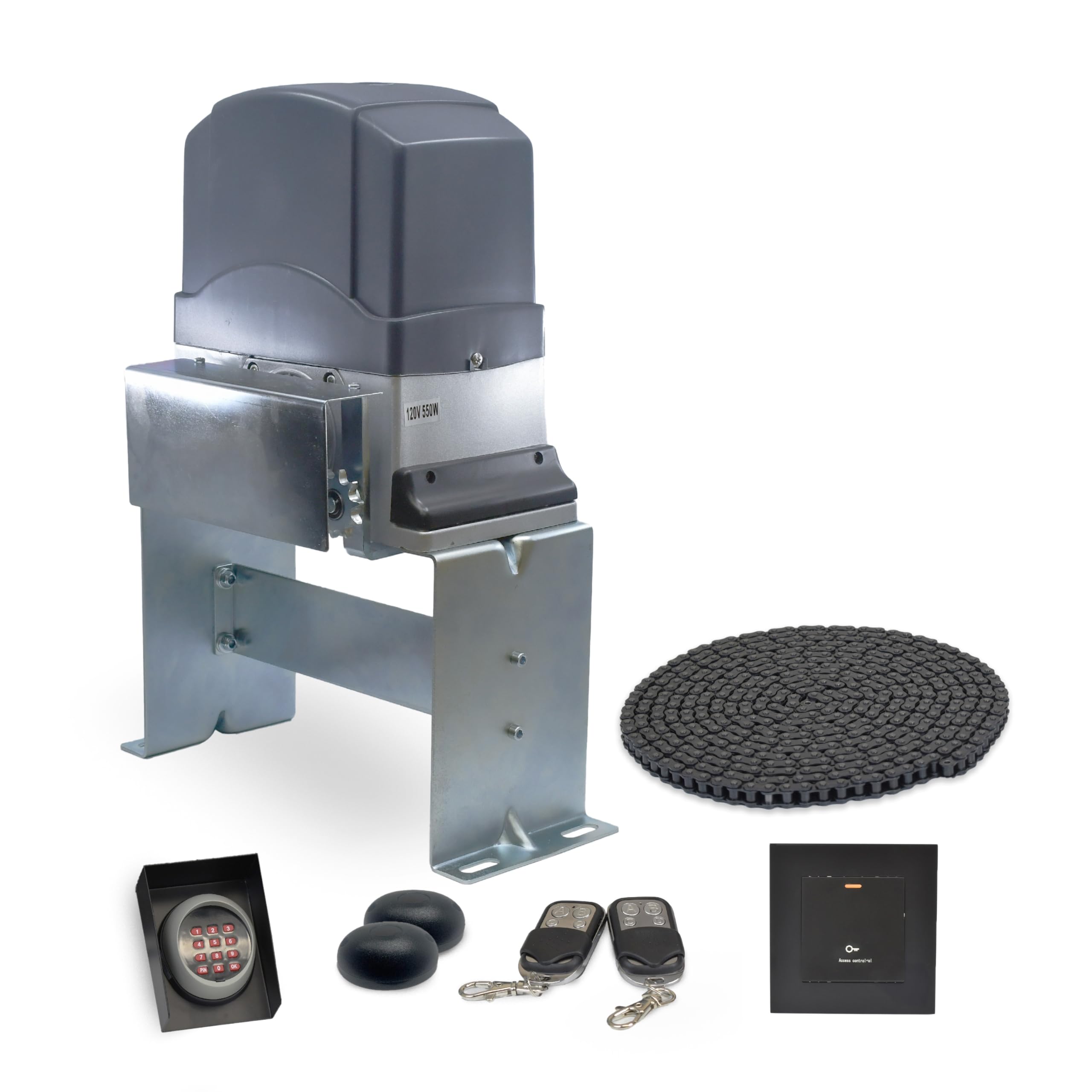
Image 1.1: The ALEKO AC2700ACC Automatic Sliding Gate Opener main unit.
2 സുരക്ഷാ വിവരങ്ങൾ
മുന്നറിയിപ്പ്: Improper installation or use can lead to serious injury or death. Always follow all safety instructions.
- Ensure the gate area is clear of people and obstructions before operating.
- Do not allow children to play near the gate or with the gate opener controls.
- റിമോട്ട് കൺട്രോളുകൾ കുട്ടികൾക്ക് ലഭ്യമാകാതെ സൂക്ഷിക്കുക.
- ഗേറ്റും ഓപ്പണറും തേയ്മാനം, കേടുപാടുകൾ അല്ലെങ്കിൽ തെറ്റായ ക്രമീകരണം എന്നിവയുടെ ലക്ഷണങ്ങൾക്കായി പതിവായി പരിശോധിക്കുക.
- ഏതെങ്കിലും അറ്റകുറ്റപ്പണികൾ അല്ലെങ്കിൽ അറ്റകുറ്റപ്പണികൾ നടത്തുന്നതിന് മുമ്പ് വൈദ്യുതി വിച്ഛേദിക്കുക.
- In case of power failure, use the emergency release key to manually operate the gate.
- Install photocell sensors to detect obstacles and prevent the gate from closing on them.

Image 2.1: Emergency release key and remote controls for secure access and manual operation during power outages.

Image 2.2: Photocell sensors designed to stop the motor when an obstacle is detected in the gate's path.
3. പാക്കേജ് ഉള്ളടക്കം
The ALEKO AC2700ACC Automatic Sliding Gate Opener kit includes the following components:
- AC2700NOR Gate Operator Unit
- 20-foot Drive Chain
- Two 433 MHz Remote Controls
- Keypad with Cover
- വയർലെസ് കീപാഡ്
- Photocell Sensors (Pair)
- Emergency Release Key
- മൗണ്ടിംഗ് ഹാർഡ്വെയറും ബ്രാക്കറ്റുകളും

Image 3.1: The AC2700NOR Gate Operator unit, the core component of the system.

Image 3.2: The included 20-foot drive chain, essential for gate movement.

Image 3.3: One of the two 433 MHz remote controls for convenient gate operation.

Image 3.4: Keypad and protective cover for secure gate access.

Image 3.5: Wireless keypad for flexible gate control.
4. സജ്ജീകരണവും ഇൻസ്റ്റാളേഷനും
Installation of the ALEKO AC2700ACC gate opener requires careful attention to detail and adherence to local electrical codes. Professional installation is recommended for optimal safety and performance.
4.1 സൈറ്റ് തയ്യാറാക്കൽ
- Ensure the sliding gate moves freely and smoothly without binding.
- Clear any debris or obstacles from the gate's path.
- Prepare a stable, level concrete pad for mounting the gate opener unit.
4.2 ഓപ്പണർ മൌണ്ട് ചെയ്യുന്നു
- Position the opener unit on the concrete pad, ensuring proper alignment with the gate's chain attachment points.
- Secure the opener to the pad using the provided mounting hardware.

ചിത്രം 4.1: വശം view of the gate opener, illustrating its mounting position.
4.3 ചെയിൻ ഇൻസ്റ്റലേഷൻ
- Attach the drive chain securely to both ends of the sliding gate.
- Route the chain through the opener's sprocket, ensuring it is taut but not overly tight. Adjust tension as needed.

Image 4.2: The gate opener with the drive chain properly installed and engaged with the sprocket.
4.4 ഇലക്ട്രിക്കൽ കണക്ഷനുകൾ
- Connect the power supply to the opener unit according to the wiring diagram in the full product manual.
- Connect all accessories, including photocell sensors, keypads, and any other safety devices.
- എല്ലാ കണക്ഷനുകളും സുരക്ഷിതവും ശരിയായി ഇൻസുലേറ്റ് ചെയ്തതുമാണെന്ന് ഉറപ്പാക്കുക.
5. പ്രവർത്തന നിർദ്ദേശങ്ങൾ
The ALEKO AC2700ACC gate opener offers various features for convenient and safe operation.
5.1 റിമോട്ട് കൺട്രോൾ ഓപ്പറേഷൻ
- ഗേറ്റ് തുറക്കാനോ അടയ്ക്കാനോ നിങ്ങളുടെ റിമോട്ട് കൺട്രോളിലെ നിയുക്ത ബട്ടൺ അമർത്തുക.
- The remote has a maximum range of 100 feet.
5.2 കീപാഡ് പ്രവർത്തനം
- Enter your programmed access code on the keypad to operate the gate.
5.3 പ്രധാന സവിശേഷതകൾ
- സോഫ്റ്റ് സ്റ്റാർട്ട്/സ്റ്റോപ്പ്: The gate opener features a soft start and stop function to reduce wear on the motor and gate hardware, ensuring smoother operation.
- Midway Mode: Allows the gate to open partially for pedestrian access without fully opening the gate.
- Adjustable Auto-Close: The gate can be programmed to automatically close after a set period. Adjust the delay time as needed.
- തടസ്സം കണ്ടെത്തൽ: Integrated safety features, including photocell sensors, detect obstructions in the gate's path and stop or reverse the gate to prevent damage or injury.

Image 5.1: Diagram highlighting key operational features such as obstacle detection, soft start/stop, midway mode, and adjustable auto-close.
6. പരിപാലനം
പതിവ് അറ്റകുറ്റപ്പണികൾ നിങ്ങളുടെ ഗേറ്റ് ഓപ്പണറിന്റെ ദീർഘായുസ്സും വിശ്വസനീയമായ പ്രവർത്തനവും ഉറപ്പാക്കുന്നു.
- പ്രതിമാസ: Inspect the drive chain for proper tension and lubrication. Apply a suitable lubricant if necessary.
- ത്രൈമാസിക: Check all mounting hardware for tightness. Inspect the gate's movement for any binding or resistance.
- വാർഷികം: Test all safety features, including obstacle detection and emergency release. Clean the photocell sensor lenses.
- Keep the area around the gate opener clear of debris, leaves, and snow.
7. പ്രശ്നപരിഹാരം
പൊതുവായ പ്രശ്നങ്ങളും അവയുടെ സാധ്യമായ പരിഹാരങ്ങളും അറിയാൻ താഴെ കൊടുത്തിരിക്കുന്ന പട്ടിക കാണുക.
| പ്രശ്നം | സാധ്യമായ കാരണം | പരിഹാരം |
|---|---|---|
| Gate does not respond to remote/keypad. | No power; remote battery dead; remote not programmed; safety sensors obstructed. | Check power supply; replace remote battery; reprogram remote; clear sensor path. |
| ഗേറ്റ് അപ്രതീക്ഷിതമായി നിൽക്കുകയോ പിന്നോട്ട് മാറുകയോ ചെയ്യുന്നു. | Obstacle detected by safety sensors; gate binding; limit switch issue. | Clear obstacles; check gate for smooth movement; inspect and adjust limit switches. |
| Gate operates slowly or with difficulty. | കുറഞ്ഞ വോളിയംtage; motor wear; insufficient lubrication; gate friction. | Check power supply; lubricate chain and gate rollers; inspect motor; ensure gate moves freely. |
| Magnetic limit switch not working properly. | Magnets misaligned or loose; sensor dirty. | Adjust magnet positions; clean sensor area. |
If issues persist after attempting these solutions, please contact ALEKO customer support.
8 സ്പെസിഫിക്കേഷനുകൾ
Technical specifications for the ALEKO AC2700ACC Automatic Sliding Gate Opener:
- മോഡൽ നമ്പർ: AC2700ACC
- നിർമ്മാതാവ്: അലെക്കോ
- മോട്ടോർ തരം: AC Motor (120V, 550W)
- ഇനത്തിൻ്റെ ഭാരം: 58 പൗണ്ട്
- ഉൽപ്പന്ന അളവുകൾ: 19 x 19 x 12 ഇഞ്ച്
- പ്രവർത്തന താപനില: -4°F മുതൽ +122°F വരെ (-20°C മുതൽ +50°C വരെ)
- പരമാവധി ഗേറ്റ് ഭാരം: Up to 3400 lbs (when paired with an appropriate gate)
- പരമാവധി ഗേറ്റ് നീളം: Up to 40 feet (when paired with an appropriate gate)
- റിമോട്ട് ഫ്രീക്വൻസി: 433 MHz
- സുരക്ഷാ സവിശേഷതകൾ: Obstacle detection, soft start/stop, adjustable auto-close, emergency release.
- നിർമ്മാണം: Waterproof, Anti-Rust Design

Image 8.1: The gate opener's heavy-duty construction, featuring waterproof and anti-rust design, and specified working temperature range.
9. വാറൻ്റിയും പിന്തുണയും
Your ALEKO AC2700ACC Automatic Sliding Gate Opener is designed for durability and performance.
9.1 വാറൻ്റി വിവരങ്ങൾ
ഈ ഉൽപ്പന്നത്തിൽ ഒരു ഉൾപ്പെടുന്നു 1-Year Insured warranty, covering manufacturing defects and ensuring peace of mind. For specific warranty terms and conditions, please refer to the official ALEKO warranty documentation or contact customer support.

Image 9.1: Visual representation of the 1-year insured coverage and integrated safety features.
9.2 ഉപഭോക്തൃ പിന്തുണ
For technical assistance, troubleshooting, or warranty claims, please contact ALEKO Products customer support. You can find contact information and additional resources on the official ALEKO webസൈറ്റ് അല്ലെങ്കിൽ നിങ്ങളുടെ വാങ്ങൽ പ്ലാറ്റ്ഫോം വഴി.
സന്ദർശിക്കുക ALEKO Store on Amazon കൂടുതൽ വിവരങ്ങൾക്കും ഉൽപ്പന്നങ്ങൾക്കും.