
1. ആമുഖം
The TechniSat DIGITRADIO 370 CD IR is a versatile audio system designed for comprehensive entertainment. It offers reception of DAB+, FM, and Internet radio, an integrated CD player, and wireless music streaming via Bluetooth. Additional features include USB playback, AUX input, a headphone jack, and an alarm function. This manual provides detailed instructions for setting up, operating, and maintaining your device.
2 സുരക്ഷാ വിവരങ്ങൾ
- ഊർജ്ജ സ്രോതസ്സ്: നിർദ്ദിഷ്ട പവർ അഡാപ്റ്റർ മാത്രം ഉപയോഗിക്കുക. വോളിയം ഉറപ്പാക്കുകtagഇ നിങ്ങളുടെ പ്രാദേശിക വൈദ്യുതി വിതരണവുമായി പൊരുത്തപ്പെടുന്നു.
- വെൻ്റിലേഷൻ: Do not block ventilation openings. Allow adequate space around the device for proper airflow to prevent overheating.
- ജലവും ഈർപ്പവും: Do not expose the device to rain, moisture, or dripping/splashing liquids. Do not place objects filled with liquids, such as vases, on the device.
- താപ സ്രോതസ്സുകൾ: റേഡിയേറ്ററുകൾ, ഹീറ്റ് രജിസ്റ്ററുകൾ, സ്റ്റൗകൾ അല്ലെങ്കിൽ മറ്റ് ചൂട് ഉൽപ്പാദിപ്പിക്കുന്ന ഉപകരണങ്ങൾ പോലുള്ള താപ സ്രോതസ്സുകളിൽ നിന്ന് ഉപകരണം അകറ്റി നിർത്തുക.
- വൃത്തിയാക്കൽ: Unplug the device before cleaning. Use a soft, dry cloth. Do not use liquid cleaners or aerosol cleaners.
- സേവനം: ഈ ഉൽപ്പന്നം സ്വയം സേവിക്കാൻ ശ്രമിക്കരുത്. യോഗ്യതയുള്ള സേവന ഉദ്യോഗസ്ഥർക്ക് എല്ലാ സേവനങ്ങളും റഫർ ചെയ്യുക.
- CD Player Safety: Do not insert foreign objects into the CD tray. Handle CDs by their edges to avoid scratches.
3. പാക്കേജ് ഉള്ളടക്കം
പാക്കേജിൽ എല്ലാ ഇനങ്ങളും ഉണ്ടെന്ന് ഉറപ്പാക്കുക:
- TechniSat DIGITRADIO 370 CD IR (Black)
- Remote Control (including 2 AAA batteries)
- നിർദ്ദേശ മാനുവൽ (ഈ പ്രമാണം)
- പവർ അഡാപ്റ്റർ
4. ഉൽപ്പന്നം കഴിഞ്ഞുview
4.1 ഫ്രണ്ട് പാനൽ
The front panel features the main display, control buttons, volume knob, and CD tray.
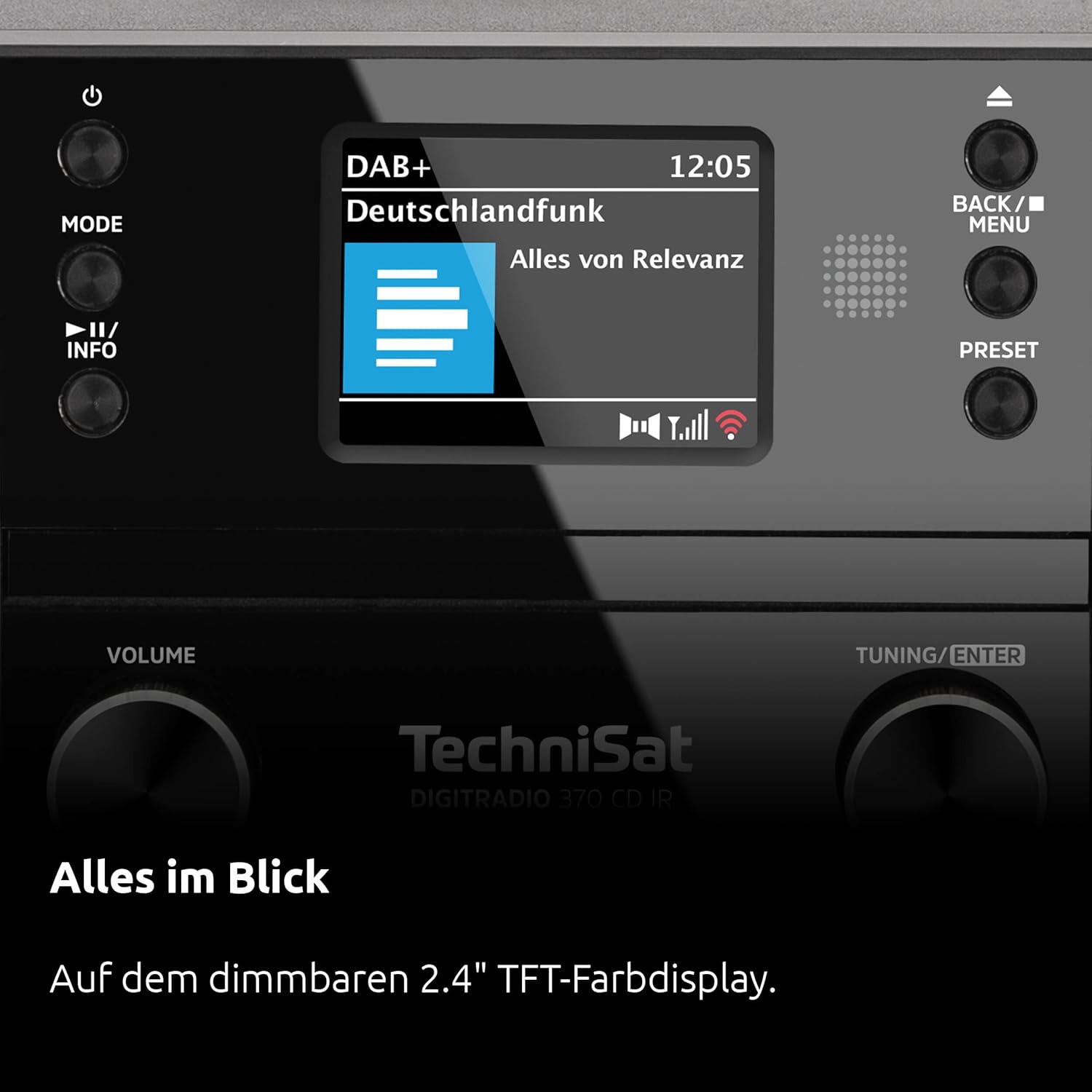
ചിത്രം: മുൻഭാഗം view of the DIGITRADIO 370 CD IR, showing the central display, control knobs for volume and tuning, mode buttons, and the CD tray.
- ഡിസ്പ്ലേ: 2.4-inch color display for information, station names, and track details.
- പവർ/സ്റ്റാൻഡ്ബൈ ബട്ടൺ: ഉപകരണം ഓണാക്കുകയോ ഓഫാക്കുകയോ ചെയ്യുന്നു.
- മോഡ് ബട്ടൺ: Switches between DAB+, FM, Internet Radio, CD, Bluetooth, and AUX modes.
- വോളിയം നോബ്: ഓഡിയോ ഔട്ട്പുട്ട് ലെവൽ ക്രമീകരിക്കുന്നു.
- Tuning/Enter Knob: മെനുകളിലൂടെ നാവിഗേറ്റ് ചെയ്ത് തിരഞ്ഞെടുപ്പുകൾ സ്ഥിരീകരിക്കുന്നു.
- സിഡി ട്രേ: Slot for inserting audio CDs.
4.2 പിൻ പാനൽ
The rear panel provides connection ports for power, USB, and auxiliary input.
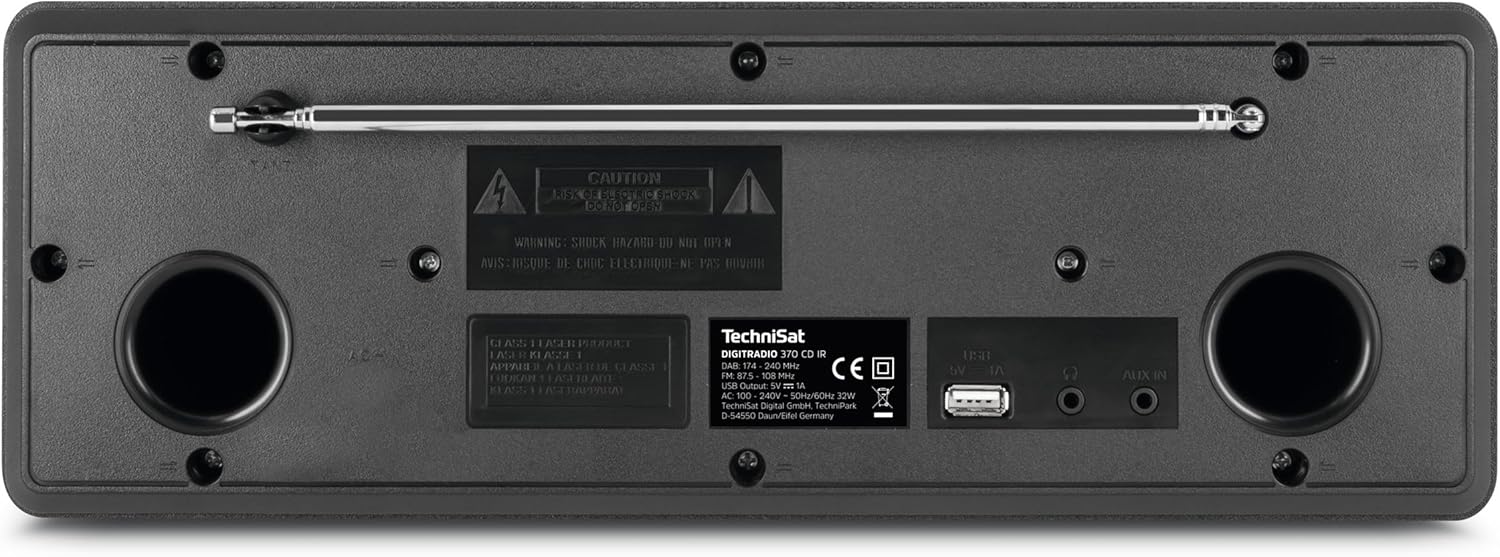
ചിത്രം: പിൻഭാഗം view of the DIGITRADIO 370 CD IR, highlighting the telescopic antenna, USB port, and AUX IN jack.
- ടെലിസ്കോപ്പിക് ആന്റിന: For DAB+ and FM radio reception. Extend fully for best signal.
- USB പോർട്ട്: MP3 പ്ലേ ചെയ്യുന്നതിന് files from a USB storage device and charging mobile devices.
- ഓക്സ് ഇൻ: ബാഹ്യ ഓഡിയോ സ്രോതസ്സുകളെ ബന്ധിപ്പിക്കുന്നതിനുള്ള 3.5mm ജാക്ക്.
- പവർ ഇൻപുട്ട്: നൽകിയിരിക്കുന്ന പവർ അഡാപ്റ്റർ ഇവിടെ ബന്ധിപ്പിക്കുക.
4.3 വിദൂര നിയന്ത്രണം
The remote control allows convenient operation of all functions from a distance.

Image: The remote control for the DIGITRADIO 370 CD IR, showing various buttons for power, mode selection, volume, navigation, and numeric input.
രണ്ട് AAA ബാറ്ററികൾ റിമോട്ട് കൺട്രോളിലേക്ക് തിരുകുക, ധ്രുവത നിരീക്ഷിക്കുക.
5. സജ്ജീകരണം
5.1 പവർ കണക്ഷൻ
- ഉപകരണത്തിന്റെ പിൻഭാഗത്തുള്ള DC IN പോർട്ടിലേക്ക് പവർ അഡാപ്റ്റർ ബന്ധിപ്പിക്കുക.
- ഒരു മതിൽ ഔട്ട്ലെറ്റിലേക്ക് പവർ അഡാപ്റ്റർ പ്ലഗ് ചെയ്യുക.
- The device will enter standby mode.
5.2 ആന്റിന കണക്ഷൻ
For optimal DAB+ and FM reception, fully extend the telescopic antenna located on the rear panel.
5.3 പ്രാരംഭ സജ്ജീകരണ വിസാർഡ്
Upon first power-on, the device will guide you through an initial setup wizard:
- ഭാഷ തിരഞ്ഞെടുക്കൽ: Use the Tuning/Enter knob to select your preferred language and press to confirm.
- Network Setup (WLAN):
- The device will scan for available Wi-Fi networks.
- ലിസ്റ്റിൽ നിന്ന് നിങ്ങളുടെ നെറ്റ്വർക്ക് തിരഞ്ഞെടുക്കുക.
- Enter the Wi-Fi password using the on-screen keyboard and the Tuning/Enter knob.
- Confirm to connect. A successful connection is required for Internet Radio functionality.
- സമയവും തീയതിയും: The device can synchronize time and date automatically via DAB+ or Internet. Confirm the settings.
6. പ്രവർത്തന നിർദ്ദേശങ്ങൾ
6.1 അടിസ്ഥാന പ്രവർത്തനം
- പവർ ഓൺ/ഓഫ്: അമർത്തുക ശക്തി മുൻ പാനലിലോ റിമോട്ട് കൺട്രോളിലോ ഉള്ള ബട്ടൺ.
- വോളിയം ക്രമീകരണം: തിരിക്കുക വോളിയം മുൻ പാനലിലെ നോബ് അല്ലെങ്കിൽ ഉപയോഗിക്കുക VOL + / VOL- റിമോട്ട് കൺട്രോളിലെ ബട്ടണുകൾ.
- മോഡ് തിരഞ്ഞെടുക്കൽ: അമർത്തുക മോഡ് button on the front panel or remote control to cycle through available sources (DAB+, FM, Internet Radio, CD, Bluetooth, AUX).
6.2 Radio Modes (DAB+, FM, Internet Radio)

Image: The radio's display showing information for a DAB+ station, including station name and program details.
- ഒരു മോഡ് തിരഞ്ഞെടുക്കുന്നു: അമർത്തുക മോഡ് until the desired radio mode (DAB+, FM, or Internet Radio) is selected.
- സ്റ്റേഷനുകൾക്കായി സ്കാൻ ചെയ്യുന്നു:
- In DAB+ or FM mode, the device may automatically scan for stations upon first use or when entering the mode.
- For Internet Radio, navigate through categories (e.g., genre, location) using the Tuning/Enter knob to find stations.
- സ്റ്റേഷൻ പ്രീസെറ്റുകൾ:
- To save a station: Tune to the desired station, then press and hold the പ്രീസെറ്റ് button until the 'Save Preset' menu appears. Select a preset number and confirm.
- To recall a station: Press the പ്രീസെറ്റ് button briefly, then use the Tuning/Enter knob to select a saved preset and confirm.
6.3 സിഡി പ്ലെയർ

Image: The CD player tray of the DIGITRADIO 370 CD IR, shown open with a CD inserted.
- ഒരു സിഡി ഇടുന്നു: Gently insert an audio CD (or MP3 CD) into the CD slot on the front panel. The device will automatically switch to CD mode and begin playback.
- പ്ലേബാക്ക് നിയന്ത്രണങ്ങൾ: ഉപയോഗിക്കുക പ്ലേ/താൽക്കാലികമായി നിർത്തുക, മുന്നോട്ട് പോകുക, ഒപ്പം പുറകോട്ട് ഒഴിവാക്കുക buttons on the front panel or remote control.
6.4 ബ്ലൂടൂത്ത് സ്ട്രീമിംഗ്

Image: A smartphone screen showing a music playback interface, indicating wireless music enjoyment via Bluetooth audio streaming.
- ബ്ലൂടൂത്ത് പ്രവർത്തനക്ഷമമാക്കുക: അമർത്തുക മോഡ് to select Bluetooth mode. The display will show "Pairing".
- ജോടിയാക്കൽ: On your mobile device (smartphone, tablet), enable Bluetooth and search for "DIGITRADIO 370 CD IR". Select it to pair.
- പ്ലേബാക്ക്: Once paired, you can stream audio from your mobile device to the radio. Control playback (play/pause, skip) from your mobile device or the radio's controls.
6.5 യുഎസ്ബി പ്ലേബാക്കും ചാർജിംഗും
The USB port on the rear panel supports MP3 file playback and charging for compatible devices.
- യുഎസ്ബി പ്ലേബാക്ക്: Insert a USB storage device containing MP3 files into the USB port. Select USB mode via the മോഡ് button. The device will scan and display playable files. Use the Tuning/Enter knob to navigate and select.
- USB ചാർജിംഗ്: Connect your mobile device to the USB port using a compatible cable. The device will begin charging.
6.6 AUX ഇൻപുട്ട്
Connect external audio sources like an MP3 player or older devices using a 3.5mm audio cable to the AUX IN port on the rear panel. Select AUX mode via the മോഡ് ബട്ടൺ.
6.7 Alarm and Sleep Timer
- ഒരു അലാറം സജ്ജീകരിക്കുന്നു: Access the alarm settings through the system menu. You can set multiple alarms with different sources (e.g., buzzer, radio) and volumes.
- സ്ലീപ്പ് ടൈമർ: The sleep timer allows the radio to turn off automatically after a set period. Access this function through the system menu and select the desired duration.
6.8 App Control (TechniSat Connect)
The DIGITRADIO 370 CD IR can be controlled using the TechniSat Connect app on your smartphone or tablet. Download the app from your device's app store and follow the in-app instructions to connect to your radio.
7. പരിപാലനം
- വൃത്തിയാക്കൽ: Disconnect the power before cleaning. Use a soft, dry, lint-free cloth to wipe the exterior surfaces. Do not use abrasive cleaners, waxes, or solvents.
- CD Player Care: Keep the CD tray clean and free of dust. Do not touch the lens inside the CD player.
- സംഭരണം: ഉപകരണം ദീർഘനേരം സൂക്ഷിക്കുകയാണെങ്കിൽ, പവർ ഔട്ട്ലെറ്റിൽ നിന്ന് അത് അൺപ്ലഗ് ചെയ്ത് തണുത്തതും വരണ്ടതുമായ സ്ഥലത്ത് സൂക്ഷിക്കുക.
8. പ്രശ്നപരിഹാരം
| പ്രശ്നം | സാധ്യമായ കാരണം | പരിഹാരം |
|---|---|---|
| ശക്തിയില്ല | പവർ കേബിൾ ബന്ധിപ്പിച്ചിട്ടില്ല; പവർ ഔട്ട്ലെറ്റ് തകരാറിലാണ്. | പവർ കേബിൾ കണക്ഷൻ പരിശോധിക്കുക; മറ്റൊരു ഔട്ട്ലെറ്റ് പരീക്ഷിക്കുക. |
| ശബ്ദമില്ല | Volume too low; wrong input mode selected; headphones connected. | ശബ്ദം കൂട്ടുക; ശരിയായ മോഡ് തിരഞ്ഞെടുക്കുക; ഹെഡ്ഫോണുകൾ വിച്ഛേദിക്കുക. |
| മോശം റേഡിയോ റിസപ്ഷൻ (DAB+/FM) | ആന്റിന നീട്ടിയിട്ടില്ല; ദുർബലമായ സിഗ്നൽ; ഇടപെടൽ. | Fully extend antenna; reposition the radio; perform a new station scan. |
| Wi-Fi-യിലേക്ക് കണക്റ്റുചെയ്യാൻ കഴിയില്ല | തെറ്റായ പാസ്വേഡ്; റൂട്ടർ വളരെ അകലെയാണ്; നെറ്റ്വർക്ക് പ്രശ്നങ്ങൾ. | Verify password; move radio closer to router; restart router. |
| ബ്ലൂടൂത്ത് ജോടിയാക്കൽ പരാജയപ്പെടുന്നു | Device not in pairing mode; mobile device Bluetooth off. | Ensure radio is in Bluetooth pairing mode; enable Bluetooth on mobile device. |
| സിഡി പ്ലേ ചെയ്യുന്നില്ല | CD inserted incorrectly; CD scratched/dirty; unsupported format. | Reinsert CD correctly; clean CD; ensure it's an audio CD or MP3 CD. |
9 സ്പെസിഫിക്കേഷനുകൾ
| ബ്രാൻഡ് | ടെക്നിസാറ്റ് |
| മോഡൽ നമ്പർ | 0000/3949 |
| കണക്റ്റിവിറ്റി ടെക്നോളജി | Auxiliary, Bluetooth, Wi-Fi |
| പ്രത്യേക സവിശേഷതകൾ | Bluetooth, Timer, Alarm Function, CD Player, Internet Radio, DAB+, FM |
| പിന്തുണയ്ക്കുന്ന മാനദണ്ഡങ്ങൾ | Bluetooth, CD-R, CD-RW, MP3, USB, AUX |
| മൊത്തം USB പോർട്ടുകൾ | 1 (for playback and charging) |
| സ്പീക്കർ തരം | Multimedia (2 x 5 Watt RMS stereo speakers) |
| പ്രദർശിപ്പിക്കുക | 2.4 ഇഞ്ച് കളർ ഡിസ്പ്ലേ |
| പവർ ഉറവിടം | കോർഡഡ് ഇലക്ട്രിക് |
| അളവുകൾ (L x W x H) | 35 x 21 x 12 സെൻ്റീമീറ്റർ |
| ഇനത്തിൻ്റെ ഭാരം | 2.75 കിലോഗ്രാം |
10. വാറൻ്റിയും പിന്തുണയും
This product comes with a manufacturer's warranty. Please refer to the warranty card included in your package for specific terms and conditions.
- നിർമ്മാതാവിൻ്റെ വാറൻ്റി: 2 years (as per German law, "2 Jahre Gewährleistung").
- സ്പെയർ പാർട്സ് ലഭ്യത: 1 വർഷം.
- For technical support or service inquiries, please visit the official TechniSat webസൈറ്റ് അല്ലെങ്കിൽ അവരുടെ ഉപഭോക്തൃ സേവനവുമായി ബന്ധപ്പെടുക.