
1. ആമുഖം
This manual provides essential instructions for the safe and efficient operation of your Multilaser MINI TORRE 900W SP380 audio system. Please read this manual thoroughly before using the product and retain it for future reference. Proper use will ensure optimal performance and extend the lifespan of your device.
2. സുരക്ഷാ നിർദ്ദേശങ്ങൾ
- ഊർജ്ജ സ്രോതസ്സ്: വൈദ്യുതി വിതരണം വോള്യവുമായി പൊരുത്തപ്പെടുന്നുണ്ടെന്ന് ഉറപ്പാക്കുകtagഉൽപ്പന്ന ലേബലിൽ വ്യക്തമാക്കിയിട്ടുള്ള ഇ ആവശ്യകതകൾ.
- വെൻ്റിലേഷൻ: Do not block ventilation openings. Maintain adequate space around the unit for proper airflow.
- ജലവും ഈർപ്പവും: Keep the device away from water, rain, and excessive humidity. Do not operate with wet hands.
- താപ സ്രോതസ്സുകൾ: Avoid placing the unit near heat sources such as radiators, stoves, or other heat-producing appliances.
- വൃത്തിയാക്കൽ: വൃത്തിയാക്കുന്നതിന് മുമ്പ് വൈദ്യുതി ബന്ധം വിച്ഛേദിക്കുക. ഉണങ്ങിയതും മൃദുവായതുമായ തുണി ഉപയോഗിക്കുക. ലിക്വിഡ് ക്ലീനറുകളോ എയറോസോൾ സ്പ്രേകളോ ഉപയോഗിക്കരുത്.
- സേവനം: യൂണിറ്റ് സ്വയം നന്നാക്കാൻ ശ്രമിക്കരുത്. എല്ലാ സേവനങ്ങളും യോഗ്യതയുള്ള സേവന ഉദ്യോഗസ്ഥരെ ഏൽപ്പിക്കുക.
- കുട്ടികൾ: ഉപകരണവും അതിന്റെ അനുബന്ധ ഉപകരണങ്ങളും കുട്ടികൾക്ക് ലഭ്യമാകാതെ സൂക്ഷിക്കുക.
- പ്ലേസ്മെൻ്റ്: യൂണിറ്റ് വീഴുന്നത് തടയാൻ സ്ഥിരതയുള്ളതും പരന്നതുമായ ഒരു പ്രതലത്തിൽ വയ്ക്കുക.
3. ഉൽപ്പന്നം കഴിഞ്ഞുview
The Multilaser MINI TORRE 900W SP380 is a powerful audio system designed for versatile sound reproduction. It features dual speakers, LED lighting, and multiple connectivity options.
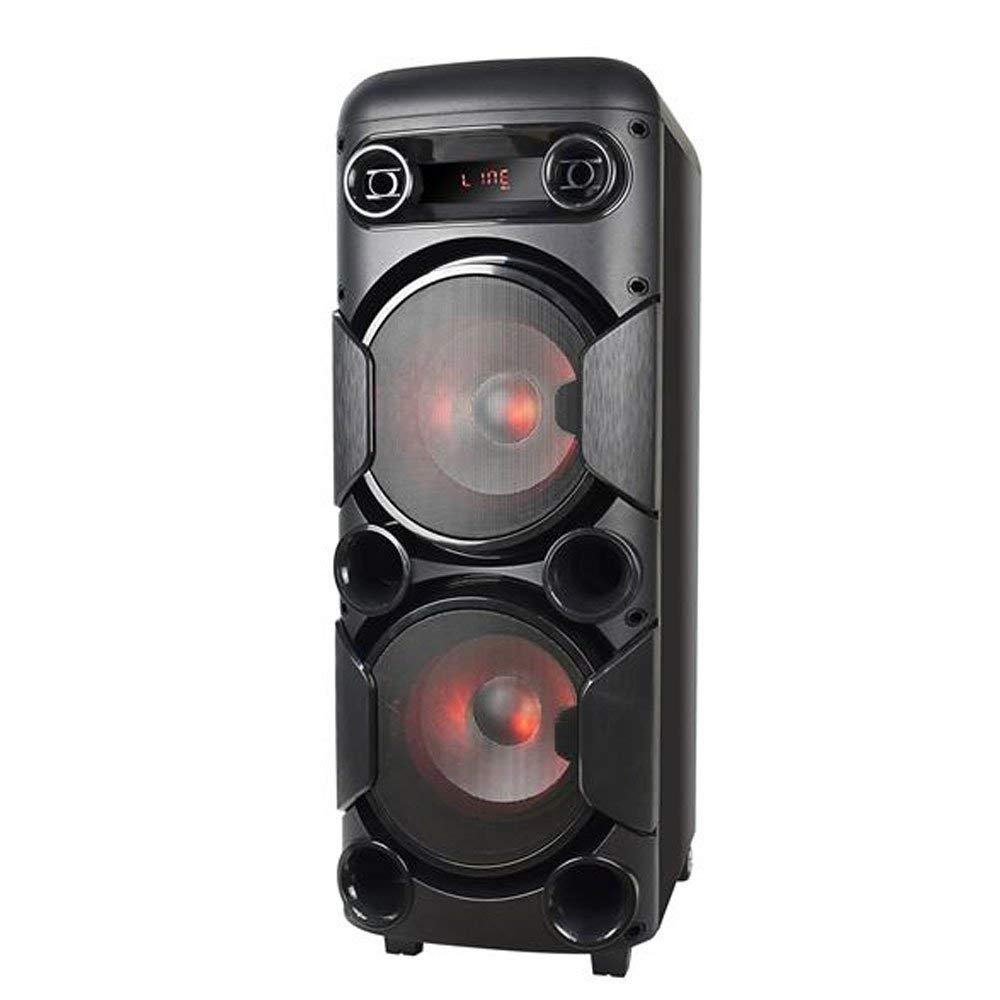
ചിത്രം 3.1: ഫ്രണ്ട് view of the Multilaser MINI TORRE 900W SP380, showcasing its dual speaker design and illuminated LED woofers.
The control panel, located on the top of the unit, provides access to all functions and inputs.

ചിത്രം 3.2: വിശദമായി view of the control panel, including volume knob, equalizer sliders, input ports (USB, TF/Memory Card, Line, Mic 1, Mic 2), and control buttons for mode, light, and playback.
4. സജ്ജീകരണം
- അൺപാക്ക് ചെയ്യുന്നു: Carefully remove the MINI TORRE from its packaging. Retain the packaging for future transport or storage.
- പ്ലേസ്മെൻ്റ്: Position the speaker on a flat, stable surface. Ensure there is adequate space around the unit for ventilation. The integrated wheels facilitate easy transport.
- പവർ കണക്ഷൻ: Connect the power cable to the AC input on the unit and then to a suitable power outlet. The device supports bivolt automatic voltage.
- പ്രാരംഭ പവർ ഓൺ: Flip the power switch (usually located on the control panel) to the "ON" position. The display will illuminate.
5. പ്രവർത്തന നിർദ്ദേശങ്ങൾ
5.1. പവർ ഓൺ/ഓഫ്
To power on the device, locate the power switch on the control panel and set it to the "ON" position. To power off, set the switch to "OFF".
5.2. വോളിയം നിയന്ത്രണം
Adjust the main volume using the large central വോളിയം knob on the control panel. Turn clockwise to increase volume and counter-clockwise to decrease.
5.3. മോഡ് തിരഞ്ഞെടുക്കൽ
അമർത്തുക മോഡ് button repeatedly to cycle through available input modes: Bluetooth (BT), FM Radio, USB, Memory Card (TF), and Auxiliary (LINE).
5.4. എൽഇഡി ലൈറ്റിംഗ്
അമർത്തുക വെളിച്ചം button to toggle the LED lighting effects on the speakers. Multiple light modes may be available.
5.5. മൈക്രോഫോൺ ഇൻപുട്ട്
Connect a microphone to either the MIC 1 or MIC 2 input. Adjust the microphone volume using the MIC.VOL slider and add echo effect with the ECHO സ്ലൈഡർ.
5.6. Sound Equalization
ഉപയോഗിക്കുക ട്രെബിൾ ഒപ്പം ബാസ്സ് sliders to adjust the high and low frequencies of the audio output, respectively, to suit your preference.
6. കണക്റ്റിവിറ്റി
6.1. ബ്ലൂടൂത്ത് ജോടിയാക്കൽ
- Turn on the MINI TORRE and select ബ്ലൂടൂത്ത് (ബിടി) mode using the മോഡ് button. The display will show "BT" and a pairing indicator.
- നിങ്ങളുടെ സ്മാർട്ട്ഫോണിലോ, ടാബ്ലെറ്റിലോ, അല്ലെങ്കിൽ മറ്റ് അനുയോജ്യമായ ഉപകരണത്തിലോ ബ്ലൂടൂത്ത് പ്രവർത്തനക്ഷമമാക്കുക.
- ഇതിനായി തിരയുക available devices and select "MULTILASER SP380" (or similar name) from the list.
- Once paired, the device will confirm the connection, and you can begin playing audio wirelessly.
6.2. USB / Memory Card Playback
ഇതിലേക്ക് ഒരു USB ഫ്ലാഷ് ഡ്രൈവ് ചേർക്കുക USB port or a TF (MicroSD) card into the TF / USB slot. The unit will automatically switch to USB or TF mode and begin playing compatible audio files. Use the playback control buttons (പ്ലേ/താൽക്കാലികമായി നിർത്തുക, മുമ്പത്തെ, അടുത്തത്) to manage your music.
6.3. Auxiliary Input (LINE IN)
ഒരു ബാഹ്യ ഓഡിയോ ഉപകരണം (ഉദാ: MP3 പ്ലെയർ, ലാപ്ടോപ്പ്) ഇതിലേക്ക് ബന്ധിപ്പിക്കുക ലൈൻ input using a 3.5mm audio cable. Select ലൈൻ കൂടെ മോഡ് മോഡ് button. Audio will play from the connected device.
6.4. എഫ്എം റേഡിയോ
ഇതിലേക്ക് മാറുക FM mode using the മോഡ് ബട്ടൺ. അമർത്തിപ്പിടിക്കുക പ്ലേ/താൽക്കാലികമായി നിർത്തുക button to initiate an automatic scan for FM stations. The unit will save detected stations. Use the മുമ്പത്തെ ഒപ്പം അടുത്തത് സംരക്ഷിച്ച സ്റ്റേഷനുകളിലൂടെ നാവിഗേറ്റ് ചെയ്യുന്നതിനുള്ള ബട്ടണുകൾ.
7. പരിപാലനം
- വൃത്തിയാക്കൽ: Before cleaning, ensure the device is powered off and unplugged. Use a soft, dry, lint-free cloth to wipe the exterior surfaces. Do not use abrasive cleaners, waxes, or solvents.
- സംഭരണം: യൂണിറ്റ് ദീർഘനേരം സൂക്ഷിക്കുകയാണെങ്കിൽ, പവർ ഔട്ട്ലെറ്റിൽ നിന്ന് അത് അൺപ്ലഗ് ചെയ്ത്, നേരിട്ടുള്ള സൂര്യപ്രകാശത്തിൽ നിന്നും കടുത്ത താപനിലയിൽ നിന്നും അകറ്റി, തണുത്തതും വരണ്ടതുമായ സ്ഥലത്ത് സൂക്ഷിക്കുക.
- തടസ്സങ്ങൾ ഒഴിവാക്കുക: Regularly check that the speaker grilles and ventilation openings are free from dust and debris.
8. പ്രശ്നപരിഹാരം
| പ്രശ്നം | സാധ്യമായ കാരണം | പരിഹാരം |
|---|---|---|
| ശക്തിയില്ല | Power cable not connected; Power outlet not working; Power switch off. | Ensure power cable is securely connected. Test the outlet with another device. Turn the power switch to "ON". |
| ശബ്ദമില്ല | Volume too low; Incorrect input mode selected; External device not playing. | ശബ്ദം കൂട്ടുക. അമർത്തുക മോഡ് to select the correct input. Ensure the external device is playing and its volume is up. |
| ബ്ലൂടൂത്ത് ജോടിയാക്കുന്നില്ല | Device too far; Bluetooth not enabled on external device; Incorrect mode. | Move devices closer. Ensure Bluetooth is enabled on your external device. Select BT mode on the speaker. |
| USB/TF കാർഡ് പ്ലേ ചെയ്യുന്നില്ല. | Card/drive not inserted correctly; Incompatible file format; Incorrect mode. | Reinsert the USB drive or TF card. Ensure audio files are in a compatible format (e.g., MP3). Select USB or TF മോഡ്. |
| എഫ്എം റേഡിയോ സ്റ്റാറ്റിക് | ദുർബലമായ സിഗ്നൽ; ആന്റിന ബന്ധിപ്പിച്ചിട്ടില്ല (ബാധകമെങ്കിൽ). | Reposition the unit or extend the antenna (if present). Perform an auto-scan for stations again. |
9 സ്പെസിഫിക്കേഷനുകൾ
Below are the technical specifications for the Multilaser MINI TORRE 900W SP380:

ചിത്രം 9.1: Packaging of the Multilaser MINI TORRE 900W SP380, highlighting its main features and technical specifications.
| ഫീച്ചർ | വിശദാംശങ്ങൾ |
|---|---|
| ബ്രാൻഡ് | മൾട്ടിലേസർ |
| മോഡൽ | SP380 |
| പരമാവധി സ്പീക്കർ ഔട്ട്പുട്ട് പവർ | 900 വാട്ട്സ് ആർഎംഎസ് |
| കണക്റ്റിവിറ്റി ടെക്നോളജി | Auxiliary, Bluetooth 5.0 |
| സ്പീക്കർ തരം | Tower (2x 8" drivers) |
| പ്രത്യേക സവിശേഷതകൾ | USB Port, LED Lighting, Microphone Input, Memory Card Slot, FM Radio, Bass Boost, Transport Wheels |
| ഇനത്തിൻ്റെ അളവുകൾ (D x W x H) | 33 സെ.മീ x 37 സെ.മീ x 82 സെ.മീ |
| ഇനത്തിൻ്റെ ഭാരം | 11.95 കിലോഗ്രാം |
| അനുയോജ്യമായ ഉപകരണങ്ങൾ | Notebook, Smartphone, Tablet |
| പവർ ഉറവിടം | Bivolt automatic (AC) |
| ഫ്രീക്വൻസി പ്രതികരണം | 60Hz-20KHz |
| സംവേദനക്ഷമത | 89 ഡി.ബി |
| പ്രതിരോധം | 4 ഓം |
| ഘടകങ്ങൾ ഉൾപ്പെടുത്തിയിട്ടുണ്ട് | 1x Mini Torre 900W SP380, 1x Cable Set, 1x User Manual |
10. വാറൻ്റിയും പിന്തുണയും
The Multilaser MINI TORRE 900W SP380 comes with a 1 വർഷത്തെ വാറൻ്റി വാങ്ങിയ തീയതി മുതൽ. സാധാരണ ഉപയോഗ സാഹചര്യങ്ങളിൽ നിർമ്മാണ വൈകല്യങ്ങൾ ഈ വാറന്റി ഉൾക്കൊള്ളുന്നു.
For warranty claims, technical support, or service inquiries, please contact Multilaser customer support through their official channels. Please have your proof of purchase and product model number (SP380) ready when contacting support.
കുറിപ്പ്: ദുരുപയോഗം, അപകടങ്ങൾ, അനധികൃത പരിഷ്കാരങ്ങൾ, അല്ലെങ്കിൽ ഈ മാനുവലിലെ നിർദ്ദേശങ്ങൾ പാലിക്കുന്നതിൽ പരാജയപ്പെടൽ എന്നിവ മൂലമുണ്ടാകുന്ന നാശനഷ്ടങ്ങൾക്ക് വാറന്റി പരിരക്ഷ നൽകുന്നില്ല.