
1. ആമുഖം
The Wouxun KG-805G is a professional-grade GMRS (General Mobile Radio Service) two-way radio designed for reliable and clear communication. This device features a robust design, including IP55 water resistance, and offers a comprehensive set of functions for various applications. This manual provides essential information for the safe and effective use of your radio.
പാക്കേജ് ഉള്ളടക്കം:
- Wouxun KG-805G GMRS Two Way Radio
- 2600mAh Li-Ion Battery (with USB-C charging support)
- USB-C ചാർജിംഗ് കേബിൾ
- വാൾ അഡാപ്റ്റർ
- നീക്കം ചെയ്യാവുന്ന ആന്റിന
- ബെൽറ്റ് ക്ലിപ്പ്
- റിസ്റ്റ് സ്ട്രാപ്പ്
- ഇൻസ്ട്രക്ഷൻ മാനുവൽ
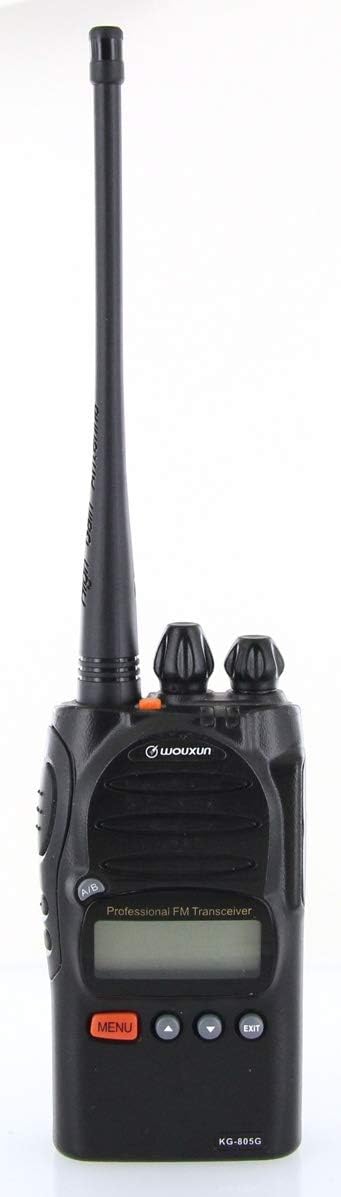
Figure 1.1: Wouxun KG-805G GMRS Two Way Radio with included antenna.
2 സുരക്ഷാ വിവരങ്ങൾ
Please read and understand all safety precautions before operating the radio. Failure to comply with these guidelines may result in injury or damage to the device.
- ബാറ്ററി സുരക്ഷ: Use only the specified battery and charger. Do not short-circuit, incinerate, or disassemble the battery.
- ആൻ്റിന: Do not touch the antenna during transmission. Avoid using the radio with a damaged antenna.
- സ്ഫോടനാത്മകമായ അന്തരീക്ഷങ്ങൾ: Do not operate the radio in potentially explosive atmospheres (e.g., near flammable gas, dust, or powders).
- ഇടപെടൽ: Turn off the radio in areas where radio devices are prohibited or can cause interference (e.g., hospitals, aircraft).
- ജല പ്രതിരോധം: The radio is rated IP55 water resistant. This means it is protected against dust and low-pressure water jets. It is not designed for submersion. Ensure all port covers are securely closed.
- FCC പാലിക്കൽ: This radio is FCC approved for GMRS use. An FCC license is required for GMRS operation.
3. ഉൽപ്പന്നം കഴിഞ്ഞുview
റേഡിയോയുടെ ഘടകങ്ങളും നിയന്ത്രണങ്ങളും പരിചയപ്പെടുക.
Radio Components:
- ആൻ്റിന കണക്റ്റർ: For attaching the removable antenna.
- പവർ/വോളിയം നോബ്: റേഡിയോ ഓൺ/ഓഫ് ചെയ്ത് ശബ്ദം ക്രമീകരിക്കുന്നു.
- ചാനൽ സെലക്ടർ നോബ്: Selects operating channels.
- പിടിടി (പുഷ്-ടു-ടോക്ക്) ബട്ടൺ: അയയ്ക്കാൻ അമർത്തുക, സ്വീകരിക്കാൻ വിടുക.
- സൈഡ് ബട്ടണുകൾ: Programmable function buttons (e.g., Monitor, Scan).
- LCD ഡിസ്പ്ലേ: Shows channel number, frequency, battery status, and other indicators.
- മെനു ബട്ടൺ: റേഡിയോയുടെ മെനു സിസ്റ്റത്തിലേക്ക് പ്രവേശിക്കുന്നു.
- മുകളിലേക്കും താഴേക്കുമുള്ള അമ്പടയാള ബട്ടണുകൾ: Navigate menu options or adjust settings.
- എക്സിറ്റ് ബട്ടൺ: മെനുവിൽ നിന്ന് പുറത്തുകടക്കുന്നു അല്ലെങ്കിൽ നിലവിലുള്ള പ്രവർത്തനം റദ്ദാക്കുന്നു.
- യുഎസ്ബി-സി പോർട്ട്: For direct battery charging.

ചിത്രം 3.1: മുൻഭാഗം view of the Wouxun KG-805G, highlighting the display and control buttons.

ചിത്രം 3.2: വശം view of the Wouxun KG-805G, showing the Push-To-Talk (PTT) button and two programmable side buttons.
4. സജ്ജീകരണം
4.1 ബാറ്ററി ഇൻസ്റ്റാളേഷൻ
- റേഡിയോയുടെ പിൻഭാഗത്തുള്ള ഗ്രൂവുകളുമായി ബാറ്ററി പായ്ക്ക് വിന്യസിക്കുക.
- ബാറ്ററി അതിന്റെ സ്ഥാനത്ത് ക്ലിക്ക് ആകുന്നതുവരെ മുകളിലേക്ക് സ്ലൈഡ് ചെയ്യുക.
- നീക്കം ചെയ്യാൻ, ബാറ്ററി റിലീസ് ലാച്ച് (ഉണ്ടെങ്കിൽ) അമർത്തി ബാറ്ററി താഴേക്ക് സ്ലൈഡ് ചെയ്യുക.

ചിത്രം 4.1: പിന്നിലേക്ക് view of the Wouxun KG-805G, showing the battery contacts and mounting area.
4.2 ആന്റിന അറ്റാച്ച്മെന്റ്
- റേഡിയോയുടെ മുകളിലുള്ള ആന്റിന കണക്ടറിൽ വിരൽ കൊണ്ട് മുറുക്കുന്നതുവരെ ആന്റിന ഘടികാരദിശയിൽ സ്ക്രൂ ചെയ്യുക. അമിതമായി മുറുക്കരുത്.
4.3 ബാറ്ററി ചാർജ് ചെയ്യുന്നു
The 2600mAh Li-Ion battery can be charged using the included desktop charger or directly via the USB-C port.
- ഡെസ്ക്ടോപ്പ് ചാർജർ: Place the radio with the battery installed into the charging cradle. Ensure the charging contacts align. The indicator light will show charging status.
- USB-C ചാർജിംഗ്: Connect the USB-C cable to the radio's USB-C port and the other end to the wall adapter or a compatible USB power source. The radio can be operated while charging via USB-C.
4.4 പ്രാരംഭ പവർ ഓൺ
- Rotate the Power/Volume knob clockwise until you hear a click. The radio will power on, and the LCD display will illuminate.
- Adjust the volume to a comfortable level by rotating the Power/Volume knob.
5. പ്രവർത്തന നിർദ്ദേശങ്ങൾ
5.1 ചാനൽ തിരഞ്ഞെടുക്കൽ
The KG-805G supports 22 simplex GMRS channels and 8 GMRS repeater channels.
- തിരിക്കുക ചാനൽ സെലക്ടർ നോബ് on top of the radio to select the desired channel (e.g., CH-001 to CH-030).
- The selected channel number will be displayed on the LCD.

Figure 5.1: The radio's LCD display showing 'CH-001', indicating the selected channel.
5.2 കൈമാറ്റം ചെയ്യലും സ്വീകരിക്കലും
- ലേക്ക് സംപ്രേക്ഷണം, അമർത്തിപ്പിടിക്കുക PTT ബട്ടൺ on the side of the radio. Speak clearly into the microphone. The transmit indicator will illuminate.
- ലേക്ക് സ്വീകരിക്കുക, release the PTT button. The receive indicator will illuminate when a signal is detected.
5.3 CTCSS/DCS Codes (Privacy Tones)
CTCSS (Continuous Tone-Coded Squelch System) and DCS (Digitally Coded Squelch) codes help filter out unwanted conversations on a channel.
- അമർത്തുക മെനു ബട്ടൺ.
- ഉപയോഗിക്കുക Up/Down Arrow buttons to navigate to the CTCSS/DCS setting.
- Press MENU again to enter the setting. Use Up/Down to select the desired code.
- Press MENU to confirm, then പുറത്ത് സാധാരണ പ്രവർത്തനത്തിലേക്ക് മടങ്ങാൻ.
- CTCSS/DCS can be set separately for transmit and receive.
5.4 VOX ഫംഗ്ഷൻ (വോയ്സ് ഓപ്പറേറ്റഡ് ട്രാൻസ്മിറ്റ്)
VOX allows hands-free transmission when your voice is detected.
- അമർത്തുക മെനു ബട്ടൺ.
- VOX ക്രമീകരണത്തിലേക്ക് നാവിഗേറ്റ് ചെയ്യുക.
- Enter the setting and use Up/Down to adjust the VOX sensitivity level (higher number for lower sensitivity).
- Confirm with MENU and EXIT.
5.5 എഫ്എം റേഡിയോ
The KG-805G includes a built-in FM radio for entertainment.
- Refer to the menu system for activating and tuning the FM radio function.
5.6 ചാനൽ സ്കാൻ
The channel scan feature allows the radio to automatically scan through active channels.
- Activate channel scan via the menu or a programmed side button. The radio will stop on an active channel.
5.7 PC Programming (Optional)
While the KG-805G can be fully operated from the front panel, optional PC programming software is available for advanced customization, such as adding/removing channels, customizing channel names, bandwidth, transmit power, or CTCSS/DCS codes. A specific Wouxun programming cable is required.
6. പരിപാലനം
6.1 റേഡിയോ വൃത്തിയാക്കൽ
- റേഡിയോയുടെ പ്രതലം മൃദുവായ, ഡി-ടച്ച് ഉപയോഗിച്ച് തുടയ്ക്കുക.amp തുണി. കഠിനമായ രാസവസ്തുക്കളോ ഉരച്ചിലുകളുള്ള ക്ലീനറുകളോ ഉപയോഗിക്കരുത്.
- Ensure all port covers are sealed to maintain IP55 water resistance.
6.2 ബാറ്ററി കെയർ
- പ്രാരംഭ ഉപയോഗത്തിന് മുമ്പ് ബാറ്ററി പൂർണ്ണമായും ചാർജ് ചെയ്യുക.
- ബാറ്ററിയുടെ ആയുസ്സ് വർദ്ധിപ്പിക്കുന്നതിന് അമിതമായി ചാർജ് ചെയ്യുന്നതോ പൂർണ്ണമായും കളയുന്നതോ ഒഴിവാക്കുക.
- ബാറ്ററി ദീർഘനേരം ഉപയോഗിക്കാത്തപ്പോൾ തണുത്തതും വരണ്ടതുമായ സ്ഥലത്ത് സൂക്ഷിക്കുക.
6.3 സംഭരണം
- നേരിട്ടുള്ള സൂര്യപ്രകാശത്തിൽ നിന്നും തീവ്രമായ താപനിലയിൽ നിന്നും മാറി വരണ്ടതും പൊടിയില്ലാത്തതുമായ അന്തരീക്ഷത്തിൽ റേഡിയോ സൂക്ഷിക്കുക.
- Remove the battery if storing the radio for a long duration.
7. പ്രശ്നപരിഹാരം
If you encounter issues with your Wouxun KG-805G, refer to the following common problems and solutions:
| പ്രശ്നം | സാധ്യമായ കാരണം | പരിഹാരം |
|---|---|---|
| റേഡിയോ പവർ ഓൺ ചെയ്യുന്നില്ല | ബാറ്ററി ചാർജ് കുറവാണ് അല്ലെങ്കിൽ ശരിയായി ഇൻസ്റ്റാൾ ചെയ്തിട്ടില്ല. | ബാറ്ററി ചാർജ് ചെയ്യുക അല്ലെങ്കിൽ സുരക്ഷിതമായി വീണ്ടും ഇൻസ്റ്റാൾ ചെയ്യുക. |
| കൈമാറാനോ സ്വീകരിക്കാനോ കഴിയില്ല | Incorrect channel selected; antenna not attached; out of range; squelch too high. | Verify channel; attach antenna; move closer to other radios; adjust squelch level. |
| മോശം ഓഡിയോ നിലവാരം | Low battery; out of range; interference. | Charge battery; move closer; check for sources of interference. |
| Programming software issues | Incorrect cable; driver issues; software compatibility. | Ensure you are using the official Wouxun programming cable and software. Consult Wouxun support for driver assistance. |
8 സ്പെസിഫിക്കേഷനുകൾ
| ഫീച്ചർ | സ്പെസിഫിക്കേഷൻ |
|---|---|
| ബ്രാൻഡ് | വുക്സുൻ |
| മോഡൽ നമ്പർ | KG-805G |
| നിറം | കറുപ്പ് |
| ചാനലുകളുടെ എണ്ണം | 128 (22 GMRS simplex, 8 GMRS repeater pre-programmed) |
| ഫ്രീക്വൻസി റേഞ്ച് | 400-470 മെഗാഹെട്സ് (ജിഎംആർഎസ്) |
| ഔട്ട്പുട്ട് പവർ | 5 വാട്ട് വരെ |
| ബാറ്ററി തരം | 2600mAh Li-Ion (updated version) |
| ചാർജിംഗ് | USB-C and Desktop Charger |
| ജല പ്രതിരോധ നില | IP55 |
| വാല്യംtage | 7.4 വോൾട്ട് (DC) |
| പ്രത്യേക സവിശേഷതകൾ | CTCSS/DCS, VOX, Channel Scan, FM Radio, Lighted LCD Display |
9. വാറൻ്റിയും പിന്തുണയും
Wouxun products are designed for reliability and performance. For specific warranty details, please refer to the warranty card included with your product or contact Wouxun customer support directly. If you require technical assistance or have questions not covered in this manual, please reach out to the manufacturer or your authorized dealer for support.