
ആമുഖം
Thank you for choosing the Music Hero TWS Beat True Wireless Stereo Earbuds. These earbuds offer a seamless audio experience with true wireless connectivity, a built-in microphone, and intuitive call control. This manual will guide you through the setup, operation, and maintenance of your new earbuds to ensure optimal performance.
പാക്കേജ് ഉള്ളടക്കം
താഴെ പറയുന്ന ഇനങ്ങൾക്കായി ബോക്സ് ചെക്ക് ചെയ്യുക:
- Music Hero TWS Beat Earbuds (Left and Right)
- ചാർജിംഗ് കേസ്
- യുഎസ്ബി ചാർജിംഗ് കേബിൾ
- ഉപയോക്തൃ മാനുവൽ

Image: Package contents showing the user manual, charging base, charging cable, and the earphones.
ഉൽപ്പന്നം കഴിഞ്ഞുview
Familiarize yourself with the key components of your Music Hero TWS Beat Earbuds:
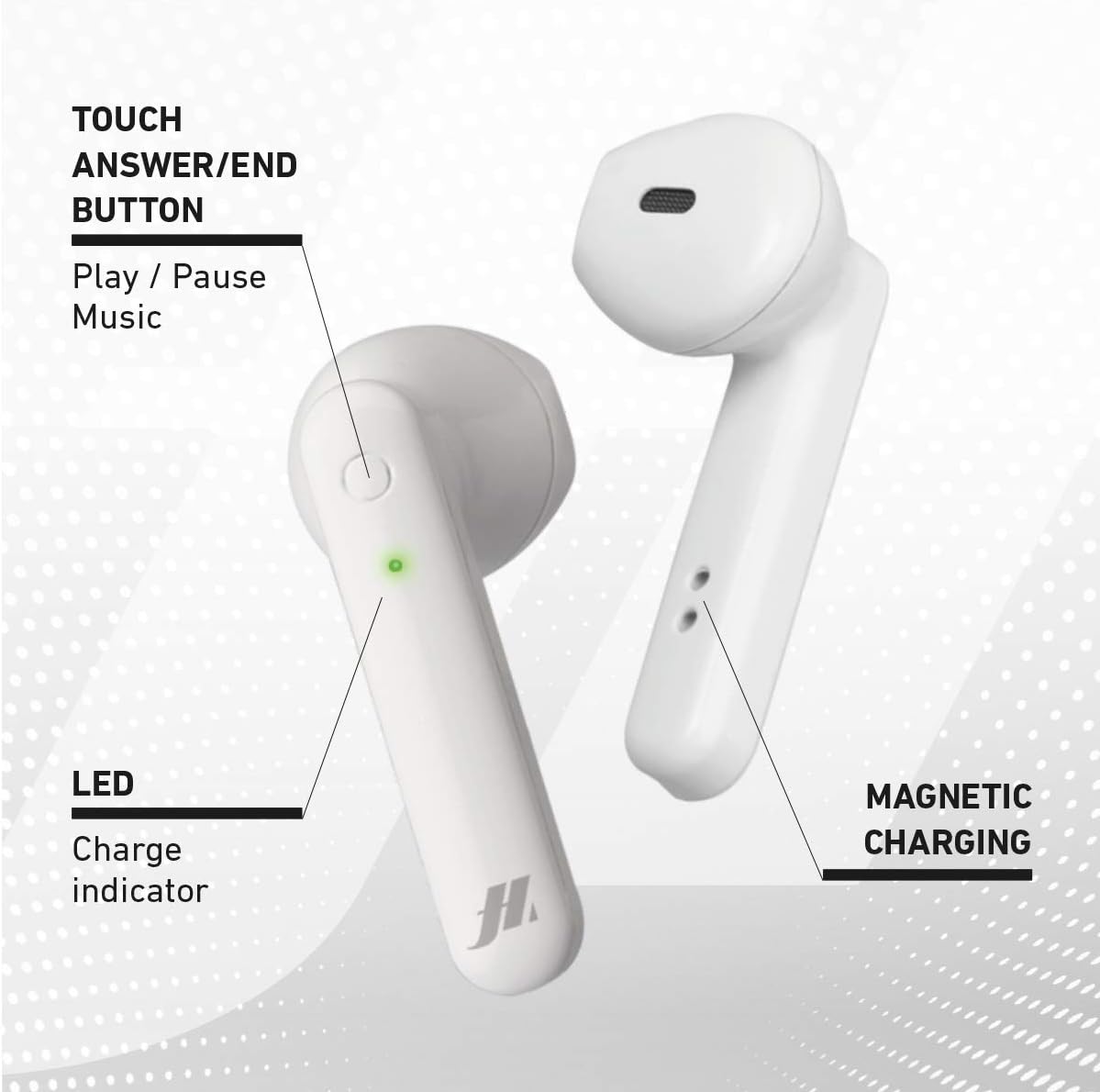
Image: Earbud features including the touch button, LED indicator, and magnetic charging points.
- Touch Answer/End Button: Used for music playback control (play/pause) and managing calls.
- LED ചാർജ് സൂചകം: Displays the charging status and connection status of the earbud.
- മാഗ്നറ്റിക് ചാർജിംഗ് കോൺടാക്റ്റുകൾ: For secure and efficient charging within the case.
സജ്ജമാക്കുക
1. ഇയർബഡുകളും കേസും ചാർജ് ചെയ്യുന്നു
ആദ്യമായി ഉപയോഗിക്കുന്നതിന് മുമ്പ്, ഇയർബഡുകളും ചാർജിംഗ് കേസും പൂർണ്ണമായും ചാർജ് ചെയ്യുക.
- ചാർജിംഗ് കെയ്സിൽ ഇയർബഡുകൾ അവയുടെ സ്ലോട്ടുകളിൽ സ്ഥാപിക്കുക.
- യുഎസ്ബി ചാർജിംഗ് കേബിൾ കേസിലെ ചാർജിംഗ് പോർട്ടിലേക്കും ഒരു പവർ സ്രോതസ്സിലേക്കും (ഉദാ: യുഎസ്ബി വാൾ അഡാപ്റ്റർ, കമ്പ്യൂട്ടർ യുഎസ്ബി പോർട്ട്) ബന്ധിപ്പിക്കുക.
- The LED indicators on the earbuds and case will show the charging status.
- A full charge takes approximately 1 hour for the earbuds and 2.5 hours for the case.

Image: Earbuds charging inside the case, showing LED indicators.

Image: Battery life and charging times for the earbuds and case.
2. നിങ്ങളുടെ ഉപകരണവുമായി ജോടിയാക്കുന്നു
- ഇയർബഡുകൾ ചാർജ്ജ് ചെയ്തിട്ടുണ്ടെന്ന് ഉറപ്പാക്കുക.
- ചാർജിംഗ് കേസ് തുറക്കുക. ഇയർബഡുകൾ സ്വയമേവ ഓണാകുകയും ജോടിയാക്കൽ മോഡിലേക്ക് പ്രവേശിക്കുകയും ചെയ്യും.
- നിങ്ങളുടെ ഉപകരണത്തിൽ (സ്മാർട്ട്ഫോൺ, ടാബ്ലെറ്റ് മുതലായവ), ബ്ലൂടൂത്ത് പ്രവർത്തനക്ഷമമാക്കുക.
- ഇതിനായി തിരയുക available Bluetooth devices and select "TWS Beat" from the list.
- Once connected, you will hear an audible confirmation, and the LED indicators on the earbuds will change.
Note: The earbuds automatically power on when removed from the case and are ready for use.
പ്രവർത്തന നിർദ്ദേശങ്ങൾ
പവർ ഓൺ/ഓഫ്
- പവർ ഓൺ: ചാർജിംഗ് കെയ്സിൽ നിന്ന് ഇയർബഡുകൾ നീക്കം ചെയ്യുക. അവ സ്വയമേവ പവർ ഓൺ ആകും.
- പവർ ഓഫ്: ഇയർബഡുകൾ ചാർജിംഗ് കെയ്സിലേക്ക് തിരികെ വയ്ക്കുക. അവ സ്വയമേവ ഓഫാകുകയും ചാർജ് ചെയ്യാൻ തുടങ്ങുകയും ചെയ്യും.
സംഗീത പ്ലേബാക്ക്
- പ്ലേ/താൽക്കാലികമായി നിർത്തുക: Tap the touch button on either earbud once.
- അടുത്ത ട്രാക്ക്: Double-tap the touch button on the right earbud.
- മുമ്പത്തെ ട്രാക്ക്: Double-tap the touch button on the left earbud.
- വോളിയം കൂട്ടുക: വലത് ഇയർബഡിലെ ടച്ച് ബട്ടണിൽ മൂന്ന് തവണ ടാപ്പ് ചെയ്യുക.
- വോളിയം താഴേക്ക്: ഇടത് ഇയർബഡിലെ ടച്ച് ബട്ടണിൽ മൂന്ന് തവണ ടാപ്പ് ചെയ്യുക.
കോൾ മാനേജുമെന്റ്
- ഉത്തരം/അവസാന കോൾ: Tap the touch button on either earbud once.
- കോൾ നിരസിക്കുക: Press and hold the touch button on either earbud for 2 seconds.
- വോയ്സ് അസിസ്റ്റന്റ്: Press and hold the touch button on either earbud for 3 seconds to activate your device's voice assistant.
- അവസാന നമ്പർ വീണ്ടും ഡയൽ ചെയ്യുക: Quadruple-tap the touch button on either earbud.
ഇയർബഡുകൾ ധരിക്കുന്നു
Insert the earbuds gently into your ears. Adjust them for a comfortable and secure fit to ensure optimal sound quality.

Image: Earbud worn in ear for proper fit.
മെയിൻ്റനൻസ്
- വൃത്തിയാക്കൽ: Regularly clean the earbuds and charging case with a soft, dry cloth. Do not use abrasive cleaners or immerse in water.
- സംഭരണം: ഉപയോഗത്തിലില്ലാത്തപ്പോൾ, ഇയർബഡുകൾ സംരക്ഷിക്കുന്നതിനും ചാർജ്ജ് ചെയ്ത നിലയിൽ നിലനിർത്തുന്നതിനും അവ ചാർജിംഗ് കേസിൽ സൂക്ഷിക്കുക.
- തീവ്രമായ അവസ്ഥകൾ ഒഴിവാക്കുക: Do not expose the earbuds to extreme temperatures, humidity, or direct sunlight. The earbuds are not water resistant.
ട്രബിൾഷൂട്ടിംഗ്
| പ്രശ്നം | പരിഹാരം |
|---|---|
| ഇയർബഡുകൾ പവർ ഓൺ ആകുന്നില്ല. | Ensure the earbuds and charging case are fully charged. Place earbuds in the case and then remove them. |
| ഇയർബഡുകൾ ഉപകരണവുമായി ജോടിയാക്കുന്നില്ല. |
|
| ഒരു ഇയർബഡ് മാത്രമാണ് പ്രവർത്തിക്കുന്നത്. |
|
| മോശം ശബ്ദ നിലവാരം അല്ലെങ്കിൽ വിച്ഛേദങ്ങൾ. |
|
സ്പെസിഫിക്കേഷനുകൾ
| ബ്രാൻഡ്: | സംഗീത നായകൻ |
| മോഡലിൻ്റെ പേര്: | TWS Beat |
| മോഡൽ നമ്പർ: | V9 |
| നിറം: | വെള്ള |
| ചെവി സ്ഥാപിക്കൽ: | ചെവിയിൽ |
| ഫോം ഘടകം: | ചെവിയിൽ |
| ശബ്ദ നിയന്ത്രണം: | നിഷ്ക്രിയ ശബ്ദം റദ്ദാക്കൽ |
| കണക്റ്റിവിറ്റി ടെക്നോളജി: | വയർലെസ് |
| വയർലെസ് കമ്മ്യൂണിക്കേഷൻ: | ബ്ലൂടൂത്ത് |
| ബ്ലൂടൂത്ത് പതിപ്പ്: | 5.3 |
| ബ്ലൂടൂത്ത് ശ്രേണി: | 10 മീറ്റർ വരെ |
| നിയന്ത്രണ രീതി: | സ്പർശിക്കുക |
| ബാറ്ററി ലൈഫ് (ഇയർബഡുകൾ): | 2.5 മണിക്കൂർ വരെ (സംഗീത പ്ലേബാക്ക്) |
| ചാർജിംഗ് സമയം (ഇയർബഡുകൾ): | ഏകദേശം 1 മണിക്കൂർ |
| ചാർജിംഗ് സമയം (കേസ്): | ഏകദേശം 2.5 മണിക്കൂർ |
| സ്റ്റാൻഡ്ബൈ സമയം: | 100 മണിക്കൂർ വരെ |
| ഫ്രീക്വൻസി ശ്രേണി: | 20 ഹെർട്സ് - 20,000 ഹെർട്സ് |
| ഇനത്തിൻ്റെ ഭാരം: | 40 ഗ്രാം |
| മെറ്റീരിയൽ: | പ്ലാസ്റ്റിക് |
| ജല പ്രതിരോധം: | വാട്ടർ റെസിസ്റ്റൻ്റ് അല്ല |
| അനുയോജ്യമായ ഉപകരണങ്ങൾ: | Phones, laptops, tablets, car audio systems |
വാറൻ്റിയും പിന്തുണയും
The Music Hero TWS Beat Earbuds come with a 2 വർഷത്തെ നിർമ്മാതാവിന്റെ വാറന്റി വാങ്ങിയ തീയതി മുതൽ. ഈ വാറന്റി നിർമ്മാണ വൈകല്യങ്ങൾ ഉൾക്കൊള്ളുകയും സാധാരണ ഉപയോഗത്തിൽ ഉൽപ്പന്നം ഉദ്ദേശിച്ച രീതിയിൽ പ്രവർത്തിക്കുന്നുവെന്ന് ഉറപ്പാക്കുകയും ചെയ്യുന്നു.
For warranty claims, technical support, or further assistance, please contact your retailer or visit the official MUSIC HERO webഉപഭോക്തൃ സേവന വിവരങ്ങൾക്കായുള്ള സൈറ്റ്.
വാറന്റി സാധൂകരണത്തിനായി നിങ്ങളുടെ വാങ്ങിയതിന്റെ തെളിവ് സൂക്ഷിക്കുക.