
1. ആമുഖം
The Maxcom MM38D is a portable senior phone designed for ease of use, featuring large backlit keys, a clear 2.2-inch display, and essential communication functions. This manual provides comprehensive instructions for setting up, operating, and maintaining your device, ensuring you can utilize all its features effectively, including the dedicated SOS button, FM radio, and camera.
2 സുരക്ഷാ വിവരങ്ങൾ
- ഉയർന്ന താപനിലയിലോ, നേരിട്ടുള്ള സൂര്യപ്രകാശത്തിലോ, ഈർപ്പത്തിലോ ഫോൺ തുറന്നുകാട്ടരുത്.
- കേടുപാടുകൾ തടയുന്നതിനും സുരക്ഷ ഉറപ്പാക്കുന്നതിനും ഒറിജിനൽ അല്ലെങ്കിൽ അംഗീകൃത ബാറ്ററികളും ചാർജറുകളും മാത്രം ഉപയോഗിക്കുക.
- Avoid dropping or subjecting the phone to severe impacts.
- ഉപകരണം സ്വയം വേർപെടുത്താനോ നന്നാക്കാനോ ശ്രമിക്കരുത്. അംഗീകൃത സർവീസ് ഉദ്യോഗസ്ഥരെ ബന്ധപ്പെടുക.
- പ്രാദേശിക നിയന്ത്രണങ്ങൾ അനുസരിച്ച് ബാറ്ററികളും ഉപകരണവും ഉത്തരവാദിത്തത്തോടെ നിർമാർജനം ചെയ്യുക.
3. പാക്കേജ് ഉള്ളടക്കം
Before using your Maxcom MM38D, please verify that all the following items are included in the package:
- Maxcom MM38D Phone
- ബാറ്ററി
- ചാർജർ
- ഉപയോക്തൃ മാനുവൽ
4. ഉപകരണ ലേഔട്ട്
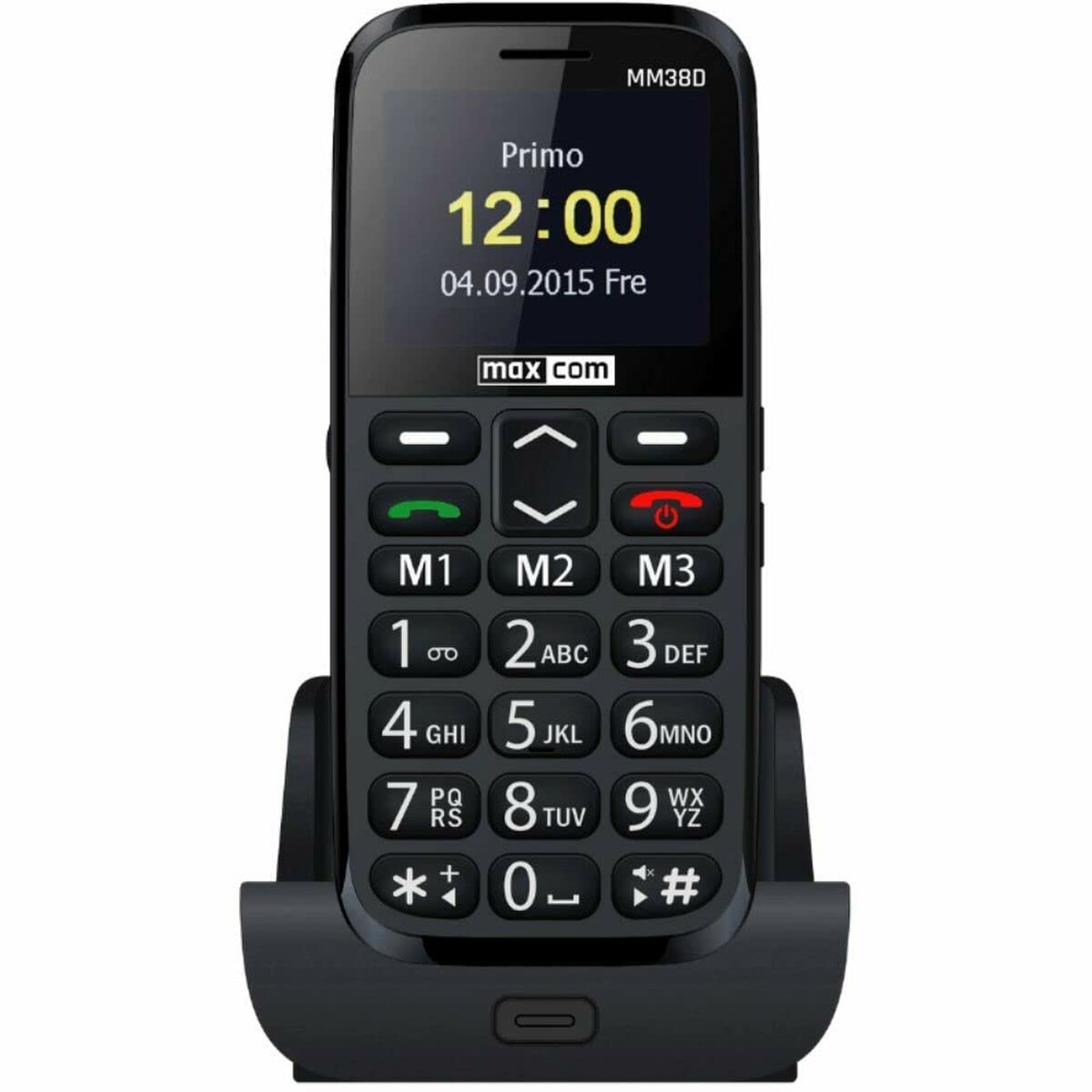
Familiarize yourself with the physical components of your Maxcom MM38D phone.
This image displays the rear panel of the Maxcom MM38D phone. Visible components include the camera lens in the upper left, a circular SOS button to its right, and a speaker grille with a grid pattern further to the right. The 'max com' logo is printed at the bottom.
പ്രധാന ഘടകങ്ങൾ:
- ഡിസ്പ്ലേ സ്ക്രീൻ: 2.2-inch color display for menus and information.
- ആൽഫാന്യൂമെറിക് കീപാഡ്: Large, backlit keys for dialing and text input.
- നാവിഗേഷൻ കീകൾ: For scrolling through menus and options.
- Call/End Call Buttons: To initiate and terminate calls.
- SOS ബട്ടൺ: Located on the back for emergency calls and messages.
- ക്യാമറ: 2-megapixel camera on the rear.
- ഫ്ലാഷ്ലൈറ്റ്: സംയോജിത പ്രകാശ സ്രോതസ്സ്.
- ചാർജിംഗ് പോർട്ട്: ചാർജർ ബന്ധിപ്പിക്കുന്നതിന്.
- ഹെഡ്ഫോൺ ജാക്ക്: For connecting headphones (may also serve as FM antenna).
5. സജ്ജീകരണം
5.1. സിം കാർഡ് ഇൻസ്റ്റാൾ ചെയ്യുന്നു
- ഫോണിൻ്റെ പിൻ കവർ നീക്കം ചെയ്യുക.
- ബാറ്ററി ശ്രദ്ധാപൂർവ്വം നീക്കം ചെയ്യുക.
- Locate the SIM card slot. Insert your 2G compatible SIM card into the slot, ensuring the gold contacts face downwards and the cut corner aligns with the slot's orientation.
- സിം കാർഡ് അതിന്റെ സ്ഥാനത്ത് ക്ലിക്കായി വരുന്നത് വരെ സൌമ്യമായി അമർത്തുക.
5.2. ബാറ്ററി ഇൻസ്റ്റാൾ ചെയ്യുന്നു
- Align the battery's metal contacts with the contacts in the phone's battery compartment.
- Press the battery down gently until it fits securely.
- Replace the back cover, ensuring it snaps firmly into place.
5.3 ബാറ്ററി ചാർജ് ചെയ്യുന്നു
- നിങ്ങളുടെ ഫോണിലെ ചാർജിംഗ് പോർട്ടിലേക്ക് ചാർജർ കേബിൾ ബന്ധിപ്പിക്കുക.
- ഒരു സാധാരണ ഇലക്ട്രിക്കൽ ഔട്ട്ലെറ്റിലേക്ക് ചാർജർ പ്ലഗ് ചെയ്യുക.
- The battery indicator on the screen will show the charging status. Allow the phone to charge fully before first use.
5.4. പവർ ഓൺ/ഓഫ്
- പവർ ഓണാക്കാൻ: അമർത്തിപ്പിടിക്കുക പവർ/എൻഡ് കോൾ സ്ക്രീൻ പ്രകാശിക്കുന്നത് വരെ ബട്ടൺ.
- പവർ ഓഫ് ചെയ്യാൻ: അമർത്തിപ്പിടിക്കുക പവർ/എൻഡ് കോൾ button until the power-off options appear, then confirm.
6. പ്രവർത്തന നിർദ്ദേശങ്ങൾ
6.1. അടിസ്ഥാന നാവിഗേഷൻ
ഉപയോഗിക്കുക നാവിഗേഷൻ കീകൾ (up, down, left, right) to move through menus and options. Press the central ശരി/തിരഞ്ഞെടുക്കുക ഒരു തിരഞ്ഞെടുപ്പ് സ്ഥിരീകരിക്കുന്നതിനുള്ള ബട്ടൺ.
6.2. കോളുകൾ ചെയ്യലും സ്വീകരിക്കലും
- ഒരു കോൾ ചെയ്യാൻ: കീപാഡ് ഉപയോഗിച്ച് ഫോൺ നമ്പർ നൽകി, വിളിക്കൂ ബട്ടൺ.
- ഒരു കോളിന് ഉത്തരം നൽകാൻ: ഫോൺ റിംഗ് ചെയ്യുമ്പോൾ, അമർത്തുക വിളിക്കൂ ബട്ടൺ.
- ഒരു കോൾ അവസാനിപ്പിക്കാൻ: അമർത്തുക കോൾ അവസാനിപ്പിക്കുക ബട്ടൺ.
- ഹാൻഡ്സ് ഫ്രീ ഫംഗ്ഷൻ: Activate the hands-free speaker during a call via the on-screen option.
6.3. Sending and Receiving Messages (SMS)
- എന്നതിലേക്ക് നാവിഗേറ്റ് ചെയ്യുക സന്ദേശങ്ങൾ മെനു.
- തിരഞ്ഞെടുക്കുക സന്ദേശം എഴുതുക or പുതിയ എസ്എംഎസ്.
- ആൽഫാന്യൂമെറിക് കീപാഡ് ഉപയോഗിച്ച് നിങ്ങളുടെ സന്ദേശം ടൈപ്പ് ചെയ്യുക.
- Enter the recipient's number or select from your contacts.
- അമർത്തുക അയക്കുക.
6.4. Using the SOS Button
The SOS button is a critical safety feature. To use it:
- Ensure emergency contacts are pre-programmed in the phone's settings (usually under SOS settings).
- അടിയന്തര സാഹചര്യത്തിൽ, അമർത്തിപ്പിടിക്കുക SOS ബട്ടൺ on the back of the phone for a few seconds.
- The phone will automatically call and send a pre-set emergency message to your designated contacts.
6.5. മറ്റ് സവിശേഷതകൾ
- എഫ്എം റേഡിയോ: Access the 'FM Radio' application from the main menu. Connect headphones to serve as an antenna for better reception.
- ഫ്ലാഷ്ലൈറ്റ്: Activate the flashlight function through the menu or a dedicated shortcut key (refer to your phone's specific key assignments).
- ക്യാമറ: Open the 'Camera' application to take photos. The phone is equipped with a 2-megapixel camera.
- ബന്ധങ്ങൾ: Store up to 300 contacts. Access the 'Contacts' menu to add, edit, or search for entries.
- കലണ്ടറും അലാറവും: Set reminders and multiple alarms through the 'Calendar' and 'Alarm' applications.
- ബ്ലൂടൂത്ത്: Enable Bluetooth in the 'Settings' menu to connect to compatible wireless headsets or other devices.
- Audio/Video Player: ഓഡിയോയും വീഡിയോയും പ്ലേ ചെയ്യുക files stored on the phone or a Micro SD card.
7. പരിപാലനം
- വൃത്തിയാക്കൽ: Use a soft, dry, lint-free cloth to clean the phone's screen and body. Avoid using liquid cleaners or aerosols.
- ബാറ്ററി കെയർ: To prolong battery life, avoid fully discharging the battery frequently. Do not leave the phone connected to the charger for extended periods after it is fully charged.
- സംഭരണം: Store the phone in a cool, dry place when not in use. Avoid dusty environments.
- ജല പ്രതിരോധം: The Maxcom MM38D is not water-resistant. Keep it away from liquids.
8. പ്രശ്നപരിഹാരം
If you encounter issues with your Maxcom MM38D, refer to the following common problems and solutions:
| പ്രശ്നം | പരിഹാരം |
|---|---|
| ഫോൺ ഓണാക്കുന്നില്ല | ബാറ്ററി ചാർജ്ജ് ചെയ്തിട്ടുണ്ടെന്നും ശരിയായി ചേർത്തിട്ടുണ്ടെന്നും ഉറപ്പാക്കുക. കുറഞ്ഞത് 30 മിനിറ്റെങ്കിലും ഫോൺ ചാർജ് ചെയ്യാൻ ശ്രമിക്കുക. |
| കോളുകൾ വിളിക്കാനോ സ്വീകരിക്കാനോ കഴിയില്ല | Check if the SIM card is properly inserted and activated. Verify network signal strength. Ensure you have sufficient credit or an active plan. |
| SOS ബട്ടൺ പ്രവർത്തിക്കുന്നില്ല. | Confirm that emergency contacts are set up in the SOS settings menu. Ensure the phone has network coverage. |
| കോളുകൾക്കിടെ മോശം ഓഡിയോ നിലവാരം | Check the call volume settings. Ensure the speaker and microphone are not obstructed. Move to an area with better network reception. |
| ബാറ്ററി പെട്ടെന്ന് തീരുന്നു | Reduce screen brightness. Close unused applications. Limit background data usage. Consider replacing an old battery. |
9 സ്പെസിഫിക്കേഷനുകൾ
| ഫീച്ചർ | സ്പെസിഫിക്കേഷൻ |
|---|---|
| ബ്രാൻഡ് | മാക്സ്കോം |
| മോഡൽ | MM38D |
| ഓപ്പറേറ്റിംഗ് സിസ്റ്റം | ആൻഡ്രോയിഡ് 10.0 |
| സ്ക്രീൻ വലിപ്പം | 2.2 ഇഞ്ച് |
| ക്യാമറ റെസല്യൂഷൻ | 2 മെഗാപിക്സലുകൾ |
| കണക്റ്റിവിറ്റി | Bluetooth, 2G GSM |
| മെമ്മറി സ്റ്റോറേജ് | 1 ജിബി |
| നിറം | കറുപ്പ് |
| പ്രത്യേക സവിശേഷതകൾ | SOS button, FM Radio, Flashlight, Calendar, Audio/Video Player, Alarm, Hands-free function, Large backlit keys, 300-contact directory, Micro SD support |
10. വാറൻ്റിയും പിന്തുണയും
For detailed warranty information, terms, and conditions, please refer to the warranty card or documentation included with your purchase. For technical support, product inquiries, or service requests, please visit the official Maxcom webനിങ്ങളുടെ ഉൽപ്പന്ന പാക്കേജിംഗിൽ നൽകിയിരിക്കുന്ന ബന്ധപ്പെടാനുള്ള വിവരങ്ങൾ ഉപയോഗിച്ച് അവരുടെ ഉപഭോക്തൃ സേവന വിഭാഗത്തെ സൈറ്റ് ചെയ്യുകയോ ബന്ധപ്പെടുകയോ ചെയ്യുക.