
LUXCEO Q508A
LUXCEO Q508A LED Video Light Instruction Manual
Model: Q508A | Brand: LUXCEO
1. ആമുഖം
This manual provides comprehensive instructions for the safe and effective use of your LUXCEO Q508A LED Video Light. Please read this manual thoroughly before operation and retain it for future reference.
The LUXCEO Q508A is a versatile LED photographic light designed for various lighting needs, offering adjustable color temperature, brightness, and a wide range of RGB colors and scene modes.
2 സുരക്ഷാ വിവരങ്ങൾ
WARNING: To prevent fire, electric shock, or injury, always follow these safety precautions:
- Do not look directly into the light when it is on.
- ഉപകരണം വെള്ളത്തിൽ നിന്നും മറ്റ് ദ്രാവകങ്ങളിൽ നിന്നും അകറ്റി നിർത്തുക. നനഞ്ഞ കൈകളാൽ പ്രവർത്തിക്കരുത്.
- Do not disassemble, repair, or modify the product. Contact qualified service personnel for repairs.
- നിർദ്ദിഷ്ട ചാർജിംഗ് കേബിളും പവർ അഡാപ്റ്ററും മാത്രം ഉപയോഗിക്കുക.
- കുട്ടികൾക്ക് ലഭ്യമാകാതെ സൂക്ഷിക്കുക.
- ഉയർന്ന താപനിലയും നേരിട്ടുള്ള സൂര്യപ്രകാശവും ഒഴിവാക്കുക.
3. പാക്കേജ് ഉള്ളടക്കം
തുറക്കുമ്പോൾ പാക്കേജ് ഉള്ളടക്കം പരിശോധിക്കുക. ഏതെങ്കിലും ഇനങ്ങൾ നഷ്ടപ്പെട്ടാലോ കേടുപാടുകൾ സംഭവിച്ചാലോ, നിങ്ങളുടെ റീട്ടെയിലറെ ബന്ധപ്പെടുക.
- 1 x LUXCEO Q508A LED Video Light
- 1 x റിമോട്ട് കൺട്രോൾ
- 1 x USB ചാർജിംഗ് കേബിൾ
- 1 x ഉപയോക്തൃ മാനുവൽ
Note: Some product kits may include additional accessories such as light stands, ball heads, or lanyards. Refer to your specific product packaging for details.
4. ഉൽപ്പന്നം കഴിഞ്ഞുview
Familiarize yourself with the components of your LUXCEO Q508A LED Video Light.

Figure 4.1: LUXCEO Q508A LED Video Light and Remote Control.
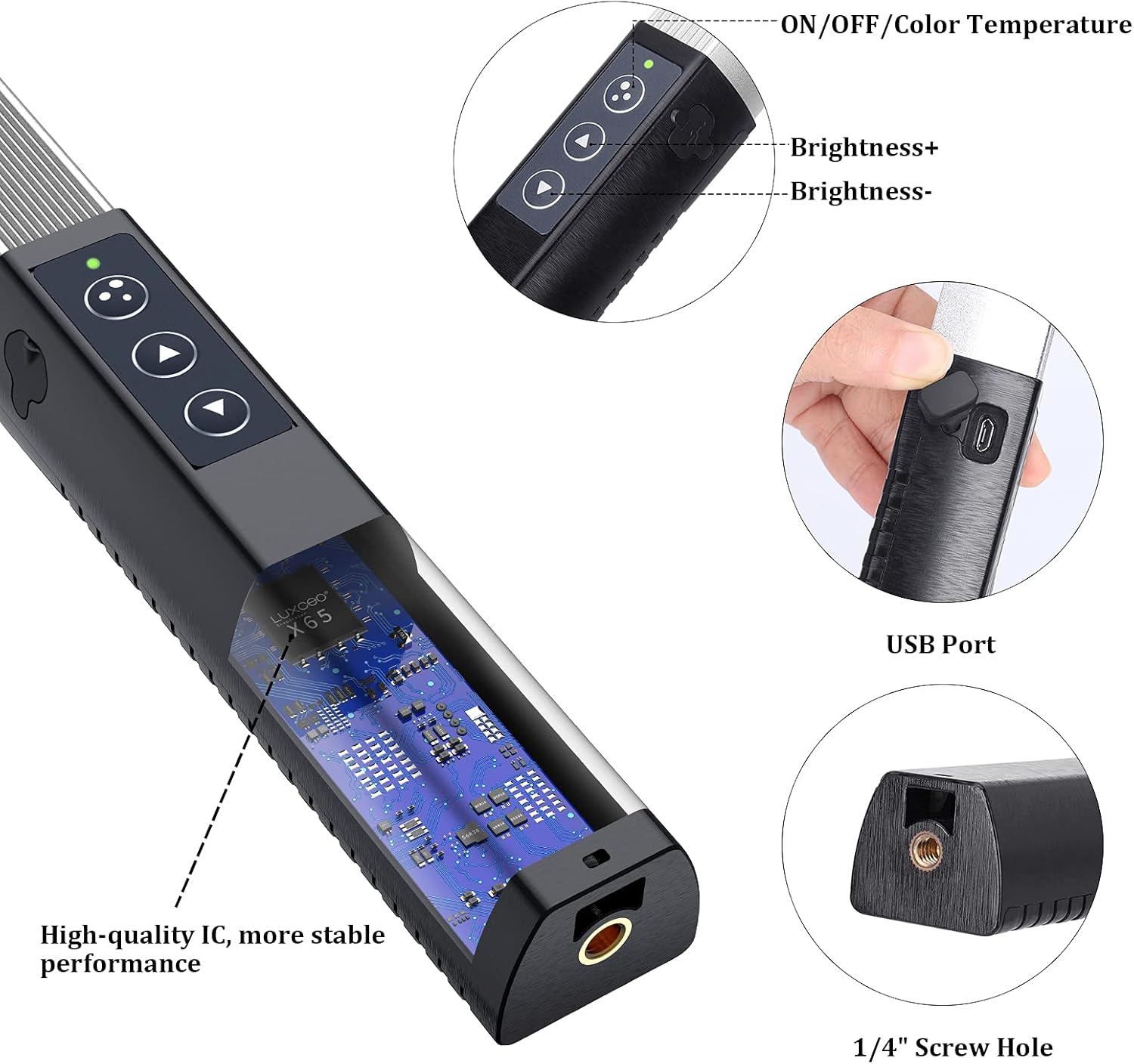
ചിത്രം 4.2: വിശദമായി view of the light's control buttons, USB port, and 1/4" screw hole.

Figure 4.3: Close-up of the 1/4" Standard Nut for mounting.

Figure 4.4: USB Charging Port location.

Figure 4.5: Aluminum fins design for heat dissipation.

Figure 4.6: Handheld handle with battery and charging indicator.
ഘടകങ്ങൾ:
- നിയന്ത്രണ ബട്ടണുകൾ: Located on the handle for power, brightness, and color temperature adjustments.
- യുഎസ്ബി ചാർജിംഗ് പോർട്ട്: ബിൽറ്റ്-ഇൻ ബാറ്ററി റീചാർജ് ചെയ്യുന്നതിന്.
- 1/4" സ്ക്രൂ ദ്വാരം: Standard mounting point for tripods, light stands, and other accessories.
- High-quality IC: Internal integrated circuit for stable performance.
- Aluminum Fins: Designed for efficient heat dissipation.
- Battery & Charging Indicator: Provides status of the internal battery.
5. സജ്ജീകരണം
5.1 Charging the Light
Before first use, fully charge the LUXCEO Q508A LED Video Light.
- Connect the provided USB charging cable to the light's USB port.
- USB കേബിളിന്റെ മറ്റേ അറ്റം അനുയോജ്യമായ ഒരു USB പവർ അഡാപ്റ്ററുമായി (ഉൾപ്പെടുത്തിയിട്ടില്ല) അല്ലെങ്കിൽ ഒരു കമ്പ്യൂട്ടർ USB പോർട്ടുമായി ബന്ധിപ്പിക്കുക.
- The charging indicator light will show the charging status. Once fully charged, the indicator will change (refer to indicator behavior in specifications or quick start guide).
5.2 റിമോട്ട് കൺട്രോൾ ബാറ്ററി ഇൻസ്റ്റലേഷൻ
The remote control comes with pre-installed batteries. If replacement is needed:
- റിമോട്ട് കൺട്രോളിന്റെ പിൻഭാഗത്ത് ബാറ്ററി കമ്പാർട്ട്മെന്റ് കണ്ടെത്തുക.
- Open the compartment and insert the correct type and number of batteries, observing polarity (+/-).
- ബാറ്ററി കമ്പാർട്ട്മെൻ്റ് സുരക്ഷിതമായി അടയ്ക്കുക.
5.3 മൗണ്ടിംഗ് ഓപ്ഷനുകൾ
The Q508A features a standard 1/4" screw hole at its base, allowing for versatile mounting.

Figure 5.1: Mounting options including lanyard, mini tripod, and full-size tripod.
- ഹാൻഡ്ഹെൽഡ് ഉപയോഗം: The ergonomic design allows for comfortable handheld operation.
- ട്രൈപോഡ്/ലൈറ്റ് സ്റ്റാൻഡ്: Attach the light to any standard tripod or light stand using the 1/4" screw.
- ലാൻയാർഡ്: If included, attach a lanyard for secure carrying or hanging.
6. പ്രവർത്തന നിർദ്ദേശങ്ങൾ
The LUXCEO Q508A can be operated using the control buttons on the light itself or via the included remote control.
6.1 പവർ ഓൺ/ഓഫ്
- On Light: Press the ON/OFF button on the light's handle to turn it on or off.
- റിമോട്ട് കൺട്രോൾ: അമർത്തുക ON or ഓഫ് റിമോട്ടിലെ ബട്ടൺ.
പ്രധാന കുറിപ്പ്:

Figure 6.1: Remote control usage tips.
If you turn off the light using the button on the light itself, you cannot turn it back on with the remote control. You must press the button on the light to turn it back on.
6.2 തെളിച്ചം ക്രമീകരിക്കുന്നു
- On Light: ഉപയോഗിക്കുക തെളിച്ചം+ ഒപ്പം തെളിച്ചം- ബട്ടണുകൾ.
- റിമോട്ട് കൺട്രോൾ: അമർത്തുക + or - buttons under "Brightness".

ചിത്രം 6.2: റിമോട്ട് കൺട്രോൾ ബട്ടൺ ലേഔട്ടും പ്രവർത്തനങ്ങളും.
6.3 വർണ്ണ താപനില ക്രമീകരിക്കൽ (സിസിടി മോഡ്)
The light offers 30 levels of color temperature adjustment from 3000K (Warm Light) to 6000K (White Light).
- On Light: അമർത്തുക ON/OFF/Color Temperature button to cycle through modes, then use brightness buttons to adjust CCT.
- റിമോട്ട് കൺട്രോൾ: അമർത്തുക CCT+ or CCT- buttons. Quick access buttons for 3000K, 4500K, and 6000K are also available.

Figure 6.3: Visual guide to color temperature and brightness adjustments.
6.4 Adjusting RGB Colors (RGB Mode)
Access 36 different RGB colors for creative lighting effects.
- റിമോട്ട് കൺട്രോൾ: അമർത്തുക ആർജിബി+ or RGB- buttons to cycle through colors.
- ദ്രുത പ്രവേശനം: Red, Green, and Blue buttons on the remote provide direct access to primary colors.
6.5 Scene Modes (FX Mode)
The Q508A offers 12 pre-programmed scene modes to simulate various lighting environments.
- റിമോട്ട് കൺട്രോൾ: അമർത്തുക FX+ or FX- buttons to cycle through the 12 scene modes.

ചിത്രം 6.4: ഓവർview of the 12 scene simulation modes.
Available Scene Modes:
- മിന്നൽ
- മെഴുകുതിരി വെളിച്ചം
- Red light SOS
- Paparazzi flash
- RGB slow loop
- RGB fast loop
- ശാന്തം 1
- ശാന്തം 2
- പോലീസ് കാർ
- ആംബുലൻസ്
- ഫയർ ട്രക്ക്
- ഡിസ്കോ
6.6 റിമോട്ട് കൺട്രോൾ ശ്രേണി
The remote control operates effectively within a range of up to 7 meters (23 feet) from the light. Ensure a clear line of sight between the remote and the light for optimal performance.
7. പരിപാലനം
7.1 വൃത്തിയാക്കൽ
- Wipe the light and remote control with a soft, dry cloth.
- അബ്രാസീവ് ക്ലീനറുകളോ, ലായകങ്ങളോ, ശക്തമായ രാസവസ്തുക്കളോ ഉപയോഗിക്കരുത്, കാരണം അവ ഉപരിതലത്തിന് കേടുവരുത്തും.
7.2 സംഭരണം
- ഉപകരണം തണുത്തതും വരണ്ടതുമായ സ്ഥലത്ത് സൂക്ഷിക്കുക, നേരിട്ടുള്ള സൂര്യപ്രകാശത്തിൽ നിന്നും തീവ്രമായ താപനിലയിൽ നിന്നും അകറ്റി നിർത്തുക.
- If storing for an extended period, ensure the battery is partially charged (around 50%) to prolong its lifespan. Recharge every 3-6 months.
7.3 ബാറ്ററി കെയർ
- ബാറ്ററി ഇടയ്ക്കിടെ പൂർണ്ണമായും ഡിസ്ചാർജ് ചെയ്യുന്നത് ഒഴിവാക്കുക.
- ഉയർന്ന താപനിലയിൽ ബാറ്ററി തുറന്നുകാട്ടരുത്.
- പ്രാദേശിക നിയന്ത്രണങ്ങൾ അനുസരിച്ച് ബാറ്ററികൾ നീക്കം ചെയ്യുക.
8. പ്രശ്നപരിഹാരം
| പ്രശ്നം | സാധ്യമായ കാരണം | പരിഹാരം |
|---|---|---|
| ലൈറ്റ് ഓണാക്കില്ല. | ബാറ്ററി തീർന്നു. | Charge the light using the USB cable. |
| Light was turned off by the device button, but attempting to turn on with remote. | Press the ON/OFF button on the light itself to turn it on. | |
| റിമോട്ട് കൺട്രോൾ പ്രവർത്തിക്കുന്നില്ല. | റിമോട്ട് കൺട്രോൾ ബാറ്ററികൾ തീർന്നുപോയിരിക്കുന്നു അല്ലെങ്കിൽ തെറ്റായി ഇൻസ്റ്റാൾ ചെയ്തിരിക്കുന്നു. | Replace remote control batteries, ensuring correct polarity. |
| Obstruction between remote and light, or out of range. | Ensure clear line of sight and operate within 7 meters. | |
| പ്രകാശ ഔട്ട്പുട്ട് മങ്ങിയതോ സ്ഥിരതയില്ലാത്തതോ ആണ്. | കുറഞ്ഞ ബാറ്ററി നില. | ലൈറ്റ് റീചാർജ് ചെയ്യുക. |
| Incorrect mode or setting selected. | Verify brightness, color temperature, or scene mode settings. |
ഈ പരിഹാരങ്ങൾ പരീക്ഷിച്ചതിന് ശേഷവും പ്രശ്നം നിലനിൽക്കുകയാണെങ്കിൽ, ദയവായി ഉപഭോക്തൃ പിന്തുണയുമായി ബന്ധപ്പെടുക.
9 സ്പെസിഫിക്കേഷനുകൾ
| ഫീച്ചർ | വിശദാംശങ്ങൾ |
|---|---|
| ബ്രാൻഡ് | LUXCEO (uyled) |
| മോഡൽ | Q508A |
| അളവുകൾ (L x W x H) | 55 x 3.5 x 2.9 സെ.മീ (21.6 x 1.4 x 1.1 ഇഞ്ച്) |
| ഭാരം | 340 ഗ്രാം (0.75 പൗണ്ട്) |
| വർണ്ണ താപനില പരിധി | 3000K - 6000K (30 levels adjustable) |
| തെളിച്ചം | പരമാവധി 1000 ലുമെൻസ് |
| കളർ റെൻഡറിംഗ് ഇൻഡക്സ് (CRI) | >95 |
| RGB നിറങ്ങൾ | 36 നിറങ്ങൾ |
| സീൻ മോഡുകൾ | 12 മോഡുകൾ |
| ബാറ്ററി തരം | Built-in 7.4V 2600mAh Lithium-ion |
| പ്രവർത്തന സമയം | 2-32 hours (depending on brightness/mode) |
| ചാർജിംഗ് പോർട്ട് | USB (ടൈപ്പ്-സി) |
| കണക്റ്റിവിറ്റി | USB |
| റിമോട്ട് കൺട്രോൾ റേഞ്ച് | 7 മീറ്റർ വരെ (23 അടി) |
| മൗണ്ടിംഗ് | 1/4" Standard Screw Hole |
| Expected Lifespan (LEDs) | 50,000 മണിക്കൂർ |
| വാട്ടർപ്രൂഫ് ലെവൽ | Waterproof (as per specifications, generally implies splash-proof) |
10. വാറൻ്റിയും പിന്തുണയും
Your LUXCEO Q508A LED Video Light comes with a manufacturer's warranty to ensure your satisfaction and product reliability.
- വാറൻ്റി കാലയളവ്: വാങ്ങിയ തീയതി മുതൽ ഒരു വർഷത്തെ വാറന്റി.
- പണം തിരികെ നൽകാനുള്ള ഗ്യാരണ്ടി: വാങ്ങിയ തീയതി മുതൽ 30 ദിവസത്തെ പണം തിരികെ ലഭിക്കുമെന്ന ഗ്യാരണ്ടി.
This warranty covers manufacturing defects and issues arising from normal use. It does not cover damage caused by misuse, accidents, unauthorized modifications, or improper maintenance.
ഉപഭോക്തൃ പിന്തുണ
If you encounter any problems with your photography light or have questions not covered in this manual, please do not hesitate to contact our customer support team.
For assistance, please reach out to the seller or manufacturer through the platform where you purchased the product. Provide your order number and a detailed description of the issue for prompt service.
Ask a question about this manual
Ask about setup, troubleshooting, compatibility, parts, safety, or missing instructions. Manuals+ will review the question and use this page’s manual context to help answer it.