
Zoook Zoook Show Stopper
Zoook Rocker Show Stopper Duet 100W Karaoke Bluetooth Party Speaker User Manual
1. ആമുഖം
Thank you for choosing the Zoook Rocker Show Stopper Duet 100W Karaoke Bluetooth Party Speaker. This manual provides essential information for setting up, operating, and maintaining your speaker. Please read it thoroughly before use to ensure optimal performance and safety.
സുരക്ഷാ വിവരങ്ങൾ
- മഴയോ ഈർപ്പമോ യൂണിറ്റ് തുറന്നുകാട്ടരുത്.
- സി തുറക്കരുത്.asing; യോഗ്യതയുള്ള ഉദ്യോഗസ്ഥരെ സർവീസ് ചെയ്യാൻ റഫർ ചെയ്യുക.
- താപ സ്രോതസ്സുകളിൽ നിന്നും സൂര്യപ്രകാശത്തിൽ നിന്നും നേരിട്ട് അകന്നുനിൽക്കുക.
- ഉപയോഗ സമയത്ത് ശരിയായ വായുസഞ്ചാരം ഉറപ്പാക്കുക.
2. പാക്കേജ് ഉള്ളടക്കം
താഴെ ലിസ്റ്റ് ചെയ്തിരിക്കുന്ന എല്ലാ ഇനങ്ങളും നിങ്ങളുടെ പാക്കേജിൽ ഉൾപ്പെടുത്തിയിട്ടുണ്ടെന്ന് ഉറപ്പാക്കുക:
- 1 x Zoook Rocker Show-Stopper Bluetooth Speaker
- 1 x വയർലെസ് മൈക്രോഫോൺ
- 1 x റിമോട്ട് കൺട്രോൾ
- 1 x 3.5mm ഓക്സ് കേബിൾ
- 1 x പവർ കോർഡ്
- 1 x ഉപയോക്തൃ ഗൈഡ് (ഈ പ്രമാണം)
- 1 x ആധികാരികതയുടെ സർട്ടിഫിക്കറ്റ്

Image: Contents of the Zoook Rocker Show Stopper package, including the speaker, wireless microphone, remote control, and cables.
3. ഉൽപ്പന്നം കഴിഞ്ഞുview
Familiarize yourself with the various parts and controls of your Zoook Rocker Show Stopper speaker.
ഫ്രണ്ട് പാനൽ സവിശേഷതകൾ
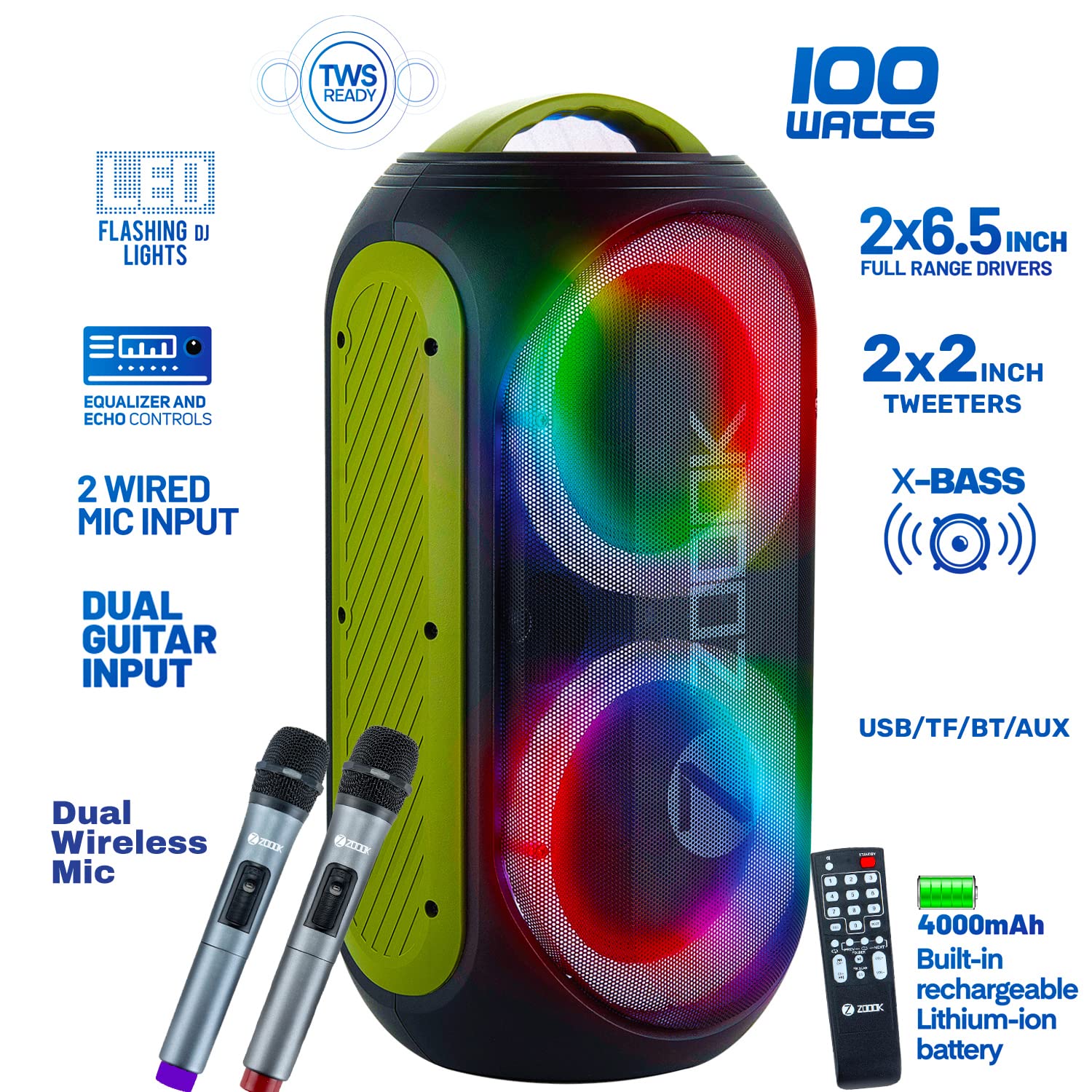
ചിത്രം: മുൻഭാഗം view of the speaker highlighting key features like 100W output, dual full-range drivers, tweeters, X-Bass, TWS Ready, LED Flashing DJ Lights, Dual Wireless Mic, 2 Wired Mic Input, Dual Guitar Input, Equalizer and Echo Controls, USB/TF/BT/AUX connectivity, and 4000mAh built-in rechargeable Lithium-ion battery.
മികച്ച പാനൽ നിയന്ത്രണങ്ങൾ

ചിത്രം: വിശദമായത് view of the top control panel with numbered buttons and ports. Key controls include AUX In, USB card slot, TF card slot, Previous/Mic-Priority, LED display, Next/TWS, Record, Light, Play-Pause/Accompany, Treble Control, Bass Control, Music Volume, Mic Volume, Echo Control, Power Switch, Mic Input 1, Mic Input 2, Charging Indicator, and Power Indicator.
പിൻ പാനൽ കണക്ഷനുകൾ

ചിത്രം: പിൻഭാഗം view of the speaker showing various input and output ports for connectivity.
4. പ്രാരംഭ സജ്ജീകരണം
സ്പീക്കറെ കുറ്റപ്പെടുത്തുന്നു
Before first use, fully charge the speaker using the provided power cord. The charging indicator will illuminate during charging and turn off when complete. A full charge provides up to 5 hours of battery life, depending on usage.
പവർ ചെയ്യുന്നത് ഓൺ/ഓഫ്
Locate the Power Switch on the top panel. Press and hold to turn the speaker ON or OFF.
5. പ്രവർത്തന നിർദ്ദേശങ്ങൾ
ബ്ലൂടൂത്ത് ജോടിയാക്കൽ
- Turn on the speaker. It will automatically enter Bluetooth pairing mode.
- Enable Bluetooth on your mobile device or tablet.
- ഇതിനായി തിരയുക "ZOOOK SHOW STOPPER" in the list of available devices and select it to pair.
- A confirmation tone will sound upon successful pairing.
ടിഡബ്ല്യുഎസ് (ട്രൂ വയർലെസ് സ്റ്റീരിയോ) ജോടിയാക്കൽ
To connect two Zoook Rocker Show Stopper speakers for stereo sound:
- Ensure both speakers are turned on and in Bluetooth mode, but not connected to any device.
- Press the 'TWS' button on one of the speakers. It will emit a pairing tone.
- The two speakers will automatically connect to each other. A confirmation tone will sound.
- Now, connect your mobile device to one of the paired speakers via Bluetooth as described above.
USB/TF കാർഡ് പ്ലേബാക്ക്
Insert a USB drive or TF (MicroSD) card into the respective slot on the top panel. The speaker will automatically detect the media and begin playback. Use the 'Previous' and 'Next' buttons to navigate tracks.
AUX ഇൻപുട്ട്
Connect an external audio device (e.g., MP3 player, laptop) to the 'AUX In' port using the provided 3.5mm Aux Cable. The speaker will automatically switch to AUX mode. Adjust volume from both the speaker and the connected device.
മൈക്രോഫോൺ ഉപയോഗം
The speaker supports dual wireless microphones and wired microphones.
- വയർലെസ് മൈക്ക്: Turn on the wireless microphone. It will automatically pair with the speaker. Adjust microphone volume using the 'Mic Volume' knob.
- വയർഡ് മൈക്ക്: Connect a wired microphone (not included) to 'Mic Input 1' or 'Mic Input 2' on the top panel. Adjust microphone volume using the 'Mic Volume' knob.
ഗിറ്റാർ ഇൻപുട്ട്
Connect your guitar to the 'Guitar Input' port on the top panel. Adjust the guitar volume from your instrument.

Image: A person playing a guitar connected to the speaker, demonstrating the guitar input feature.
ഒറ്റ-ക്ലിക്ക് റെക്കോർഡിംഗ്
While playing music from USB/TF card or using a microphone, press the 'Record' button to start recording. Press again to stop. Recordings are saved to the inserted USB/TF card.
LED ലൈറ്റ് മോഡുകൾ
Press the 'Light' button on the top panel to cycle through different LED flashing DJ light modes. Press and hold to turn the lights off.
ശബ്ദ ക്രമീകരണം
Use the 'Bass Control', 'Treble Control', and 'Echo Control' knobs on the top panel to customize your audio experience.
റിമോട്ട് കൺട്രോൾ ഉപയോഗം
The included remote control allows you to manage playback, volume, light modes, and other functions from a distance.
Image: The remote control for the Zoook Rocker Show Stopper speaker, showing its various buttons for function control.
6. പ്രശ്നപരിഹാരം
| പ്രശ്നം | സാധ്യമായ കാരണം | പരിഹാരം |
|---|---|---|
| സ്പീക്കർ പവർ ഓൺ ചെയ്യുന്നില്ല. | Low battery; Power cord not connected. | Charge the speaker; Ensure power cord is securely connected. |
| ശബ്ദമില്ല. | Volume too low; Incorrect input mode; Device not paired. | Increase volume; Select correct input mode (Bluetooth, AUX, USB/TF); Pair device. |
| ബ്ലൂടൂത്ത് ജോടിയാക്കൽ പരാജയപ്പെട്ടു. | സ്പീക്കർ ജോടിയാക്കൽ മോഡിലല്ല; ഉപകരണം വളരെ അകലെയാണ്; തടസ്സം. | Ensure speaker is in BT mode; Move device closer; Turn off other Bluetooth devices. |
| മൈക്രോഫോൺ പ്രവർത്തിക്കുന്നില്ല. | Mic volume too low; Mic not powered on (wireless); Incorrect input. | Increase Mic Volume; Turn on wireless mic; Ensure wired mic is in correct input. |
| റെക്കോർഡിംഗ് പ്രവർത്തിക്കുന്നില്ല. | No USB/TF card inserted; Card full or corrupted. | Insert a valid USB/TF card; Use a different card or clear space. |
7 സ്പെസിഫിക്കേഷനുകൾ
| ഫീച്ചർ | വിശദാംശങ്ങൾ |
|---|---|
| മോഡൽ | Zoook Show Stopper |
| സ്പീക്കറുകൾ പരമാവധി ഔട്ട്പുട്ട് പവർ | 100 വാട്ട്സ് |
| പവർ ഉറവിടം | ബാറ്ററി പവർ |
| ബാറ്ററി തരം | Built-in Rechargeable Lithium-ion (4000mAh) |
| ബാറ്ററി ശരാശരി ആയുസ്സ് | 5 മണിക്കൂർ വരെ |
| കണക്റ്റിവിറ്റി ടെക്നോളജി | Bluetooth, USB, TF Card, Aux |
| ഓഡിയോ ഇൻപുട്ട് | XLR, 1/4", Aux |
| പ്രത്യേക സവിശേഷതകൾ | Dual Wireless Mic, Flashing DJ Lights, Dual Guitar Inputs, One Click Recording, TWS Ready, Remote Control, Bass & Treble Control, Echo Control |
| ഉൽപ്പന്ന അളവുകൾ (LxWxH) | 22 x 24.2 x 50.2 സെ.മീ |
| ഇനത്തിൻ്റെ ഭാരം | 5.7 കി.ഗ്രാം |
| പരമാവധി പ്രവർത്തന ദൂരം | 10 അടി (ബ്ലൂടൂത്ത്) |

Image: Diagram showing the dimensions of the Zoook Rocker Show Stopper speaker (Height: 502mm, Width: 242mm, Depth: 220mm).
8. പരിപാലനം
വൃത്തിയാക്കൽ
Wipe the speaker with a soft, dry cloth. Do not use abrasive cleaners or solvents. Avoid getting moisture into any openings.
സംഭരണം
When not in use for extended periods, store the speaker in a cool, dry place away from direct sunlight and extreme temperatures. It is recommended to charge the battery periodically to maintain its lifespan.
9. വാറൻ്റിയും പിന്തുണയും
വാറൻ്റി വിവരങ്ങൾ
The Zoook Rocker Show Stopper Duet speaker comes with a 1-year manufacturer's warranty from the date of purchase. This warranty covers manufacturing defects. Please retain your purchase receipt for warranty claims.
ഉപഭോക്തൃ പിന്തുണ
For technical assistance, troubleshooting, or warranty inquiries, please contact Zoook customer support through their official webസൈറ്റ് അല്ലെങ്കിൽ നിങ്ങളുടെ ഉൽപ്പന്ന പാക്കേജിംഗിൽ നൽകിയിരിക്കുന്ന ബന്ധപ്പെടാനുള്ള വിവരങ്ങൾ.
Ask a question about this manual
Ask about setup, troubleshooting, compatibility, parts, safety, or missing instructions. Manuals+ will review the question and use this page’s manual context to help answer it.