
MCR SVP916-1-40A
SINOTIMER SVP-916 Adjustable Voltagഇ പ്രൊട്ടക്ടർ ഉപയോക്തൃ മാനുവൽ
Model: SVP916-1-40A | Brand: MCR
1. ആമുഖം
Welcome to the user manual for the SINOTIMER SVP-916 Adjustable Voltage Protector. This advanced device is engineered to provide comprehensive protection for your electrical appliances and circuits against common power anomalies such as overvoltagഇ, അണ്ടർവോൾtage, and overcurrent conditions. Featuring a clear dual LED display, it allows for real-time monitoring of voltage and current, along with adjustable protection parameters to suit various electrical environments. Please read this manual thoroughly before installation and operation to ensure safe and optimal performance.

ചിത്രം 1.1: മുൻഭാഗം view of the SINOTIMER SVP-916 Adjustable Voltage Protector, showing the dual LED display and control buttons.

Figure 1.2: The SVP-916 integrated into a home electrical panel, illustrating its role as a voltage guard with current limit protection.
2 പ്രധാനപ്പെട്ട സുരക്ഷാ വിവരങ്ങൾ
To prevent personal injury or damage to the device and connected equipment, always observe the following safety precautions:
- പ്രൊഫഷണൽ ഇൻസ്റ്റാളേഷൻ ശുപാർശ ചെയ്യുന്നു: യോഗ്യതയുള്ള ഒരു ഇലക്ട്രീഷ്യനോ പരിശീലനം ലഭിച്ച പ്രൊഫഷണലോ മാത്രമേ ഇൻസ്റ്റാളേഷൻ നടത്താവൂ.
- പവർ വിച്ഛേദിക്കുക: Always ensure the main power supply is disconnected before installing, wiring, or performing any maintenance on the device.
- ഇൻഡോർ ഉപയോഗത്തിന് മാത്രം: This device is designed for indoor use in dry environments. Do not expose it to moisture, water, or extreme temperatures.
- തുറക്കരുത്: Do not attempt to open, disassemble, or modify the device. There are no user-serviceable parts inside.
- ശരിയായ വയറിംഗ്: Ensure all wiring connections are secure and comply with local electrical codes and standards. Incorrect wiring can lead to malfunction or hazards.
- റേറ്റുചെയ്ത ശേഷി: Do not exceed the maximum rated current (40A) or voltage (120V) of the device. Overloading can cause damage or fire.
- വെൻ്റിലേഷൻ: അമിതമായി ചൂടാകുന്നത് തടയാൻ ഉപകരണത്തിന് ചുറ്റും മതിയായ വായുസഞ്ചാരം ഉറപ്പാക്കുക.

Figure 2.1: The SVP-916 helps protect against common electrical hazards such as short circuits, surges, wire damage, and overloads, ensuring home electricity safety.
3. ഉൽപ്പന്നം കഴിഞ്ഞുview
3.1 പ്രധാന സവിശേഷതകൾ
- വാല്യംtagഇയും നിലവിലെ പരിരക്ഷയും: Automatically cuts off power when the circuit experiences overvoltagഇ, അണ്ടർവോൾtage, or overcurrent conditions.
- LED ഡിസ്പ്ലേ: Features a clear digital LED display for easy and accurate reading of real-time voltagഇ, നിലവിലെ മൂല്യങ്ങൾ.
- Voltmeter and Ammeter Functionality: The dual LED display serves as both a voltmeter and an ammeter, showing actual voltage and current simultaneously.
- ക്രമീകരിക്കാവുന്ന പാരാമീറ്ററുകൾ: രണ്ട് വാല്യംtage and current protection thresholds can be adjusted by the user to suit specific application requirements.
- യാന്ത്രിക വീണ്ടെടുക്കൽ: The device is designed to automatically restore power once the circuit returns to normal status after a protection event.
- സ്മാർട്ട് നിയന്ത്രണം: Utilizes CMOS chips for intelligent control and stable performance.
3.2 ഘടകങ്ങളും ഡിസ്പ്ലേയും

ചിത്രം 3.1: വിശദമായി view of the SVP-916 panel, highlighting key components and indicators.
The SVP-916 features a user-friendly interface with the following main components:
- N (Neutral Input) Terminal: Connects to the neutral line of the incoming power supply.
- IN (Line Input) Terminal: Connects to the live (phase) line of the incoming power supply.
- L (Line Output) Terminal: Connects to the live (phase) line of the protected circuit.
- OUT (Neutral Output) Terminal: Connects to the neutral line of the protected circuit.
- Working Volt/Amp ഡിസ്പ്ലേ: Dual LED digital display showing real-time voltage (red) and current (green).
- പ്രവർത്തന സൂചകങ്ങൾ:
- OV:fast (Overvoltage Fast): Indicates an overvoltagഇ വ്യവസ്ഥ.
- UV:slow (Undervoltage Slow): Indicates an undervoltagഇ വ്യവസ്ഥ.
- OC:fast (Overcurrent Fast): Indicates an overcurrent condition.
- ക്രമീകരണ ബട്ടണുകൾ:
- SET ബട്ടൺ: പാരാമീറ്റർ ക്രമീകരണങ്ങൾ നൽകാനും സ്ഥിരീകരിക്കാനും ഉപയോഗിക്കുന്നു.
- മുകളിലേക്കുള്ള ബട്ടൺ (▲): Used to increase parameter values.
- ഡൗൺ ബട്ടൺ (▼): Used to decrease parameter values.
4 സ്പെസിഫിക്കേഷനുകൾ
The following table outlines the technical specifications of the SINOTIMER SVP-916 Adjustable Voltagഇ പ്രൊട്ടക്ടർ:
| ആട്രിബ്യൂട്ട് | മൂല്യം |
|---|---|
| ബ്രാൻഡ് | എംസിആർ |
| നിർമ്മാതാവ് | സിനോട്ടിമർ |
| മോഡൽ നമ്പർ | SVP916-1-40A |
| ഭാഗം നമ്പർ | SVP916-1-40A |
| വാല്യംtage | 120 വോൾട്ട് |
| തുറമുഖങ്ങളുടെ എണ്ണം | 2 |
| പരമാവധി ലോഡ് കറന്റ് | 40 Ampഈറസ് |
| ASIN | B08CB9GWY4 |
| ആദ്യം ലഭ്യമായ തീയതി | ജൂലൈ 3, 2020 |
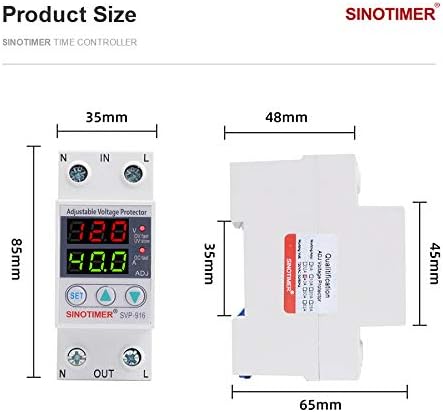
Figure 4.1: Product dimensions of the SVP-916, showing measurements in millimeters (85mm height, 35mm width, 65mm depth).
5. ഇൻസ്റ്റലേഷനും സജ്ജീകരണവും
മുന്നറിയിപ്പ്: Ensure the main power supply is completely disconnected before proceeding with installation. Improper installation can lead to electric shock or fire.
5.1 വയറിംഗ് ഡയഗ്രം
The SVP-916 is designed for easy integration into your electrical system. Follow the wiring diagram below carefully:

Figure 5.1: Wiring diagram for the SVP-916, showing connections with a power switch and an air circuit breaker.
- ഇൻപുട്ട് കണക്ഷനുകൾ: Connect the incoming live (L) wire to the 'IN' terminal and the incoming neutral (N) wire to the 'N' terminal on the top of the device.
- ഔട്ട്പുട്ട് കണക്ഷനുകൾ: Connect the outgoing live (L) wire to the 'L' terminal and the outgoing neutral (N) wire to the 'OUT' terminal on the bottom of the device.
- സംയോജനം: The device should be installed in series with the circuit it is protecting, typically after the main power switch or circuit breaker and before the load.
- സുരക്ഷിത കണക്ഷനുകൾ: Ensure all wire connections are tight and secure to prevent loose contacts and potential hazards.
5.2 മൗണ്ടിംഗ്
The SVP-916 is designed for DIN rail mounting, making it suitable for installation inside standard electrical distribution boxes or control panels.
6. പ്രവർത്തന നിർദ്ദേശങ്ങൾ
6.1 ഡിസ്പ്ലേ റീഡിംഗുകൾ
Once powered on, the dual LED display will show the real-time voltage (red display) and current (green display) of the circuit. The working indicators (OV, UV, OC) will illuminate if a protection event occurs.
6.2 Adjusting Protection Parameters
The SVP-916 allows you to set custom thresholds for overvoltagഇ, അണ്ടർവോൾtage, and overcurrent protection. Follow these steps to adjust the parameters:
- ക്രമീകരണ മോഡ് നൽകുക: അമർത്തിപ്പിടിക്കുക സെറ്റ് button for approximately 3-5 seconds until the display starts flashing, indicating you are in setting mode.
- Navigate Parameters: ചുരുക്കത്തിൽ അമർത്തുക സെറ്റ് button to cycle through the adjustable parameters (e.g., Overvoltage Threshold, Undervoltage Threshold, Overcurrent Threshold, Recovery Delay Time, etc.). Each parameter will flash when selected.
- മൂല്യങ്ങൾ ക്രമീകരിക്കുക: ഉപയോഗിക്കുക ▲ (Up) ഒപ്പം ▼ (Down) buttons to increase or decrease the value of the currently selected parameter.
- ക്രമീകരണങ്ങൾ സംരക്ഷിക്കുക: After adjusting a parameter, briefly press the സെറ്റ് button to confirm the value and move to the next parameter. To exit the setting mode and save all changes, press and hold the സെറ്റ് button again for 3-5 seconds, or wait for the device to automatically exit after a period of inactivity.
Refer to the device's specific parameter codes and ranges, which may be printed on the device itself or provided in supplementary documentation, for precise adjustment values.
7. പരിപാലനം
The SINOTIMER SVP-916 is designed for long-term, maintenance-free operation. However, periodic checks can help ensure its continued reliability:
- വൃത്തിയാക്കൽ: ഉപകരണം വൃത്തിയായും പൊടിയില്ലാതെയും സൂക്ഷിക്കുക. പുറംഭാഗം തുടയ്ക്കാൻ മൃദുവായതും ഉണങ്ങിയതുമായ തുണി ഉപയോഗിക്കുക. ലിക്വിഡ് ക്ലീനറുകളോ ലായകങ്ങളോ ഉപയോഗിക്കരുത്.
- കണക്ഷൻ പരിശോധന: Periodically inspect the wiring connections to ensure they remain tight and free from corrosion.
- പരിസ്ഥിതി വ്യവസ്ഥകൾ: പ്രവർത്തന അന്തരീക്ഷം നിർദ്ദിഷ്ട താപനിലയിലും ഈർപ്പത്തിലും പരിധിക്കുള്ളിൽ തന്നെയാണെന്ന് ഉറപ്പാക്കുക.
- പ്രവർത്തനക്ഷമത പരിശോധന: If possible and safe to do so, periodically test the protection functions by simulating an overvoltage or overcurrent condition (e.g., using a controlled test setup) to confirm the device trips as expected.
കുറിപ്പ്: Any internal repairs or servicing must be performed by authorized personnel only.
8. പ്രശ്നപരിഹാരം
If you encounter issues with your SVP-916, refer to the following troubleshooting guide:
| പ്രശ്നം | സാധ്യമായ കാരണം | പരിഹാരം |
|---|---|---|
| Device does not power on / Display is off. | ഇൻപുട്ട് പവർ ഇല്ല; തെറ്റായ വയറിംഗ്; ഉപകരണ തകരാർ. | Check main power supply. Verify wiring connections are correct and secure. If power is present and wiring is correct, the device may be faulty; contact support. |
| Device trips frequently. | Actual overvoltage/undervoltage/overcurrent condition; Protection parameters set too low. | യഥാർത്ഥ വോള്യം പരിശോധിക്കുകtage and current of the circuit. Adjust protection thresholds to appropriate levels (see Section 6.2). Investigate and resolve underlying circuit issues. |
| Device does not trip during fault. | Protection parameters set too high; Device fault. | Verify protection thresholds are set correctly. If parameters are correct and fault is present, the device may be faulty; contact support. |
| Display shows incorrect readings. | Loose connections; Device fault. | എല്ലാ വയറിംഗ് കണക്ഷനുകളും ഇറുകിയതാണോ എന്ന് പരിശോധിക്കുക. പ്രശ്നം നിലനിൽക്കുകയാണെങ്കിൽ, പിന്തുണയുമായി ബന്ധപ്പെടുക. |
| ക്രമീകരണ മോഡിൽ പ്രവേശിക്കാൻ കഴിയില്ല. | SET button not held long enough; Button malfunction. | Ensure the SET button is held for 3-5 seconds. If still unresponsive, contact support. |
ഈ പരിഹാരങ്ങൾ പരീക്ഷിച്ചതിനുശേഷവും പ്രശ്നം നിലനിൽക്കുകയാണെങ്കിൽ, ദയവായി ഉപഭോക്തൃ പിന്തുണയുമായി ബന്ധപ്പെടുക.
9. വാറൻ്റിയും പിന്തുണയും
For warranty information, technical support, or service inquiries regarding your SINOTIMER SVP-916 Adjustable Voltage Protector, please refer to the warranty card included with your product or contact the manufacturer/seller directly. Please have your model number (SVP916-1-40A) and purchase details ready when contacting support.
Ask a question about this manual
Ask about setup, troubleshooting, compatibility, parts, safety, or missing instructions. Manuals+ will review the question and use this page’s manual context to help answer it.