
1. ആമുഖം
The YOSUDA PRO Magnetic Exercise Bike 010C is designed for effective indoor cycling workouts. Featuring a hyper-quiet magnetic system and robust alloy steel construction, it offers a smooth and stable exercise experience. This manual provides essential information for assembly, operation, maintenance, and troubleshooting to ensure safe and optimal use of your exercise bike.
പ്രധാന സവിശേഷതകൾ:
- Hyper Quiet Magnetic System: Operates at less than 20 dB for silent workouts.
- ശക്തമായ ശേഷി: Supports users up to 400 lbs with heavy alloy steel construction.
- ക്രമീകരിക്കാവുന്ന പ്രതിരോധം: 50 lbs flywheel with 100 micro-adjustable magnetic resistance levels.
- സ്മാർട്ട് കണക്റ്റിവിറ്റി: Bluetooth support for sports apps and real-time data tracking.
- Comfort & Customization: 4-way adjustable seat and 2-way adjustable handlebars for personalized fit.
- സംയോജിത ഡിസ്പ്ലേ: Large screen monitor displays RPM, time, speed, distance, calories, and odometer. Includes a tablet holder.
2. സജ്ജീകരണം
2.1 അസംബ്ലി
The YOSUDA PRO Magnetic Exercise Bike is designed for straightforward assembly, with most major components pre-assembled. Tools and a detailed guide are included to assist you.
- അൺപാക്ക് ചെയ്യുന്നു: Carefully remove all components from the packaging. Ensure all parts listed in the manual are present.
- സ്റ്റെബിലൈസറുകൾ ഘടിപ്പിക്കുക: Secure the front and rear stabilizer bars to the main frame using the provided bolts and tools.
- പെഡലുകൾ ഇൻസ്റ്റാൾ ചെയ്യുക: Attach the pedals to the crank arms. Note that pedals are typically marked 'L' for left and 'R' for right. Ensure they are tightened securely.
- സീറ്റ് പോസ്റ്റ് ഇൻസ്റ്റാൾ ചെയ്യുക: Insert the seat post into the main frame and adjust to an initial comfortable height.
- Install Handlebar Post: Insert the handlebar post into the main frame and adjust to an initial comfortable height.
- Connect Monitor Cables: Connect the monitor cables from the main frame to the display unit.
- Install Monitor: Secure the monitor onto the handlebar post.
- Install Water Bottle Holder: Attach the water bottle holder to the designated area on the frame.

ചിത്രം: കഴിഞ്ഞുview of YOSUDA PRO Magnetic Exercise Bike components during assembly.
2.2 പ്രാരംഭ ക്രമീകരണങ്ങൾ
Proper adjustment of the seat and handlebars is crucial for comfort and effective workouts.
- സീറ്റ് ക്രമീകരണം: The seat can be adjusted 4-ways (up/down and forward/backward). Loosen the adjustment knob, slide the seat to your desired position, and tighten the knob securely. Ensure your knees have a slight bend at the bottom of the pedal stroke.
- ഹാൻഡിൽബാർ ക്രമീകരണം: The handlebars can be adjusted 2-ways (up/down). Loosen the adjustment knob, raise or lower the handlebars to a comfortable height, and tighten the knob. Your back should be straight and comfortable.
- പെഡൽ സ്ട്രാപ്പുകൾ: Adjust the toe-caged pedal straps to secure your feet firmly in place. This prevents your feet from slipping during intense workouts.
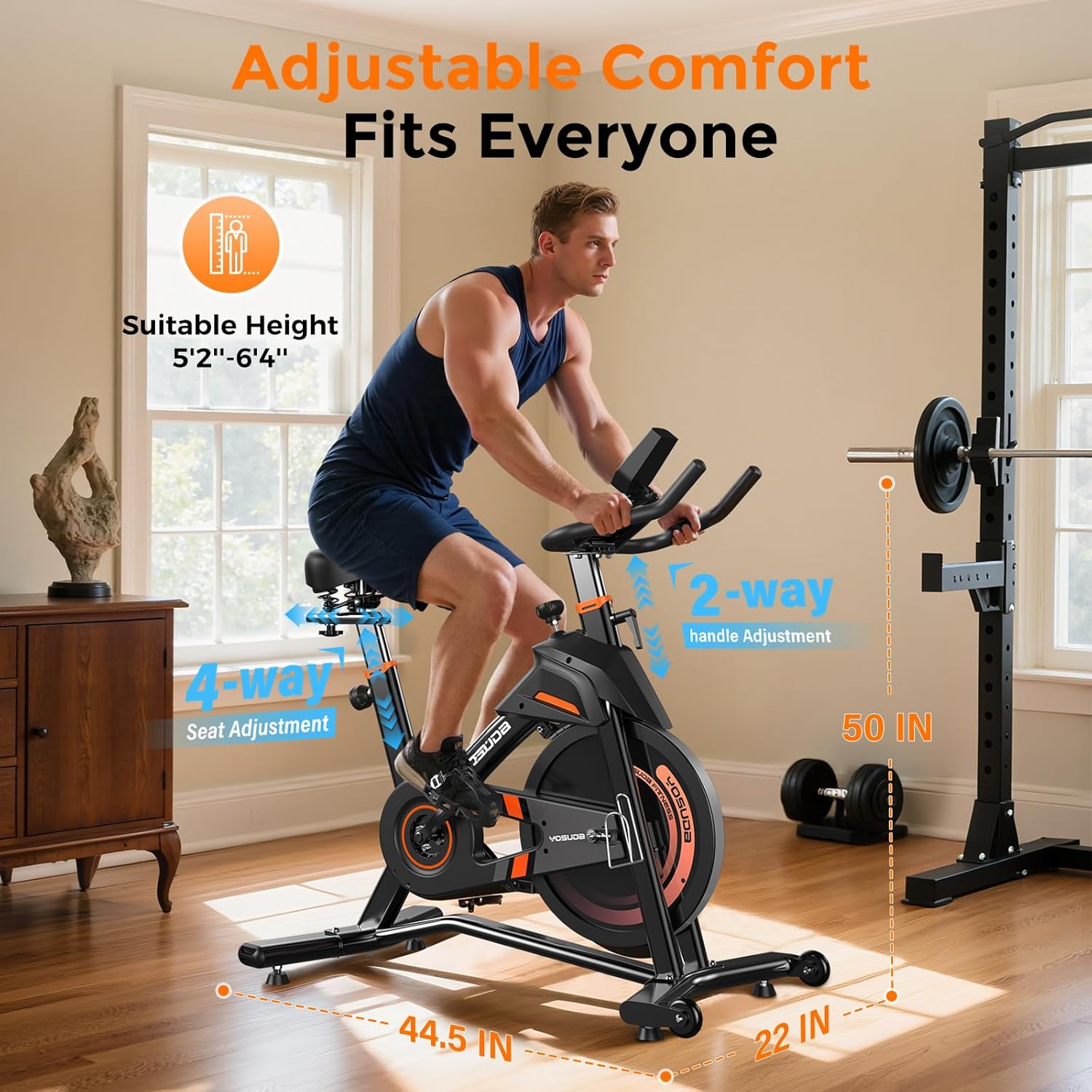
ചിത്രം: വിശദമായത് view of the adjustable seat and handlebars for personalized comfort.
3. ഓപ്പറേഷൻ
3.1 പവർ ഓൺ, മോണിറ്റർ പ്രവർത്തനങ്ങൾ
The exercise bike is pedal-powered and does not require an external power source for operation. The monitor is battery-operated.
- യാന്ത്രിക സജീവമാക്കൽ: The monitor automatically turns on when you start pedaling.
- Display Metrics: The large screen monitor displays:
- ആർപിഎം: മിനിറ്റിലെ ഭ്രമണങ്ങൾ
- സമയം: Duration of your workout
- വേഗത: Current speed in miles
- ദൂരം: Total distance covered in miles
- കലോറികൾ: കണക്കാക്കിയ കലോറികൾ കത്തിച്ചു
- ഓഡോമീറ്റർ: Total accumulated distance
- ഡാറ്റ പുനഃസജ്ജമാക്കുന്നു: To clear workout data, press and hold the "RESET" button on the monitor.
- ടാബ്ലെറ്റ് ഹോൾഡർ: Utilize the integrated tablet holder to place your device for entertainment or to follow workout programs.

Image: Close-up of the exercise bike's monitor and tablet holder.
3.2 പ്രതിരോധം ക്രമീകരിക്കുന്നു
The YOSUDA PRO Magnetic Exercise Bike features 100 micro-adjustable magnetic resistance levels, allowing for precise control over your workout intensity.
- പ്രതിരോധം വർദ്ധിപ്പിക്കുക: കാന്തിക പ്രതിരോധം വർദ്ധിപ്പിക്കുന്നതിന് റെസിസ്റ്റൻസ് നോബ് ഘടികാരദിശയിൽ തിരിക്കുക, ഇത് പെഡലിംഗ് കൂടുതൽ ബുദ്ധിമുട്ടാക്കുന്നു.
- പ്രതിരോധം കുറയ്ക്കുക: കാന്തിക പ്രതിരോധം കുറയ്ക്കുന്നതിന് റെസിസ്റ്റൻസ് നോബ് എതിർ ഘടികാരദിശയിൽ തിരിക്കുക, ഇത് പെഡലിംഗ് എളുപ്പമാക്കുന്നു.
- അടിയന്തരമായി നിർത്തുക: Press down firmly on the resistance knob to engage the emergency brake and quickly stop the flywheel.

Image: The resistance knob and flywheel, illustrating the magnetic resistance system.
3.3 Smart Features and App Integration
This exercise bike is equipped with Bluetooth connectivity to enhance your workout experience.
- Connect to Apps: Pair your device via Bluetooth with compatible sports apps to track your exercise data, participate in virtual courses, and monitor your progress.
- തത്സമയ ഡാറ്റ: Receive real-time recording of exercise data directly to your connected device.

Image: User engaging with virtual rides through top fitness applications.
4. പരിപാലനം
Regular maintenance ensures the longevity and safe operation of your YOSUDA PRO Magnetic Exercise Bike.
- വൃത്തിയാക്കൽ: പരസ്യം ഉപയോഗിച്ച് ബൈക്ക് തുടയ്ക്കുകamp ഓരോ ഉപയോഗത്തിനു ശേഷവും വിയർപ്പും പൊടിയും നീക്കം ചെയ്യാൻ തുണി ഉപയോഗിക്കുക. ഉരച്ചിലുകൾ ഉള്ള ക്ലീനറുകൾ ഒഴിവാക്കുക.
- പെഡൽ പരിശോധന: Inspect and re-tighten pedals every 1-2 months to ensure they remain secure for safe use. Loose pedals can cause injury or damage.
- ബെൽറ്റ് ഡ്രൈവ്: The silent belt drive system requires minimal maintenance. Keep the area around the belt clean and free of debris.
- സ്ഥിരത പരിശോധന: Periodically check all bolts and nuts to ensure they are tight. Re-tighten as necessary to maintain the bike's stability.
5. പ്രശ്നപരിഹാരം
If you encounter any issues with your exercise bike, refer to the following common solutions:
- ഞരക്കമുള്ള ശബ്ദങ്ങൾ: Check all connection points and ensure they are tightened. Apply a small amount of lubricant to moving parts if necessary, avoiding the flywheel and brake system.
- Unstable Bike: Ensure the bike is placed on a flat, level surface. Adjust the leveling feet on the stabilizer bars until the bike is stable.
- മോണിറ്റർ പ്രദർശിപ്പിക്കുന്നില്ല: Check the batteries in the monitor and replace them if needed. Ensure the sensor cable is securely connected.
- പ്രതിരോധ പ്രശ്നങ്ങൾ: If resistance feels inconsistent or unresponsive, check the connection of the resistance cable to the knob and the magnetic brake system.
6 സ്പെസിഫിക്കേഷനുകൾ
| ഫീച്ചർ | വിശദാംശങ്ങൾ |
|---|---|
| ബ്രാൻഡ് | യോസുദ |
| മോഡലിൻ്റെ പേര് | L-007C |
| പ്രത്യേക ഫീച്ചർ | Light Commercial, Magnetic, Smart with Bluetooth |
| നിറം | Black Orange |
| പവർ ഉറവിടം | പെഡൽ ഉപയോഗിച്ച് പ്രവർത്തിക്കുന്ന (വൈദ്യുതിയല്ലാത്തത്) |
| ശുപാർശ ചെയ്യുന്ന ഉപയോഗങ്ങൾ | ഇൻഡോർ |
| ഇനത്തിൻ്റെ ഭാരം | 37.65 കിലോഗ്രാം (ഏകദേശം 83 പൗണ്ട്) |
| മെറ്റീരിയൽ | അലോയ് സ്റ്റീൽ |
| പ്രതിരോധ സംവിധാനം | കാന്തിക |
| ഉൽപ്പന്ന അളവുകൾ | 50"D x 22"W x 44.5"H |
| പരമാവധി ഭാരം ശുപാർശ | 400 പൗണ്ട് |
| പ്രതിരോധ നിലകളുടെ എണ്ണം | 100 |
| ഡ്രൈവ് സിസ്റ്റം | ബെൽറ്റ് |
7. വാറണ്ടിയും പിന്തുണയും
YOSUDA is committed to providing excellent customer service and product support.
- സാങ്കേതിക സേവനം: Enjoy 24/7 technical support for any inquiries or assistance you may need with your exercise bike.
- ബന്ധപ്പെടാനുള്ള വിവരങ്ങൾ: For specific warranty details or to reach customer support, please refer to the contact information provided in your product packaging or visit the official YOSUDA webസൈറ്റ്.
8. ഔദ്യോഗിക ഉൽപ്പന്ന വീഡിയോകൾ
ഈ സമയത്ത് ഉൾച്ചേർക്കുന്നതിനായി ഔദ്യോഗിക വിൽപ്പനക്കാരന്റെ വീഡിയോകളൊന്നും ലഭ്യമല്ല.