
ആമുഖം
This user manual provides comprehensive instructions for the MOKiN USB C Hub Dual HDMI Adapter. This versatile 6-in-1 docking station is designed to expand the connectivity of your USB-C enabled laptop, converting a single USB-C port into multiple essential ports, including dual HDMI outputs, USB 3.1, and USB 2.0 ports, along with Power Delivery (PD) capabilities. It aims to enhance your productivity by facilitating multi-monitor setups and efficient data transfer.
ഉൽപ്പന്നം കഴിഞ്ഞുview
The MOKiN USB C Hub is a compact and powerful accessory that provides the following ports:
- 2 x HDMI Ports: Supports up to 4K@30Hz resolution for dual monitor setups.
- 1 x USB 3.1 പോർട്ട്: 10Gbps വരെയുള്ള അതിവേഗ ഡാറ്റാ കൈമാറ്റത്തിന്.
- 2 x USB 2.0 പോർട്ടുകൾ: Ideal for connecting peripherals like keyboards and mice without lag.
- 1 x USB-C പവർ ഡെലിവറി (PD) പോർട്ട്: Supports up to 100W power pass-through charging for your laptop.

ചിത്രം 1: ഓവർview of the MOKiN USB C Hub with its 6-in-1 port configuration. The image highlights the USB-C input, two HDMI outputs, one USB 3.1 port, and two USB 2.0 ports.
സജ്ജമാക്കുക
- ലാപ്ടോപ്പ് അനുയോജ്യത പരിശോധിക്കുക: Ensure your laptop's USB-C port supports video output (DisplayPort Alt Mode) and Power Delivery if you intend to use these features. Not all USB-C ports are identical. Look for symbols like a lightning bolt (Thunderbolt), a 'D' inside a square (DisplayPort), or a battery icon next to the USB-C port.
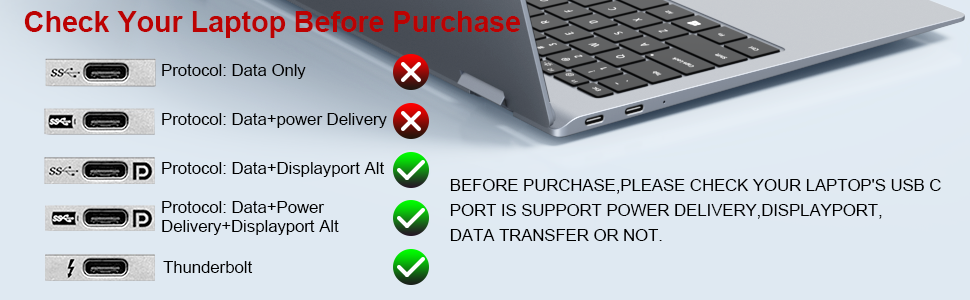
Figure 2: Guide to checking your laptop's USB-C port for compatibility with data, power delivery, and DisplayPort Alt Mode. Ports supporting Data+Displayport Alt, Data+Power Delivery+Displayport Alt, or Thunderbolt are compatible.
- Connect the Hub to your Laptop: Plug the USB-C connector of the MOKiN hub into an available USB-C port on your laptop.
- ബാഹ്യ ഡിസ്പ്ലേകൾ ബന്ധിപ്പിക്കുക: Use HDMI cables to connect your monitors to the HDMI ports on the MOKiN hub.
- പെരിഫറലുകൾ ബന്ധിപ്പിക്കുക: Plug in your USB devices (e.g., keyboard, mouse, external hard drive) into the USB 3.1 and USB 2.0 ports on the hub.
- പവർ ഡെലിവറി (ഓപ്ഷണൽ): If you wish to charge your laptop through the hub, connect your laptop's original USB-C power adapter to the PD port on the MOKiN hub.

Figure 3: The MOKiN USB C Hub connected to a laptop, demonstrating the Power Delivery feature with a 100W fast charging capability.
The hub is plug-and-play, requiring no additional drivers or software installation for most operating systems.
പ്രവർത്തന നിർദ്ദേശങ്ങൾ
Display Modes (Windows Laptops)
For Windows laptops, the MOKiN USB C Hub supports both Mirror (SST) and Extend (MST) display modes, allowing for triple display setups (laptop screen + two external monitors).
- മിറർ മോഡ്: Duplicates your laptop's screen onto the connected external monitors.
- വിപുലീകരണ മോഡ്: Extends your desktop across multiple screens, providing more workspace. Each external monitor can display different content.

Figure 4: Illustration of multiple display modes for Windows systems. It shows both Mirror Mode (duplicating the laptop screen) and Extend Mode (extending the desktop across two external monitors).
To configure display settings on Windows, right-click on your desktop, select "Display settings," and arrange your monitors as desired.
Display Modes (Mac OS Laptops)
Important Note for Mac OS Users: Due to Mac OS limitations, this hub only supports മിറർ മോഡ് (SST) for external displays. It does not support extended triple display functionality where each external monitor shows different content. All connected external monitors will mirror the primary display.

Figure 5: Visual representation indicating that MacBooks connected to this hub will only support Mirror Mode for external displays.
ഡാറ്റ കൈമാറ്റം
The hub provides high-speed data transfer capabilities:
- യുഎസ്ബി 3.1 പോർട്ട്: Offers data transfer speeds up to 10Gbps, suitable for external hard drives and high-bandwidth devices.
- USB 2.0 പോർട്ടുകൾ: Provides 480Mbps transfer speed, ideal for connecting standard USB devices like flash drives, keyboards, and mice.
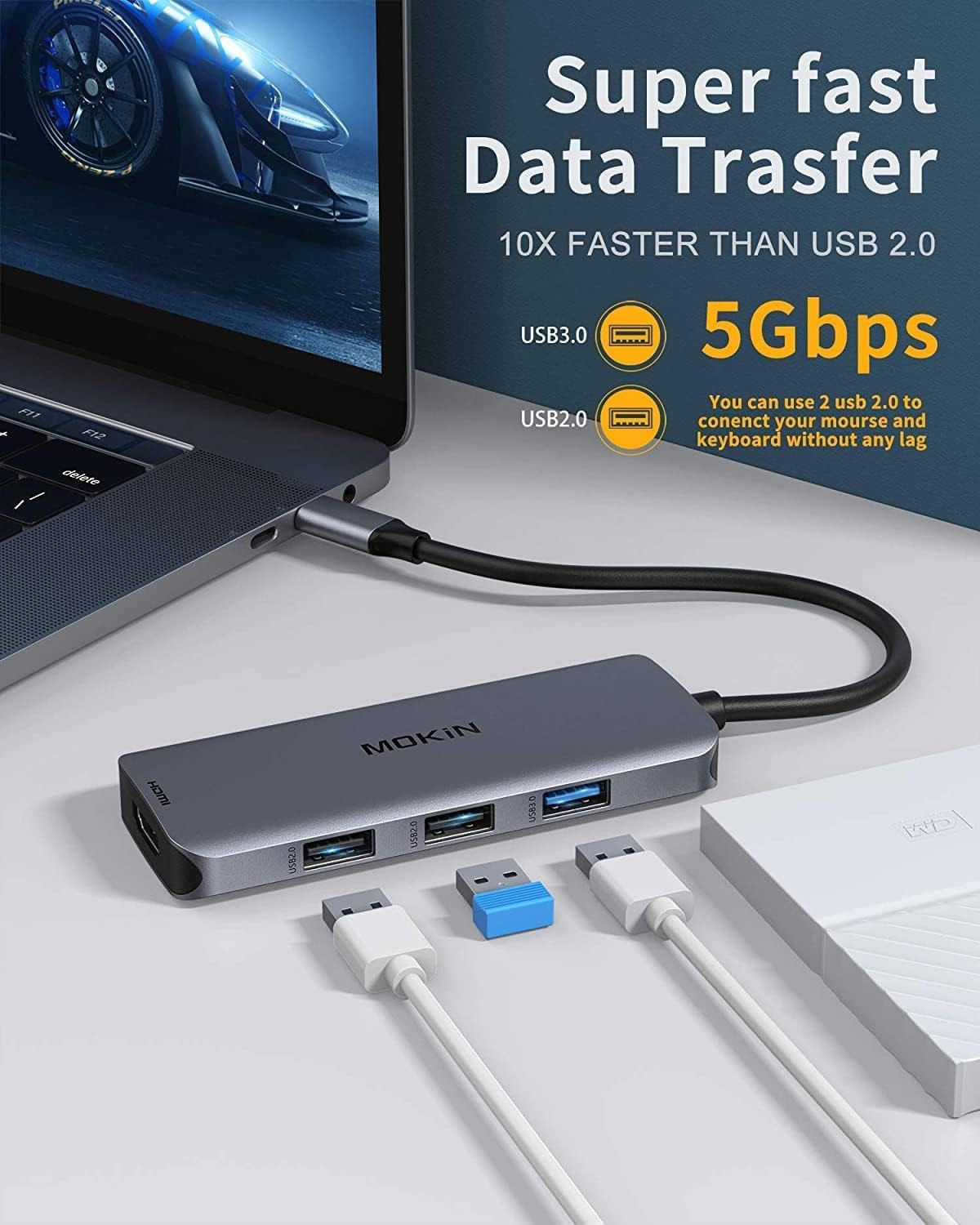
Figure 6: Depiction of the data transfer capabilities, highlighting the 10Gbps speed of the USB 3.1 port and the 480Mbps speed of the USB 2.0 ports.
അനുയോജ്യത
This MOKiN USB C Hub is broadly compatible with a range of devices and operating systems that support USB-C with DisplayPort Alt Mode and Power Delivery. Below is a list of commonly compatible and incompatible devices. This list is not exhaustive.
അനുയോജ്യമായ ഉപകരണങ്ങൾ (ഭാഗിക പട്ടിക):
- ലെനോവോ: Yoga 900/910, X1 Yoga (2nd Gen), 13' Lenovo 720, c740-14il, Yoga C740, Legion Y740, Ideapad 5, Ideapad Slim 7, 2020 IdeaPad 5 15 mit Ryzen 4800u, Thinkpad T590, T480, Thinkbook 14s, L590, E15, X1 Carbon.
- HP: Spectre X2, X360, Elite×2 1012, Elitebook Folio G1, ZBook 15 G3, Elitebook 840 g6, Chromebook, Notebook 15-dy1036nr, ENVY x360 13-ay0000, Pavilion Intel Core 13, Envy x360 model m6-aq105dx, Envy 17t (2020).
- ഡെൽ: XPS 15 (9550, 9560), XPS 13 (9350, 9360, 9370, 9380), XPS 12 2-in-1 9250, Precision 5510, Latitude 5290 2-in-1/5285/5480/7280, Latitude E7470, Precision, Latitude 5590, Latitude 5510.
- ഏസർ: Spin 7, New Switch Alpha 12, Chromebook R13, Aspire V Nitro 15, model SB230.
- ആപ്പിൾ: MacBook Pro 2020/2019/2018/2017/2016, MacBook Air 2020/2019/2018/2017, iPad Pro 2018/2020, Macbook Retina 12" Laptop 2015/2016, iMac, iMac Pro 2019/2018/2017 (Note: Mac OS supports mirror mode only).
- മൈക്രോസോഫ്റ്റ്: Surfacebook 2, Surface Pro 7, Surface GO 2, Surface 3.
- അസൂസ്: Zenbook S13 UX392, X571GD.
- Google: Chromebook Pixel.
അനുയോജ്യമല്ലാത്ത ഉപകരണങ്ങൾ (ഭാഗിക പട്ടിക):
- HP: 14s-be102TX, Probook 650 G2, Probook 455 G4, Pavilion-14 bf116tx, 14-ce1004TX 14, Elitebook 820 G3, Pavilion 15 ck009, EliteBook 745 G4, Pavilion Power Laptop 15-cb, Probook 430 G5, EliteBook 828 G4, Pavilion 15-cs3000, Pavillion Laptop Model 15-cs1014-ng, Probook g3, bs049dx.
- ലെനോവോ: IdeaPad 3 (17") Intel, Flex 5 14 (AMD), IdeaPad Flex 5 15 (Intel) 2-in-1, ThinkPad 11e Yoga Gen 6 (11") 2-in-1.
- ഡെൽ: Inspiron 15 3000, Inspiron 11 3000 2-in-1, Inspiron 17 3000.
- സാംസങ്: Galaxy A20/A20E/A50/A70/A80/S6/S7/J6/J7/M20/M30; Galaxy Tab A/10.1/10.5/S3.
- ആപ്പിൾ: MacBook Air 7.2, MacBook Pro 2015, iMac 2021.
- LG: Google Nexus 5X/6P, Stylist/G6, V30, K10/K20.
- മറ്റുള്ളവ: Oneplus 2/3/3T/5T/6T; All Motorola phones; GoPro; Amazon Fire Tablet; Surface Dock 2; Acer Aspire A717-72G, A515-44-R1DM, A515-54 model; Predator Helios 300 PH315-52-754M; Microsoft Surface Pro 6; Huawei MediaPad M5 Lite.
If your device is not listed, please check its USB-C port specifications to confirm support for DisplayPort Alt Mode and Power Delivery.
ട്രബിൾഷൂട്ടിംഗ്
- ഡിസ്പ്ലേ ഔട്ട്പുട്ട് ഇല്ല:
- നിങ്ങളുടെ ലാപ്ടോപ്പിന്റെ USB-C പോർട്ട് DisplayPort Alt മോഡിനെ പിന്തുണയ്ക്കുന്നുണ്ടെന്ന് ഉറപ്പാക്കുക.
- Check all cable connections (USB-C to hub, HDMI to monitors) are secure.
- നിങ്ങളുടെ ലാപ്ടോപ്പ് പുനരാരംഭിച്ച് ഹബ് വീണ്ടും ബന്ധിപ്പിക്കാൻ ശ്രമിക്കുക.
- Test with different HDMI cables or monitors if possible.
- നിങ്ങളുടെ ലാപ്ടോപ്പിന്റെ ഗ്രാഫിക്സ് ഡ്രൈവറുകൾ അപ്ഡേറ്റ് ചെയ്യുക.
- മിന്നുന്നതോ അസ്ഥിരമായതോ ആയ ഡിസ്പ്ലേ:
- Ensure the resolution and refresh rate settings are within the supported range (e.g., 4K@30Hz for dual HDMI).
- Reduce the resolution of the external monitors to see if stability improves.
- Ensure adequate power supply to the hub and laptop, especially when using multiple high-power devices.
- തിരിച്ചറിയാത്ത USB ഉപകരണങ്ങൾ:
- Ensure the hub is securely connected to the laptop.
- Try connecting the USB device directly to the laptop to confirm it functions independently.
- Avoid connecting high-power consumption USB devices simultaneously without external power to the hub.
- ചാർജിംഗ് പ്രശ്നങ്ങൾ (PD പോർട്ട്):
- നിങ്ങളുടെ ലാപ്ടോപ്പിന്റെ ഒറിജിനൽ USB-C പവർ അഡാപ്റ്റർ ഹബ്ബിന്റെ PD പോർട്ടുമായി ബന്ധിപ്പിച്ചിട്ടുണ്ടെന്ന് ഉറപ്പാക്കുക.
- Verify that your laptop supports charging via its USB-C port.
- വാട്ട് പരിശോധിക്കുകtage of your power adapter; it should be sufficient for your laptop and the hub.
- ഹബ് അമിത ചൂടാക്കൽ:
- It is normal for the hub to become warm during heavy use, especially with multiple displays and devices connected.
- Ensure proper ventilation around the hub. Avoid placing it in enclosed spaces.
- If it becomes excessively hot, disconnect some peripherals or displays to reduce load.
സ്പെസിഫിക്കേഷനുകൾ
| ഫീച്ചർ | സ്പെസിഫിക്കേഷൻ |
|---|---|
| മോഡൽ നമ്പർ | MOUC0412 |
| ഉൽപ്പന്ന അളവുകൾ | 5.3 x 3.4 x 0.68 ഇഞ്ച് |
| ഇനത്തിൻ്റെ ഭാരം | 2.88 ഔൺസ് |
| HDMI ഔട്ട്പുട്ട് | 2 x HDMI (up to 4K@30Hz for dual display, 4K@60Hz for single display) |
| USB പോർട്ടുകൾ | 1 x യുഎസ്ബി 3.1 (10Gbps), 2 x യുഎസ്ബി 2.0 (480Mbps) |
| പവർ ഡെലിവറി (PD) | 100W വരെ |
| ഹാർഡ്വെയർ ഇന്റർഫേസ് | യുഎസ്ബി ടൈപ്പ്-സി |
| പ്രത്യേക ഫീച്ചർ | പ്ലഗ് ആൻഡ് പ്ലേ |
| അനുയോജ്യമായ ഓപ്പറേറ്റിംഗ് സിസ്റ്റങ്ങൾ | Windows 10, 8, 7, Vista, XP, Mac OS X 10.6 or later, Linux 2.6.14 or Later |
മെയിൻ്റനൻസ്
To ensure the longevity and optimal performance of your MOKiN USB C Hub:
- ഉപകരണം വൃത്തിയായും പൊടിയില്ലാതെയും സൂക്ഷിക്കുക. വൃത്തിയാക്കാൻ മൃദുവായതും ഉണങ്ങിയതുമായ തുണി ഉപയോഗിക്കുക.
- ഹബ്ബിൽ തീവ്രമായ താപനില, ഈർപ്പം അല്ലെങ്കിൽ നേരിട്ടുള്ള സൂര്യപ്രകാശം ഏൽക്കുന്നത് ഒഴിവാക്കുക.
- Do not drop or subject the hub to strong impacts.
- Disconnect the hub from your laptop when not in use for extended periods.
- കേബിളുകൾക്കും കണക്ടറുകൾക്കും കേടുപാടുകൾ സംഭവിക്കാതിരിക്കാൻ സൌമ്യമായി കൈകാര്യം ചെയ്യുക.
വാറൻ്റിയും പിന്തുണയും
For specific warranty information and technical support, please refer to the official MOKiN website or contact MOKiN customer service directly. Contact details are typically provided with your product packaging or on the manufacturer's official support pages.
MOKiN is committed to providing support for their products. If you encounter any issues not covered in this manual, please reach out to their support team for assistance.


