
1. ആമുഖം
This manual provides detailed instructions for the setup, operation, and maintenance of your TOPPING D10s USB Digital to Analog Converter. The D10s is designed to enhance your audio experience by converting digital audio signals from your computer or phone into high-fidelity analog sound. It features an XU208 XMOS chip, ES9038Q2M DAC, and supports DSD256 and 32Bit/384kHz audio playback.
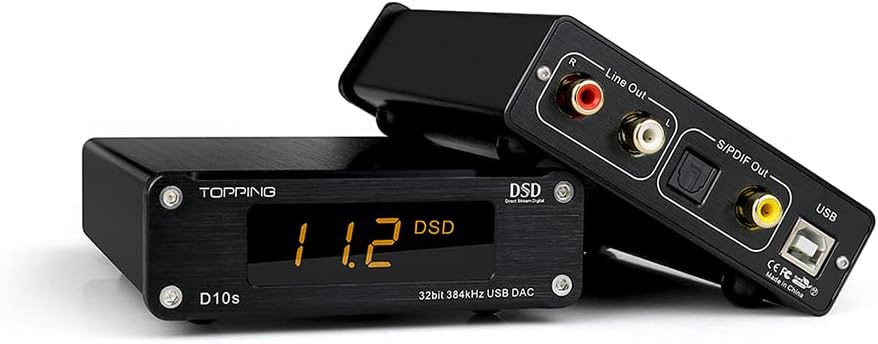
ചിത്രം 1.1: മുന്നിലും പിന്നിലും view of the TOPPING D10s USB DAC, showcasing അതിന്റെ ഒതുക്കമുള്ള രൂപകൽപ്പനയും വിവിധ ഇൻപുട്ട്/ഔട്ട്പുട്ട് പോർട്ടുകളും.
2 സുരക്ഷാ വിവരങ്ങൾ
- ഉപകരണം വെള്ളം, ഈർപ്പം അല്ലെങ്കിൽ തീവ്രമായ താപനില എന്നിവയിൽ തുറന്നുകാട്ടരുത്.
- താപ സ്രോതസ്സുകൾക്ക് സമീപം അല്ലെങ്കിൽ നേരിട്ട് സൂര്യപ്രകാശത്തിൽ ഉപകരണം സ്ഥാപിക്കുന്നത് ഒഴിവാക്കുക.
- Use only the provided USB cable for power and data connection.
- ഉപകരണം ഡിസ്അസംബ്ലിംഗ് ചെയ്യാനോ പരിഷ്ക്കരിക്കാനോ ശ്രമിക്കരുത്. എല്ലാ സേവനങ്ങളും യോഗ്യതയുള്ള ഉദ്യോഗസ്ഥരെ ഏൽപ്പിക്കുക.
- പ്രവർത്തന സമയത്ത് ഉപകരണത്തിന് ചുറ്റും ശരിയായ വായുസഞ്ചാരം ഉറപ്പാക്കുക.
3. പാക്കേജ് ഉള്ളടക്കം
പാക്കേജിൽ ഇനിപ്പറയുന്ന ഇനങ്ങൾ ഉണ്ടോ എന്ന് പരിശോധിക്കുക:
- 1 x TOPPING D10s Unit
- 1 x USB കേബിൾ
- 1 x ഉപയോക്തൃ മാനുവൽ
- 1 x TOPPING Repair Card (Warranty Card)
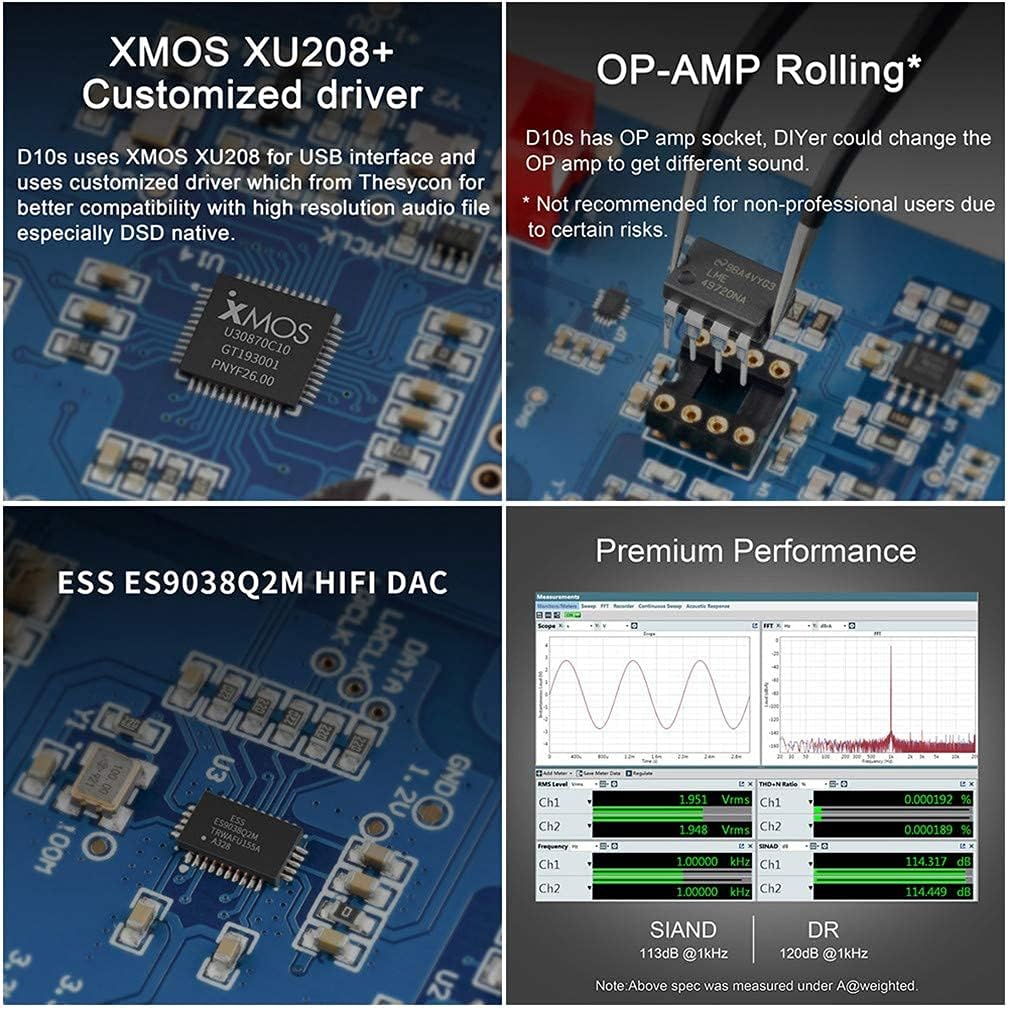
Image 3.1: Visual representation of the items included in the TOPPING D10s package.
4. ഉൽപ്പന്നം കഴിഞ്ഞുview
The TOPPING D10s is a compact USB DAC designed for high-resolution audio playback. It features a clear display and multiple output options.
4.1 ഫ്രണ്ട് പാനൽ

Image 4.1: Front panel of the D10s, displaying the current sampling rate (e.g., 384 kHz) and audio format (PCM).
- ഡിസ്പ്ലേ: Shows the current audio format (PCM or DSD) and sampling rate. The orange LED is designed to be soft and non-dazzling.
4.2 പിൻ പാനൽ

Image 4.2: Rear panel of the D10s, illustrating the various input and output connections.
- യുഎസ്ബി ഇൻപുട്ട്: Connects to your computer or phone for power and digital audio input.
- RCA Output (Line Out): Analog audio output for connecting to active speakers or an ampജീവൻ.
- Optical Output (S/PDIF Out): ഡിജിറ്റൽ ഓഡിയോ ഔട്ട്പുട്ട്.
- Coaxial Output (S/PDIF Out): ഡിജിറ്റൽ ഓഡിയോ ഔട്ട്പുട്ട്.
5. സജ്ജീകരണം
5.1 Connecting to Active Speakers
Connect the RCA Line Out ports of the D10s to the analog input of your active speakers. This configuration allows the D10s to act as a high-quality DAC, bypassing your computer's internal sound card.

ചിത്രം 5.1: ഉദാample setup connecting the D10s to active speakers and a computer.
5.2 Connecting to a Power/Headphone Ampജീവപര്യന്തം
To integrate the D10s into an existing HiFi system, connect the RCA Line Out of the D10s to the input of your power ampലൈഫ് അല്ലെങ്കിൽ ഹെഡ്ഫോൺ amplifier. This setup utilizes the D10s for digital-to-analog conversion, improving the sound quality of high-resolution audio files.
5.3 Using as a USB Interface (Digital Output)
If you possess a separate, higher-end DAC, the D10s can function as a USB interface. Connect the USB input of the D10s to your computer, and then connect the Coaxial or Optical output of the D10s to the digital input of your other DAC. The D10s will convert the USB audio stream into a Coaxial or Optical signal. Note that Coaxial and Optical outputs support up to 24bit/192kHz and DSD64 (DoP).
5.4 PC Connection and Driver Installation
For basic plug-and-play functionality, connect the D10s directly to your PC via the included USB cable. For optimal performance and DSD playback, especially on Windows systems, driver installation may be required.
- Connect the D10s to your computer using the supplied USB cable. The D10s will power on automatically with your PC.
- For Windows systems, it is recommended to install the customized Thesycon driver. This driver package and setup tutorial can typically be found on the manufacturer's support webസൈറ്റ്.
- For macOS, the D10s is generally plug-and-play and does not require additional drivers.
- After driver installation (if applicable), select the D10s as your audio output device in your operating system's sound settings.
- For advanced playback of high-resolution files, especially DSD, consider using dedicated audio playback software (e.g., Audirvana Plus for Mac, or other compatible players for Windows) that can output the original bit rate to the D10s.

Image 5.2: Illustrates PC audio settings and software for configuring the D10s.
6. ഓപ്പറേഷൻ
6.1 പവർ ഓൺ/ഓഫ്
The D10s is USB-powered and will automatically power on when connected to an active USB port on your computer. It will also synchronously power off when your PC shuts down, even if the USB port continues to supply power.
6.2 Audio Format and Sampling Rate Indicator
The front display of the D10s accurately indicates the audio format (PCM or DSD) and the sampling rate of the music currently playing. This allows for immediate verification of the audio stream's characteristics.

Image 6.1: D10s display showing DSD playback at 11.2 MHz.
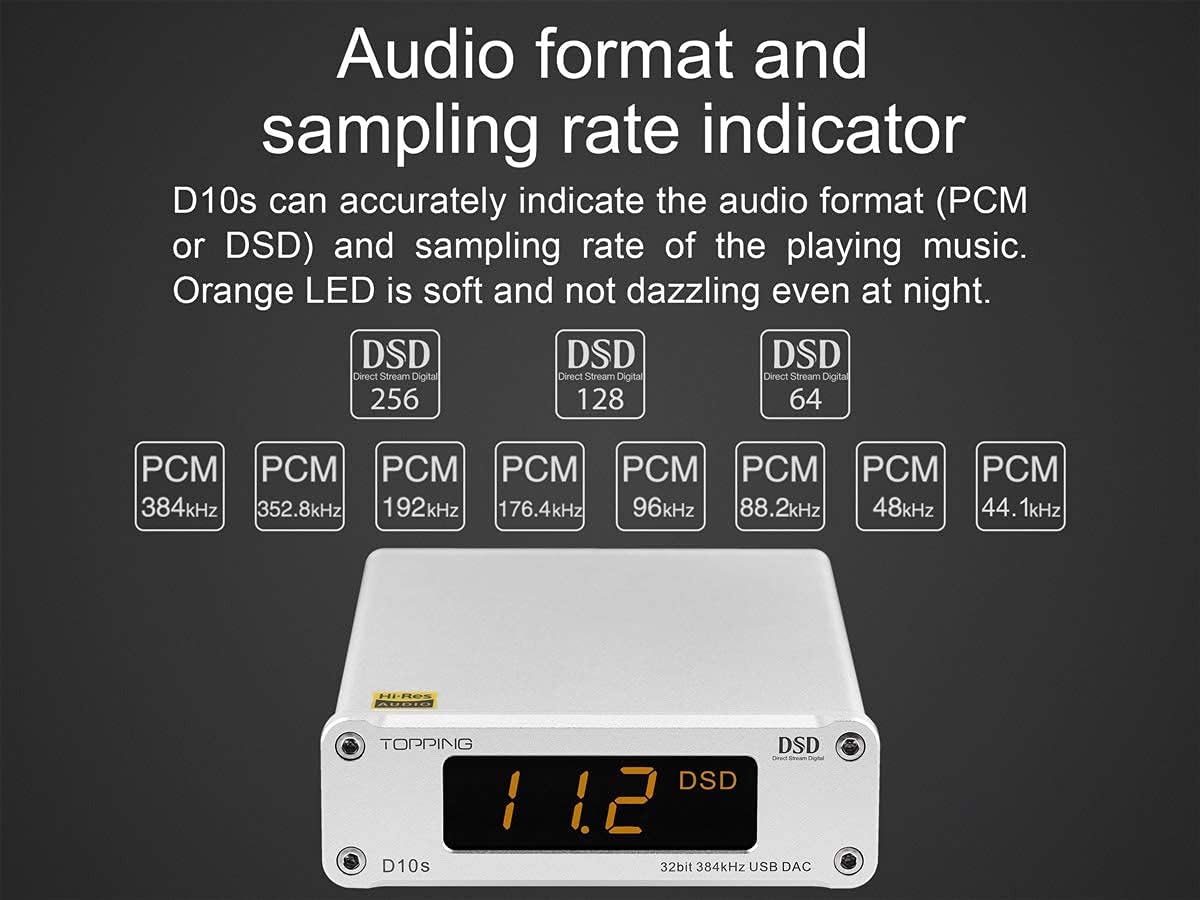
Image 6.2: Internal components of the D10s, highlighting the XMOS XU208 chip, ESS ES9038Q2M DAC, and the replaceable OP-AMP സോക്കറ്റ്.
6.3 Replaceable OP-AMP ഉരുളുന്നു
The TOPPING D10s features an OP-AMP socket, allowing experienced users to replace the operational amplifier to achieve different sound characteristics. This feature is intended for advanced users with knowledge of audio electronics.
Warning: Replacing the OP-AMP is not recommended for non-professional users due to potential risks of damaging the device or voiding the warranty. Proceed with caution and at your own risk.
7. പരിപാലനം
- വൃത്തിയാക്കൽ: ഉപകരണത്തിന്റെ പുറംഭാഗം വൃത്തിയാക്കാൻ മൃദുവായതും ഉണങ്ങിയതുമായ തുണി ഉപയോഗിക്കുക. ലിക്വിഡ് ക്ലീനറുകളോ ഉരച്ചിലുകളുള്ള വസ്തുക്കളോ ഉപയോഗിക്കരുത്.
- സംഭരണം: When not in use for extended periods, store the D10s in a cool, dry place away from direct sunlight and dust.
- വെൻ്റിലേഷൻ: Ensure that the device has adequate airflow around it to prevent overheating.
8. പ്രശ്നപരിഹാരം
| പ്രശ്നം | സാധ്യമായ കാരണം | പരിഹാരം |
|---|---|---|
| ശബ്ദ ഔട്ട്പുട്ട് ഇല്ല. |
|
|
| Display shows incorrect sampling rate or format. |
|
|
| പിസി ഉപകരണം തിരിച്ചറിഞ്ഞില്ല. |
|
|
9 സ്പെസിഫിക്കേഷനുകൾ
| ഫീച്ചർ | വിശദാംശങ്ങൾ |
|---|---|
| മോഡൽ | D10s |
| അളവുകൾ | 10.3 x 14.6 x 3.7 cm (4.06"W x 5.75"L x 1.46"H) |
| ഭാരം | 323 ഗ്രാം (10.6 ഔൺസ്) |
| നിറം | കറുപ്പ് |
| പവർ ഇൻപുട്ട് | DC5V/0.5A (USB powered) |
| ഇൻപുട്ട് | USB |
| ഡിജിറ്റൽ put ട്ട്പുട്ട് | Optical (OPT), Coaxial (COAX), RCA (Line Out) |
| പ്രദർശിപ്പിക്കുക | Customized Digital Tube |
| USB IN (PCM) | 44.1kHz-384kHz / 16Bit-32Bit |
| USB IN (DSD) | DSD64-DSD256 (Native); DSD128 (DoP) |
| ഓപ്റ്റ്/കോക്സ് ഔട്ട് | 44.1kHz-192kHz / 16Bit-24Bit, DSD64 (DoP) |
| THD+N @1kHz A-wt (Line Out/USB In@96kHz) | <0.0002% |
| SNR @1kHz A-wt | 120dB |
| Dynamic Range @1kHz A-wt | 120dB |
| Frequency Response @1kHz A-wt | 20Hz-20kHz (±0.1dB), 20Hz-40kHz (±0.4dB) |
| ഔട്ട്പുട്ട് ലെവൽ | 2Vrms @0dBFS |
| Noise @1kHz A-wt | <2.5uVrms |
| ചാനൽ Crosstalk@1kHz | -135dB |
| ചാനൽ ബാലൻസ് | <0.02dB |
| ഔട്ട്പുട്ട് ഇംപെഡൻസ് | 20Ω |
| മെറ്റീരിയൽ | അലുമിനിയം |
10. വാറൻ്റിയും പിന്തുണയും
The TOPPING D10s comes with a TOPPING repair card, which serves as your warranty document. Please refer to the terms and conditions specified on the repair card for details regarding warranty coverage and service procedures.
For technical support, troubleshooting assistance beyond this manual, or warranty claims, please contact your authorized dealer or the manufacturer's customer service. Contact information can typically be found on the TOPPING official website or the repair card.
Keep your purchase receipt and the repair card in a safe place as proof of purchase for warranty purposes.