
PowerPac PPFS212B 2-in-1 Dual-Usage Stand Fan Instruction Manual
Model: PPFS212B
1 പ്രധാനപ്പെട്ട സുരക്ഷാ വിവരങ്ങൾ
ഈ ഉപകരണം ഉപയോഗിക്കുന്നതിന് മുമ്പ് എല്ലാ നിർദ്ദേശങ്ങളും ശ്രദ്ധാപൂർവ്വം വായിക്കുകയും ഭാവിയിലെ റഫറൻസിനായി സൂക്ഷിക്കുകയും ചെയ്യുക. ഈ നിർദ്ദേശങ്ങൾ പാലിക്കുന്നതിൽ പരാജയപ്പെടുന്നത് വൈദ്യുതാഘാതം, തീപിടുത്തം അല്ലെങ്കിൽ ഗുരുതരമായ പരിക്കിന് കാരണമായേക്കാം.
- വോളിയം ഉറപ്പാക്കുകtagറേറ്റിംഗ് ലേബലിൽ സൂചിപ്പിച്ചിരിക്കുന്ന e നിങ്ങളുടെ മെയിൻസ് വിതരണ വോള്യവുമായി പൊരുത്തപ്പെടുന്നുtage.
- ഫാൻ, പ്ലഗ്, കോർഡ് എന്നിവ വെള്ളത്തിലോ മറ്റ് ദ്രാവകങ്ങളിലോ മുക്കരുത്.
- Unplug the fan from the power outlet before cleaning, assembling, or disassembling parts.
- Keep fingers, pencils, or any other objects out of the fan grille when it is running.
- കേടായ കമ്പിയിലോ പ്ലഗോ ഉപയോഗിച്ച് ഫാൻ പ്രവർത്തിപ്പിക്കരുത്. നന്നാക്കാൻ യോഗ്യതയുള്ള സർവീസ് ഉദ്യോഗസ്ഥരെ ബന്ധപ്പെടുക.
- This appliance is equipped with thermal fuse protection against overheating. If the fan stops working unexpectedly, unplug it and allow it to cool before attempting to restart.
- ശാരീരികമോ ഇന്ദ്രിയപരമോ മാനസികമോ ആയ കഴിവുകൾ കുറവുള്ള വ്യക്തികൾ (കുട്ടികൾ ഉൾപ്പെടെ) അല്ലെങ്കിൽ അവരുടെ സുരക്ഷയ്ക്ക് ഉത്തരവാദിയായ ഒരു വ്യക്തി ഉപകരണത്തിൻ്റെ ഉപയോഗത്തെ സംബന്ധിച്ച മേൽനോട്ടമോ നിർദ്ദേശമോ നൽകിയിട്ടില്ലെങ്കിൽ, ഈ ഉപകരണം ഉപയോഗിക്കാൻ ഉദ്ദേശിച്ചുള്ളതല്ല. .
2. ഉൽപ്പന്നം കഴിഞ്ഞുview
The PowerPac PPFS212B is a versatile 2-in-1 dual-usage stand fan designed for efficient cooling in indoor environments. It features 7 blades for maximum airflow, 3-speed settings, and an oscillation function for wider air distribution. The fan is equipped with thermal fuse protection for enhanced safety.
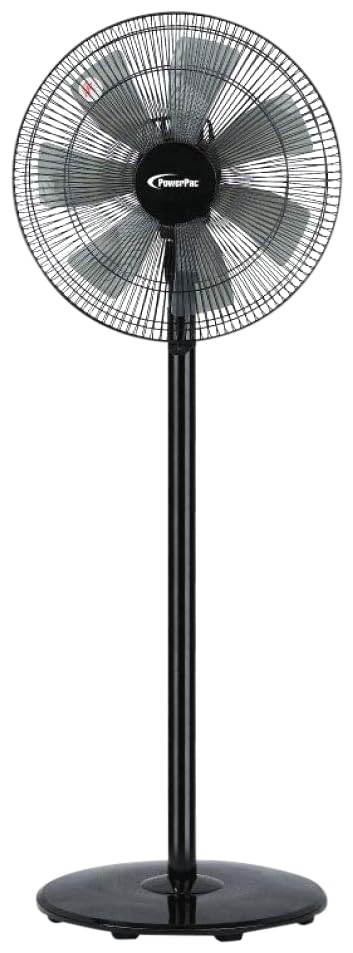
Image: PowerPac PPFS212B 2-in-1 Dual-Usage Stand Fan, showcasing its black finish and stand configuration.
3. പാക്കേജ് ഉള്ളടക്കം
Please check the package contents upon opening to ensure all parts are present and undamaged:
- 1 x PowerPac PPFS212B Stand Fan (includes fan head, stand pole, and base)
4. അസംബ്ലി നിർദ്ദേശങ്ങൾ
Follow these steps to assemble your PowerPac PPFS212B fan:
- പാക്കേജിംഗിൽ നിന്ന് എല്ലാ ഘടകങ്ങളും ശ്രദ്ധാപൂർവ്വം അൺപാക്ക് ചെയ്യുക.
- Attach the stand pole to the fan base. Ensure it is securely fastened according to the markings or locking mechanism.
- Mount the fan head assembly onto the top of the stand pole. Align the connection points and secure it firmly.
- Ensure all screws and fasteners are tightened to prevent wobbling during operation.
- Place the assembled fan on a stable, flat surface.
Image: Illustrative diagram of the PowerPac PPFS212B fan assembly, showing the base, stand, and fan head components.
5. പ്രവർത്തന നിർദ്ദേശങ്ങൾ
To operate your PowerPac PPFS212B fan:
- അനുയോജ്യമായ ഒരു ഇലക്ട്രിക്കൽ ഔട്ട്ലെറ്റിലേക്ക് പവർ കോർഡ് പ്ലഗ് ചെയ്യുക.
- പവർ ഓൺ/ഓഫ്: Press the 'ON/OFF' button (or corresponding button) on the control panel to turn the fan on or off.
- വേഗത ക്രമീകരണം: Press the 'SPEED' button repeatedly to cycle through the 3 available speed settings (Low, Medium, High).
- ഓസിലേഷൻ പ്രവർത്തനം: Press the 'OSC' button (or corresponding button) to activate or deactivate the oscillation feature, which allows the fan head to sweep from side to side.
- When finished, press the 'ON/OFF' button to turn off the fan and unplug it from the power outlet.
6. പരിപാലനവും ശുചീകരണവും
Regular cleaning and maintenance will help ensure optimal performance and longevity of your fan:
- വൃത്തിയാക്കുന്നതിന് മുമ്പ് എല്ലായ്പ്പോഴും വൈദ്യുതി വിതരണത്തിൽ നിന്ന് ഫാൻ അൺപ്ലഗ് ചെയ്യുക.
- ഒരു സോഫ്റ്റ് ഉപയോഗിക്കുക, ഡിamp cloth to wipe the exterior surfaces of the fan. Do not use abrasive cleaners, solvents, or harsh chemicals.
- To clean the fan blades, carefully remove the front grille (if detachable) according to the product design. Wipe the blades with a soft cloth. Ensure all parts are dry before reassembling.
- മോട്ടോർ ഭവനത്തിലേക്ക് വെള്ളം ഒഴുകാൻ അനുവദിക്കരുത്.
- ദീർഘനേരം ഉപയോഗിക്കാത്തപ്പോൾ ഫാൻ തണുത്തതും വരണ്ടതുമായ സ്ഥലത്ത് സൂക്ഷിക്കുക.
7. പ്രശ്നപരിഹാരം
നിങ്ങളുടെ ഫാനിൽ പ്രശ്നങ്ങൾ നേരിടുകയാണെങ്കിൽ, പൊതുവായ പ്രശ്നങ്ങളും പരിഹാരങ്ങളും അറിയാൻ താഴെ കൊടുത്തിരിക്കുന്ന പട്ടിക പരിശോധിക്കുക:
| പ്രശ്നം | സാധ്യമായ കാരണം | പരിഹാരം |
|---|---|---|
| ഫാൻ ഓണാകുന്നില്ല. | വൈദ്യുതി വിതരണം ഇല്ല. Thermal fuse activated. | ഔട്ട്ലെറ്റിൽ പ്ലഗ് സുരക്ഷിതമായി ചേർത്തിട്ടുണ്ടോയെന്ന് പരിശോധിക്കുക. പവർ ഔട്ട്ലെറ്റ് പ്രവർത്തനക്ഷമമാണെന്ന് ഉറപ്പാക്കുക. Unplug and allow the fan to cool down for 30 minutes before restarting. |
| വായുസഞ്ചാരം കുറവാണ് അല്ലെങ്കിൽ ഇല്ല. | ഫാൻ വേഗത വളരെ കുറവായി സജ്ജീകരിച്ചിരിക്കുന്നു. ഫാൻ ബ്ലേഡുകൾ വൃത്തികെട്ടതാണ്. | ഫാൻ വേഗത ക്രമീകരണം വർദ്ധിപ്പിക്കുക. Unplug the fan and clean the blades as per maintenance instructions. |
| ഫാൻ ആന്ദോളനം ചെയ്യുന്നില്ല. | ഓസിലേഷൻ ഫംഗ്ഷൻ ഓഫാണ്. | Press the 'OSC' button to activate oscillation. |
| പ്രവർത്തന സമയത്ത് അസാധാരണമായ ശബ്ദം. | അയഞ്ഞ ഭാഗങ്ങൾ. തടസ്സം. | Unplug the fan and check for any loose components or obstructions around the blades or motor. Tighten any loose parts. |
ഈ പരിഹാരങ്ങൾ പരീക്ഷിച്ചതിനുശേഷവും പ്രശ്നം നിലനിൽക്കുകയാണെങ്കിൽ, ദയവായി ഉപഭോക്തൃ പിന്തുണയുമായി ബന്ധപ്പെടുക.
8 സ്പെസിഫിക്കേഷനുകൾ
| ഫീച്ചർ | സ്പെസിഫിക്കേഷൻ |
|---|---|
| ബ്രാൻഡ് | പവർപാക് |
| മോഡൽ നമ്പർ | PPFS212B |
| ടൈപ്പ് ചെയ്യുക | 2-in-1 Dual-Usage Stand Fan |
| ബ്ലേഡുകളുടെ എണ്ണം | 7 |
| വേഗതകളുടെ എണ്ണം | 3 |
| പവർ ഉറവിടം | കോർഡഡ് ഇലക്ട്രിക് |
| വാട്ട്tage | 50 വാട്ട്സ് |
| നിയന്ത്രണ രീതി | പുഷ് ബട്ടൺ |
| പ്രത്യേക സവിശേഷതകൾ | Oscillating, Thermal Fuse Protection |
| മെറ്റീരിയൽ | പ്ലാസ്റ്റിക് |
| ഇൻഡോർ/ഔട്ട്ഡോർ ഉപയോഗം | ഇൻഡോർ |
| നിറം | കറുപ്പ് |
9. വാറൻ്റിയും പിന്തുണയും
This PowerPac PPFS212B fan comes with a 2 വർഷത്തെ വാറൻ്റി വാങ്ങിയ തീയതി മുതൽ. സാധാരണ ഉപയോഗ സാഹചര്യങ്ങളിൽ നിർമ്മാണ വൈകല്യങ്ങൾ ഈ വാറന്റി ഉൾക്കൊള്ളുന്നു.
For warranty claims, technical support, or any inquiries regarding your product, please contact PowerPac customer service. Keep your proof of purchase for warranty validation.