
1. ആമുഖം
This manual provides instructions for the AT&T BL102-3 DECT 6.0 3-Handset Cordless Phone system. This system includes a digital answering machine, Smart Call Blocker, Caller ID Announcer, Audio Assist, and intercom functionality. It is designed for home use and offers extended range and clear audio quality.

ചിത്രം: കഴിഞ്ഞുview of the AT&T BL102-3S 3-handset cordless phone system, highlighting its answering machine and smart call blocker features.
2. സജ്ജീകരണം
2.1 പാക്കേജ് ഉള്ളടക്കം
നിങ്ങളുടെ പാക്കേജിൽ ഇനിപ്പറയുന്ന ഇനങ്ങൾ അടങ്ങിയിട്ടുണ്ടെന്ന് പരിശോധിക്കുക:
- കോർഡ്ലെസ് ഹാൻഡ്സെറ്റുകൾ (3)
- ഡിജിറ്റൽ ആൻസറിംഗ് സിസ്റ്റമുള്ള ബേസ് യൂണിറ്റ്
- Chargers for Handsets (2)
- ബേസ് യൂണിറ്റിനുള്ള പവർ അഡാപ്റ്റർ
- ടെലിഫോൺ ലൈൻ കോർഡ്
- ഹാൻഡ്സെറ്റുകൾക്ക് റീചാർജ് ചെയ്യാവുന്ന ബാറ്ററികൾ
- ഉപയോക്തൃ മാനുവൽ (ഈ പ്രമാണം)
2.2 ബേസ് യൂണിറ്റ് ബന്ധിപ്പിക്കുന്നു
- പവർ അഡാപ്റ്റർ ബേസ് യൂണിറ്റിലേക്കും ഒരു വാൾ ഔട്ട്ലെറ്റിലേക്കും ബന്ധിപ്പിക്കുക.
- Connect one end of the telephone line cord to the base unit and the other end to a telephone wall jack.
- Place the base unit on a flat, stable surface or mount it to a wall (mounting hardware not included).

Image: The AT&T BL102-3S base unit shown in both table-top and wall-mounted configurations, demonstrating its versatility.
2.3 ഹാൻഡ്സെറ്റ് ബാറ്ററികൾ ഇൻസ്റ്റാൾ ചെയ്യുകയും ചാർജ് ചെയ്യുകയും ചെയ്യുന്നു
- ഓരോ ഹാൻഡ്സെറ്റിന്റെയും പിൻഭാഗത്തുള്ള ബാറ്ററി കമ്പാർട്ട്മെന്റ് കവർ തുറക്കുക.
- Insert the supplied rechargeable battery, ensuring correct polarity.
- ബാറ്ററി കമ്പാർട്ട്മെൻ്റ് കവർ അടയ്ക്കുക.
- Place each handset in its respective charger or the base unit. The CHARGE indicator on the handset will illuminate.
- മികച്ച ബാറ്ററി പ്രകടനം ഉറപ്പാക്കാൻ, പ്രാരംഭ ഉപയോഗത്തിന് മുമ്പ് ഹാൻഡ്സെറ്റുകൾ കുറഞ്ഞത് 16 മണിക്കൂറെങ്കിലും ചാർജ് ചെയ്യാൻ അനുവദിക്കുക.
2.4 Initial Handset Setup
After charging, the handset will prompt you to set the date and time. Follow the on-screen instructions. You may also be prompted to select a language.
3. ഫോൺ പ്രവർത്തിപ്പിക്കൽ
3.1 കോളുകൾ ചെയ്യലും സ്വീകരിക്കലും
- ഒരു കോൾ ചെയ്യാൻ: അമർത്തുക ഫോൺ / ഫ്ലാഷ് or സ്പീക്കർ, തുടർന്ന് നമ്പർ ഡയൽ ചെയ്യുക.
- ഒരു കോളിന് ഉത്തരം നൽകാൻ: അമർത്തുക ഫോൺ / ഫ്ലാഷ് or സ്പീക്കർ ഫോൺ റിംഗ് ചെയ്യുമ്പോൾ.
- ഒരു കോൾ അവസാനിപ്പിക്കാൻ: അമർത്തുക ഓഫ്/റദ്ദാക്കുക അല്ലെങ്കിൽ ഹാൻഡ്സെറ്റ് ചാർജറിൽ വയ്ക്കുക.
3.2 Handset Speakerphone
ഈ ഹാൻഡ്സെറ്റിൽ ഒരു ഫുൾ-ഡ്യൂപ്ലെക്സ് സ്പീക്കർഫോൺ ഉണ്ട്, ഇത് ഇരു കക്ഷികൾക്കും സംസാരിക്കാനും സ്വാഭാവിക സംഭാഷണങ്ങൾക്കായി ഒരേസമയം കേൾക്കാനും അനുവദിക്കുന്നു.

Image: A cordless handset with its speakerphone function active, indicating hands-free communication.
3.3 Audio Assist
അമർത്തുക ഓഡിയോ അസിസ്റ്റ് button on the side of the handset to instantly boost volume and enhance sound frequencies, making speech easier to understand.

Image: A user holding the handset, with the 'Audio Assist' button on the side highlighted, indicating its function for enhanced sound.
3.4 കോളർ ഐഡി പ്രഖ്യാപനം
When a call comes in, the handset announces the name of the caller (if available in your Caller ID service and phonebook), allowing you to screen calls without looking at the display.

Image: The handset displaying a call from "Mr. Johnson" with a speech bubble indicating "Mr. Johnson is calling...", illustrating the Caller ID Announce feature.
3.5 ഇൻ്റർകോം
Use the intercom feature to communicate between handsets within your system. Press ഇന്റർകോം (if available on your model) or follow the menu options to initiate an intercom call.
3.6 വിപുലീകരണം
The system is expandable up to 5 handsets using the BL102-0 accessory handset (sold separately).
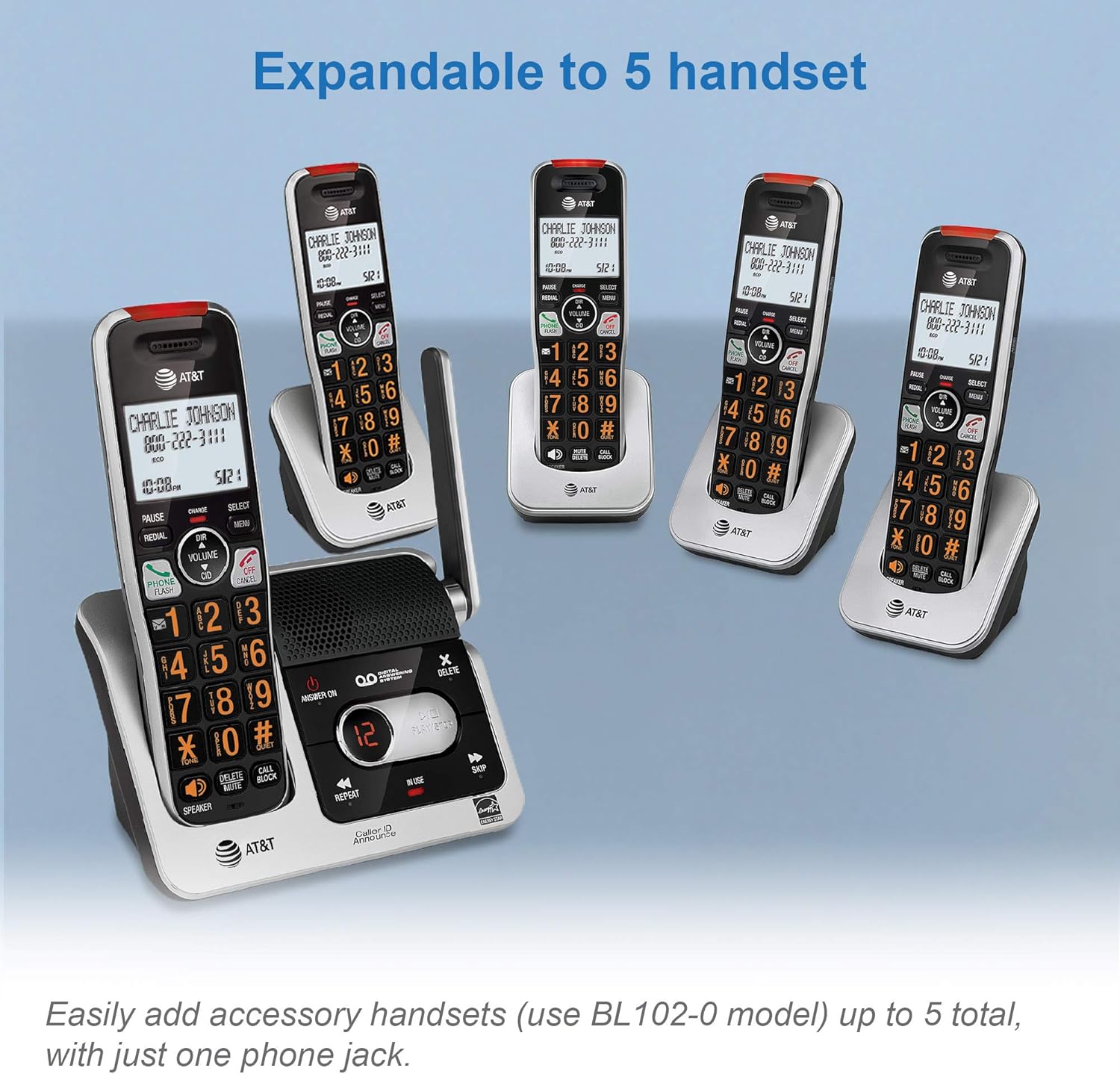
Image: The AT&T BL102-3S base unit with multiple accessory handsets, demonstrating the system's expandability up to five handsets.
4. ഡിജിറ്റൽ ആൻസറിംഗ് സിസ്റ്റം
The integrated digital answering system can record up to 22 minutes of incoming messages, outgoing announcements, and memos.
4.1 ആൻസറിംഗ് സിസ്റ്റം ഓൺ/ഓഫ് ആക്കൽ
അമർത്തുക ഉത്തരം / ഓഫ് ചെയ്യുക ഉത്തരം നൽകുന്ന സംവിധാനം സജീവമാക്കുന്നതിനോ നിർജ്ജീവമാക്കുന്നതിനോ അടിസ്ഥാന യൂണിറ്റിലെ ബട്ടൺ.
4.2 Message Playback
അമർത്തുക കളിക്കുക/നിർത്തുക on the base unit to listen to messages. Use ആവർത്തിക്കുക to replay the current message or ഒഴിവാക്കുക to advance to the next message. The LED message counter displays the number of new messages.

Image: The base unit's answering system controls, showing the LED message counter displaying '12' and a speech bubble with a message, indicating message playback functionality.
4.3 റിമോട്ട് ആക്സസ്
You can access your answering system remotely from any touch-tone phone. Refer to the full user manual for detailed instructions on setting up and using remote access.
5. സ്മാർട്ട് കോൾ ബ്ലോക്കർ
The Smart Call Blocker feature helps filter unwanted calls, including robocalls, telemarketers, and nuisance calls.

Image: The handset and base unit with a red 'no entry' symbol over a person icon, illustrating the Smart Call Blocker's function to block unwanted callers.
5.1 ഇത് എങ്ങനെ പ്രവർത്തിക്കുന്നു
- Robocall Blocking: Robocalls are automatically blocked from ringing through.
- Blacklisting Numbers: You can permanently blacklist any number with one touch using the dedicated ബ്ലോക്ക് വിളിക്കുക key on the handset. The call block directory can store up to 1,000 entries.
- കോൾ സ്ക്രീനിംഗ്: For unknown callers, the system can prompt them to announce their name or press a key, allowing you to decide whether to answer or block the call.

Image: A detailed graphic explaining how the Smart Call Blocker screens robocalls, unknown callers, and manages trusted organizations, with a visual representation of the handset and call block button.
6. പരിപാലനം
6.1 വൃത്തിയാക്കൽ
ഫോണും ബേസ് യൂണിറ്റും ഒരു സോഫ്റ്റ്, ഡി ക്ലീനർ ഉപയോഗിച്ച് വൃത്തിയാക്കുക.amp തുണി. ക്ലീനിംഗ് സ്പ്രേകളോ കഠിനമായ രാസവസ്തുക്കളോ ഉപയോഗിക്കരുത്, കാരണം ഇവ ഫിനിഷിനോ ഇലക്ട്രിക്കൽ ഘടകങ്ങൾക്കോ കേടുവരുത്തും.
6.2 ബാറ്ററി കെയർ
- Use only the supplied rechargeable batteries or equivalent replacements.
- തീപിടുത്തമുണ്ടായാൽ ബാറ്ററികൾ നശിപ്പിക്കരുത്. പ്രത്യേക ഉപയോഗ നിർദ്ദേശങ്ങൾക്കായി പ്രാദേശിക കോഡുകൾ പരിശോധിക്കുക.
- ഫോൺ കൂടുതൽ നേരം ഉപയോഗിക്കാൻ കഴിയുന്നില്ലെങ്കിൽ, ചോർച്ച തടയാൻ ബാറ്ററികൾ നീക്കം ചെയ്യുക.
7. പ്രശ്നപരിഹാരം
നിങ്ങളുടെ ഫോൺ സിസ്റ്റത്തിൽ പ്രശ്നങ്ങൾ അനുഭവപ്പെടുകയാണെങ്കിൽ, ഇനിപ്പറയുന്ന പരിഹാരങ്ങൾ പരീക്ഷിക്കുക:
| പ്രശ്നം | പരിഹാരം |
|---|---|
| ഡയൽ ടോൺ ഇല്ല | Ensure the telephone line cord is securely connected to both the base unit and the wall jack. Check if the power adapter is connected to the base unit and a working electrical outlet. |
| ഹാൻഡ്സെറ്റ് ചാർജ് ചെയ്യുന്നില്ല | Ensure the handset is correctly placed in the charger. Verify the charger is plugged into a working power outlet. Clean the charging contacts on both the handset and charger. |
| Poor sound quality/range | ബേസ് യൂണിറ്റിന് അടുത്തേക്ക് നീങ്ങുക. തടസ്സമുണ്ടാക്കുന്ന മറ്റ് ഇലക്ട്രോണിക് ഉപകരണങ്ങൾക്ക് (ഉദാ: മൈക്രോവേവ്, വൈ-ഫൈ റൂട്ടറുകൾ) സമീപം ബേസ് യൂണിറ്റ് വയ്ക്കുന്നത് ഒഴിവാക്കുക. |
| സ്മാർട്ട് കോൾ ബ്ലോക്കർ പ്രതീക്ഷിച്ചതുപോലെ പ്രവർത്തിക്കുന്നില്ല. | Review the Smart Call Blocker settings in the handset menu. Ensure the feature is enabled and that numbers are correctly added to the block list or trusted list. |
| മറുപടി നൽകുന്ന സംവിധാനം സന്ദേശങ്ങൾ റെക്കോർഡ് ചെയ്യുന്നില്ല. | ഉത്തരം നൽകുന്ന സംവിധാനം ഓണാക്കിയിട്ടുണ്ടെന്ന് ഉറപ്പാക്കുക. മെമ്മറി നിറഞ്ഞിട്ടുണ്ടോയെന്ന് പരിശോധിക്കുക; ആവശ്യമെങ്കിൽ പഴയ സന്ദേശങ്ങൾ ഇല്ലാതാക്കുക. |
8 സ്പെസിഫിക്കേഷനുകൾ
8.1 പൊതുവായത്
- സാങ്കേതികവിദ്യ: DECT 6.0 Digital technology
- ഹാൻഡ്സെറ്റുകൾ: 3 (5 വരെ വികസിപ്പിക്കാം)
- ഉത്തരം നൽകുന്ന സംവിധാനം: ഡിജിറ്റൽ, 22 മിനിറ്റ് വരെ റെക്കോർഡിംഗ് സമയം
- കോൾ തടയൽ: Smart Call Blocker, 1000 name/number directory
- കോളർ ഐഡി: 50 name/number caller ID history, Caller ID Announce
- ഫോണ്നമ്പറുകള് അടങ്ങിയ പുസ്തകം: 50 name/number directory
- ഡിസ്പ്ലേ: Large 2-inch LCD with high-contrast text
- കീപാഡ്: Enlarged font, extra-large, and lighted
- ഓഡിയോ സവിശേഷതകൾ: Handset speakerphone, Audio Assist, Volume control
- മറ്റ് സവിശേഷതകൾ: Visual Ringer, Quiet mode, ECO mode, Intercom between handsets, Conference between an outside line and up to 4 cordless handsets, Last 10 number redial, Any key answer
- ഊർജ്ജ സ്രോതസ്സ്: Battery Powered (rechargeable Ni-MH batteries)
- മെറ്റീരിയൽ: പ്ലാസ്റ്റിക്
- നിറം: വെള്ളി/കറുപ്പ്
8.2 അളവുകൾ

Image: Diagram showing the dimensions of the AT&T BL102-3S base unit: Height 7.39 inches (18.77 cm), Width 3.46 inches (8.79 cm), Length 5.68 inches (14.43 cm).

Image: Diagram showing the dimensions of the AT&T BL102-3S handset: Height 7.29 inches (18.52 cm), Width 3.00 inches (7.62 cm), Length 2.83 inches (7.19 cm).
9. വാറൻ്റിയും പിന്തുണയും
9.1 വാറൻ്റി വിവരങ്ങൾ
This product is covered by a limited warranty. Please refer to the warranty card included in your product packaging or visit the manufacturer's official webവിശദമായ വാറന്റി നിബന്ധനകൾക്കും വ്യവസ്ഥകൾക്കും സൈറ്റ്.
9.2 ഉപഭോക്തൃ പിന്തുണ
For technical assistance, product registration, or to purchase accessories, please visit the VTech (manufacturer of AT&T branded phones) support website or contact their customer service line. Contact details are typically provided in the product packaging or on the official VTech webസൈറ്റ്.