
AUNA PAS5_Disgobox DVD
auna pro DisGo Box DVD Mobile PA System User Manual
Model: PAS5_Disgobox DVD
1. ആമുഖം
വാങ്ങിയതിന് നന്ദി.asing the auna pro DisGo Box DVD Mobile PA System. This versatile audio system is designed for karaoke events, presentations, and various mobile sound applications, featuring an integrated DVD player, Bluetooth connectivity, USB/SD slots, and wireless UHF microphones. This manual provides essential information for safe operation, setup, maintenance, and troubleshooting to ensure optimal performance and longevity of your device.
2. സുരക്ഷാ നിർദ്ദേശങ്ങൾ
ഉപകരണം പ്രവർത്തിപ്പിക്കുന്നതിന് മുമ്പ് ദയവായി ഈ സുരക്ഷാ നിർദ്ദേശങ്ങൾ ശ്രദ്ധാപൂർവ്വം വായിക്കുക. ഭാവിയിലെ റഫറൻസിനായി ഈ മാനുവൽ സൂക്ഷിക്കുക.
- ഊർജ്ജ സ്രോതസ്സ്: Only connect the device to a power supply as indicated on the rating label. Ensure the voltagഇ അനുയോജ്യമാണ്.
- ബാറ്ററി സുരക്ഷ: Do not expose the battery to excessive heat or direct sunlight. Do not short-circuit the battery terminals. Fully charge the battery before first use.
- വെൻ്റിലേഷൻ: യൂണിറ്റിന് ചുറ്റും മതിയായ വായുസഞ്ചാരം ഉറപ്പാക്കുക. വെന്റിലേഷൻ തുറസ്സുകൾ തടയരുത്.
- ജലവും ഈർപ്പവും: Do not expose the device to rain, moisture, or dripping/splashing liquids. Do not place objects filled with liquids on the device.
- വൃത്തിയാക്കൽ: Disconnect the power before cleaning. Use a dry, soft cloth. Do not use liquid cleaners or aerosols.
- സേവനം: യൂണിറ്റ് സ്വയം നന്നാക്കാൻ ശ്രമിക്കരുത്. എല്ലാ സേവനങ്ങളും യോഗ്യതയുള്ള സേവന ഉദ്യോഗസ്ഥരെ ഏൽപ്പിക്കുക.
- പ്ലേസ്മെൻ്റ്: Place the unit on a stable, flat surface. Avoid placing it near heat sources or in direct sunlight.
- മൈക്രോഫോൺ ബാറ്ററികൾ: Use the correct type and size of batteries for the wireless microphones. Insert batteries with correct polarity.
3. പാക്കേജ് ഉള്ളടക്കം
താഴെ ലിസ്റ്റ് ചെയ്തിരിക്കുന്ന എല്ലാ ഇനങ്ങളും നിങ്ങളുടെ പാക്കേജിൽ ഉൾപ്പെടുത്തിയിട്ടുണ്ടെന്ന് ഉറപ്പാക്കുക:
- 1 x PA System Unit
- 1 x പവർ കേബിൾ
- 2 x UHF വയർലെസ് മൈക്രോഫോണുകൾ
- 1 x റിമോട്ട് കൺട്രോൾ
- 1 x ഉപയോക്തൃ മാനുവൽ (ഈ പ്രമാണം)

Figure 3.1: The auna pro DisGo Box DVD PA system, showing the main unit, two wireless microphones, and the remote control.
4. ഉൽപ്പന്നം കഴിഞ്ഞുview
Familiarize yourself with the main components and features of your DisGo Box DVD PA system.
4.1 പ്രധാന സവിശേഷതകൾ
- ശക്തമായ ശബ്ദം: Equipped with 2 x 10'' (25.5 cm) subwoofers for robust audio output.
- XMR Bass Technology: Delivers full, deep bass for an immersive sound experience.
- Integrated DVD Player: Supports DVD playback for video content.
- ബഹുമുഖ കണക്റ്റിവിറ്റി: Features MP3-compatible USB ports and an SD card slot for diverse music sources.
- വയർലെസ് മൈക്രോഫോണുകൾ: Includes two UHF wireless microphones for stable, noise-free transmission up to 50 meters.
- ബ്ലൂടൂത്ത് ഇന്റർഫേസ്: Seamlessly stream music from smartphones or tablets.
- നീണ്ട ബാറ്ററി ലൈഫ്: Integrated 7A/12V battery provides approximately 3-5 hours of continuous operation.
- പോർട്ടബിൾ ഡിസൈൻ: Features a retractable trolley handle and smooth-running floor rollers for easy transport.

Figure 4.1: The system delivers powerful sound, suitable for karaoke and events.

Figure 4.2: XMR Bass Technology ensures full and deep low frequencies.

Figure 4.3: The integrated battery provides extended operating time.
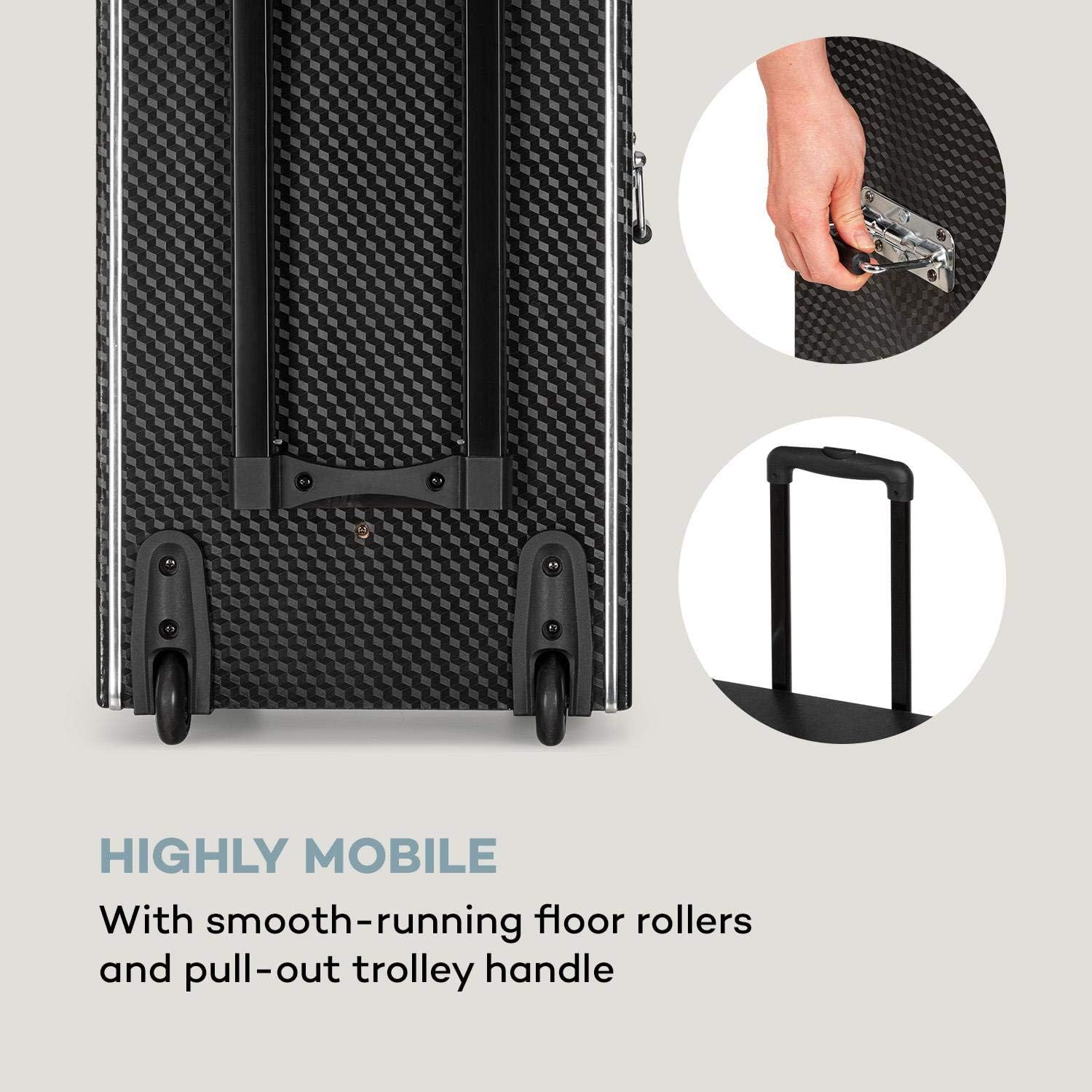
Figure 4.4: The system is highly mobile with smooth-running rollers and a pull-out trolley handle.
4.2 നിയന്ത്രണ പാനലും കണക്ഷനുകളും
The control panel provides access to all functions and inputs/outputs.
- ഇൻപുട്ടുകൾ:
- 1 x 6.3 mm Microphone Input
- 1 x 6.3 mm Guitar Input
- 1 x RCA Line-in
- 3 x USB Ports (MP3 compatible)
- 1 x SD സ്ലോട്ട്
- ഔട്ട്പുട്ടുകൾ:
- 1 x RCA DVD-out
- 1 x RCA Video-out
- 1 x Speaker Terminals
- നിയന്ത്രണങ്ങൾ:
- വോളിയം നിയന്ത്രണങ്ങൾ
- 2-band Equalizer (Bass and Treble)
- Microphone Volume and Echo Controls
- ഡിവിഡി പ്ലെയർ നിയന്ത്രണങ്ങൾ
- ഇൻപുട്ട് സെലക്ടർ

Figure 4.5: The top control panel with various inputs and sound adjustments.

Figure 4.6: The front panel features the DVD player, USB ports, and SD card slot for diverse media playback.
5. സജ്ജീകരണം
Follow these steps for initial setup of your PA system.
- അൺപാക്ക് ചെയ്യുന്നു: പാക്കേജിംഗിൽ നിന്ന് എല്ലാ ഘടകങ്ങളും ശ്രദ്ധാപൂർവ്വം നീക്കം ചെയ്യുക. ഭാവിയിലെ ഗതാഗതത്തിനോ സംഭരണത്തിനോ വേണ്ടി പാക്കേജിംഗ് സൂക്ഷിക്കുക.
- പ്രാരംഭ ബാറ്ററി ചാർജ്: Before first use, fully charge the integrated battery for 5-8 hours using the provided power cable. The battery indicator will show charging status.
- മൈക്രോഫോൺ ബാറ്ററികൾ: Open the battery compartment of each UHF wireless microphone and insert 2 x 1.5V AA batteries, observing correct polarity.
- പ്ലേസ്മെൻ്റ്: Position the PA system on a stable, flat surface. Ensure there is sufficient space around the unit for ventilation.
- പവർ കണക്ഷൻ: Connect the power cable to the unit and then to a suitable power outlet (220-240 V~ | 50/60 Hz). The unit can operate on mains power or its internal battery.
6. പ്രവർത്തന നിർദ്ദേശങ്ങൾ
This section details how to operate the various functions of your DisGo Box DVD PA system.
6.1 പവർ ഓൺ/ഓഫ്
Locate the power switch on the unit. Press to turn the system ON or OFF.
6.2 Media Playback (DVD, USB, SD)
- ഡിവിഡി പ്ലേബാക്ക്: Insert a DVD into the DVD slot. Use the remote control or front panel buttons to control playback (Play, Pause, Stop, Skip). Connect the RCA video-out to an external display for video.
- USB/SD പ്ലേബാക്ക്: Insert a USB flash drive into one of the USB ports or an SD card into the SD slot. The system will automatically detect and play compatible MP3 files. Use the control panel or remote for navigation.
6.3 ബ്ലൂടൂത്ത് കണക്ഷൻ
Connect your smartphone or tablet wirelessly via Bluetooth.
- PA സിസ്റ്റം ഓണാക്കിയിട്ടുണ്ടെന്ന് ഉറപ്പാക്കുക.
- Select the Bluetooth input mode on the PA system.
- നിങ്ങളുടെ മൊബൈൽ ഉപകരണത്തിൽ, ബ്ലൂടൂത്ത് പ്രവർത്തനക്ഷമമാക്കി ലഭ്യമായ ഉപകരണങ്ങൾക്കായി തിരയുക.
- Select "auna pro DisGo Box DVD" (or similar name) from the list to pair.
- Once paired, you can stream audio from your device to the PA system.

Figure 6.1: Easily connect your smartphone or tablet via Bluetooth for wireless audio streaming.
6.4 Using Wireless Microphones
The system includes two UHF wireless microphones for vocal performances.
- Ensure batteries are inserted correctly into the microphones.
- മൈക്രോഫോണുകൾ അവയുടെ പവർ സ്വിച്ചുകൾ ഉപയോഗിച്ച് ഓണാക്കുക.
- The microphones will automatically connect to the PA system.
- Adjust microphone volume and echo effects using the dedicated controls on the PA system's control panel.

Figure 6.2: The UHF radio microphones provide wireless performance for singing or speaking.
6.5 ശബ്ദ ക്രമീകരണം
Use the equalizer controls to fine-tune the audio output.
- ബാസ് നിയന്ത്രണം: ലോ-ഫ്രീക്വൻസി ഔട്ട്പുട്ട് ക്രമീകരിക്കുന്നു.
- ട്രെബിൾ നിയന്ത്രണം: ഉയർന്ന ഫ്രീക്വൻസി ഔട്ട്പുട്ട് ക്രമീകരിക്കുന്നു.
- മാസ്റ്റർ വോളിയം: സിസ്റ്റത്തിന്റെ മൊത്തത്തിലുള്ള ഔട്ട്പുട്ട് വോളിയം നിയന്ത്രിക്കുന്നു.
7. പരിപാലനം
Proper maintenance ensures the longevity and optimal performance of your PA system.
- വൃത്തിയാക്കൽ: Disconnect the power cable before cleaning. Use a soft, dry cloth to wipe the exterior surfaces. Do not use abrasive cleaners, waxes, or solvents.
- ബാറ്ററി കെയർ: To maximize battery life, avoid fully discharging the battery frequently. Recharge the battery regularly, even if the unit is not in use for extended periods (e.g., every 3 months). Store the unit in a cool, dry place.
- സംഭരണം: When not in use, store the unit in a dust-free environment. If storing for a long time, ensure the battery is partially charged.
8. പ്രശ്നപരിഹാരം
If you encounter issues with your PA system, refer to the following common problems and solutions.
| പ്രശ്നം | സാധ്യമായ കാരണം | പരിഹാരം |
|---|---|---|
| ശക്തിയില്ല | Power cable not connected; battery discharged; power switch off. | Ensure power cable is securely connected. Charge the battery. Turn the power switch ON. |
| ശബ്ദ ഔട്ട്പുട്ട് ഇല്ല | Volume too low; incorrect input selected; audio source issue. | Increase master volume. Select the correct input source (DVD, USB, SD, Bluetooth, Line-in). Check audio source device. |
| മൈക്രോഫോണുകൾ പ്രവർത്തിക്കുന്നില്ല | Microphone batteries low/dead; microphone power off; microphone volume low. | Replace microphone batteries. Turn on microphones. Increase microphone volume on the PA system. |
| ബ്ലൂടൂത്ത് കണക്ഷൻ പ്രശ്നങ്ങൾ | Device not in pairing mode; previously paired device interfering; distance too far. | Ensure PA system is in Bluetooth pairing mode. Turn off Bluetooth on previously paired devices. Move mobile device closer to the PA system. |
| ഡിവിഡി പ്ലേ ചെയ്യുന്നില്ല | Disc dirty/scratched; incorrect format; disc inserted incorrectly. | Clean the disc. Ensure the disc format is supported. Re-insert the disc correctly. |
9 സ്പെസിഫിക്കേഷനുകൾ
Detailed technical specifications for the auna pro DisGo Box DVD Mobile PA System.
| ഫീച്ചർ | സ്പെസിഫിക്കേഷൻ |
|---|---|
| മോഡൽ നമ്പർ | PAS5_Disgobox DVD |
| ബ്രാൻഡ് | ഔന |
| പവർ ഔട്ട്പുട്ട് | Max. 300 Watt / 150 Watt RMS |
| സബ് വൂഫർ വലിപ്പം | 2 x 10'' (25.5 cm) |
| കണക്റ്റിവിറ്റി | Bluetooth, USB, SD, 6.3mm Microphone, 6.3mm Guitar, RCA Line-in |
| ഔട്ട്പുട്ടുകൾ | RCA DVD-out, RCA Video-out, Speaker Terminals |
| ഇക്വലൈസർ | 2-band (Bass, Treble) |
| വയർലെസ് മൈക്രോഫോണുകൾ | UHF, Handheld type, Range up to 50m |
| മൈക്രോഫോൺ പവർ | 2 x 1.5V AA Battery per microphone |
| ബാറ്ററി തരം | 7A 12V (integrated) |
| ബാറ്ററി പ്രവർത്തന സമയം | Approx. 3 - 5 hours (volume dependent) |
| ബാറ്ററി ചാർജ് സമയം | 5 - 8 മണിക്കൂർ |
| വൈദ്യുതി വിതരണം | 220-240 V~ | 50/60 Hz (Mains) or 7A 12V Battery |
| അളവുകൾ (WxHxD) | ഏകദേശം. 37.5 x 59.5 x 30 സെ |
| Dimensions (Trolley Function) | ഏകദേശം. 37.5 x 89.5 x 30 സെ |
| ഭാരം | ഏകദേശം 13.5 കിലോ |
10. വാറൻ്റിയും പിന്തുണയും
For warranty information and technical support, please refer to the warranty card included with your product or contact your retailer or the manufacturer directly. Keep your proof of purchase for any warranty claims.
For further assistance, you may visit the official AUNA webസൈറ്റ് അല്ലെങ്കിൽ അവരുടെ ഉപഭോക്തൃ സേവന വിഭാഗവുമായി ബന്ധപ്പെടുക.
Ask a question about this manual
Ask about setup, troubleshooting, compatibility, parts, safety, or missing instructions. Manuals+ will review the question and use this page’s manual context to help answer it.