
TecTake 402997-NL
tectake 402997 Denis Electric Desk Frame - User Manual
Model: 402997-NL
ആമുഖം
Thank you for choosing the tectake 402997 Denis Electric Desk Frame. This manual provides essential information for the safe and efficient assembly, operation, and maintenance of your new desk frame. Please read this manual thoroughly before installation and keep it for future reference.

ചിത്രം: കഴിഞ്ഞുview of the tectake 402997 Denis Electric Desk Frame, showing the main frame components, control panel, power adapter, and cables. The image also illustrates the height and width adjustment capabilities.
പ്രധാന സവിശേഷതകൾ
- Continuously electrically height-adjustable for ergonomic working positions.
- Variable frame width to accommodate different tabletop sizes.
- High-quality robust steel construction ensures durability and stability.
- Powerful and quiet motors (<50 dB) for smooth height transitions.
- Equipped with memory function to save preferred height settings.
- Includes an alarm function for reminding position changes.
- Automatic stop on resistance (anti-collision system) for safety.
- Design allows for maximum legroom without a crossbar.
- എളുപ്പമുള്ള അസംബ്ലി പ്രക്രിയ.

Image: Visual representation of the desk frame's key features, including adjustable height, variable width, high load capacity (up to 125 kg), quiet motors, sturdy steel frame, anti-collision system, and 100% stability with adjustable feet.
സജ്ജീകരണവും അസംബ്ലിയും
The tectake 402997 desk frame is designed for easy assembly. Please follow the included assembly instructions carefully. Ensure all components are present before beginning.
പാക്കേജ് ഉള്ളടക്കം:
- Desk frame components
- നിയന്ത്രണ പാനൽ
- പവർ അഡാപ്റ്ററും കേബിളുകളും
- Assembly hardware (screws, tools if provided)
- അസംബ്ലി നിർദ്ദേശങ്ങളുടെ മാനുവൽ
അസംബ്ലി ഘട്ടങ്ങൾ (പൊതുവായത്):
- എല്ലാ ഘടകങ്ങളും അൺപാക്ക് ചെയ്ത് പാർട്സ് ലിസ്റ്റുമായി താരതമ്യം ചെയ്യുക.
- Attach the feet to the lifting columns.
- Connect the crossbars to the lifting columns, adjusting the width as needed for your tabletop.
- Securely attach your chosen tabletop (not included) to the frame using appropriate screws.
- Mount the control panel in an accessible location on the tabletop.
- Connect all motor and control cables, ensuring they are neatly routed, possibly using the integrated cable tray.
- Connect the power adapter to the frame and then to a power outlet.
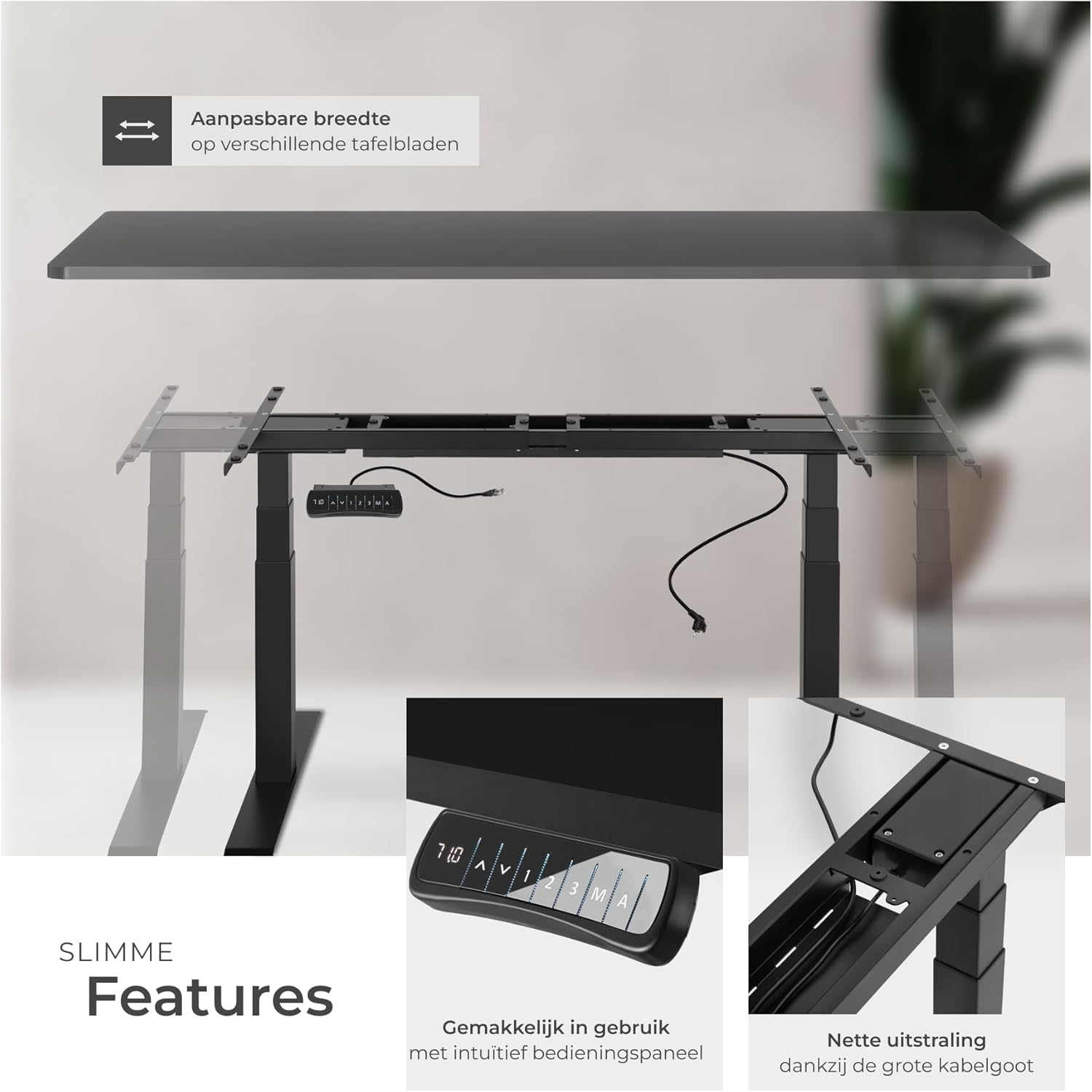
Image: Illustrates the adjustable width feature of the frame, allowing it to fit various tabletop sizes. Also shows the intuitive control panel and the large cable tray for organized cable management.

ചിത്രം: വിശദമായത് views of the control panel for height adjustment and memory functions, the practical and extra-large cable tray for secure cable storage, the durable powder-coated steel frame, and the adjustable screw feet for precise compensation on uneven surfaces.
പ്രവർത്തന നിർദ്ദേശങ്ങൾ
The tectake 402997 desk frame features an intuitive control panel for easy height adjustment and personalized settings.
നിയന്ത്രണ പാനൽ പ്രവർത്തനങ്ങൾ:
- മുകളിലേക്കും താഴേക്കുമുള്ള അമ്പടയാളങ്ങൾ (▲ / ▼): Press and hold to continuously adjust the desk height. Release to stop at the desired height.
- ഡിജിറ്റൽ ഡിസ്പ്ലേ: Shows the current height of the desk in centimeters.
- മെമ്മറി പ്രീസെറ്റുകൾ (1, 2, 3): Press a numbered button to move the desk to a pre-saved height. To save a height, adjust the desk to the desired position, then press 'M' followed by the desired number (1, 2, or 3).
- Alarm Function (A): Activates a reminder to change your working position after a set period. Refer to the detailed assembly instructions for setting the alarm duration.
സുരക്ഷാ സവിശേഷതകൾ:
- ആന്റി-കൊളിഷൻ സിസ്റ്റം: The desk will automatically stop and slightly reverse if it encounters an obstruction during height adjustment.

Image: Highlights the maximum flexibility of the desk frame, showing the two powerful motors within the frame, the spacious cable tray, and a detailed view of the control panel with exact height indication, intuitive arrow keys for stepless adjustment, alarm function for position changes, and three memory options for saving different table heights.
മെയിൻ്റനൻസ്
Regular maintenance ensures the longevity and optimal performance of your tectake desk frame.
- വൃത്തിയാക്കൽ: ഫ്രെയിം ഒരു സോഫ്റ്റ്, ഡി ക്ലീനർ ഉപയോഗിച്ച് തുടയ്ക്കുക.amp cloth. Avoid abrasive cleaners or solvents that could damage the powder-coated finish.
- കേബിൾ മാനേജുമെന്റ്: Periodically check that all cables are securely connected and neatly routed within the cable tray to prevent pinching or damage.
- സ്ക്രൂവിന്റെ ഇറുകിയത: Over time, screws may loosen. Periodically check and tighten all assembly screws to maintain stability.
- മോട്ടോർ പരിശോധന: പ്രവർത്തന സമയത്ത് അസാധാരണമായ ശബ്ദങ്ങൾ കേൾക്കുക. എന്തെങ്കിലും പ്രശ്നങ്ങൾ ശ്രദ്ധയിൽപ്പെട്ടാൽ, ട്രബിൾഷൂട്ടിംഗ് വിഭാഗം പരിശോധിക്കുക അല്ലെങ്കിൽ ഉപഭോക്തൃ പിന്തുണയുമായി ബന്ധപ്പെടുക.
ട്രബിൾഷൂട്ടിംഗ്
If you encounter any issues with your desk frame, please refer to the following common problems and solutions:
- മേശ അനങ്ങുന്നില്ല:
- Check if the power cable is securely plugged into the wall outlet and the control box.
- Ensure all motor cables are properly connected to the control box.
- If an error code appears on the display, refer to the detailed assembly instructions for specific error meanings and solutions.
- അസമമായ ഉയര ക്രമീകരണം:
- Perform a reset procedure (refer to your detailed assembly instructions for specific steps, usually involving holding down certain buttons).
- Ensure the desk is not overloaded beyond its maximum capacity.
- Desk stops unexpectedly:
- The anti-collision system may have been triggered. Check for any obstructions under or around the desk.
- The motor may have overheated from continuous use. Allow it to cool down for 20-30 minutes before attempting operation again.
For issues not covered here, please consult the comprehensive assembly instructions provided with your product or contact tectake customer support.
സ്പെസിഫിക്കേഷനുകൾ
Detailed technical specifications for the tectake 402997 Denis Electric Desk Frame:

Image: Provides a comprehensive overview of the product information, including maximum and minimum dimensions, suitable tabletop sizes, support plate dimensions, cable length, and a visual representation of the frame with key measurements. Also lists technical details such as load capacity, motor power, lifting speed, voltage, weight, and material.
| ഫീച്ചർ | വിശദാംശങ്ങൾ |
|---|---|
| ബ്രാൻഡ് | ടെക് ടേക്ക് |
| മോഡൽ നമ്പർ | 402997-NL |
| Maximum Total Dimensions (LxWxH) | ഏകദേശം 190 x 68 x 123 സെ.മീ |
| Minimum Total Dimensions (LxWxH) | ഏകദേശം 110 x 68 x 58 സെ.മീ |
| Suitable Tabletop Sizes (LxW) | approx. 120 x 60 to 200 x 80 cm |
| Main Column (LxW) | ഏകദേശം 7 x 7 സെ.മീ |
| Extendable Columns | 2 |
| Support Plate (LxW) | ഏകദേശം 3.2 x 58 സെ.മീ |
| Foot (LxW) | ഏകദേശം 9 x 68 സെ.മീ |
| ഇലക്ട്രിക് മോട്ടോറുകൾ | 2 (<50 dB) |
| ലിഫ്റ്റിംഗ് സ്പീഡ് | 38 മിമി/സെ |
| Power (per motor) | 40 W |
| വാല്യംtage | 100 - 240 വി |
| കേബിൾ നീളം | ഏകദേശം 300 സെ.മീ |
| പരമാവധി ലോഡ് കപ്പാസിറ്റി | 125 കി.ഗ്രാം |
| ഭാരം | ഏകദേശം 31 കി.ഗ്രാം |
| മെറ്റീരിയൽ | പൊടിയിൽ പൊതിഞ്ഞ ഉരുക്ക് |
വാറൻ്റിയും പിന്തുണയും
For warranty information and customer support, please refer to the documentation included with your purchase or visit the official tectake webസൈറ്റ്. ഏതെങ്കിലും വാറന്റി ക്ലെയിമുകൾക്ക് നിങ്ങളുടെ വാങ്ങലിന്റെ തെളിവ് സൂക്ഷിക്കുക.
If you require assistance with assembly, operation, or troubleshooting, please contact tectake customer service. They can provide further guidance and support.
Ask a question about this manual
Ask about setup, troubleshooting, compatibility, parts, safety, or missing instructions. Manuals+ will review the question and use this page’s manual context to help answer it.