
PROHEAR 037
PROHEAR 037 Bluetooth Noise-Cancelling Headphones User Manual
Model: 037 | Brand: PROHEAR
ആമുഖം
Thank you for choosing the PROHEAR 037 Bluetooth Noise-Cancelling Headphones. These headphones are designed to provide superior hearing protection while allowing you to enjoy music and make calls in noisy environments. Featuring advanced Bluetooth V5.1 technology and a high Noise Reduction Rating (NRR 25dB) and Single Number Rating (SNR 30dB), the PROHEAR 037 ensures both safety and entertainment.

Image: The PROHEAR 037 Bluetooth Noise-Cancelling Headphones, black in color, showcasing their over-ear design and control buttons on the left earcup.
ഉൽപ്പന്ന സവിശേഷതകൾ
- Advanced Bluetooth V5.1: Provides a more stable, faster, and wider range connection for seamless music streaming and call handling.
- High Noise Reduction: SNR 30dB and NRR 25dB effectively protect your hearing from loud noises in various work environments.
- ദീർഘകാല ബാറ്ററി: Built-in 1500mAh lithium battery offers extended usage time, rechargeable via USB.
- അവബോധജന്യമായ നിയന്ത്രണങ്ങൾ: Raised buttons allow for easy adjustment of volume, song changes, and call management, even while wearing work gloves.
- സുഖപ്രദമായ ഡിസൈൻ: Features a super soft and padded headband, adjustable fit, and soft, replaceable ear cushions for all-day comfort.
- Wired Mode Option: Includes a 3.5mm AUX jack for wired connection when Bluetooth is not desired or available.

Image: An infographic highlighting the benefits of Bluetooth 5.3 technology, including faster connection speed, wider range (33-49ft / 10-15m+), longer battery life (1500mAh, 40H+ playtime), better sound quality (deep bass, sufficient volume, true stereo), and stable connection. A person is shown using the headphones while operating a snow blower.

Image: An illustration detailing the comfort features of the headphones, including voice transmission for Bluetooth and phone ringing, a super soft and padded headband, adjustable fit for all sizes, replaceable ear pads, and soft cushions for prolonged use. A battery level display icon is also shown.
പാക്കേജ് ഉള്ളടക്കം
എല്ലാ ഇനങ്ങളും ഉണ്ടെന്ന് ഉറപ്പാക്കാൻ പാക്കേജ് പരിശോധിക്കുക:
- PROHEAR 037 Bluetooth Noise-Cancelling Headphones
- യുഎസ്ബി ചാർജിംഗ് കേബിൾ
- 3.5mm AUX ഓഡിയോ കേബിൾ
- ഉപയോക്തൃ മാനുവൽ (ഈ പ്രമാണം)
- ചുമക്കുന്ന ബാഗ്
സജ്ജമാക്കുക
1. ഹെഡ്ഫോണുകൾ ചാർജ് ചെയ്യുന്നു
Before first use, fully charge the headphones. The built-in 1500mAh lithium battery provides long usage time.
- Connect the supplied USB charging cable to the Micro USB charging port on the headphones.
- USB കേബിളിന്റെ മറ്റേ അറ്റം അനുയോജ്യമായ ഒരു USB പവർ സ്രോതസ്സുമായി ബന്ധിപ്പിക്കുക (ഉദാ: കമ്പ്യൂട്ടർ USB പോർട്ട്, വാൾ അഡാപ്റ്റർ).
- The indicator light will show charging status. A full charge typically takes about 2 hours and provides over 40 hours of use.
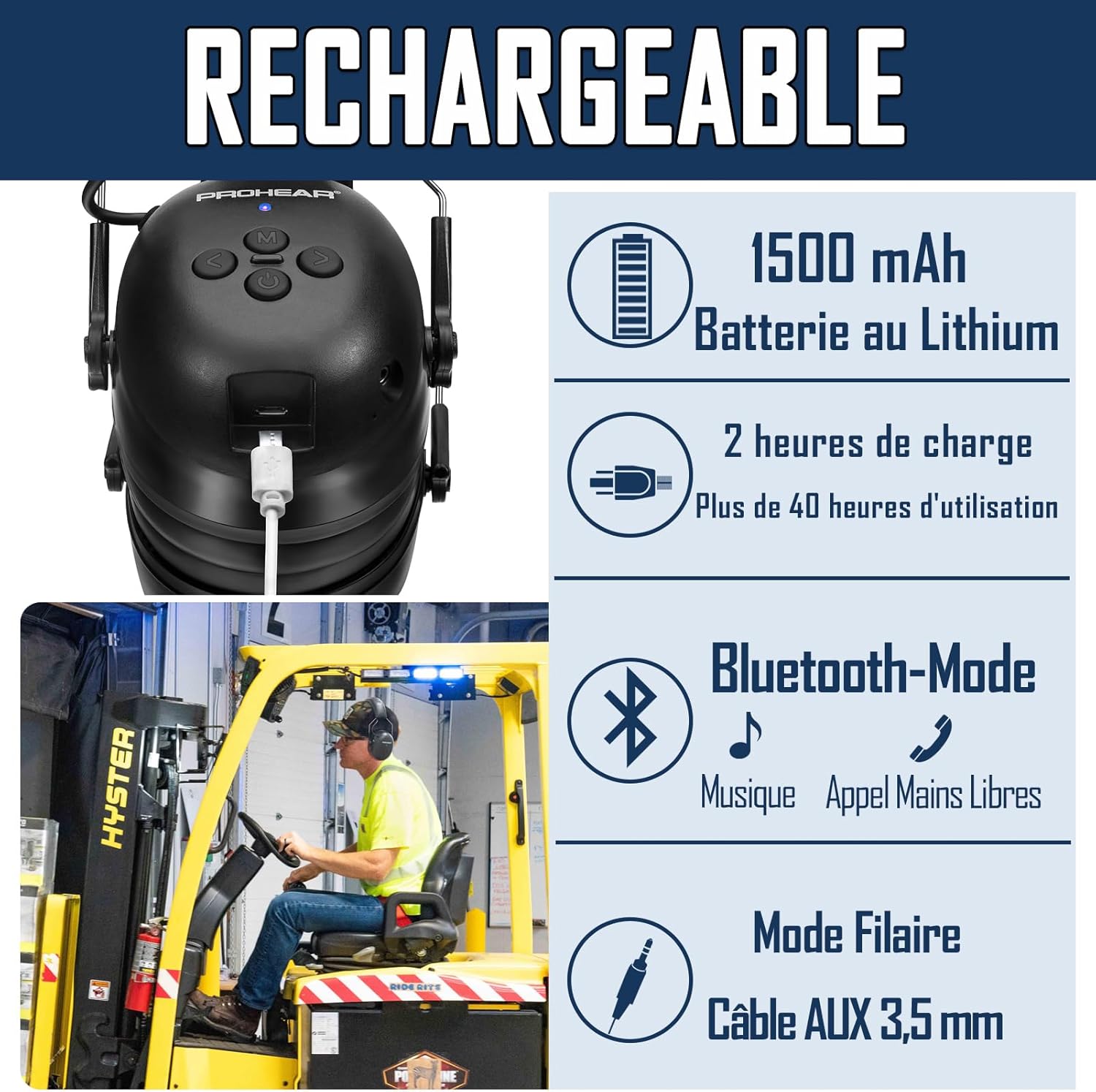
ചിത്രം: ഒരു ക്ലോസ്-അപ്പ് view of the headphone's charging port with a USB cable inserted, illustrating the 1500mAh lithium battery, 2-hour charging time for over 40 hours of use, Bluetooth mode for music and hands-free calls, and wired mode via 3.5mm AUX cable.
2. ബ്ലൂടൂത്ത് ജോടിയാക്കൽ
To connect your PROHEAR 037 headphones to a Bluetooth-enabled device:
- ഹെഡ്ഫോണുകൾ ചാർജ് ചെയ്തിട്ടുണ്ടെന്നും പവർ ഓഫ് ചെയ്തിട്ടുണ്ടെന്നും ഉറപ്പാക്കുക.
- Press and hold the Power Button until the indicator light flashes, indicating pairing mode.
- നിങ്ങളുടെ ഉപകരണത്തിൽ (സ്മാർട്ട്ഫോൺ, ടാബ്ലെറ്റ് മുതലായവ), ബ്ലൂടൂത്ത് പ്രവർത്തനക്ഷമമാക്കി ലഭ്യമായ ഉപകരണങ്ങൾക്കായി തിരയുക.
- Select "PROHEAR 037" from the list of found devices.
- Once connected, the indicator light will change to a steady blue, confirming successful pairing.
പവർ ഓൺ ചെയ്യുമ്പോൾ ഹെഡ്ഫോണുകൾ അവസാനം ജോടിയാക്കിയ ഉപകരണത്തിലേക്ക് വീണ്ടും കണക്റ്റുചെയ്യാൻ ശ്രമിക്കും.
പ്രവർത്തന നിർദ്ദേശങ്ങൾ
The PROHEAR 037 headphones feature intuitive controls designed for ease of use, even with work gloves. The raised button design helps in quickly locating controls by touch.

Image: A diagram showing the detailed functions and button layout of the PROHEAR 037 headphones. Labels indicate: 1. Power Button, 2. Tuning button (Volume/Track), 3. BT Button (M), 4. Micro USB Charging port, 5. AUX Jack, 6. Indicator light. Tables illustrate controls for Phone Mode (M button to answer/hang up) and BT Music Mode (Tuning buttons for changing songs, press and hold for volume; M button for pause, connect/disconnect Bluetooth).
ബട്ടൺ പ്രവർത്തനങ്ങൾ കഴിഞ്ഞുview:
| ബട്ടൺ | ആക്ഷൻ | ഫംഗ്ഷൻ |
|---|---|---|
| പവർ ബട്ടൺ | അമർത്തിപ്പിടിക്കുക | പവർ ഓൺ/ഓഫ് |
| M (BT) Button | ഷോർട്ട് പ്രസ്സ് | കോൾ സ്വീകരിക്കുക/അവസാനിപ്പിക്കുക, സംഗീതം പ്ലേ ചെയ്യുക/താൽക്കാലികമായി നിർത്തുക |
| M (BT) Button | അമർത്തിപ്പിടിക്കുക | ബ്ലൂടൂത്ത് കണക്റ്റ്/വിച്ഛേദിക്കുക |
| Tuning Button (<) | ഷോർട്ട് പ്രസ്സ് | മുൻ ഗാനം |
| Tuning Button (<) | അമർത്തിപ്പിടിക്കുക | വോളിയം ഡൗൺ |
| Tuning Button (>) | ഷോർട്ട് പ്രസ്സ് | അടുത്ത ഗാനം |
| Tuning Button (>) | അമർത്തിപ്പിടിക്കുക | വോളിയം കൂട്ടുക |
Using in Wired Mode
To use the headphones with non-Bluetooth devices or when battery is low, connect the supplied 3.5mm AUX audio cable to the AUX jack on the headphones and to your audio source.
മെയിൻ്റനൻസ്
- വൃത്തിയാക്കൽ: ഒരു സോഫ്റ്റ്, ഡി ഉപയോഗിച്ച് ഹെഡ്ഫോണുകൾ തുടയ്ക്കുകamp cloth. Do not use harsh chemicals or abrasive cleaners. Ensure no liquid enters the earcups or charging port.
- സംഭരണം: Store the headphones in a cool, dry place, away from direct sunlight and extreme temperatures. Use the provided carrying bag for protection during transport.
- ചെവി തലയണകൾ: The ear cushions are replaceable. If they become worn or damaged, contact PROHEAR support for replacement parts to maintain optimal noise reduction and comfort.
- ബാറ്ററി കെയർ: For optimal battery life, avoid fully discharging the battery frequently. Charge the headphones regularly, even if not in use for extended periods.
ട്രബിൾഷൂട്ടിംഗ്
| പ്രശ്നം | സാധ്യമായ കാരണം | പരിഹാരം |
|---|---|---|
| ഹെഡ്ഫോണുകൾ ഓണാകില്ല. | കുറഞ്ഞ ബാറ്ററി. | ഹെഡ്ഫോണുകൾ പൂർണ്ണമായും ചാർജ് ചെയ്യുക. |
| ബ്ലൂടൂത്ത് വഴി ജോടിയാക്കാൻ കഴിയില്ല. | ഹെഡ്ഫോണുകൾ ജോടിയാക്കൽ മോഡിൽ ഇല്ല; ഉപകരണം ബ്ലൂടൂത്ത് ഓഫാണ്; ഉപകരണത്തിൽ നിന്ന് വളരെ അകലെയാണ്. | Ensure headphones are in pairing mode (flashing light). Turn device Bluetooth off/on. Move headphones closer to device (within 10-15m). |
| ശബ്ദമില്ല അല്ലെങ്കിൽ കുറഞ്ഞ ശബ്ദമില്ല. | ഹെഡ്ഫോണിലോ ഉപകരണത്തിലോ ശബ്ദം വളരെ കുറവാണ്; തെറ്റായ ഓഡിയോ ഉറവിടം തിരഞ്ഞെടുത്തു. | Increase volume on both headphones and connected device. Check if AUX cable is fully inserted if using wired mode. |
| മോശം കോൾ നിലവാരം. | Environmental noise; weak Bluetooth connection. | Move to a quieter area if possible. Ensure strong Bluetooth connection. |
സ്പെസിഫിക്കേഷനുകൾ
- മോഡൽ നമ്പർ: 037
- ബ്ലൂടൂത്ത് പതിപ്പ്: V5.1
- നോയ്സ് റിഡക്ഷൻ റേറ്റിംഗ് (NRR): 25dB
- Single Number Rating (SNR): 30dB
- ബാറ്ററി: 1500mAh ലിഥിയം-അയൺ (ഉൾപ്പെടുത്തിയത്)
- ചാർജിംഗ് സമയം: ഏകദേശം 2 മണിക്കൂർ
- ഉപയോഗ സമയം: Over 40 hours (Bluetooth mode)
- കണക്റ്റിവിറ്റി: ബ്ലൂടൂത്ത്, 3.5mm AUX
- മെറ്റീരിയൽ: എബിഎസ് പ്ലാസ്റ്റിക്
- പാക്കേജ് അളവുകൾ: 20.8 x 16.3 x 10.9 സെ.മീ
- ഭാരം: 520 ഗ്രാം
- നിർമ്മാതാവ്: PROHEAR LLC.
- മാതൃരാജ്യം: ചൈന
സുരക്ഷാ വിവരങ്ങൾ
Please read and follow these safety guidelines to ensure safe operation and prevent damage:
- ഹെഡ്ഫോണുകൾ തീവ്രമായ താപനിലയിലോ, ഈർപ്പത്തിലോ, ദ്രാവകങ്ങളിലോ ഏൽപ്പിക്കരുത്.
- ഹെഡ്ഫോണുകൾ വേർപെടുത്തുകയോ പരിഷ്ക്കരിക്കുകയോ ചെയ്യരുത്. ഇത് വാറന്റി അസാധുവാക്കുകയും സുരക്ഷാ അപകടങ്ങൾ ഉണ്ടാക്കുകയും ചെയ്തേക്കാം.
- നൽകിയിരിക്കുന്ന ചാർജിംഗ് കേബിളോ സാക്ഷ്യപ്പെടുത്തിയ തത്തുല്യമായതോ മാത്രം ഉപയോഗിക്കുക.
- കുട്ടികൾക്ക് ലഭ്യമാകാതെ സൂക്ഷിക്കുക.
- Ensure proper fit to achieve stated noise reduction levels.
- Be aware of your surroundings when using noise-cancelling headphones, especially in situations requiring alertness (e.g., near traffic).
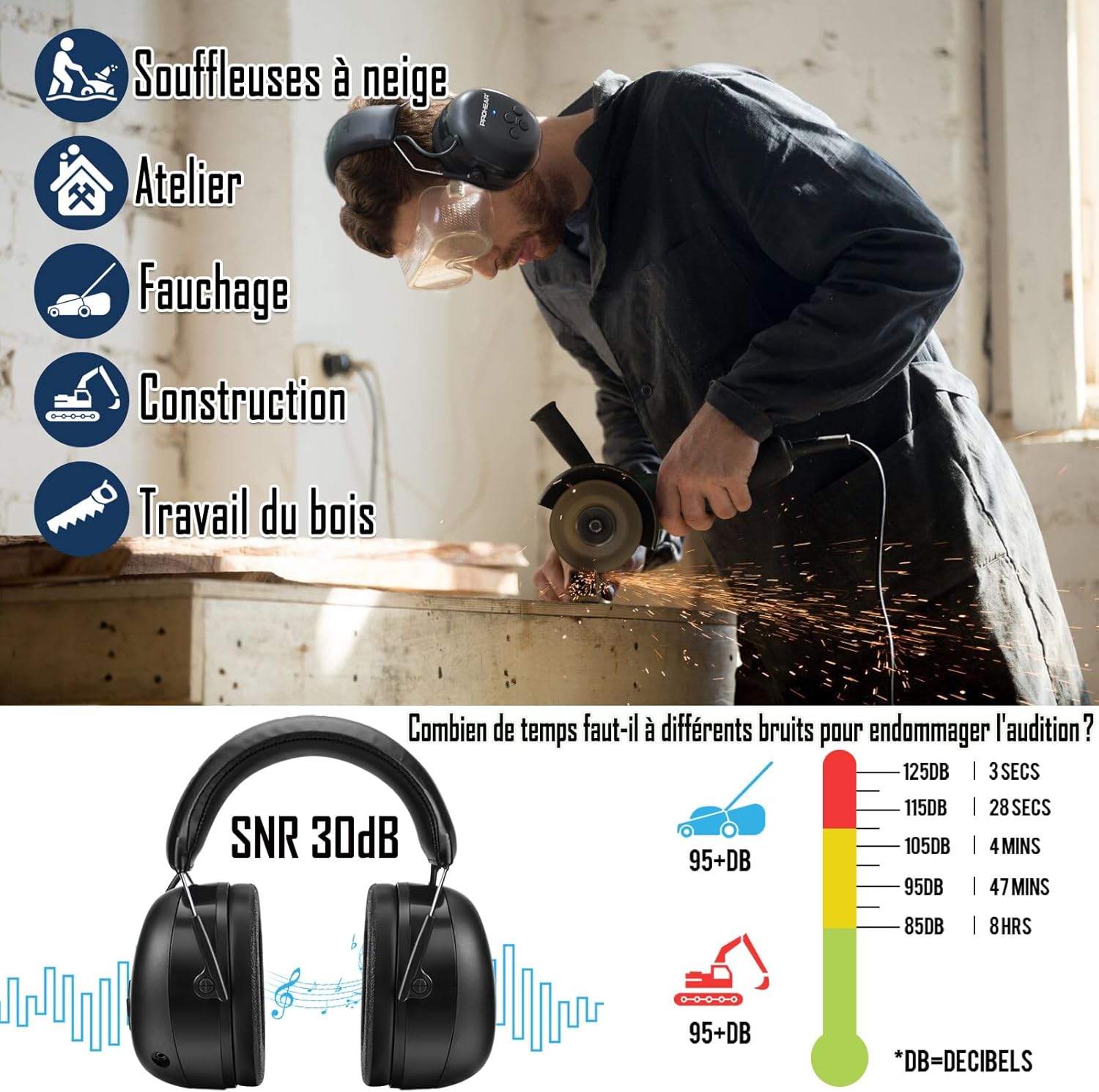
Image: An infographic illustrating common applications for the headphones (snow blowers, workshop, mowing, construction, woodworking) and a chart showing how long different noise levels (dB) can be tolerated before causing hearing damage. This emphasizes the importance of hearing protection.
വാറൻ്റിയും പിന്തുണയും
PROHEAR products are designed for durability and performance. The PROHEAR 037 headphones come with a 3 വർഷത്തെ വാറൻ്റി. For warranty claims, technical support, or replacement parts, please contact PROHEAR customer service through the retailer where you purchased the product or visit the official PROHEAR webസൈറ്റ്.
കൂടുതൽ വിവരങ്ങൾക്കും പിന്തുണയ്ക്കും ദയവായി സന്ദർശിക്കുക: www.prohear.com
Ask a question about this manual
Ask about setup, troubleshooting, compatibility, parts, safety, or missing instructions. Manuals+ will review the question and use this page’s manual context to help answer it.