
1. ആമുഖം
The Zetronix XS7 Pro is a solar-powered outdoor security PTZ (Pan-Tilt-Zoom) IP camera designed for continuous surveillance. This camera features a self-sustaining design, utilizing a solar panel and integrated long-life battery to eliminate the need for frequent recharging. It offers remote control via smartphone, 1080p HD video recording, motion detection, and advanced night vision capabilities. The XS7 Pro is built to withstand various weather conditions, ensuring reliable operation for your security needs.
2. പാക്കേജ് ഉള്ളടക്കം
നിങ്ങളുടെ പാക്കേജിൽ എല്ലാ ഇനങ്ങളും ഉണ്ടെന്ന് ഉറപ്പാക്കുക:
- XS7 Pro PTZ IP Camera Unit
- സംയോജിത സോളാർ പാനൽ
- മ Bra ണ്ടിംഗ് ബ്രാക്കറ്റും ഹാർഡ്വെയറും
- യുഎസ്ബി ചാർജിംഗ് കേബിൾ
- ഉപയോക്തൃ മാനുവൽ
3. ഉൽപ്പന്നം കഴിഞ്ഞുview
Familiarize yourself with the components of your Zetronix XS7 Pro camera.

ചിത്രം 3.1: മുൻഭാഗം view of the XS7 Pro camera with its integrated solar panel.

ചിത്രം 3.2: വശം view illustrating the camera's mounting arm and solar panel angle.
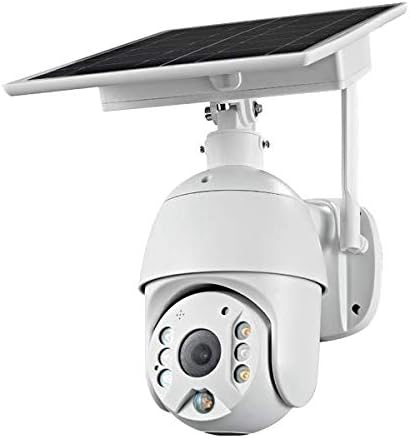
Figure 3.3: Frontal dimensions of the XS7 Pro camera unit.

Figure 3.4: Side dimensions of the XS7 Pro camera unit.

Figure 3.5: The camera features an IP65 waterproof rating, indicating protection against dust and water jets.
4. സജ്ജീകരണം
Follow these steps to set up your XS7 Pro camera:
- ക്യാമറ ചാർജ് ചെയ്യുക: Before initial use, fully charge the camera's internal battery using the provided USB cable. Connect the cable to the camera's charging port and a standard USB power adapter (not included).
- ആപ്പ് ഡൗൺലോഡ് ചെയ്യുക: Download the official Zetronix security camera application from your smartphone's app store (iOS or Android).
- ഒരു അക്കൗണ്ട് സൃഷ്ടിക്കുക: ആപ്പ് തുറന്ന് സ്ക്രീനിലെ നിർദ്ദേശങ്ങൾ പാലിച്ച് പുതിയൊരു ഉപയോക്തൃ അക്കൗണ്ട് സൃഷ്ടിക്കുക അല്ലെങ്കിൽ നിങ്ങൾക്ക് ഇതിനകം ഒരു അക്കൗണ്ട് ഉണ്ടെങ്കിൽ ലോഗിൻ ചെയ്യുക.
- ക്യാമറ ചേർക്കുക: In the app, select the option to add a new device. Follow the prompts to connect your camera to your 2.4GHz Wi-Fi network. Ensure your Wi-Fi signal is strong at the installation location. Note: The camera supports 2.4GHz Wi-Fi only.
- ക്യാമറ ഘടിപ്പിക്കുക: ഉപയോഗിച്ച് ഒരു ഔട്ട്ഡോർ ലൊക്കേഷൻ തിരഞ്ഞെടുക്കുക ampസോളാർ പാനലിനുള്ള സൂര്യപ്രകാശ എക്സ്പോഷറും വ്യക്തമായ വെളിച്ചവും view of the area you wish to monitor. Use the provided mounting bracket and hardware to securely attach the camera to a wall or other stable surface. Adjust the solar panel to maximize sun exposure.
- അന്തിമ ക്രമീകരണങ്ങൾ: Once mounted, use the app to verify the camera's view and make any necessary pan and tilt adjustments.
5. പ്രവർത്തന നിർദ്ദേശങ്ങൾ
The XS7 Pro camera is controlled primarily through its dedicated smartphone application.
5.1 തത്സമയം View ഒപ്പം റെക്കോർഡിംഗ്
- Open the app and select your camera from the device list to access the live video feed.
- തത്സമയം മുതൽ view, you can initiate manual video recording or capture still images.
- റെക്കോർഡ് ചെയ്ത footage can be stored on a local memory card (not included) or via cloud storage options (subscription may be required).
5.2 പാൻ, ടിൽറ്റ് നിയന്ത്രണം
- Use the directional controls within the app to remotely pan the camera 360 degrees and tilt it 180 degrees, allowing you to adjust the viewആവശ്യാനുസരണം ആംഗിൾ.
5.3 മോഷൻ ഡിറ്റക്ഷനും അലേർട്ടുകളും
- The camera features motion detection up to 30 feet. Configure motion detection sensitivity and alert preferences in the app settings.
- ചലനം കണ്ടെത്തുമ്പോൾ നിങ്ങളുടെ സ്മാർട്ട്ഫോണിൽ തൽക്ഷണ അറിയിപ്പുകൾ സ്വീകരിക്കുക.
5.4 നൈറ്റ് വിഷൻ
- The XS7 Pro offers high-range 90 feet invisible IR night vision for clear black and white footagകുറഞ്ഞ വെളിച്ചത്തിൽ.
- Bright white LEDs provide color night vision when activated, illuminating the area for full-color video.
5.5 ടു-വേ ഓഡിയോ
- Utilize the integrated speaker and microphone for real-time two-way audio communication through the app.
5.6 മുഖം തിരിച്ചറിയൽ
- The camera supports face recognition technology for enhanced security alerts. Refer to the app's settings for configuration details.
6. പരിപാലനം
To ensure optimal performance and longevity of your XS7 Pro camera:
- സോളാർ പാനൽ വൃത്തിയാക്കുക: ഇടയ്ക്കിടെ സോഫ്റ്റ്, ഡി-ടൈപ്പ് ഉപയോഗിച്ച് സോളാർ പാനൽ തുടയ്ക്കുക.amp സൂര്യപ്രകാശത്തെ തടസ്സപ്പെടുത്തുകയും ചാർജിംഗ് കാര്യക്ഷമത കുറയ്ക്കുകയും ചെയ്യുന്ന പൊടി, അഴുക്ക് അല്ലെങ്കിൽ അവശിഷ്ടങ്ങൾ നീക്കം ചെയ്യാൻ തുണി ഉപയോഗിക്കുക.
- ക്യാമറ ലെൻസ് വൃത്തിയാക്കുക: Gently clean the camera lens with a microfiber cloth to ensure clear image quality. Avoid abrasive materials.
- മൗണ്ടിംഗ് പരിശോധിക്കുക: Regularly inspect the mounting hardware to ensure the camera remains securely attached and properly positioned.
- സോഫ്റ്റ്വെയർ അപ്ഡേറ്റുകൾ: Keep the camera's firmware and the smartphone application updated to the latest versions for improved features and security.
7. പ്രശ്നപരിഹാരം
If you encounter issues with your XS7 Pro camera, refer to the following common solutions:
- ക്യാമറ ഓണാക്കുന്നില്ല:
- Ensure the camera's internal battery is charged. Connect it to a USB power source for several hours.
- Verify the solar panel is receiving adequate direct sunlight.
- Wi-Fi-ലേക്ക് കണക്റ്റുചെയ്യാനായില്ല:
- Confirm your Wi-Fi network is 2.4GHz. The camera does not support 5GHz networks.
- കൃത്യതയ്ക്കായി നിങ്ങളുടെ വൈഫൈ പാസ്വേഡ് പരിശോധിക്കുക.
- Ensure the camera is within range of your Wi-Fi router. Try moving the camera closer or using a Wi-Fi extender.
- നിങ്ങളുടെ വൈഫൈ റൂട്ടറും ക്യാമറയും പുനരാരംഭിക്കുക.
- മോശം വീഡിയോ നിലവാരം:
- ക്യാമറ ലെൻസിൽ അഴുക്കോ അഴുക്കോ ഉണ്ടോ എന്ന് വൃത്തിയാക്കുക.
- നിങ്ങളുടെ വൈഫൈ സിഗ്നൽ ശക്തി പരിശോധിക്കുക. ദുർബലമായ സിഗ്നൽ വീഡിയോ സ്ട്രീമിംഗ് ഗുണനിലവാരത്തെ ബാധിച്ചേക്കാം.
- മോഷൻ ഡിറ്റക്ഷൻ പ്രവർത്തിക്കുന്നില്ല:
- ആപ്പ് ക്രമീകരണങ്ങളിൽ മോഷൻ ഡിറ്റക്ഷൻ പ്രവർത്തനക്ഷമമാക്കിയിട്ടുണ്ടോയെന്ന് പരിശോധിക്കുക.
- ചലന കണ്ടെത്തൽ സംവേദനക്ഷമത ക്രമീകരിക്കുക.
- ക്യാമറകൾക്ക് തടസ്സങ്ങളൊന്നുമില്ലെന്ന് ഉറപ്പാക്കുക. view കണ്ടെത്തൽ മേഖലയിൽ.
- No Audio or Two-Way Audio Issues:
- Check the volume settings on your smartphone and within the app.
- Ensure the microphone and speaker permissions are granted to the app on your smartphone.
ഈ ഘട്ടങ്ങൾ നിങ്ങളുടെ പ്രശ്നം പരിഹരിക്കുന്നില്ലെങ്കിൽ, ദയവായി ഉപഭോക്തൃ പിന്തുണയുമായി ബന്ധപ്പെടുക.
8 സ്പെസിഫിക്കേഷനുകൾ
| ഫീച്ചർ | സ്പെസിഫിക്കേഷൻ |
|---|---|
| മോഡൽ നമ്പർ | Soliur-XS7 Pro |
| ബ്രാൻഡ് | സെട്രോണിക്സ് |
| ശുപാർശ ചെയ്യുന്ന ഉപയോഗം | ഔട്ട്ഡോർ സെക്യൂരിറ്റി |
| കണക്റ്റിവിറ്റി ടെക്നോളജി | വയർലെസ്സ് (വൈ-ഫൈ 2.4GHz) |
| പ്രത്യേക സവിശേഷതകൾ | Motion Sensor, Night Vision (IR & Color), PTZ (Pan-Tilt-Zoom), Two-Way Audio, Face Recognition |
| ഇൻഡോർ/ഔട്ട്ഡോർ ഉപയോഗം | ഔട്ട്ഡോർ |
| അനുയോജ്യമായ ഉപകരണങ്ങൾ | സ്മാർട്ട്ഫോൺ |
| മൌണ്ട് തരം | മതിൽ മൗണ്ട് |
| ഫോം ഫാക്ടർ | താഴികക്കുടം |
| അലേർട്ട് തരം | ചലനം മാത്രം |
| പ്രകാശ സ്രോതസ്സ് | എൽഇഡി |
| വാട്ടർപ്രൂഫ് റേറ്റിംഗ് | IP65 |
| നിയന്ത്രണ രീതി | ആപ്പ്, ശബ്ദം |
| വീഡിയോ ക്യാപ്ചർ റെസല്യൂഷൻ | 1080p |
| നൈറ്റ് വിഷൻ | രാത്രി നിറം |
| പവർ ഉറവിടം | ബാറ്ററി പവർ, സോളാർ |
| വാട്ട്tage | 3 വാട്ട്സ് |
| വീഡിയോ ക്യാപ്ചർ ഫോർമാറ്റ് | MPEG-4 |
9. വാറൻ്റി വിവരങ്ങൾ
The Zetronix XS7 Pro camera comes with a 1 വർഷത്തെ നിർമ്മാതാവിൻ്റെ വാറൻ്റി. Please retain your proof of purchase for warranty claims. For specific terms and conditions, refer to the warranty documentation included with your product or contact Zetronix customer support.
10. പിന്തുണ
For further assistance, technical support, or warranty inquiries, please contact Zetronix customer service through their official webസൈറ്റ് അല്ലെങ്കിൽ നിങ്ങളുടെ ഉൽപ്പന്ന പാക്കേജിംഗിൽ നൽകിയിരിക്കുന്ന ബന്ധപ്പെടാനുള്ള വിവരങ്ങൾ.