
Andoer A1
Andoer A1 Universal Portable Teleprompter Instruction Manual
മോഡൽ: A1
ആമുഖം
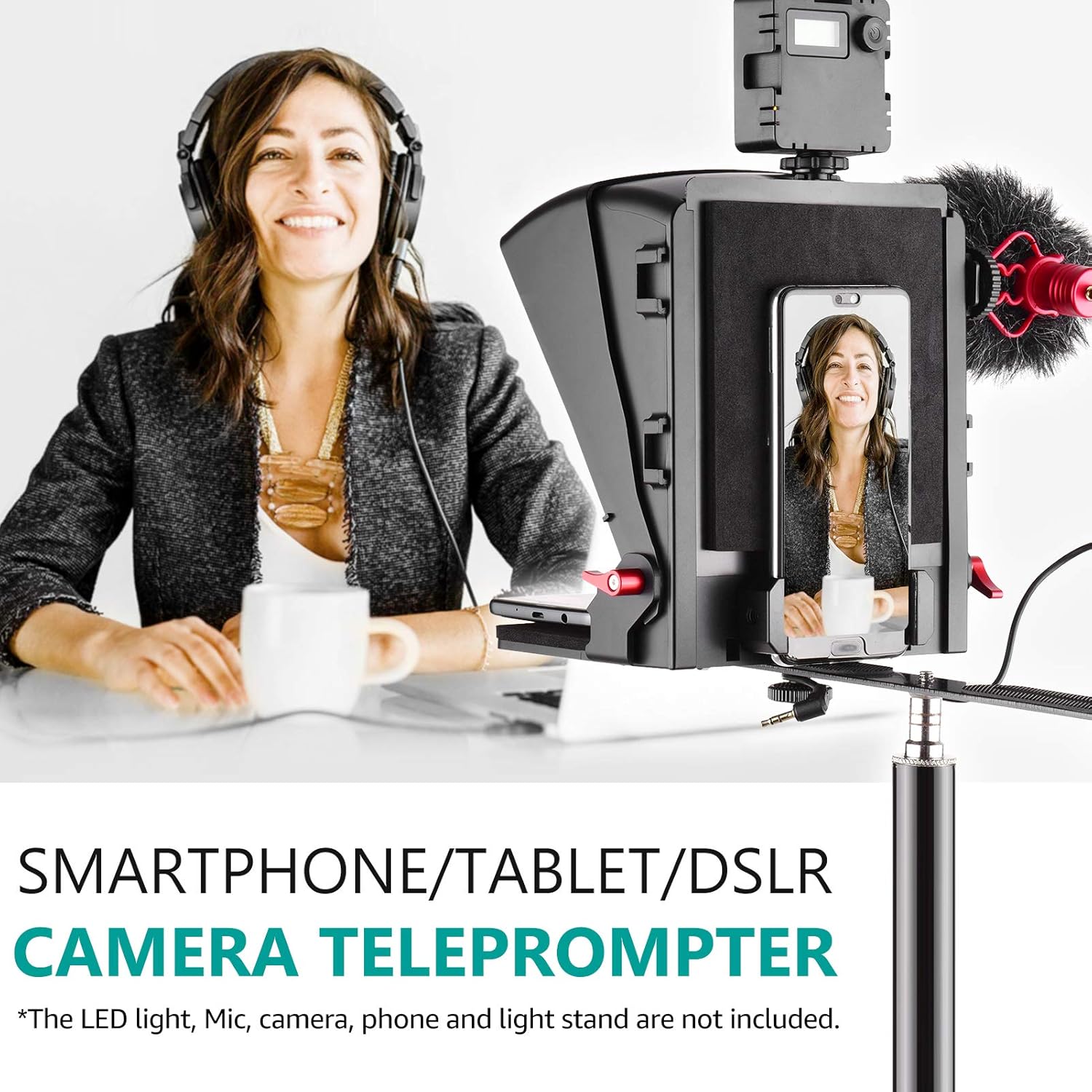
The Andoer A1 Universal Portable Teleprompter is designed to assist with video recording, live streaming, interviews, presentations, and stage speeches by displaying scrolling text that is visible to the speaker but not to the camera. This device supports various setups including smartphones, tablets, and DSLR cameras, ensuring smooth and professional delivery of your content. This manual provides detailed instructions for assembly, operation, and maintenance.
പാക്കേജ് ഉള്ളടക്കം
താഴെ ലിസ്റ്റ് ചെയ്തിരിക്കുന്ന എല്ലാ ഇനങ്ങളും നിങ്ങളുടെ പാക്കേജിൽ ഉൾപ്പെടുത്തിയിട്ടുണ്ടെന്ന് ദയവായി പരിശോധിക്കുക. ഏതെങ്കിലും ഇനങ്ങൾ നഷ്ടപ്പെട്ടിട്ടുണ്ടെങ്കിലോ കേടായിട്ടുണ്ടെങ്കിലോ, ദയവായി ഉപഭോക്തൃ പിന്തുണയുമായി ബന്ധപ്പെടുക.
- Teleprompter Main Unit
- റിമോട്ട് കൺട്രോൾ
- സ്മാർട്ട്ഫോൺ/ടാബ്ലെറ്റ് Clamp
- ക്യാമറ മൗണ്ടിംഗ് പ്ലേറ്റ്
- ലെൻസ് അഡാപ്റ്റർ വളയങ്ങൾ (വിവിധ വലുപ്പങ്ങൾ)
- ക്ലീനിംഗ് തുണി
- ഹെക്സ് റെഞ്ചുകളും സ്ക്രൂകളും
- സ്റ്റോറേജ് ബാഗ്
- ഇൻസ്ട്രക്ഷൻ മാനുവൽ
ഉൽപ്പന്ന സവിശേഷതകൾ
- സാർവത്രിക അനുയോജ്യത: Supports smartphones and tablets for prompting, and DSLR cameras or smartphones for shooting.
- Multiple Cold Shoe Mounts: Equipped with 5 cold shoe mounts for attaching external accessories such as microphones, LED fill lights, and other devices to enhance your video production.
- Lens Fix Pocket: Designed to accommodate most camera lenses without the need for additional lens adapter rings, simplifying setup.
- Flexible Shooting Modes: Allows for both vertical and horizontal shooting orientations for diverse content creation needs.
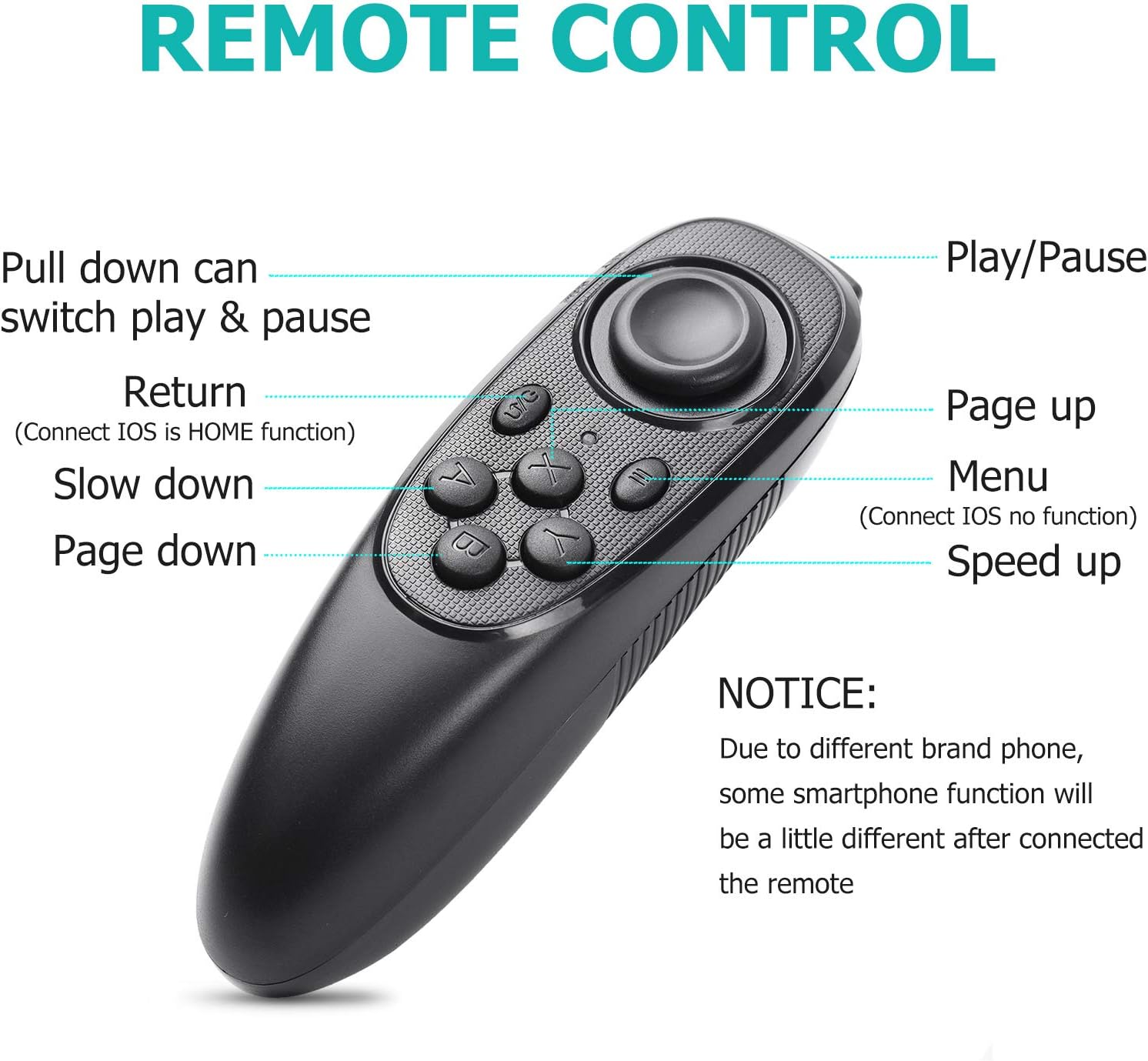
- റിമോട്ട് കൺട്രോൾ: Includes a remote control for convenient adjustment of text scrolling speed, play/pause, and page navigation.


സജ്ജീകരണ നിർദ്ദേശങ്ങൾ
Follow these steps to correctly assemble and set up your Andoer A1 Teleprompter.
- അടിസ്ഥാനം കൂട്ടിച്ചേർക്കുക: Attach the teleprompter main unit to a tripod or light stand using the appropriate mounting screw. Ensure it is securely fastened.
- Insert Prompting Device: Open the front panel of the teleprompter. Place your smartphone or tablet onto the lower tray, ensuring the screen faces upwards towards the reflective glass. Adjust the clamps to secure the device.
- Mount Shooting Device:
- For DSLR Camera: Attach your DSLR camera to the camera mounting plate. Slide the plate into the rear slot of the teleprompter. Adjust the camera's position so the lens is centered with the teleprompter's opening. Secure the camera with the provided screws.
- For Smartphone Shooting: Attach the smartphone clamp to the rear of the teleprompter. Insert your smartphone into the clamp, ensuring its camera lens aligns with the teleprompter's opening.
- Attach Lens Hood/Shade: If using a DSLR, attach the provided lens hood or fabric shade around your camera lens and the teleprompter opening to prevent light leakage.
- Adjust Camera Opening: Use the foam rings or adjustable plates to match the teleprompter's camera opening to your camera lens diameter, minimizing stray light.
- പവർ ഓണാക്കി ബന്ധിപ്പിക്കുക: Power on your camera and prompting device. Ensure the prompting device is displaying your script in mirrored mode.
പ്രവർത്തന നിർദ്ദേശങ്ങൾ
Once the teleprompter is set up, follow these steps to operate it effectively:
- Prepare Your Script: Load your script into a teleprompter application on your smartphone or tablet. Ensure the text is displayed in mirrored mode so it appears correctly on the teleprompter's reflective glass.
- റിമോട്ട് കൺട്രോൾ ബന്ധിപ്പിക്കുക: Pair the included remote control with your prompting device via Bluetooth. Refer to your device's Bluetooth settings for pairing instructions.
- Adjust Text Display: Use the remote control to manage your script:
- പ്ലേ/താൽക്കാലികമായി നിർത്തുക: Press the designated button to start or stop the text scrolling.
- പേജ് മുകളിലേക്കും താഴേക്കും: Navigate through your script page by page.
- Speed Up/Slow Down: Adjust the scrolling speed to match your speaking pace.
- Return (iOS Home Function): For iOS devices, this button may function as a home button.
- Menu (iOS No Function): For iOS devices, this button may not have a specific function.
- Monitor Your Recording: Ensure your camera is recording and that the teleprompter text is clearly visible and readable through the reflective glass.
മെയിൻ്റനൻസ്
Proper maintenance ensures the longevity and optimal performance of your teleprompter.
- ഗ്ലാസ് വൃത്തിയാക്കൽ: Use the provided cleaning cloth or a soft, lint-free cloth with a small amount of glass cleaner to gently wipe the reflective glass. Avoid abrasive materials that could scratch the surface.
- പൊതുവായ ശുചീകരണം: Wipe down the exterior of the teleprompter with a dry or slightly damp തുണി. കഠിനമായ രാസവസ്തുക്കൾ ഉപയോഗിക്കരുത്.
- സംഭരണം: When not in use, store the teleprompter in its protective bag in a dry, dust-free environment.
- കണക്ഷനുകൾ പരിശോധിക്കുക: എല്ലാ സ്ക്രൂകളും കണക്ഷനുകളും ഇറുകിയതും സുരക്ഷിതവുമാണെന്ന് ഉറപ്പാക്കാൻ ഇടയ്ക്കിടെ പരിശോധിക്കുക.
ട്രബിൾഷൂട്ടിംഗ്
If you encounter issues with your Andoer A1 Teleprompter, refer to the following common problems and solutions:
| പ്രശ്നം | സാധ്യമായ കാരണം | പരിഹാരം |
|---|---|---|
| Text is blurry or unclear on the reflective glass. | Improper mirroring setting on prompting device; dirty reflective glass; incorrect viewing ആംഗിൾ. | Ensure your teleprompter app is set to mirror the text. Clean the reflective glass with the provided cloth. Adjust your viewing angle or the teleprompter's position. |
| Remote control is not connecting or functioning. | Remote not paired; low battery; interference; app incompatibility. | Ensure the remote is fully charged or has fresh batteries. Re-pair the remote with your smartphone/tablet via Bluetooth. Check if your teleprompter app supports external Bluetooth remotes. Move away from potential sources of interference. |
| Difficulty assembling the unit. | Unclear understanding of assembly steps; missing parts. | Refer to the detailed setup instructions in this manual and the provided installation video. Ensure all components are present as per the package contents list. If issues persist, contact customer support. |
| Smartphone/tablet does not fit securely. | Device size exceeds maximum capacity; clamps not adjusted correctly. | Ensure your device is within the supported size range (typically up to 8 inches for tablets). Adjust the clamps firmly to secure the device. |
സ്പെസിഫിക്കേഷനുകൾ
| ഫീച്ചർ | വിശദാംശങ്ങൾ |
|---|---|
| ബ്രാൻഡ് | അൻഡോയർ |
| മോഡൽ | A1 |
| പാക്കേജ് അളവുകൾ | 10.43 x 9.41 x 4.29 ഇഞ്ച് |
| ഇനത്തിൻ്റെ ഭാരം | 3.28 പൗണ്ട് |
| ഫോക്കൽ ലെങ്ത് വിവരണം | 35 മില്ലിമീറ്റർ |
| ലെൻസ് തരം | വൈഡ് ആംഗിൾ |
| പരമാവധി ഫോക്കൽ ദൈർഘ്യം | 35 മില്ലിമീറ്റർ |
| കുറഞ്ഞ ഫോക്കൽ ലെങ്ത് | 35 മില്ലിമീറ്റർ |
വാറൻ്റിയും പിന്തുണയും
Andoer products are designed for reliability and performance. For warranty information or technical support, please refer to the contact details provided with your purchase or visit the official Andoer webസൈറ്റ്. ഏതെങ്കിലും വാറന്റി ക്ലെയിമുകൾക്ക് നിങ്ങളുടെ വാങ്ങലിന്റെ തെളിവ് സൂക്ഷിക്കുക.
Ask a question about this manual
Ask about setup, troubleshooting, compatibility, parts, safety, or missing instructions. Manuals+ will review the question and use this page’s manual context to help answer it.