
FxyxGyc T10
FxyxGyc T10 Language Translator Device User Manual
മോഡൽ: T10
Portable Instant Translator Device Supports WiFi/Bluetooth/Offline Two-Way Real-Time Online 137 Languages
1. ആമുഖം
The FxyxGyc T10 Language Translator Device is a portable, smart translation tool designed to facilitate communication across language barriers. It supports real-time two-way translation for 137 online languages, 12 offline languages, and 45 languages for photo translation. Equipped with Google/Microsoft translation engines, it offers high accuracy and fast response times.
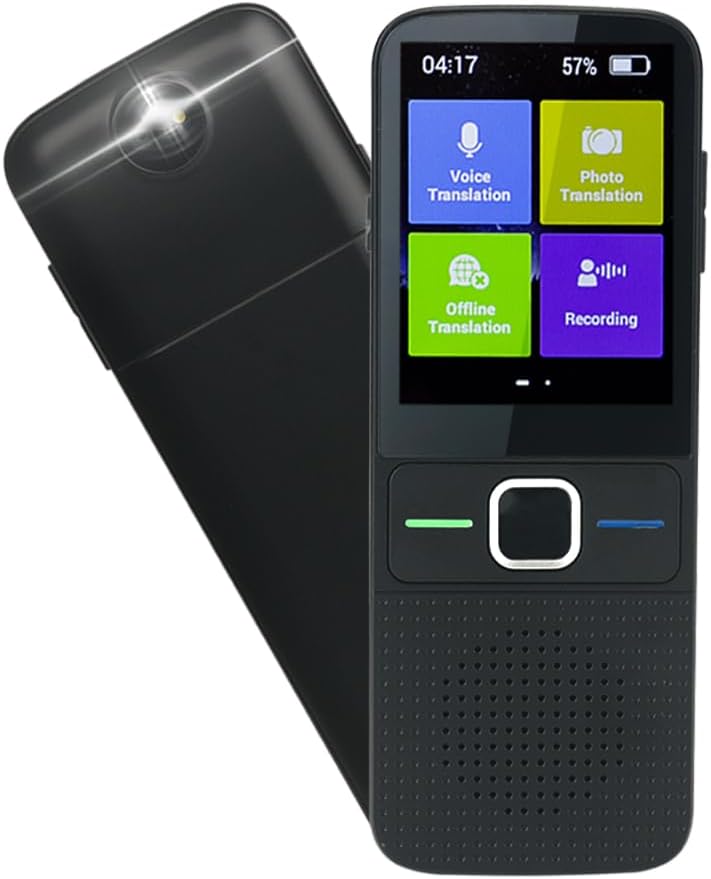
ചിത്രം 1.1: മുന്നിലും പിന്നിലും view of the FxyxGyc T10 Language Translator Device, showcasing its compact design and camera lens.

Figure 1.2: The FxyxGyc T10 device, highlighting its role as a global translator with intelligent voice translation capabilities.
2. ബോക്സിൽ എന്താണുള്ളത്?
Upon unboxing your FxyxGyc T10 Language Translator Device, please ensure all the following items are present:
- FxyxGyc T10 Language Translator Device (main unit)
- യുഎസ്ബി ചാർജർ
- ഇൻസ്ട്രക്ഷൻ മാനുവൽ
3. സജ്ജീകരണം
3.1 പ്രാരംഭ ചാർജിംഗ്
Before first use, fully charge the device using the provided USB charger. Connect the USB charger to the device's Type-C port and plug it into a standard USB power adapter (not included). A full charge typically takes approximately 250 minutes (4 hours and 10 minutes).
Important: Use a regular charger. The device does not support PD fast charging.
3.2 പവർ ഓൺ/ഓഫ്
- പവർ ഓണാക്കാൻ: Press and hold the power button (usually located on the side) until the screen illuminates.
- പവർ ഓഫ് ചെയ്യാൻ: Press and hold the power button until a power-off menu appears on the screen, then select "Power Off".
3.3 നെറ്റ്വർക്ക് കണക്ഷൻ (വൈ-ഫൈ)
For online translation and updates, the device requires a Wi-Fi connection.
- From the main screen, navigate to ക്രമീകരണങ്ങൾ.
- തിരഞ്ഞെടുക്കുക വൈഫൈ.
- വൈഫൈ ടോഗിൾ ചെയ്യുക On.
- ലിസ്റ്റിൽ നിന്ന് നിങ്ങൾക്ക് ആവശ്യമുള്ള വൈഫൈ നെറ്റ്വർക്ക് തിരഞ്ഞെടുക്കുക.
- Enter the Wi-Fi password if prompted, then tap ബന്ധിപ്പിക്കുക.

Figure 3.1: The device screen displaying the Wi-Fi connection icon, indicating successful network access.
3.4 ഭാഷ തിരഞ്ഞെടുക്കൽ
To set the device's interface language and default translation languages:
- From the main screen, tap the ക്രമീകരണങ്ങൾ ഐക്കൺ.
- താഴേക്ക് സ്ക്രോൾ ചെയ്ത് തിരഞ്ഞെടുക്കുക ഭാഷ.
- Choose your preferred interface language from the list.
- For translation, select the source and target languages within the translation application.

Figure 3.2: Steps to access and change language settings on the device, showing the settings menu and language list.
4. പ്രവർത്തന നിർദ്ദേശങ്ങൾ
4.1 Voice Translation (Online)
The device supports two-way real-time voice translation for 137 languages when connected to Wi-Fi.
- പ്രധാന സ്ക്രീനിൽ നിന്ന്, ടാപ്പ് ചെയ്യുക ശബ്ദ വിവർത്തനം.
- Select the two languages for translation (e.g., Language A to Language B).
- അമർത്തിപ്പിടിക്കുക പച്ച ബട്ടൺ to speak in Language A. Release the button to hear the translation in Language B.
- അമർത്തിപ്പിടിക്കുക നീല ബട്ടൺ to speak in Language B. Release the button to hear the translation in Language A.

Figure 4.1: Illustration of the one-click operation for voice translation, showing the green and blue buttons for respective language inputs.

Figure 4.2: A visual representation of the 137 languages supported by the device, categorized by region, including dialect support for Cantonese.
4.2 ഓഫ്ലൈൻ വിവർത്തനം
The device supports offline translation for 12 languages (English, Chinese, Japanese, Russian, Korean, German, Spanish, French, Italian, Dutch, Portuguese). To use this feature, you must pre-download the language packs.
- Ensure the device is connected to Wi-Fi.
- പ്രധാന സ്ക്രീനിൽ നിന്ന്, ടാപ്പ് ചെയ്യുക ഓഫ്ലൈൻ വിവർത്തനം.
- Select the language packs you wish to download.
- Once downloaded, you can use voice translation for these languages without an internet connection.
4.3 ഫോട്ടോ വിവർത്തനം
The built-in camera allows for translation of text from images in up to 45 languages. This is useful for menus, signs, and labels.
- പ്രധാന സ്ക്രീനിൽ നിന്ന്, ടാപ്പ് ചെയ്യുക ഫോട്ടോ വിവർത്തനം.
- Position the device's camera over the text you wish to translate.
- ചിത്രം പകർത്താൻ സ്ക്രീനിൽ ടാപ്പ് ചെയ്യുക.
- ഉപകരണം ചിത്രം പ്രോസസ്സ് ചെയ്യുകയും വിവർത്തനം ചെയ്ത വാചകം പ്രദർശിപ്പിക്കുകയും ചെയ്യും.
4.4 റെക്കോർഡിംഗ് പ്രവർത്തനം
The device can record audio for up to 60 minutes in English, Mandarin, or Cantonese, and then export the translated text to a computer.
- പ്രധാന സ്ക്രീനിൽ നിന്ന്, ടാപ്പ് ചെയ്യുക റെക്കോർഡിംഗ്.
- Select the recording language.
- Tap the record button to start/stop recording.
- To export, connect the device to your PC via USB and access the recorded files.
5. പരിപാലനം
5.1 വൃത്തിയാക്കൽ
- ഉപകരണത്തിന്റെ സ്ക്രീനും ബോഡിയും വൃത്തിയാക്കാൻ മൃദുവായതും ഉണങ്ങിയതും ലിന്റ് രഹിതവുമായ ഒരു തുണി ഉപയോഗിക്കുക.
- അബ്രാസീവ് ക്ലീനറുകൾ, ലായകങ്ങൾ, എയറോസോൾ സ്പ്രേകൾ എന്നിവ ഉപയോഗിക്കരുത്.
- തുറസ്സുകളിൽ ഈർപ്പം കയറുന്നത് ഒഴിവാക്കുക.
5.2 സോഫ്റ്റ്വെയർ അപ്ഡേറ്റുകൾ
The device supports online automatic upgrades. When a new system update is available, the device will automatically update in the background when connected to Wi-Fi.

Figure 5.1: The device illustrating the automatic online upgrade feature, ensuring the system is always up-to-date.
5.3 ബാറ്ററി കെയർ
The device is equipped with a 1500mAh Lithium Polymer battery. To maximize battery life:
- തീവ്രമായ താപനില ഒഴിവാക്കുക.
- ബാറ്ററി ഇടയ്ക്കിടെ പൂർണ്ണമായും ഡിസ്ചാർജ് ചെയ്യരുത്.
- ദീർഘനേരം ഉപയോഗിച്ചിട്ടില്ലെങ്കിൽ, ഭാഗികമായി ചാർജ് ചെയ്ത് ഉപകരണം സൂക്ഷിക്കുക.

Figure 5.2: Details on the 1500mAh battery, including continuous use time (approx. 1560 minutes) and standby duration (approx. 125 hours).
6. പ്രശ്നപരിഹാരം
| പ്രശ്നം | സാധ്യമായ കാരണം | പരിഹാരം |
|---|---|---|
| ഉപകരണം പവർ ഓണാക്കുന്നില്ല. | ബാറ്ററി കുറവാണ്; ഉപകരണം ഫ്രീസുചെയ്തു. | Charge the device for at least 30 minutes. If still unresponsive, perform a hard reset (refer to device manual for specific button combination, usually holding power button for 10-15 seconds). |
| വിവർത്തനം കൃത്യമല്ല അല്ലെങ്കിൽ വേഗത കുറവാണ്. | Poor Wi-Fi connection; unclear speech; language mismatch. | Ensure a stable Wi-Fi connection. Speak clearly and directly into the microphone. Verify that the correct source and target languages are selected. |
| Offline translation not working. | Language packs not downloaded or corrupted. | Connect to Wi-Fi and re-download the necessary offline language packs. |
| Photo translation fails. | Poor lighting; blurry image; text not clear. | Ensure adequate lighting. Hold the device steady to avoid blur. Make sure the text is clearly visible and within the camera's focus. |
| ബാറ്ററി പെട്ടെന്ന് തീരുന്നു. | High screen brightness; continuous use; background apps. | Reduce screen brightness. Close unused applications. Limit continuous online translation sessions. |
7 സ്പെസിഫിക്കേഷനുകൾ
| ഫീച്ചർ | വിശദാംശങ്ങൾ |
|---|---|
| ഉൽപ്പന്നത്തിൻ്റെ പേര് | വിവർത്തകൻ |
| ഉൽപ്പന്ന മോഡൽ | T10 |
| ഓപ്പറേറ്റിംഗ് സിസ്റ്റം | ആൻഡ്രോയിഡ് |
| നെറ്റ്വർക്കിംഗ് മോഡ് | വൈഫൈ |
| സ്ക്രീൻ വലിപ്പം | 2.4 ഇഞ്ച് IPS ടച്ച് സ്ക്രീൻ |
| ബാറ്ററി ശേഷി | 1500mAh ലിഥിയം പോളിമർ (ഉൾപ്പെടുത്തിയിരിക്കുന്നു) |
| തുടർച്ചയായ ഉപയോഗ സമയം | 8-12 hours (approx. 1560 minutes) |
| സ്റ്റാൻഡ്ബൈ സമയം | 7 days (approx. 125 hours) |
| ചാർജിംഗ് സമയം | ഏകദേശം 250 മിനിറ്റ് |
| ഡാറ്റ ഇൻ്റർഫേസ് | ടൈപ്പ്-സി യുഎസ്ബി |
| Translation Engine | Google / Microsoft |
| സ്പീച്ച് ഔട്ട്പുട്ട് | Microsoft SR |
| Supported Online Languages | 137 ഭാഷകൾ |
| Supported Offline Languages | 12 languages (English, Chinese, Japanese, Russian, Korean, German, Spanish, French, Italian, Dutch, Portuguese) |
| Supported Photo Translation Languages | 45 ഭാഷകൾ |
| ഉൽപ്പന്ന അളവുകൾ | 5.12 x 1.97 x 0.59 inches (130mm x 50mm x 15mm approx.) |
| ഇനത്തിൻ്റെ ഭാരം | 6.7 ഔൺസ് (190 ഗ്രാം) |
| നിർമ്മാതാവ് | Shenzhen Intelligent Voice Technology Co.,Ltd |
| ആദ്യ തീയതി ലഭ്യമാണ് | 1 ജനുവരി 2021 |

Figure 7.1: Detailed product parameters including dimensions, screen size, battery capacity, and operating system.
8. വാറൻ്റിയും പിന്തുണയും
For warranty information and technical support, please refer to the contact details provided in the physical instruction manual included with your device or visit the official FxyxGyc webവാറന്റി ക്ലെയിമുകൾക്കുള്ള വാങ്ങലിന്റെ തെളിവായി നിങ്ങളുടെ വാങ്ങൽ രസീത് സൂക്ഷിക്കുക.
Typical warranty periods for electronic devices range from 12 to 24 months from the date of purchase, covering manufacturing defects. Damage caused by misuse, accidents, or unauthorized modifications is generally not covered.
Ask a question about this manual
Ask about setup, troubleshooting, compatibility, parts, safety, or missing instructions. Manuals+ will review the question and use this page’s manual context to help answer it.