
BONTEC 110SB-FBA
BONTEC TV Wall Mount Bracket User Manual
Model: 110SB-FBA
ആമുഖം
This user manual provides comprehensive instructions for the installation, operation, and maintenance of your BONTEC TV Wall Mount Bracket. Designed for 17-45 inch LED, OLED, LCD Flat Screen TVs up to 66lbs, this low-profile, ultra-slim mount offers a secure and aesthetically pleasing solution for mounting your television. Please read this manual thoroughly before installation to ensure safe and correct usage.
സുരക്ഷാ വിവരങ്ങൾ
- മൗണ്ടിന്റെയും ടെലിവിഷന്റെയും സംയുക്ത ഭാരം ഭിത്തിയുടെ ഘടന സുരക്ഷിതമായി താങ്ങാൻ കഴിയുമെന്ന് ഉറപ്പാക്കുക.
- Do not mount on drywall alone. Always mount into wood studs, concrete, or brick walls.
- Verify your TV's VESA pattern and weight are within the mount's specifications (Max VESA 200x200mm, Max 66lbs).
- Use all provided hardware. If any parts are missing or damaged, contact BONTEC customer support.
- മര സ്റ്റഡുകൾ കൃത്യമായി കണ്ടെത്താൻ എപ്പോഴും ഒരു സ്റ്റഡ് ഫൈൻഡർ ഉപയോഗിക്കുക.
- During installation, ensure no electrical wires or plumbing are behind the drilling area.
- സുരക്ഷയും കൈകാര്യം ചെയ്യൽ എളുപ്പവും ഉറപ്പാക്കാൻ ഇൻസ്റ്റാളേഷനായി രണ്ട് പേരെ ശുപാർശ ചെയ്യുന്നു.
- After installation, double-check all connections and ensure the TV is securely fastened to the mount.
പാക്കേജ് ഉള്ളടക്കം
ഇൻസ്റ്റാളേഷൻ ആരംഭിക്കുന്നതിന് മുമ്പ് എല്ലാ ഘടകങ്ങളും നിലവിലുണ്ടെന്ന് ദയവായി പരിശോധിക്കുക:
- TV Wall Mount Bracket (Main Frame)
- TV Mounting Brackets (x2)
- Assorted Screws and Washers for TV attachment
- Lag Bolts and Wall Anchors for wall attachment
- സ്പിരിറ്റ് ലെവൽ
- കേബിൾ ബന്ധങ്ങൾ (x3)
- ഇൻസ്റ്റലേഷൻ മാനുവൽ

Image: All components of the BONTEC TV Wall Mount Bracket, including the main frame, TV brackets, and installation hardware.
സ്പെസിഫിക്കേഷനുകൾ
| ബ്രാൻഡ് | BONTEC |
| മോഡൽ നമ്പർ | 110SB-FBA |
| അനുയോജ്യമായ ടിവി വലുപ്പങ്ങൾ | 17-45 ഇഞ്ച് |
| പരമാവധി ഭാരം ശേഷി | 66 പൗണ്ട് (30 കി.ഗ്രാം) |
| VESA അനുയോജ്യത | 50x50mm, 75x75mm, 100x100mm, 200x100mm, 100x200mm, 200x200mm |
| Wall Distance (Low Profile) | 1.18 ഇഞ്ച് (30 മിമി) |
| ടിൽറ്റ് ആംഗിൾ | Up to 10 degrees forward |
| മെറ്റീരിയൽ | ഉയർന്ന കരുത്തുള്ള സ്റ്റീൽ |
| നിറം | കറുപ്പ് |
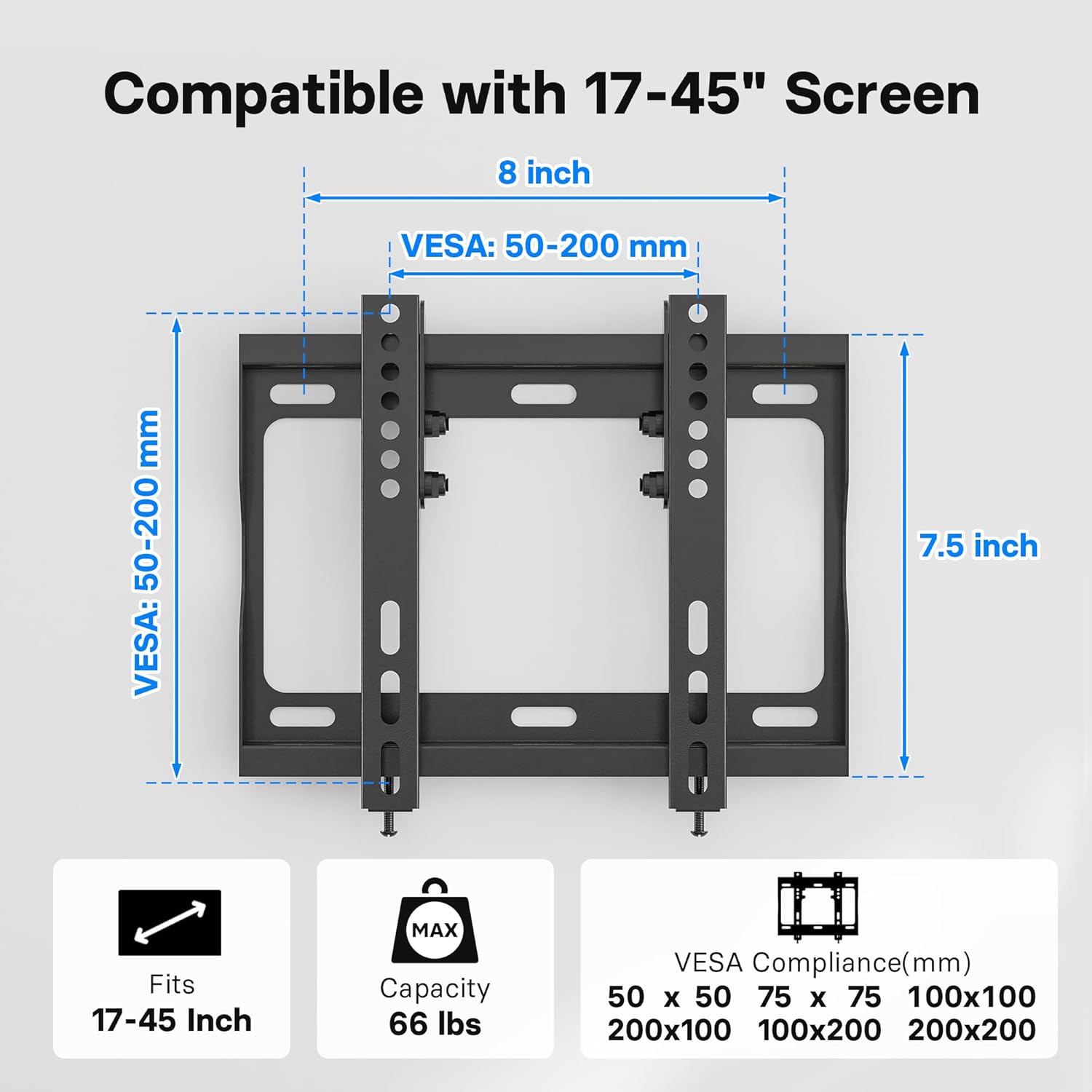
Image: Diagram illustrating the VESA compatibility (50-200mm) and screen size range (17-45 inches) for the mount.
സജ്ജീകരണവും ഇൻസ്റ്റാളേഷനും
Follow these steps carefully to install your BONTEC TV Wall Mount Bracket. It is highly recommended to have two people for this process.
ഘട്ടം 1: ടിവിയിലേക്ക് ടിവി ബ്രാക്കറ്റുകൾ അറ്റാച്ചുചെയ്യുക
- പോറലുകൾ ഉണ്ടാകാതിരിക്കാൻ നിങ്ങളുടെ ടിവി മുഖം മൃദുവായതും വൃത്തിയുള്ളതുമായ ഒരു പ്രതലത്തിൽ ശ്രദ്ധാപൂർവ്വം വയ്ക്കുക.
- നിങ്ങളുടെ ടിവിയുടെ പിൻഭാഗത്തുള്ള VESA മൗണ്ടിംഗ് ദ്വാരങ്ങൾ തിരിച്ചറിയുക.
- Select the appropriate screws and washers from the provided hardware kit that fit your TV's mounting holes.
- Attach the two vertical TV mounting brackets to the back of your TV. Ensure the hooks on the brackets are facing inward, towards the center of the TV.
- Tighten the screws securely, but do not overtighten.

Image: A television mounted flat against a wall, demonstrating the ultra-slim 1.18-inch profile of the mount.
Step 2: Mark and Drill Holes on Wall
- നിങ്ങളുടെ ടിവിക്ക് ആവശ്യമായ ഉയരം നിർണ്ണയിക്കുക.
- Place the wall plate against the wall at the desired height and use the included spirit level to ensure it is perfectly horizontal.
- Mark the drilling points through the holes on the wall plate using a pencil.
- വുഡ് സ്റ്റഡുകൾക്ക്: Use a stud finder to locate the center of the wood studs. Drill pilot holes (recommended size: 7/32" or 5.5mm) at the marked locations.
- For Concrete/Brick Walls: Drill pilot holes (recommended size: 3/8" or 10mm) at the marked locations. Insert the plastic wall anchors into the drilled holes. Tap gently with a hammer if needed until flush with the wall surface.

Image: Visual guide demonstrating the applicability of the mount to wood studs, concrete walls, and brick walls. A warning states: "DO NOT MOUNT ON DRYWALL ALONE".
ഘട്ടം 3: വാൾ പ്ലേറ്റ് ഭിത്തിയിൽ ഘടിപ്പിക്കുക
- തുരന്ന ദ്വാരങ്ങൾക്കൊപ്പം വാൾ പ്ലേറ്റ് വിന്യസിക്കുക.
- Secure the wall plate to the wall using the lag bolts and washers. For concrete/brick walls, ensure the lag bolts go into the previously inserted wall anchors.
- Tighten all bolts firmly to ensure the wall plate is securely fastened to the wall.
ഘട്ടം 4: വാൾ പ്ലേറ്റിൽ ടിവി തൂക്കിയിടുക
- സഹായത്തോടെ, ബ്രാക്കറ്റുകൾ ഘടിപ്പിച്ചിരിക്കുന്ന ടിവി ശ്രദ്ധാപൂർവ്വം ഉയർത്തുക.
- ടിവി ബ്രാക്കറ്റുകളിലെ കൊളുത്തുകൾ വാൾ പ്ലേറ്റിന്റെ മുകളിലെ അറ്റവുമായി വിന്യസിക്കുക.
- Gently lower the TV, ensuring the brackets engage securely with the wall plate.
- Once the TV is hanging, locate the safety lock bolts at the bottom of the TV brackets. Tighten these bolts to secure the TV to the wall plate and prevent accidental dislodging.

Image: A visual representation of the easy 15-minute installation process, showing the TV being mounted onto the wall plate.

ചിത്രം: ഒരു ക്ലോസ്-അപ്പ് view of the safety lock bolts, which secure the TV brackets to the wall plate after the TV is hung.
ഇൻസ്റ്റലേഷൻ വീഡിയോ ഗൈഡ്
Video: An official BONTEC video demonstrating the installation process and key features of the Low Profile TV Wall Mount Bracket for 17-45 inch TVs.
Operating the Mount (Tilt Feature)
The BONTEC TV Wall Mount features a 10-degree forward tilt to optimize your viewing experience and reduce glare.
- To adjust the tilt, loosen the tilt adjustment bolts on the side of the TV mounting brackets.
- Carefully tilt the TV to your desired angle (up to 10 degrees forward).
- Once the desired angle is achieved, tighten the tilt adjustment bolts securely to lock the TV in place.

Image: A diagram illustrating the 10-degree tilt capability of the mount and the space provided for cable management behind the TV.

Image: A family enjoying television, demonstrating how the BONTEC TV wall mount allows for optimal viewing angles in a living room setting.
മെയിൻ്റനൻസ്
To ensure the longevity and safe operation of your BONTEC TV Wall Mount Bracket:
- എല്ലാ സ്ക്രൂകളും ബോൾട്ടുകളും ഇറുകിയതും സുരക്ഷിതവുമാണെന്ന് ഉറപ്പാക്കാൻ ഇടയ്ക്കിടെ പരിശോധിക്കുക.
- മൃദുവായതും ഉണങ്ങിയതുമായ തുണി ഉപയോഗിച്ച് മൗണ്ട് വൃത്തിയാക്കുക. അബ്രാസീവ് ക്ലീനറുകളോ ലായകങ്ങളോ ഉപയോഗിക്കുന്നത് ഒഴിവാക്കുക.
- Do not hang anything from the mount other than the specified television.
ട്രബിൾഷൂട്ടിംഗ്
| പ്രശ്നം | സാധ്യമായ കാരണം | പരിഹാരം |
|---|---|---|
| ഇൻസ്റ്റാൾ ചെയ്തതിന് ശേഷം ടിവി ലെവലിൽ അല്ല. | Wall plate not perfectly level during installation. | Loosen the wall plate bolts slightly, adjust with a spirit level, then re-tighten. |
| TV feels loose on the mount. | Safety lock bolts not tightened or TV brackets not fully engaged. | Ensure TV brackets are fully seated on the wall plate. Tighten the safety lock bolts at the bottom of the TV brackets. |
| Cannot achieve desired tilt angle. | Tilt adjustment bolts are too tight. | Loosen the tilt adjustment bolts on the side of the TV brackets, adjust tilt, then re-tighten. |
| Mounting screws for TV do not fit. | Incorrect screw size or type selected. | Refer to your TV's manual for correct screw size. Use the appropriate screws from the provided kit or purchase compatible ones. |
വാറൻ്റിയും പിന്തുണയും
For warranty information and customer support, please refer to the product packaging or visit the official BONTEC webസൈറ്റ്. വാറൻ്റി ക്ലെയിമുകൾക്കായി നിങ്ങളുടെ വാങ്ങൽ രസീത് സൂക്ഷിക്കുക.
If you encounter any issues not covered in this manual, please contact BONTEC customer service for assistance.
Ask a question about this manual
Ask about setup, troubleshooting, compatibility, parts, safety, or missing instructions. Manuals+ will review the question and use this page’s manual context to help answer it.