
1. ആമുഖം
Thank you for choosing the EarFun Air Pro Wireless Earbuds. This manual provides detailed instructions for setting up, operating, and maintaining your earbuds to ensure optimal performance and longevity. Please read this manual thoroughly before use and retain it for future reference.
2. പാക്കേജ് ഉള്ളടക്കം
താഴെ കൊടുത്തിരിക്കുന്ന എല്ലാ ഇനങ്ങളും നിങ്ങളുടെ പാക്കേജിൽ ഉണ്ടെന്ന് ഉറപ്പാക്കുക:
- EarFun Air Pro Wireless Earbuds
- ചാർജിംഗ് കേസ്
- USB-C ചാർജിംഗ് കേബിൾ
- ഇയർടിപ്പുകൾ (വിവിധ വലുപ്പങ്ങൾ)
- ഉപയോക്തൃ മാനുവൽ (ഈ പ്രമാണം)
3. ഉൽപ്പന്നം കഴിഞ്ഞുview
Familiarize yourself with the components of your EarFun Air Pro earbuds and charging case.

ചിത്രം 3.1: EarFun Air Pro Wireless Earbuds and their charging case. The earbuds are black with a metallic accent, and the charging case is a sleek black oval shape with the EarFun logo.
3.1 ഇയർബഡ് ഘടകങ്ങൾ
- ടച്ച് കൺട്രോൾ ഏരിയ: പ്ലേബാക്ക്, കോളുകൾ, മോഡുകൾ എന്നിവ കൈകാര്യം ചെയ്യുന്നതിന്.
- മൈക്രോഫോണുകൾ: Multiple microphones for active noise cancellation and clear calls.
- ചെവി നുറുങ്ങ്: Silicone tips for comfort and passive noise isolation.
- ചാർജിംഗ് കോൺടാക്റ്റുകൾ: Located at the bottom of each earbud.
3.2 ചാർജിംഗ് കേസ് ഘടകങ്ങൾ
- ഇയർബഡ് സ്ലോട്ടുകൾ: Magnetic slots for securing and charging earbuds.
- ചാർജിംഗ് സൂചകം: ചാർജിംഗ് നില സൂചിപ്പിക്കുന്ന LED ലൈറ്റ്.
- യുഎസ്ബി-സി പോർട്ട്: കേസെടുത്തതിന്.
4. സജ്ജീകരണം
4.1 പ്രാരംഭ ചാർജിംഗ്
- Remove the protective film from the charging contacts on both earbuds.
- ചാർജിംഗ് കെയ്സിലേക്ക് ഇയർബഡുകൾ സ്ഥാപിക്കുക.
- USB-C കേബിൾ കേസിലെ ചാർജിംഗ് പോർട്ടിലേക്കും ഒരു പവർ സ്രോതസ്സിലേക്കും ബന്ധിപ്പിക്കുക.
- Allow approximately 1.5 hours for a full charge of the earbuds and case. The indicator light on the case will show charging status.
4.2 ഒരു ഉപകരണവുമായി ജോടിയാക്കൽ
- ഇയർബഡുകൾ പൂർണ്ണമായും ചാർജ് ചെയ്തിട്ടുണ്ടെന്ന് ഉറപ്പാക്കുക.
- ചാർജിംഗ് കേസ് തുറക്കുക. ഇയർബഡുകൾ സ്വയമേവ ജോടിയാക്കൽ മോഡിലേക്ക് പ്രവേശിക്കും, ഇയർബഡുകളിലൊന്നിൽ മിന്നുന്ന LED ഇത് സൂചിപ്പിക്കുന്നു.
- നിങ്ങളുടെ ഉപകരണത്തിൽ (സ്മാർട്ട്ഫോൺ, ടാബ്ലെറ്റ് മുതലായവ), ബ്ലൂടൂത്ത് പ്രവർത്തനക്ഷമമാക്കുക.
- ഇതിനായി തിരയുക "EarFun Air Pro" in the list of available Bluetooth devices and select it to connect.
- കണക്റ്റുചെയ്തുകഴിഞ്ഞാൽ, ഒരു വോയ്സ് പ്രോംപ്റ്റ് വിജയകരമായ ജോടിയാക്കൽ സ്ഥിരീകരിക്കും.
കുറിപ്പ്: ഉപകരണത്തിൽ ബ്ലൂടൂത്ത് പ്രവർത്തനക്ഷമമാക്കിയിട്ടുണ്ടെങ്കിൽ, കേസിൽ നിന്ന് നീക്കം ചെയ്യുമ്പോൾ ഇയർബഡുകൾ അവസാനം ജോടിയാക്കിയ ഉപകരണത്തിലേക്ക് യാന്ത്രികമായി വീണ്ടും കണക്റ്റുചെയ്യും.
4.3 ചെവിയുടെ നുറുങ്ങുകൾ തിരഞ്ഞെടുക്കൽ
Choosing the correct ear tip size is crucial for comfort, sound quality, and effective noise cancellation. Experiment with the included ear tips to find the best fit for your ears. A good seal will provide better bass response and noise isolation.
5. പ്രവർത്തന നിർദ്ദേശങ്ങൾ
5.1 ടച്ച് നിയന്ത്രണങ്ങൾ
The EarFun Air Pro earbuds feature intuitive touch controls on the outer surface of each earbud.

ചിത്രം 5.1: A person demonstrating the use of touch controls on the EarFun Air Pro earbuds. The image highlights the tap control functionality for changing modes or managing music.
| ആക്ഷൻ | ഫംഗ്ഷൻ |
|---|---|
| ഒറ്റ ടാപ്പ് (ഇടത്/വലത്) | സംഗീതം പ്ലേ ചെയ്യുക/താൽക്കാലികമായി നിർത്തുക, കോൾ സ്വീകരിക്കുക/അവസാനിപ്പിക്കുക |
| ഡബിൾ ടാപ്പ് (വലത്) | അടുത്ത ട്രാക്ക് |
| ഡബിൾ ടാപ്പ് (ഇടത്) | മുമ്പത്തെ ട്രാക്ക് |
| ട്രിപ്പിൾ ടാപ്പ് (ഇടത്) | Cycle ANC/Transparency/Normal Mode |
| ട്രിപ്പിൾ ടാപ്പ് (വലത്) | വോയ്സ് അസിസ്റ്റൻ്റ് സജീവമാക്കുക |
| അമർത്തിപ്പിടിക്കുക (ഇടത്/വലത്) | കോൾ നിരസിക്കുക |
5.2 ആക്ടീവ് നോയ്സ് റദ്ദാക്കലും (ANC) ട്രാൻസ്പരൻസി മോഡും
The EarFun Air Pro features QuietSmart Technology for active noise cancellation up to 38dB, and a Transparency Mode.
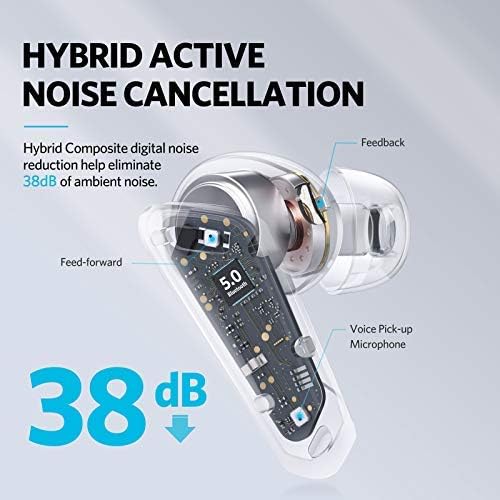
ചിത്രം 5.2: A cutaway diagram of an earbud illustrating the components involved in Hybrid Active Noise Cancellation, showing feed-forward and feedback microphones, and a voice pick-up microphone, indicating a noise reduction of 38dB.
- ANC മോഡ്: Reduces ambient noise, ideal for noisy environments.
- സുതാര്യത മോഡ്: Allows you to hear your surroundings while listening to audio, enhancing situational awareness.
- സാധാരണ മോഡ്: നോയ്സ് റദ്ദാക്കലോ സുതാര്യതയോ ഇല്ലാതെ സ്റ്റാൻഡേർഡ് ഓഡിയോ പ്ലേബാക്ക്.
Cycle through these modes by triple-tapping the left earbud.
5.3 സിംഗിൾ ഇയർബഡ് മോഡ്
Either earbud can be used independently. Simply remove one earbud from the case and leave the other in, or place one back into the case during use. The active earbud will automatically switch to mono mode.

ചിത്രം 5.3: A person relaxing on a couch, listening to music with only one EarFun Air Pro earbud in their ear, demonstrating the single-ear listening feature.
5.4 In-Ear Detection
The earbuds feature in-ear detection. Removing an earbud from your ear will automatically pause playback, and reinserting it will resume playback.

ചിത്രം 5.4: A man holding one EarFun Air Pro earbud after removing it from his ear, while the other remains in his ear, illustrating the in-ear detection technology that pauses music when an earbud is removed.
5.5 കോളുകൾ ചെയ്യലും സ്വീകരിക്കലും
The EarFun Air Pro earbuds utilize 6-microphone Environment Noise Cancellation (ENC) technology for clear calls.
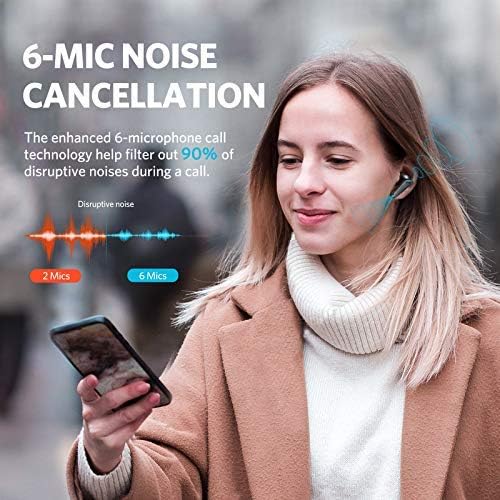
ചിത്രം 5.5: A woman smiling and holding a smartphone to her chest while wearing EarFun Air Pro earbuds, illustrating the 6-mic noise cancellation feature for calls, with a graphic showing noise reduction.
- ഉത്തരം/അവസാന കോൾ: ഇയർബഡുകളിലൊന്നിൽ ഒറ്റത്തവണ ടാപ്പ് ചെയ്യുക.
- കോൾ നിരസിക്കുക: ഇയർബഡുകളിൽ ഏതെങ്കിലുമൊന്ന് അമർത്തിപ്പിടിക്കുക.
6. പരിപാലനം
6.1 വൃത്തിയാക്കൽ
- മൃദുവായതും ഉണങ്ങിയതും ലിന്റ് രഹിതവുമായ തുണി ഉപയോഗിച്ച് ഇയർബഡുകൾ, ഇയർ ടിപ്പുകൾ, ചാർജിംഗ് കോൺടാക്റ്റുകൾ എന്നിവ പതിവായി വൃത്തിയാക്കുക.
- ചെവിയുടെ അറ്റങ്ങൾ നീക്കം ചെയ്ത് ആവശ്യമെങ്കിൽ നേരിയ സോപ്പും വെള്ളവും ഉപയോഗിച്ച് വൃത്തിയാക്കുക, വീണ്ടും ഘടിപ്പിക്കുന്നതിന് മുമ്പ് അവ പൂർണ്ണമായും ഉണങ്ങിയെന്ന് ഉറപ്പാക്കുക.
- കഠിനമായ രാസവസ്തുക്കളോ ഉരച്ചിലുകളോ ഉപയോഗിക്കുന്നത് ഒഴിവാക്കുക.
6.2 സംഭരണം
- ഉപയോഗത്തിലില്ലാത്തപ്പോൾ, ഇയർബഡുകൾ സംരക്ഷിക്കുന്നതിനും ചാർജ്ജ് ചെയ്ത നിലയിൽ നിലനിർത്തുന്നതിനും എല്ലായ്പ്പോഴും ചാർജിംഗ് കേസിൽ സൂക്ഷിക്കുക.
- തീവ്രമായ താപനിലയിൽ നിന്നും നേരിട്ടുള്ള സൂര്യപ്രകാശത്തിൽ നിന്നും അകന്ന്, തണുത്തതും വരണ്ടതുമായ സ്ഥലത്ത് സൂക്ഷിക്കുക.
6.3 ജല പ്രതിരോധം
The EarFun Air Pro earbuds are IPX5 water-resistant, meaning they can withstand sweat and light splashes. They are not designed for swimming or submersion in water. Ensure earbuds are dry before placing them back in the charging case.
7. പ്രശ്നപരിഹാരം
| പ്രശ്നം | സാധ്യമായ പരിഹാരം |
|---|---|
| ഇയർബഡുകൾ ജോടിയാക്കുന്നില്ല |
|
| ഒരു ഇയർബഡിൽ നിന്ന് ശബ്ദമില്ല |
|
| Poor sound quality/weak bass |
|
| ഇയർബഡുകൾ ചാർജ് ചെയ്യുന്നില്ല |
|
8 സ്പെസിഫിക്കേഷനുകൾ
| ഫീച്ചർ | വിശദാംശങ്ങൾ |
|---|---|
| മോഡൽ | TW302 |
| ബ്ലൂടൂത്ത് പതിപ്പ് | 5.0 |
| കണക്റ്റിവിറ്റി ടെക്നോളജി | ബ്ലൂടൂത്ത് |
| സജീവ നോയ്സ് റദ്ദാക്കൽ | Up to 38dB (QuietSmart Technology) |
| മൈക്രോഫോണുകൾ | 6-Mic ENC for calls |
| ഡ്രൈവർമാർ | Dual 10mm Composite Dynamic Drivers |
| കളിസമയം (ഇയർബഡുകൾ) | Up to 9 hours (Normal Mode), 7 hours (ANC Mode) |
| കേസുള്ള മൊത്തം പ്ലേടൈം | 32 മണിക്കൂർ വരെ |
| ചാർജിംഗ് സമയം | Approx. 1.5 hours (earbuds and case) |
| ചാർജിംഗ് പോർട്ട് | USB-C |
| ജല പ്രതിരോധം | IPX5 (Sweat & Water Resistant) |
| നിയന്ത്രണ തരം | ടച്ച് നിയന്ത്രണം |
| പ്രത്യേക സവിശേഷതകൾ | In-ear Infrared Detection, Transparency Mode, Single Earbud Mode, Voice Assistant Activation |
| പരമാവധി പ്രവർത്തന ദൂരം | 15 മീറ്റർ |
| ഇനത്തിൻ്റെ ഭാരം | 53 ഗ്രാം |
9. വാറൻ്റിയും പിന്തുണയും
EarFun products are designed and manufactured to the highest quality standards. For detailed warranty information, product registration, or technical support, please visit the official EarFun webസൈറ്റിൽ ബന്ധപ്പെടുകയോ അവരുടെ ഉപഭോക്തൃ സേവനവുമായി നേരിട്ട് ബന്ധപ്പെടുകയോ ചെയ്യുക. വാറന്റി ക്ലെയിമുകൾക്കുള്ള വാങ്ങലിന്റെ തെളിവായി നിങ്ങളുടെ വാങ്ങൽ രസീത് സൂക്ഷിക്കുക.
ഉദ്യോഗസ്ഥൻ Webസൈറ്റ്: www.myearfun.com