
1. ആമുഖം
This manual provides essential information for the safe and effective use of your ProForm Sport 3.0 Treadmill. Please read all instructions thoroughly before assembly and operation. Retain this manual for future reference.
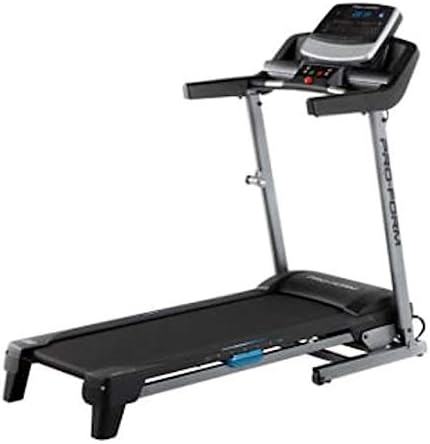
Image: The ProForm Sport 3.0 Treadmill, showcasing its overall design and console.
2 പ്രധാനപ്പെട്ട സുരക്ഷാ വിവരങ്ങൾ
To reduce the risk of serious injury, read the following important precautions before using the treadmill:
- ഏതെങ്കിലും വ്യായാമ പരിപാടി ആരംഭിക്കുന്നതിന് മുമ്പ് ഒരു ഡോക്ടറെ സമീപിക്കുക.
- The treadmill is designed to support a maximum user weight of 125 കിലോഗ്രാം (275 പൗണ്ട്).
- Recommended for users 15 വയസ്സും അതിൽ കൂടുതലും പ്രായമുള്ളവർ.
- Always attach the സുരക്ഷാ കീ to your clothing before starting the treadmill. The treadmill will stop if the safety key is disengaged.
- ഓപ്പറേഷൻ സമയത്ത് ട്രെഡ്മില്ലിൽ നിന്ന് കുട്ടികളെയും വളർത്തുമൃഗങ്ങളെയും അകറ്റി നിർത്തുക.
- ട്രെഡ്മില്ല് ഒരു നിരപ്പായ പ്രതലത്തിൽ വയ്ക്കുക, അതിന് പിന്നിൽ കുറഞ്ഞത് 2 മീറ്റർ (6.5 അടി) വ്യക്തമായ ഇടവും ഓരോ വശത്തും 0.5 മീറ്റർ (1.6 അടി) അകലവും ഉണ്ടായിരിക്കണം.
- ഉചിതമായ വ്യായാമ വസ്ത്രങ്ങളും അത്ലറ്റിക് ഷൂകളും ധരിക്കുക.
- Do not operate the treadmill if it has a damaged power cord or plug, or if it is not working properly.
3. അസംബ്ലി നിർദ്ദേശങ്ങൾ
The ProForm Sport 3.0 Treadmill requires assembly. Please refer to the separate assembly guide included with your product for detailed, step-by-step instructions. Ensure all components listed in the assembly guide are present before beginning. A tool kit is included to assist with assembly.
The treadmill features a സ്പേസ് സേവർ design, allowing it to be folded for storage after use. Follow the assembly guide for instructions on how to properly fold and unfold the treadmill.
4. പ്രവർത്തന നിർദ്ദേശങ്ങൾ

ചിത്രം: ക്ലോസ്-അപ്പ് view of the ProForm Sport 3.0 Treadmill console.
4.1 പവർ ഓണും ഓഫും
- Connect the power cord to a grounded outlet. The treadmill operates on 9Vcc 2.0A.
- Locate the main power switch, usually near the front of the treadmill base, and flip it to the 'ON' position.
- To power off, flip the main power switch to 'OFF' and unplug the power cord.
4.2 കൺസോൾ ഓവർview
The console features a 5-inch Multi-Color Display that shows workout metrics such as speed, incline, time, distance, and heart rate. It includes an audio port compatible with two 2-inch speakers for entertainment during your workout.
4.3 ഒരു വ്യായാമം ആരംഭിക്കൽ
- Step onto the treadmill belt, placing your feet on the side rails.
- അറ്റാച്ചുചെയ്യുക സുരക്ഷാ കീ clip to your clothing. Insert the safety key into its designated slot on the console.
- കൺസോളിലെ 'സ്റ്റാർട്ട്' ബട്ടൺ അമർത്തുക. ബെൽറ്റ് കുറഞ്ഞ വേഗതയിൽ ചലിക്കാൻ തുടങ്ങും.

Image: A user engaging in a workout on the ProForm Sport 3.0 Treadmill.
4.4 വേഗതയും ചരിവും ക്രമീകരിക്കൽ
- ഉപയോഗിക്കുക ഡിജിറ്റൽ സ്പീഡ് നിയന്ത്രണം buttons (usually '+' and '-') to adjust the belt speed from 0 മുതൽ 10 എംപിഎച്ച് വരെ.
- ഉപയോഗിക്കുക Digital Incline Control buttons to adjust the incline from 0% മുതൽ 10% വരെ.
- Quick speed and incline buttons may also be available for rapid adjustments.
4.5 പ്രീ-സെറ്റ് പ്രോഗ്രാമുകൾ ഉപയോഗിക്കുന്നു
The treadmill includes 16 Pre-set Training Programs. Select a program from the console. The treadmill will automatically adjust speed and incline according to the program's profile. Follow the on-screen prompts.
4.6 ഹൃദയമിടിപ്പ് നിരീക്ഷണം
The treadmill is equipped with an EKG Pulse Sensor. To monitor your heart rate, grasp the metal contacts on the handlebars firmly with both hands. Your heart rate will be displayed on the console after a few seconds.
5. പരിപാലനം
പതിവ് അറ്റകുറ്റപ്പണികൾ നിങ്ങളുടെ ട്രെഡ്മില്ലിന്റെ ദീർഘായുസ്സും മികച്ച പ്രകടനവും ഉറപ്പാക്കുന്നു.
- വൃത്തിയാക്കൽ: കൺസോളിലും മറ്റ് പ്രതലങ്ങളിലും പരസ്യം ഉപയോഗിച്ച് തുടയ്ക്കുക.amp ഓരോ ഉപയോഗത്തിനു ശേഷവും തുണി ഉപയോഗിക്കുക. അബ്രാസീവ് ക്ലീനറുകളോ ലായകങ്ങളോ ഉപയോഗിക്കുന്നത് ഒഴിവാക്കുക.
- ബെൽറ്റ് പരിശോധന: Periodically check the walking belt for wear and tear. Ensure the belt is centered and properly tensioned. Refer to the assembly guide for belt adjustment procedures.
- ലൂബ്രിക്കേഷൻ: The walking belt may require lubrication over time. Consult your assembly guide or manufacturer's recommendations for the correct lubricant and application frequency.
- ഘടക പരിശോധന: Regularly inspect all nuts, bolts, and moving parts for tightness and proper function. Tighten any loose fasteners.
6. പ്രശ്നപരിഹാരം
If you experience issues with your treadmill, refer to the following common problems and solutions:
| പ്രശ്നം | സാധ്യമായ കാരണം | പരിഹാരം |
|---|---|---|
| ട്രെഡ്മിൽ പവർ ഓൺ ആകുന്നില്ല. | പവർ കോർഡ് പ്ലഗ് ഇൻ ചെയ്തിട്ടില്ല; മെയിൻ പവർ സ്വിച്ച് ഓഫ്; സർക്യൂട്ട് ബ്രേക്കർ ട്രിപ്പുചെയ്തു. | Ensure power cord is securely plugged in. Turn main power switch to 'ON'. Check household circuit breaker. |
| Belt does not move. | Safety key not inserted; motor overload; belt misalignment. | Insert the safety key fully. Reduce user weight if exceeding capacity. Refer to assembly guide for belt alignment. |
| Inaccurate heart rate reading. | Hands not firmly on sensors; dry hands; interference. | Ensure firm, consistent contact with EKG pulse sensors. Moisten hands slightly if dry. Avoid electronic interference. |
| പ്രവർത്തന സമയത്ത് അസാധാരണമായ ശബ്ദം. | അയഞ്ഞ ഘടകങ്ങൾ; ബെൽറ്റ് ഘർഷണം; മോട്ടോർ പ്രശ്നം. | Check and tighten all visible bolts and screws. Lubricate belt if necessary (refer to manual). If noise persists, contact support. |
7 സ്പെസിഫിക്കേഷനുകൾ
| മോഡൽ നമ്പർ | സ്പോർട്ട് 3.0 |
| മോട്ടോർ പവർ | 2.5 എച്ച്.പി |
| പരമാവധി ഉപയോക്തൃ ഭാരം | 125 കി.ഗ്രാം (275 പൗണ്ട്) |
| വേഗത പരിധി | 0 - 10 MPH (Digital Control) |
| ചരിവ് പരിധി | 0 - 10% (Digital Control) |
| റണ്ണിംഗ് ബെൽറ്റ് അളവുകൾ | 16 x 50 inches (approx. 40.6 x 127 cm) |
| ഡിസ്പ്ലേ തരം | 5-inch Multi-Color LCD |
| മുൻകൂട്ടി നിശ്ചയിച്ച പ്രോഗ്രാമുകൾ | 16 |
| കുഷ്യനിംഗ് സിസ്റ്റം | ProShoxTM Plus |
| ഫ്രെയിം മെറ്റീരിയൽ | സ്റ്റീൽ അലോയ് |
| ഉൽപ്പന്ന അളവുകൾ (L x W x H) | 170 x 70 x 30 സെ.മീ (ഏകദേശം 67 x 27.5 x 11.8 ഇഞ്ച്) |
| ഉൽപ്പന്ന ഭാരം | 50 കി.ഗ്രാം (110 പൗണ്ട്) |
| പവർ ആവശ്യകത | 9Vcc 2.0A (Cable Eléctrico) |
| ഉൾപ്പെടുത്തിയ ഘടകങ്ങൾ | Power cable, Tool kit, Space Saver system, ProShoxTM Plus cushioning, Safety key braking system |
8. വാറൻ്റിയും പിന്തുണയും
For information regarding your product's warranty, please refer to the warranty card included with your purchase or visit the official ProForm website. If you require technical assistance, replacement parts, or have questions not covered in this manual, please contact ProForm customer support directly.
Extended protection plans may be available for purchase separately. Please consult your retailer for details on available extended warranty options.