
1. ആമുഖം
Thank you for choosing the Laney F67-LIONHEART Portable Bluetooth Speaker. This manual provides essential information for the safe and efficient operation of your new speaker. Please read it thoroughly before use and retain it for future reference.
The Laney F67-LIONHEART is a portable Bluetooth speaker designed to deliver high-quality audio with versatile connectivity. Featuring a rechargeable Li-Ion battery, it offers extended playtime and robust sound performance.
2. സുരക്ഷാ നിർദ്ദേശങ്ങൾ
- ഊർജ്ജ സ്രോതസ്സ്: Only use the provided PSU (Power Supply Unit) for charging. Using an incompatible charger may damage the device or pose a fire risk.
- വാട്ടർ എക്സ്പോഷർ: ഈ ഉൽപ്പന്നം അല്ല waterproof. Avoid exposure to water, rain, or moisture to prevent electric shock or damage.
- വെൻ്റിലേഷൻ: വെന്റിലേഷൻ ദ്വാരങ്ങളൊന്നും തടയരുത്. സ്പീക്കറിന് ചുറ്റും മതിയായ വായുസഞ്ചാരം ഉറപ്പാക്കുക.
- ചൂട്: റേഡിയേറ്ററുകൾ, ഹീറ്റ് രജിസ്റ്ററുകൾ, സ്റ്റൗകൾ അല്ലെങ്കിൽ മറ്റ് ഉപകരണങ്ങൾ (ഉൾപ്പെടെ) പോലുള്ള താപ സ്രോതസ്സുകളിൽ നിന്ന് സ്പീക്കറിനെ അകറ്റി നിർത്തുക. ampലൈഫയറുകൾ) ചൂട് ഉത്പാദിപ്പിക്കുന്നത്.
- വൃത്തിയാക്കൽ: Unplug the speaker before cleaning. Use only a dry cloth.
- ബാറ്ററി: Do not attempt to replace the internal Li-Ion battery yourself. Contact qualified service personnel for battery-related issues.
- വേർപെടുത്തുക: Do not attempt to disassemble or modify the speaker. This will void the warranty and may cause damage or injury.
- പ്ലേസ്മെൻ്റ്: വീഴാതിരിക്കാൻ സ്പീക്കർ ഒരു സ്ഥിരതയുള്ളതും പരന്നതുമായ പ്രതലത്തിൽ വയ്ക്കുക.
3. പാക്കേജ് ഉള്ളടക്കം
താഴെ പറയുന്ന ഇനങ്ങൾക്കായി ബോക്സ് ചെക്ക് ചെയ്യുക:
- Laney F67-LIONHEART Portable Bluetooth Speaker
- പൊതുമേഖലാ സ്ഥാപനം (വൈദ്യുതി വിതരണ യൂണിറ്റ്)
- High-quality audio cable (3.5mm jack)
- Removable Shoulder Strap
4. നിയന്ത്രണങ്ങളും സവിശേഷതകളും

ചിത്രം: Top control panel of the Laney F67-LIONHEART speaker, showing Bluetooth, Volume, Bass, Treble controls, AUX In, Charge port, and Power switch.
- ബ്ലൂടൂത്ത് പെയർ ബട്ടൺ: ബ്ലൂടൂത്ത് ജോടിയാക്കൽ മോഡ് ആരംഭിക്കാൻ അമർത്തിപ്പിടിക്കുക.
- വോളിയം നിയന്ത്രണം: Rotary knob to adjust the overall output volume.
- ബാസ് നിയന്ത്രണം: Rotary knob to adjust the low-frequency response.
- ട്രെബിൾ നിയന്ത്രണം: Rotary knob to adjust the high-frequency response.
- ഓക്സ് ഇൻ: 3.5mm stereo input for connecting external audio devices via cable.
- ചാർജ് പോർട്ട്: Input for connecting the PSU to charge the internal battery.
- വൈദ്യുതി സ്വിച്ച്: Toggle switch to turn the speaker ON or OFF.
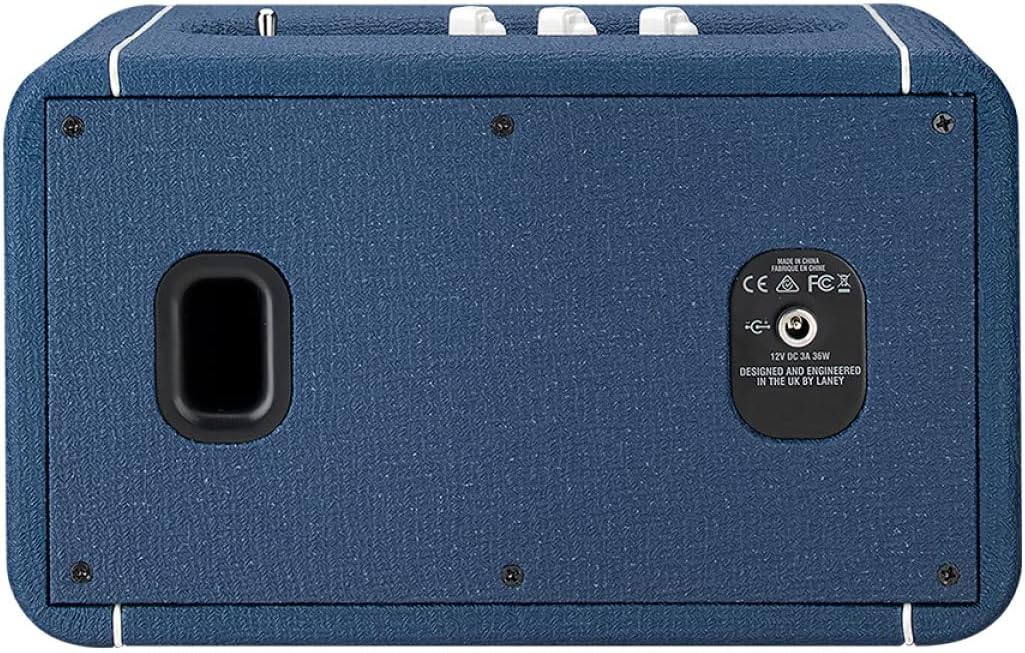
ചിത്രം: Rear panel of the Laney F67-LIONHEART speaker, displaying the 12V DC 3A 36W power input and regulatory compliance markings.
The rear panel includes the main power input for charging and operation.
5. സജ്ജീകരണം
- പ്രാരംഭ ചാർജ്: Before first use, fully charge the speaker. Connect the supplied PSU to the Charge Port on the speaker and plug it into a wall outlet. The charge indicator light will show charging status.
- പവർ ഓൺ: Toggle the Power Switch to the 'ON' position. The power indicator light will illuminate.
6. പ്രവർത്തന നിർദ്ദേശങ്ങൾ
6.1. ബ്ലൂടൂത്ത് ജോടിയാക്കൽ
- Ensure the speaker is powered ON.
- അമർത്തിപ്പിടിക്കുക ബ്ലൂടൂത്ത് പെയർ ബട്ടൺ until the Bluetooth indicator light begins to flash, indicating it is in pairing mode.
- On your audio device (smartphone, tablet, laptop), go to the Bluetooth settings and search for available devices.
- Select "Laney F67-LIONHEART" from the list.
- Once connected, the Bluetooth indicator light on the speaker will stop flashing and remain solid. You can now play audio wirelessly.
6.2. Using the AUX Input
- Connect one end of the supplied 3.5mm audio cable to the ഓക്സ് ഇൻ സ്പീക്കറിൽ പോർട്ട്.
- ഓഡിയോ കേബിളിന്റെ മറ്റേ അറ്റം ഹെഡ്ഫോൺ ജാക്കിലേക്കോ നിങ്ങളുടെ ബാഹ്യ ഉപകരണത്തിന്റെ ഓഡിയോ ഔട്ട്പുട്ടിലേക്കോ ബന്ധിപ്പിക്കുക.
- The speaker will automatically switch to AUX input mode. Adjust the volume on both the speaker and your external device.
6.3. ശബ്ദം ക്രമീകരിക്കുന്നു
- ഉപയോഗിക്കുക വോളിയം നിയന്ത്രണം knob to set the overall loudness.
- ക്രമീകരിക്കുക ബാസ് നിയന്ത്രണം knob to increase or decrease the low-frequency response according to your preference.
- ക്രമീകരിക്കുക ട്രെബിൾ നിയന്ത്രണം knob to increase or decrease the high-frequency response for clarity.
6.4. സ്പീക്കറിൽ നിന്ന് നിരക്ക് ഈടാക്കുന്നു
- Connect the supplied PSU to the ചാർജ് പോർട്ട് സ്പീക്കറിൽ.
- Plug the PSU into a suitable wall power outlet.
- The charge indicator light will show the charging status. A full charge provides approximately 20+ hours of playtime.
7. പരിപാലനം
- വൃത്തിയാക്കൽ: സ്പീക്കറിന്റെ പുറംഭാഗം വൃത്തിയാക്കാൻ മൃദുവായതും ഉണങ്ങിയതുമായ തുണി ഉപയോഗിക്കുക. ലിക്വിഡ് ക്ലീനറുകളോ എയറോസോളുകളോ ഉപയോഗിക്കരുത്.
- സംഭരണം: When not in use for extended periods, store the speaker in a cool, dry place. It is recommended to charge the battery periodically (e.g., every 3-6 months) to maintain battery health.
- ഗതാഗതം: Use the supplied shoulder strap for convenient and secure transport.
8. പ്രശ്നപരിഹാരം
| പ്രശ്നം | സാധ്യമായ കാരണം | പരിഹാരം |
|---|---|---|
| സ്പീക്കർ പവർ ഓൺ ചെയ്യുന്നില്ല. | Battery is depleted. Power switch is OFF. | Charge the speaker using the supplied PSU. Ensure the Power switch is in the 'ON' position. |
| സ്പീക്കറിൽ നിന്ന് ശബ്ദമില്ല. | Volume is too low. Incorrect input selected. Device not paired (Bluetooth). Audio cable not fully inserted (AUX). | Increase speaker volume and source device volume. Ensure Bluetooth is connected or AUX cable is properly inserted. Re-pair Bluetooth device if necessary. |
| ബ്ലൂടൂത്ത് ഉപകരണം ജോടിയാക്കാൻ കഴിയില്ല. | സ്പീക്കർ ജോടിയാക്കൽ മോഡിലല്ല. ഉപകരണം വളരെ അകലെയാണ്. തടസ്സം. | Press and hold the Bluetooth Pair button until the light flashes. Ensure device is within range (approx. 10 meters). Move away from other wireless devices. |
| Poor sound quality (Bluetooth). | ഉപകരണം വളരെ ദൂരെയാണ്. തടസ്സങ്ങൾ. ബാറ്ററി കുറവാണ്. | Move the device closer to the speaker. Ensure no major obstructions. Charge the speaker. |
9 സ്പെസിഫിക്കേഷനുകൾ

ചിത്രം: Diagram showing the dimensions of the Laney F67-LIONHEART speaker: 26.5 inches (width), 15.5 inches (depth), and 16 inches (height).
- മോഡലിൻ്റെ പേര്: F67-ലയൺഹാർട്ട്
- സ്പീക്കർ തരം: വൂഫർ
- പ്രത്യേക സവിശേഷത: പോർട്ടബിൾ
- ശുപാർശ ചെയ്യുന്ന ഉപയോഗങ്ങൾ: സ്മാർട്ട്ഫോണുകൾക്കോ ടാബ്ലെറ്റുകൾക്കോ വേണ്ടി
- അനുയോജ്യമായ ഉപകരണങ്ങൾ: ലാപ്ടോപ്പ്, സ്മാർട്ട്ഫോൺ, ടാബ്ലെറ്റ്
- സബ് വൂഫർ വ്യാസം: 4 ഇഞ്ച്
- സറൗണ്ട് സൗണ്ട് ചാനൽ കോൺഫിഗറേഷൻ: 2.0
- ഉൽപ്പന്ന അളവുകൾ: 15.5"D x 26.5"W x 16"H
- ഇനത്തിൻ്റെ ഭാരം: 3.8 കിലോഗ്രാം (8.36 പൗണ്ട്)
- വാട്ടർപ്രൂഫ്: തെറ്റ്
- വയർലെസ് കമ്മ്യൂണിക്കേഷൻ ടെക്നോളജി: ബ്ലൂടൂത്ത്
- ഊർജ്ജ സ്രോതസ്സ്: ബാറ്ററി പവർ
- വൂഫർ വ്യാസം: 4 ഇഞ്ച്
- ട്വീറ്റർ വ്യാസം: 0.75 ഇഞ്ച്
- ഓഡിയോ ഡ്രൈവർ തരം: ഡൈനാമിക് ഡ്രൈവർ
- സ്പീക്കർ Ampലിഫിക്കേഷൻ തരം: സജീവമാണ്
- സ്പീക്കർ പരമാവധി ഔട്ട്പുട്ട് പവർ: 160 വാട്ട്സ്
- കണക്റ്റിവിറ്റി ടെക്നോളജി: Bluetooth, USB (for charging external devices via USB port, if available)
- ഓഡിയോ putട്ട്പുട്ട് മോഡ്: സ്റ്റീരിയോ
- മൗണ്ടിംഗ് തരം: ഫ്രീസ്റ്റാൻഡിംഗ്
10. വാറൻ്റിയും പിന്തുണയും
The Laney F67-LIONHEART Portable Bluetooth Speaker comes with a Limited Warranty. Please refer to the warranty card included with your product or visit the official Laney webവിശദമായ നിബന്ധനകൾക്കും വ്യവസ്ഥകൾക്കും സൈറ്റ്.
For technical support, service, or warranty claims, please contact your authorized Laney dealer or visit the Laney Amps official support page. Ensure you have your product model number (F67-LIONHEART) and proof of purchase available when seeking assistance.