
1. ഉൽപ്പന്നം കഴിഞ്ഞുview
The Numskull Official Xbox Series X Storage Locker is a versatile accessory designed to organize your gaming setup. This officially licensed Microsoft product ensures compatibility with all Xbox accessories. It provides ample storage for up to 10 Xbox, PlayStation, or Nintendo Switch game cases and Blu-Ray movies. The locker also features integrated hangers for up to 4 game controllers on its sides and a dedicated secure stand on top for your gaming headset. Additionally, a convenient bottom drawer offers extra space for smaller gaming accessories, cables, and remotes.

ചിത്രം 1.1: മുൻഭാഗം view of the Numskull Xbox Series X Storage Locker, showcasing its capacity for games, controllers, and a headset.
2. സജ്ജീകരണ നിർദ്ദേശങ്ങൾ
The Numskull Official Xbox Series X Storage Locker comes pre-assembled and requires no complex setup. Follow these simple steps to integrate it into your gaming space:
- അൺപാക്ക് ചെയ്യുന്നു: Carefully remove the storage locker from its packaging. Inspect for any signs of damage during transit.
- പ്ലേസ്മെൻ്റ്: Choose a stable, flat surface for the locker, such as a desk, shelf, or entertainment unit. Ensure there is enough space around it for easy access to the game cases, controllers, and the accessory drawer.
- സംഘടിപ്പിക്കുക: Begin placing your game cases or Blu-Ray discs into the central compartments. Utilize the side hooks for hanging up to four Xbox controllers. Place your gaming headset on the dedicated stand located on top of the unit. The bottom drawer can be used for smaller items like cables, charging docks, or other accessories.

Image 2.1: The storage locker integrated into a typical gaming environment, demonstrating its compact footprint.
3. പ്രവർത്തന നിർദ്ദേശങ്ങൾ
Using your Numskull Storage Locker is straightforward. It is designed for convenient access and organization of your gaming essentials.
- Accessing Game Cases: Gently open the front doors of the locker to reveal the ten vertical slots for game cases or Blu-Ray discs. Close the doors securely after use.
- Storing Controllers: The locker features four dedicated hooks, two on each side. Simply hang your Xbox controllers by their handles onto these hooks for easy access and display.
- Using the Headset Stand: Place your gaming headset over the top stand, ensuring it rests securely. This keeps your headset organized and prevents damage.
- Utilizing the Accessory Drawer: Pull the small drawer located at the bottom front of the unit to store smaller items such as USB drives, charging cables, or remote controls. Push the drawer back in until it is flush with the unit.
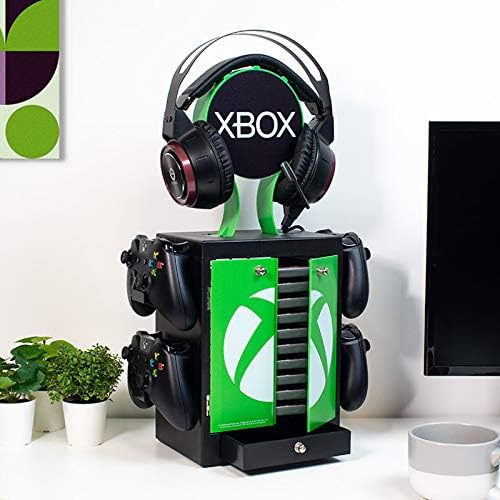
Image 3.1: The locker with its doors open, revealing game storage, and the accessory drawer pulled out.

ചിത്രം 3.2: വിശദാംശം view of controllers neatly hung on the side hooks of the storage unit.

Image 3.3: Close-up of the bottom accessory drawer, showing its capacity for small items.
4. പരിപാലനം
To ensure the longevity and appearance of your Numskull Storage Locker, follow these simple maintenance guidelines:
- വൃത്തിയാക്കൽ: മൃദുവായ, ഡി ഉപയോഗിച്ച് ഉപരിതലങ്ങൾ തുടയ്ക്കുകamp cloth. For stubborn marks, a mild soap solution can be used, followed by wiping with a clean, dry cloth. Avoid abrasive cleaners or solvents, as these can damage the plastic finish.
- പൊടിയിടൽ: Regularly dust the unit to prevent accumulation, especially in crevices and around the controller hooks.
- ഓവർലോഡിംഗ് ഒഴിവാക്കുക: Do not exceed the recommended capacity for game cases (10) or controllers (4). Overloading can stress the structure and potentially cause damage.
- പരിസ്ഥിതി വ്യവസ്ഥകൾ: Keep the locker away from direct sunlight, extreme temperatures, and high humidity to prevent material degradation.
5. പ്രശ്നപരിഹാരം
The Numskull Storage Locker is a simple, robust product. Most issues can be resolved with basic checks.
| പ്രശ്നം | സാധ്യമായ കാരണം | പരിഹാരം |
|---|---|---|
| Locker feels unstable or wobbly. | Uneven surface; items unevenly distributed. | Ensure the locker is placed on a completely flat and level surface. Redistribute contents evenly to balance the weight. |
| വാതിലുകൾ ശരിയായി അടയുന്നില്ല. | Obstruction inside; misaligned hinges. | Check for any game cases or items blocking the door's path. If hinges appear misaligned, gently try to adjust them or contact support if persistent. |
| ഡ്രോയർ സ്റ്റിക്കുകൾ അല്ലെങ്കിൽ തുറക്കാൻ/അടയ്ക്കാൻ പ്രയാസമാണ്. | Overloaded drawer; debris in tracks. | Remove some items from the drawer. Check the drawer tracks for any dust or small debris and clean if necessary. |
6 സ്പെസിഫിക്കേഷനുകൾ
| ഫീച്ചർ | വിശദാംശങ്ങൾ |
|---|---|
| ബ്രാൻഡ് | Numskull |
| മോഡൽ നമ്പർ | 44371 |
| നിറം | Xbox (Black with Green accents) |
| ഉൽപ്പന്ന അളവുകൾ (L x W x H) | 33.99 x 29.97 x 11.99 സെ.മീ (ഏകദേശം 13.38 x 11.8 x 4.72 ഇഞ്ച്) |
| ഇനത്തിൻ്റെ ഭാരം | 900 ഗ്രാം (ഏകദേശം 1.98 പൗണ്ട്) |
| മെറ്റീരിയൽ | പ്ലാസ്റ്റിക് |
| ഉൽപ്പന്ന അനുയോജ്യത | Xbox Series S, Xbox Series X (and other standard game cases/controllers) |
| Number of Game Case Slots | 10 |
| Number of Controller Hooks | 4 |
| പ്രത്യേക ഫീച്ചർ | Integrated Headset Stand, Accessory Drawer |
| അസംബ്ലി ആവശ്യമാണ് | ഇല്ല |
7. വാറൻ്റിയും പിന്തുണയും
Numskull stands by the quality of its products. All Numskull gaming accessories, including this Xbox Series X Storage Locker, come with a ഒരു വർഷത്തെ നിർമ്മാതാവിന്റെ വാറന്റി വാങ്ങിയ തീയതി മുതൽ.
This warranty covers defects in materials and workmanship under normal use. It does not cover damage caused by misuse, accidents, unauthorized modifications, or normal wear and tear.
For warranty claims, technical support, or any product-related inquiries, please visit the official Numskull website or contact their customer service department. Please have your proof of purchase and the product model number (44371) ready when contacting support.
For the most up-to-date contact information and detailed warranty terms, please refer to the official Numskull webസൈറ്റ്: www.numskull.com