
ആമുഖം
This manual provides essential information for the safe and efficient use of your Doro 780X mobile phone. Please read it carefully before using the device.

The Doro 780X mobile phone, shown both in its charging cradle and as a standalone unit, highlighting its compact design and dedicated direct dial buttons.
പ്രധാന സവിശേഷതകൾ
The Doro 780X is designed with simplicity and safety in mind, offering a range of features tailored for ease of use.
- Simplified Keypad: Features three large, dedicated keys (A, B, C) for direct dialing of important contacts, eliminating the need to navigate complex menus.
- ഉച്ചത്തിലുള്ളതും വ്യക്തവുമായ ശബ്ദം: Equipped with HD voice technology for superior call clarity, even in noisy environments. It is also Hearing Aid Compatible (HAC) with a rating of T3/M3.
- Response by Doro Button: An easily accessible assistance button on the back of the phone that, when pressed, alerts pre-set responders and shares the user's GPS location.
- സുരക്ഷാ ടൈമർ: A unique feature allowing users to set a timer for specific activities. If the timer is not deactivated within the set period, the assistance function is automatically triggered.
- Splash-Proof (IP54): Provides protection against water splashes, enhancing durability for daily use.
- Charging Cradle Included: Comes with a convenient charging cradle for effortless recharging, alongside a standard USB lead and mains plug.

ഒരു ഓവർview of the Doro 780X's primary features, including its focus on safety, direct dial buttons, assistance button, speakerphone, and safety timer.

Visual icons representing key features such as Hearing Aid Compatibility, the Assistance button, Direct Dials, IP54 rating for splash resistance, and the included Charging Cradle.
സജ്ജീകരണ ഗൈഡ്
1. പായ്ക്ക് ചെയ്യലും പ്രാരംഭ ചാർജും
Carefully remove all components from the packaging. Place the Doro 780X into the provided charging cradle or connect the USB lead to the phone and a standard mains charging plug. Ensure the phone is fully charged before first use. The battery type is 1600mAh Li-ion.
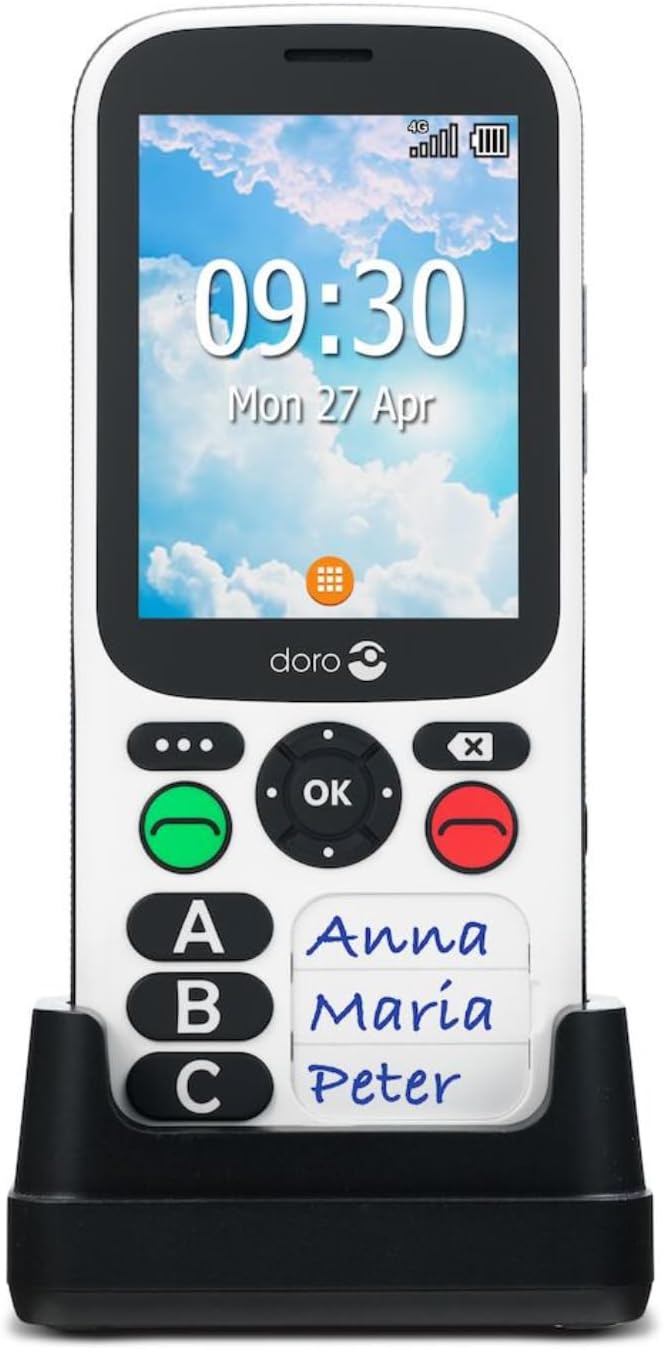
The Doro 780X phone securely placed in its dedicated charging cradle, ready for charging.
2. സിം കാർഡ് ചേർക്കൽ
The Doro 780X uses a Micro SIM card. Locate the SIM card slot, typically under the battery cover. Insert your Micro SIM card according to the diagram in the quick start guide (not provided here, refer to product packaging). Ensure it is correctly seated.
3. Setting Up Direct Dial Contacts (A, B, C)
The Doro 780X allows you to program up to three direct dial contacts (A, B, C). These contacts are the primary way to make calls. Refer to the phone's on-screen instructions or the full online manual for detailed steps on how to assign phone numbers to these keys. Once set, a simple press of the A, B, or C button followed by the green call button will initiate a call to the assigned contact.
4. Response by Doro App Setup
To utilize the Response by Doro feature, responders need to be set up within the Response by Doro app. This app allows for remote management of settings and receives alerts when the assistance button is pressed. Ensure all intended responders have the app installed and are configured correctly.
പ്രവർത്തന നിർദ്ദേശങ്ങൾ
കോളുകൾ ചെയ്യുന്നു
- To call a direct contact: Press the corresponding A, B, അല്ലെങ്കിൽ C button, then press the green call button.
- The phone is designed for simplified use and primarily relies on these direct dial buttons.
കോളുകൾ സ്വീകരിക്കുന്നു
- When the phone rings, press the green call button to answer.
- The phone can be set to automatic answer in hands-free mode.
Using the Assistance Button
The assistance button is located on the back of the phone. In an emergency, press and hold this button. It will alert your pre-set responders via the Response by Doro app and send your GPS location.

A visual representation of the Doro 780X's assistance button and how it connects the user to their network of pre-set contacts in an emergency, sharing GPS location.
Safety Timer Function
Activate the safety timer for specific situations, such as taking a shower. If the timer is not deactivated within the set time (up to 120 minutes), the Response button will automatically activate, alerting your responders.
SMS Messaging
The Doro 780X is designed to സ്വീകരിക്കുക SMS messages but not to അയയ്ക്കുക them. Senders of messages will receive a 'message opened' receipt when the Doro user reads the SMS.
പരിപാലനവും പരിചരണവും
- വൃത്തിയാക്കൽ: Use a soft, dry cloth to clean the phone. Avoid using harsh chemicals or abrasive materials.
- ജല പ്രതിരോധം: The Doro 780X is splash-proof (IP54 rated). This means it is protected against water splashes from any direction. Do not submerge the phone in water or expose it to pressurized water.
- ബാറ്ററി കെയർ: To prolong battery life, avoid extreme temperatures. Charge the phone regularly using the provided charging cradle or USB cable.
- സംഭരണം: ദീർഘനേരം ഉപയോഗിക്കാത്തപ്പോൾ ഫോൺ തണുത്തതും വരണ്ടതുമായ സ്ഥലത്ത് സൂക്ഷിക്കുക.
ട്രബിൾഷൂട്ടിംഗ്
| പ്രശ്നം | സാധ്യമായ കാരണം | പരിഹാരം |
|---|---|---|
| ഫോൺ ഓണാക്കുന്നില്ല. | ബാറ്ററി തീർന്നു. | Charge the phone using the charging cradle or USB cable. Ensure the charger is properly connected to a power source. |
| കോളുകൾ വിളിക്കാനോ സ്വീകരിക്കാനോ കഴിയില്ല. | No SIM card inserted or SIM card not properly seated. No network coverage. | Ensure the Micro SIM card is correctly inserted. Check for network signal strength. Contact your service provider if issues persist. |
| മോശം കോൾ നിലവാരം. | Weak network signal. Obstructions. | Move to an area with better network coverage. Ensure nothing is blocking the phone's antenna. |
| Assistance button not working. | Responders not set up in the app. Phone out of network range. | Verify that responders are correctly configured in the Response by Doro app. Ensure the phone has network connectivity. |
സ്പെസിഫിക്കേഷനുകൾ
- മോഡൽ: Doro 780X (Internal Model: 7966)
- ഡിസ്പ്ലേ: 2.8" QVGA Display
- ഓപ്പറേറ്റിംഗ് സിസ്റ്റം: ഡോറോസ്
- പ്രോസസ്സർ: MediaTek MTK6731 Quad Core Processor (CPU model: AMD A Series)
- റാം: 512 MB
- സംഭരണം: 4 ജിബി
- സിം കാർഡ് തരം: മൈക്രോ സിം
- ബാറ്ററി: 1600mAh ലിഥിയം-അയൺ (ഉൾപ്പെടുത്തിയത്)
- സംസാര സമയം: 8 മണിക്കൂർ വരെ
- സ്റ്റാൻഡ്ബൈ സമയം: 330 മണിക്കൂർ വരെ
- അളവുകൾ: 6 x 1.3 x 13.8 സെ.മീ
- ഭാരം: 300 ഗ്രാം
- ജല പ്രതിരോധം: IP54 (സ്പ്ലാഷ് പ്രൂഫ്)
- ശ്രവണസഹായി അനുയോജ്യത: ടി3/എം3
വാറൻ്റിയും പിന്തുണയും
Warranty information for your Doro 780X mobile phone is typically provided with the product packaging or can be found on the official Doro webസൈറ്റ്. വാറന്റി ക്ലെയിമുകൾക്കായി നിങ്ങളുടെ വാങ്ങലിന്റെ തെളിവ് സൂക്ഷിക്കുക.
For technical support or further assistance, please refer to the contact information provided by Doro in your product documentation or visit the official Doro support webസൈറ്റ്.