
1. ആമുഖം
FREESTYLE FH0955 LED ബ്ലൂടൂത്ത് ഹെഡ്ഫോണുകൾ തിരഞ്ഞെടുത്തതിന് നന്ദി. നിങ്ങളുടെ പുതിയ ഹെഡ്ഫോണുകളുടെ ശരിയായ സജ്ജീകരണം, പ്രവർത്തനം, പരിപാലനം എന്നിവയ്ക്കുള്ള അവശ്യ വിവരങ്ങൾ ഈ മാനുവൽ നൽകുന്നു. ഉൽപ്പന്നത്തിന്റെ ഒപ്റ്റിമൽ പ്രകടനവും ദീർഘായുസ്സും ഉറപ്പാക്കാൻ ഉപയോഗിക്കുന്നതിന് മുമ്പ് ദയവായി ഇത് ശ്രദ്ധാപൂർവ്വം വായിക്കുക.
2. ഉൽപ്പന്നം കഴിഞ്ഞുview
ഫ്രീസ്റ്റൈൽ FH0955 ഹെഡ്ഫോണുകൾ സൗകര്യത്തിനും സ്റ്റൈലിനും വേണ്ടി രൂപകൽപ്പന ചെയ്തിരിക്കുന്ന സംയോജിത സവിശേഷതകളുള്ള വയർലെസ് ഓഡിയോ അനുഭവം വാഗ്ദാനം ചെയ്യുന്നു. ബ്ലൂടൂത്ത് 5.0 + EDR കണക്റ്റിവിറ്റി, നേരിട്ടുള്ള സംഗീത പ്ലേബാക്കിനായി ബിൽറ്റ്-ഇൻ മൈക്രോ എസ്ഡി കാർഡ് സ്ലോട്ട്, പോർട്ടബിലിറ്റിക്കായി മടക്കാവുന്ന ഹെഡ്ബാൻഡ്, ഇയർകപ്പുകളിൽ സൂക്ഷ്മമായ LED ബാക്ക്ലൈറ്റിംഗ് എന്നിവയാണ് പ്രധാന സവിശേഷതകൾ.

ചിത്രം 2.1: മുൻഭാഗം view ഫ്രീസ്റ്റൈൽ FH0955 LED ബ്ലൂടൂത്ത് ഹെഡ്ഫോണുകളുടെ, ഷോക്asing ഓവർ-ഇയർ ഡിസൈനും LED ലൈറ്റിംഗും.

ചിത്രം 2.2: സൈഡ് പ്രോfile ഫ്രീസ്റ്റൈൽ FH0955 LED ബ്ലൂടൂത്ത് ഹെഡ്ഫോണുകളുടെ, ഇയർകപ്പും ഹെഡ്ബാൻഡ് രൂപകൽപ്പനയും എടുത്തുകാണിക്കുന്നു.

ചിത്രം 2.3: ഫ്രീസ്റ്റൈൽ FH0955 LED ബ്ലൂടൂത്ത് ഹെഡ്ഫോണുകൾ ധരിച്ച്, സാധാരണ ഉപയോഗം പ്രകടമാക്കുന്ന ഒരാൾ.
3. സജ്ജീകരണം
3.1. ഹെഡ്ഫോണുകൾ ചാർജ് ചെയ്യുന്നു
ആദ്യ ഉപയോഗത്തിന് മുമ്പ്, ഹെഡ്ഫോണുകൾ പൂർണ്ണമായും ചാർജ് ചെയ്യുക. FH0955LB മോഡലിൽ 400 mAh ലിഥിയം-അയൺ ബാറ്ററി സജ്ജീകരിച്ചിരിക്കുന്നു.
- ഹെഡ്ഫോണുകളിലെ ചാർജിംഗ് പോർട്ടിലേക്ക് നൽകിയിരിക്കുന്ന മൈക്രോ യുഎസ്ബി ചാർജിംഗ് കേബിൾ ബന്ധിപ്പിക്കുക.
- കേബിളിന്റെ മറ്റേ അറ്റം ഒരു USB പവർ സ്രോതസ്സുമായി ബന്ധിപ്പിക്കുക (ഉദാ: കമ്പ്യൂട്ടർ USB പോർട്ട്, USB വാൾ അഡാപ്റ്റർ അല്ലെങ്കിൽ പവർ ബാങ്ക്).
- ചാർജ് ചെയ്യുമ്പോൾ LED ഇൻഡിക്കേറ്റർ പ്രകാശിക്കുകയും പൂർണ്ണമായി ചാർജ്ജ് ചെയ്യുമ്പോൾ ഓഫാകുകയോ നിറം മാറുകയോ ചെയ്യും.
- ഒരു ഫുൾ ചാർജ് സാധാരണയായി ഏകദേശം 2 മണിക്കൂർ എടുക്കും, കൂടാതെ 10 മണിക്കൂർ വരെ തുടർച്ചയായി സംഗീത പ്ലേബാക്ക് നൽകുന്നു.
3.2. ബ്ലൂടൂത്ത് ജോടിയാക്കൽ
നിങ്ങളുടെ ഹെഡ്ഫോണുകൾ ഒരു ഉപകരണത്തിലേക്ക് വയർലെസ് ആയി ബന്ധിപ്പിക്കാൻ:
- ഹെഡ്ഫോണുകൾ ചാർജ് ചെയ്തിട്ടുണ്ടെന്നും പവർ ഓഫ് ചെയ്തിട്ടുണ്ടെന്നും ഉറപ്പാക്കുക.
- ജോടിയാക്കൽ മോഡ് സൂചിപ്പിക്കുന്ന LED ഇൻഡിക്കേറ്റർ മിന്നുന്നതുവരെ ഹെഡ്ഫോണുകളിലെ പവർ ബട്ടൺ അമർത്തിപ്പിടിക്കുക.
- നിങ്ങളുടെ ഉപകരണത്തിൽ (സ്മാർട്ട്ഫോൺ, ടാബ്ലെറ്റ്, കമ്പ്യൂട്ടർ), ബ്ലൂടൂത്ത് പ്രവർത്തനക്ഷമമാക്കി ലഭ്യമായ ഉപകരണങ്ങൾക്കായി തിരയുക.
- കണ്ടെത്തിയ ഉപകരണങ്ങളുടെ പട്ടികയിൽ നിന്ന് "FH0955" അല്ലെങ്കിൽ സമാനമായ ഒരു പേര് തിരഞ്ഞെടുക്കുക.
- കണക്റ്റ് ചെയ്തുകഴിഞ്ഞാൽ, മോഡലിനെ ആശ്രയിച്ച്, LED ഇൻഡിക്കേറ്റർ മിന്നുന്നത് നിർത്തുകയും ദൃഢമായി തുടരുകയോ ഓഫാകുകയോ ചെയ്യും.
- ബ്ലൂടൂത്ത് 5.0 + EDR സാങ്കേതികവിദ്യ 10 മീറ്റർ വരെ സ്ഥിരതയുള്ള കണക്ഷൻ അനുവദിക്കുന്നു.
3.3. മൈക്രോ എസ്ഡി കാർഡ് പ്ലേബാക്ക്
കണക്റ്റുചെയ്ത ഉപകരണം ഇല്ലാതെ നേരിട്ട് സംഗീതം പ്ലേ ചെയ്യുന്നതിനായി ഹെഡ്ഫോണുകളിൽ ഒരു സംയോജിത മൈക്രോ എസ്ഡി കാർഡ് സ്ലോട്ട് ഉണ്ട്.
- ഒരു മൈക്രോ എസ്ഡി കാർഡ് ഇടുക (ഓഡിയോ മുൻകൂട്ടി ലോഡുചെയ്തത്) files) ഹെഡ്ഫോണുകളിലെ നിയുക്ത സ്ലോട്ടിലേക്ക്.
- ഹെഡ്ഫോണുകൾ യാന്ത്രികമായി മൈക്രോ എസ്ഡി പ്ലേബാക്ക് മോഡിലേക്ക് മാറണം. ഇല്ലെങ്കിൽ, മാറാൻ മോഡ് ബട്ടൺ (ലഭ്യമെങ്കിൽ) ഉപയോഗിക്കുക.
- നിങ്ങളുടെ സംഗീതം നിയന്ത്രിക്കാൻ ഹെഡ്ഫോണുകളിലെ പ്ലേബാക്ക് നിയന്ത്രണങ്ങൾ ഉപയോഗിക്കുക.
3.4. വയർഡ് കണക്ഷൻ (3.5mm ഓഡിയോ ജാക്ക്)
ബ്ലൂടൂത്ത് ഇല്ലാത്ത ഉപകരണങ്ങൾക്കോ ബാറ്ററി തീർന്നുപോകുമ്പോഴോ, ഉൾപ്പെടുത്തിയിരിക്കുന്ന 3.5mm ഓഡിയോ കേബിൾ ഉപയോഗിക്കാം.
- 3.5mm ഓഡിയോ കേബിളിന്റെ ഒരറ്റം ഹെഡ്ഫോണുകളിലെ ഓഡിയോ ജാക്കുമായി ബന്ധിപ്പിക്കുക.
- മറ്റേ അറ്റം നിങ്ങളുടെ ഉപകരണത്തിന്റെ 3.5mm ഓഡിയോ ഔട്ട്പുട്ടിലേക്ക് ബന്ധിപ്പിക്കുക.
- ഹെഡ്ഫോണുകൾ പാസീവ് മോഡിൽ പ്രവർത്തിക്കും, ബ്ലൂടൂത്ത് പ്രവർത്തനം പ്രവർത്തനരഹിതമാക്കും.
4. പ്രവർത്തന നിർദ്ദേശങ്ങൾ
4.1. പവർ ഓൺ/ഓഫ്
- പവർ ഓൺ: LED ഇൻഡിക്കേറ്റർ പ്രകാശിക്കുന്നത് വരെ ഏകദേശം 3 സെക്കൻഡ് നേരത്തേക്ക് പവർ ബട്ടൺ അമർത്തിപ്പിടിക്കുക.
- പവർ ഓഫ്: LED ഇൻഡിക്കേറ്റർ ഓഫാകുന്നതുവരെ ഏകദേശം 3-5 സെക്കൻഡ് നേരത്തേക്ക് പവർ ബട്ടൺ അമർത്തിപ്പിടിക്കുക.
4.2. സംഗീതം പ്ലേബാക്ക്
- പ്ലേ/താൽക്കാലികമായി നിർത്തുക: Play/Pause ബട്ടൺ ഒരിക്കൽ അമർത്തുക.
- അടുത്ത ട്രാക്ക്: "അടുത്തത്" ബട്ടൺ അമർത്തുക (പലപ്പോഴും വോളിയം കൂട്ടുക, ദീർഘനേരം അമർത്തുക).
- മുമ്പത്തെ ട്രാക്ക്: "മുമ്പത്തെ" ബട്ടൺ അമർത്തുക (പലപ്പോഴും വോളിയം കുറയ്ക്കുക, ദീർഘനേരം അമർത്തുക).
- വോളിയം കൂട്ടുക: വോളിയം അപ്പ് ബട്ടൺ ചുരുക്കി അമർത്തുക.
- വോളിയം താഴേക്ക്: വോളിയം ഡൗൺ ബട്ടൺ ചുരുക്കി അമർത്തുക.
4.3. കോൾ മാനേജ്മെന്റ്
ബിൽറ്റ്-ഇൻ മൈക്രോഫോൺ ഉപയോഗിച്ച്, ബ്ലൂടൂത്ത് വഴി കണക്റ്റ് ചെയ്യുമ്പോൾ നിങ്ങൾക്ക് ഫോൺ കോളുകൾ നിയന്ത്രിക്കാൻ കഴിയും.
- ഉത്തരം/അവസാന കോൾ: ഇൻകമിംഗ് കോളിനിടെ പ്ലേ/പോസ് ബട്ടൺ ഒരിക്കൽ അമർത്തുക.
- കോൾ നിരസിക്കുക: ഒരു ഇൻകമിംഗ് കോൾ വരുമ്പോൾ പ്ലേ/പോസ് ബട്ടൺ ഏകദേശം 2 സെക്കൻഡ് അമർത്തിപ്പിടിക്കുക.
- അവസാന നമ്പർ വീണ്ടും ഡയൽ ചെയ്യുക: പ്ലേ/പോസ് ബട്ടൺ രണ്ടുതവണ അമർത്തുക.
4.4. എൽഇഡി ബാക്ക്ലൈറ്റിംഗ്
ഹെഡ്ഫോണുകളിൽ സൂക്ഷ്മമായ LED ബാക്ക്ലൈറ്റിംഗ് ഉണ്ട്. ലഭ്യമെങ്കിൽ, LED മോഡുകൾ ടോഗിൾ ചെയ്യുന്നതിനോ മാറ്റുന്നതിനോ നിങ്ങളുടെ ഉപകരണത്തിലെ നിർദ്ദിഷ്ട നിയന്ത്രണങ്ങൾ പരിശോധിക്കുക. ഈ സവിശേഷത പ്രാഥമികമായി സൗന്ദര്യാത്മകമാണ്.
5. പരിപാലനം
5.1. വൃത്തിയാക്കൽ
- ഹെഡ്ഫോണുകളുടെ ഉപരിതലം വൃത്തിയാക്കാൻ മൃദുവായതും ഉണങ്ങിയതുമായ തുണി ഉപയോഗിക്കുക.
- അബ്രാസീവ് ക്ലീനറുകൾ, ആൽക്കഹോൾ, കെമിക്കൽ ലായകങ്ങൾ എന്നിവ ഉപയോഗിക്കരുത്, കാരണം ഇവ ഫിനിഷിന് കേടുവരുത്തും.
- ചാർജിംഗ് പോർട്ടും ഓഡിയോ ജാക്കും പൊടിയിൽ നിന്നും അവശിഷ്ടങ്ങളിൽ നിന്നും മുക്തമായി സൂക്ഷിക്കുക.
5.2. സംഭരണം
- നേരിട്ടുള്ള സൂര്യപ്രകാശത്തിൽ നിന്നും കടുത്ത താപനിലയിൽ നിന്നും മാറി തണുത്തതും വരണ്ടതുമായ സ്ഥലത്ത് ഹെഡ്ഫോണുകൾ സൂക്ഷിക്കുക.
- ദീർഘനേരം ഉപയോഗിക്കാത്തപ്പോൾ, ബാറ്ററിയുടെ ആരോഗ്യം നിലനിർത്താൻ കുറഞ്ഞത് മൂന്ന് മാസത്തിലൊരിക്കലെങ്കിലും ബാറ്ററി ചാർജ് ചെയ്യുക.
- ഒതുക്കമുള്ള സംഭരണത്തിനും ഗതാഗതത്തിനും മടക്കാവുന്ന ഹെഡ്ബാൻഡ് സവിശേഷത ഉപയോഗിക്കുക.
6. പ്രശ്നപരിഹാരം
| പ്രശ്നം | സാധ്യമായ കാരണം | പരിഹാരം |
|---|---|---|
| ഹെഡ്ഫോണുകൾ പവർ ഓൺ ചെയ്യുന്നില്ല. | കുറഞ്ഞ ബാറ്ററി. | ഹെഡ്ഫോണുകൾ പൂർണ്ണമായും ചാർജ് ചെയ്യുക. |
| ബ്ലൂടൂത്ത് വഴി ജോടിയാക്കാൻ കഴിയില്ല. | ഹെഡ്ഫോണുകൾ ജോടിയാക്കൽ മോഡിൽ ഇല്ല; ഉപകരണം ബ്ലൂടൂത്ത് ഓഫാണ്; ഉപകരണത്തിൽ നിന്ന് വളരെ അകലെയാണ്. | ഹെഡ്ഫോണുകൾ ജോടിയാക്കൽ മോഡിലാണെന്ന് ഉറപ്പാക്കുക. ഉപകരണ ബ്ലൂടൂത്ത് ഓഫ്/ഓൺ ചെയ്യുക. ഉപകരണത്തിന് അടുത്തേക്ക് നീക്കുക (10 മീറ്ററിനുള്ളിൽ). |
| ശബ്ദമില്ല. | ശബ്ദം വളരെ കുറവാണ്; ഓഡിയോ ഉറവിടം തെറ്റാണ്; ഹെഡ്ഫോണുകൾ ബന്ധിപ്പിച്ചിട്ടില്ല. | ഹെഡ്ഫോണുകളിലും ഉപകരണത്തിലും ശബ്ദം വർദ്ധിപ്പിക്കുക. ബ്ലൂടൂത്ത് കണക്ഷൻ അല്ലെങ്കിൽ 3.5mm കേബിൾ പരിശോധിക്കുക. ശരിയായ മോഡ് (ബ്ലൂടൂത്ത്/മൈക്രോ എസ്ഡി) ഉറപ്പാക്കുക. |
| മൈക്രോഎസ്ഡി കാർഡ് പ്ലേ ചെയ്യുന്നില്ല. | കാർഡ് ശരിയായി ചേർത്തിട്ടില്ല; പിന്തുണയ്ക്കുന്നില്ല. file ഫോർമാറ്റ്; കാർഡ് കേടായി. | കാർഡ് വീണ്ടും ചേർക്കുക. ഓഡിയോ ഉറപ്പാക്കുക. fileപിന്തുണയ്ക്കുന്ന ഫോർമാറ്റിലാണ് (ഉദാ. MP3). മറ്റൊരു മൈക്രോ എസ്ഡി കാർഡ് പരീക്ഷിക്കുക. |
7 സ്പെസിഫിക്കേഷനുകൾ
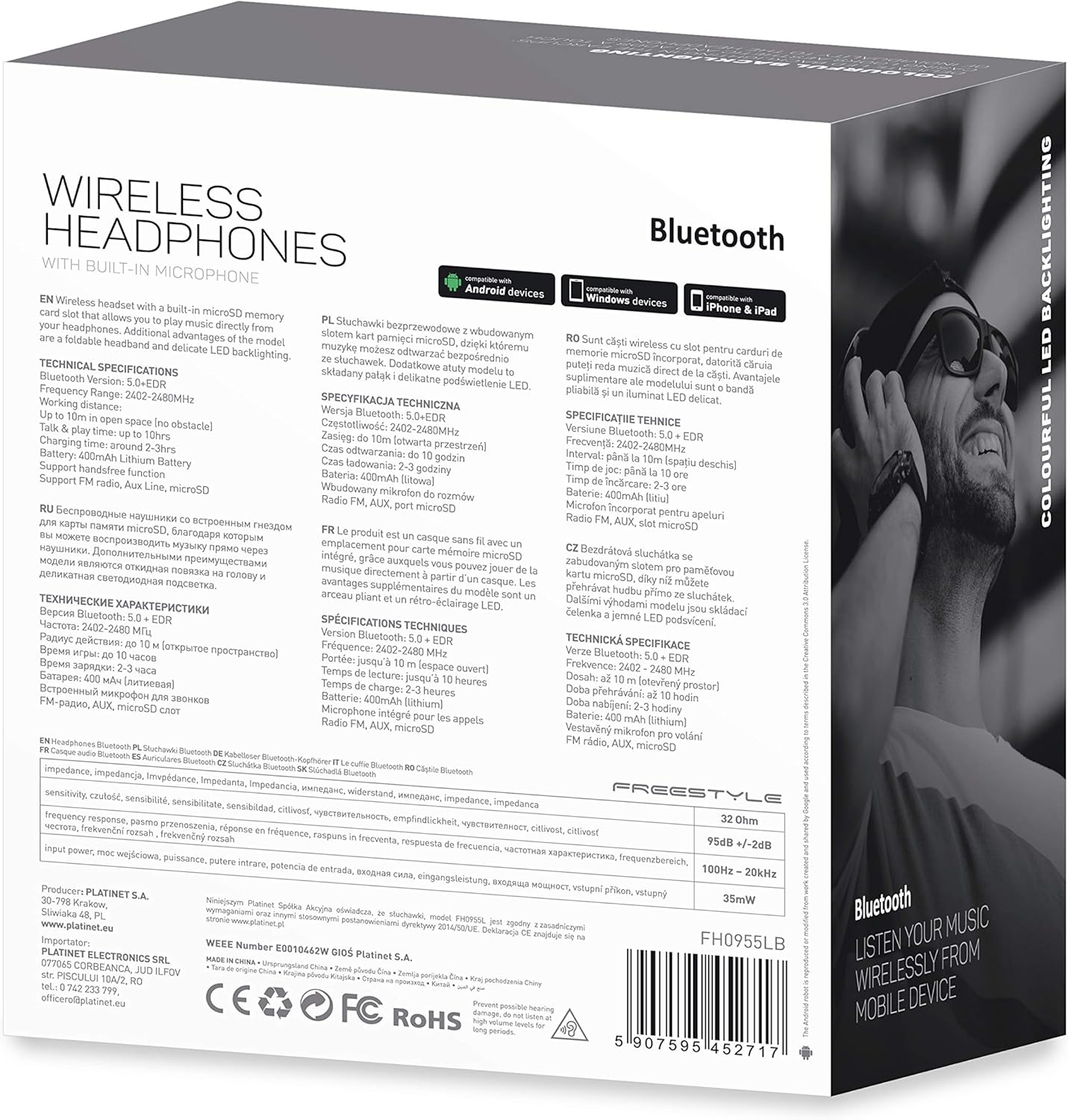
ചിത്രം 7.1: വിശദമായത് view ഉൽപ്പന്ന പാക്കേജിംഗിന്റെ, സാങ്കേതിക സവിശേഷതകളും അനുസരണ വിവരങ്ങളും കാണിക്കുന്നു.
| ഫീച്ചർ | സ്പെസിഫിക്കേഷൻ |
|---|---|
| മോഡൽ നമ്പർ | എഫ്എച്ച്0955എൽബി |
| ബ്രാൻഡ് | ഫ്രീസ്റ്റൈൽ |
| കണക്റ്റിവിറ്റി ടെക്നോളജി | വയർലെസ്സ് (ബ്ലൂടൂത്ത് 5.0 + EDR) |
| വയർലെസ് ശ്രേണി | 10 മീറ്റർ വരെ |
| ഓഡിയോ ജാക്ക് | 3.5 മി.മീ |
| ഫോം ഫാക്ടർ | ചെവിക്ക് മുകളിൽ (സർക്കം-ഓറിക്കുലാർ) |
| പ്രത്യേക സവിശേഷതകൾ | നോയ്സ് റദ്ദാക്കൽ, എൽഇഡി ബാക്ക്ലൈറ്റിംഗ്, മൈക്രോഎസ്ഡി കാർഡ് സ്ലോട്ട് |
| ബാറ്ററി തരം | ഇന്റഗ്രേറ്റഡ് ലിഥിയം-അയൺ (400 mAh) |
| പ്ലേബാക്ക് സമയം | 10 മണിക്കൂർ വരെ |
| ചാർജിംഗ് സമയം | ഏകദേശം 2 മണിക്കൂർ |
| ചാർജിംഗ് പോർട്ട് | മൈക്രോ യുഎസ്ബി |
| നിറം | കറുപ്പ് |
| മെറ്റീരിയൽ | തുകൽ (ഇയർപാഡുകൾ/ഹെഡ്ബാൻഡ്) |
| ജല പ്രതിരോധ നില | വെള്ളത്തെ പ്രതിരോധിക്കുന്ന |
| ഉൾപ്പെടുത്തിയ ഘടകങ്ങൾ | 1 ജോടി ഹെഡ്ഫോണുകൾ |
| നിർമ്മാതാവ് | പ്ലാറ്റിനറ്റ് |
8. വാറൻ്റിയും പിന്തുണയും
നിർദ്ദിഷ്ട വാറന്റി വിശദാംശങ്ങൾ സാധാരണയായി നിങ്ങളുടെ വാങ്ങൽ ഡോക്യുമെന്റേഷനോടൊപ്പമോ നിർമ്മാതാവിന്റെ ഔദ്യോഗിക പ്രസ്താവനയിലോ നൽകും. webസൈറ്റ്. ഏതെങ്കിലും വാറന്റി ക്ലെയിമുകൾക്കായി നിങ്ങളുടെ വാങ്ങലിന്റെ തെളിവ് സൂക്ഷിക്കുക.
സാങ്കേതിക പിന്തുണയ്ക്കോ അന്വേഷണങ്ങൾക്കോ, നിങ്ങളുടെ റീട്ടെയിലർ അല്ലെങ്കിൽ നിർമ്മാതാവായ പ്ലാറ്റിനറ്റ് നൽകിയിട്ടുള്ള ബന്ധപ്പെടാനുള്ള വിവരങ്ങൾ പരിശോധിക്കുക.
9 സുരക്ഷാ വിവരങ്ങൾ
- ഹെഡ്ഫോണുകൾ തീവ്രമായ താപനിലയിലോ, ഈർപ്പത്തിലോ, ദ്രാവകങ്ങളിലോ ഏൽപ്പിക്കരുത്.
- കേൾവിക്ക് കേടുപാടുകൾ സംഭവിക്കുന്നത് തടയാൻ ദീർഘനേരം ഉയർന്ന ശബ്ദത്തിൽ കേൾക്കുന്നത് ഒഴിവാക്കുക.
- ഹെഡ്ഫോണുകൾ ഡിസ്അസംബ്ലിംഗ് ചെയ്യാനോ പരിഷ്ക്കരിക്കാനോ ശ്രമിക്കരുത്, കാരണം ഇത് വാറന്റി അസാധുവാക്കുകയും കേടുപാടുകൾ വരുത്തുകയും ചെയ്തേക്കാം.
- കുട്ടികൾക്ക് ലഭ്യമാകാതെ സൂക്ഷിക്കുക.
- പ്രാദേശിക ഇലക്ട്രോണിക് മാലിന്യ നിയന്ത്രണങ്ങൾ അനുസരിച്ച് ഉൽപ്പന്നം ഉത്തരവാദിത്തത്തോടെ സംസ്കരിക്കുക.