
DOOGEE S40 Pro
DOOGEE S40 Pro റഗ്ഗഡ് ഫോൺ യൂസർ മാനുവൽ
മോഡൽ: S40 Pro
ആമുഖം
The DOOGEE S40 Pro is a rugged smartphone designed for durability and performance in challenging environments. It features a 5.45-inch display, Android 10, a 4650mAh battery, and dual rear cameras. This manual provides essential information for setting up, operating, maintaining, and troubleshooting your device.

ചിത്രം: മുന്നിലും പിന്നിലും view of the DOOGEE S40 Pro rugged phone, showcasing അതിന്റെ കരുത്തുറ്റ രൂപകൽപ്പനയും ക്യാമറ മൊഡ്യൂളും.
1. സജ്ജീകരണം
1.1 അൺബോക്സിംഗും പാക്കേജ് ഉള്ളടക്കങ്ങളും
Carefully unbox your DOOGEE S40 Pro. Verify that all standard accessories are included in the package.

Image: Contents of the DOOGEE S40 Pro package, including the phone, power adapter, USB cable, user manual, and warranty information.
- DOOGEE S40 Pro Smartphone
- പവർ അഡാപ്റ്റർ
- USB കേബിൾ
- ഉപയോക്തൃ മാനുവൽ
- വാറൻ്റി കാർഡ്
1.2 സിം കാർഡും SD കാർഡും ഇൻസ്റ്റാൾ ചെയ്യൽ
The DOOGEE S40 Pro supports dual SIM cards and an expandable SD card for additional storage. Locate the SIM tray on the side of the device.
- Use the provided SIM ejector tool to open the SIM card tray.
- Carefully place your Nano-SIM cards and/or microSD card into the designated slots on the tray. Ensure the gold contacts are facing down.
- ഉപകരണ ബോഡിയുമായി ഫ്ലഷ് ആകുന്നതുവരെ ട്രേ ഫോണിലേക്ക് പതുക്കെ തിരികെ തള്ളുക.
1.3 പ്രാരംഭ ചാർജിംഗ്
ആദ്യ ഉപയോഗത്തിന് മുമ്പ്, ഉപകരണം പൂർണ്ണമായും ചാർജ് ചെയ്യാൻ ശുപാർശ ചെയ്യുന്നു.
- പവർ അഡാപ്റ്ററിലേക്ക് USB കേബിൾ ബന്ധിപ്പിക്കുക.
- Plug the USB cable into the charging port of the phone.
- ഒരു മതിൽ ഔട്ട്ലെറ്റിലേക്ക് പവർ അഡാപ്റ്റർ പ്ലഗ് ചെയ്യുക.
- ചാർജിംഗ് ഇൻഡിക്കേറ്റർ സ്ക്രീനിൽ ദൃശ്യമാകും. ബാറ്ററി ഐക്കൺ പൂർണ്ണമായി കാണിക്കുന്നത് വരെ ഫോൺ ചാർജ് ചെയ്യാൻ അനുവദിക്കുക.
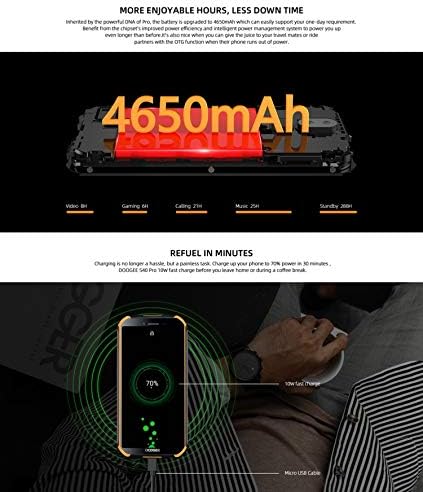
Image: The DOOGEE S40 Pro connected to a charger, showing the charging animation and battery percentage.
1.4 പവർ ഓൺ/ഓഫ്
- പവർ ഓണാക്കാൻ: Press and hold the Power button (located on the right side) until the DOOGEE logo appears.
- പവർ ഓഫ് ചെയ്യാൻ: പവർ ഓപ്ഷൻ മെനു ദൃശ്യമാകുന്നതുവരെ പവർ ബട്ടൺ അമർത്തിപ്പിടിക്കുക. "പവർ ഓഫ്" തിരഞ്ഞെടുത്ത് സ്ഥിരീകരിക്കുക.
- പുനരാരംഭിക്കാൻ: പവർ ഓപ്ഷനുകൾ മെനുവിൽ നിന്ന്, "പുനരാരംഭിക്കുക" തിരഞ്ഞെടുത്ത് സ്ഥിരീകരിക്കുക.
2. പ്രവർത്തന നിർദ്ദേശങ്ങൾ
2.1 അടിസ്ഥാന നാവിഗേഷൻ
The DOOGEE S40 Pro operates on Android 10.0 and uses a touchscreen for navigation.
- ടാപ്പ് ചെയ്യുക: ഒരു ഇനം തിരഞ്ഞെടുക്കാനോ ഒരു ആപ്ലിക്കേഷൻ തുറക്കാനോ സ്ക്രീനിൽ ഒരിക്കൽ സ്പർശിക്കുക.
- സ്വൈപ്പ്: പേജുകളിലൂടെയോ ലിസ്റ്റുകളിലൂടെയോ സ്ക്രോൾ ചെയ്യാൻ സ്ക്രീനിലുടനീളം നിങ്ങളുടെ വിരൽ വലിച്ചിടുക.
- പിഞ്ച്-ടു-സൂം: സ്ക്രീനിൽ രണ്ട് വിരലുകൾ വയ്ക്കുക, സൂം ഇൻ ചെയ്യുകയോ സൂം ഔട്ട് ചെയ്യുകയോ ചെയ്യുന്നതിന് അവയെ അകറ്റി നിർത്തുകയോ ഒരുമിച്ച് നീക്കുകയോ ചെയ്യുക.
- ലോംഗ് പ്രസ്സ്: Press and hold an item to access additional options or move icons.
2.2 കോളുകളും സന്ദേശമയയ്ക്കലും
- കോളുകൾ ചെയ്യുന്നു: ഫോൺ ആപ്പ് തുറന്ന് നമ്പർ നൽകുക, തുടർന്ന് കോൾ ഐക്കണിൽ ടാപ്പ് ചെയ്യുക.
- കോളുകൾ സ്വീകരിക്കുന്നു: Swipe up to answer or down to decline an incoming call.
- സന്ദേശങ്ങൾ അയയ്ക്കുന്നു: Open the Messages app, tap the new message icon, enter the recipient and message, then tap send.
2.3 ക്യാമറ ഉപയോഗം
The S40 Pro features dual rear cameras (13MP Sony primary sensor + 2MP portrait camera) and a front camera for selfies.

Image: Diagram highlighting the AI Rear Dual Camera setup on the DOOGEE S40 Pro, showing the 13MP Sony sensor and 2MP portrait camera, along with exampലെ ഫോട്ടോകൾ.
- നിങ്ങളുടെ ഹോം സ്ക്രീനിൽ നിന്നോ ആപ്പ് ഡ്രോയറിൽ നിന്നോ ക്യാമറ ആപ്പ് തുറക്കുക.
- ക്യാമറ സ്വിച്ച് ഐക്കൺ ഉപയോഗിച്ച് മുൻ ക്യാമറയും പിൻ ക്യാമറയും തമ്മിൽ മാറുക.
- ഒരു ഫോട്ടോ എടുക്കാൻ ഷട്ടർ ബട്ടൺ ടാപ്പ് ചെയ്യുക.
- Explore different modes like Portrait, Video, and Panorama.
2.4 ഫിംഗർപ്രിന്റ് അൺലോക്ക്
The device includes a rear-mounted fingerprint sensor for quick and secure unlocking.

Image: Illustration of the fingerprint unlock feature on the DOOGEE S40 Pro, showing a finger interacting with the rear-mounted sensor.
- പോകുക ക്രമീകരണങ്ങൾ > സുരക്ഷയും സ്ഥാനവും > വിരലടയാളം.
- നിങ്ങളുടെ വിരലടയാളം രജിസ്റ്റർ ചെയ്യുന്നതിന് ഓൺ-സ്ക്രീൻ നിർദ്ദേശങ്ങൾ പാലിക്കുക.
- Once registered, simply place your finger on the sensor to unlock the phone.
2.5 NFC and Google Pay
The DOOGEE S40 Pro supports NFC (Near Field Communication) for convenient data transmission and mobile payments like Google Pay.

Image: Visual representation of NFC functionality for Google Pay and data transmission, and the 3.5mm headphone jack on the DOOGEE S40 Pro.
- To enable NFC: പോകുക ക്രമീകരണങ്ങൾ > ബന്ധിപ്പിച്ച ഉപകരണങ്ങൾ > എൻഎഫ്സി അത് ടോഗിൾ ചെയ്യുക.
- ഗൂഗിൾ പേ: Ensure Google Pay is set up with your payment methods. Tap your phone to compatible terminals for contactless payments.
2.6 കണക്റ്റിവിറ്റി
- വൈഫൈ: വയർലെസ് നെറ്റ്വർക്കുകളിലേക്ക് കണക്റ്റുചെയ്യുക വഴി ക്രമീകരണങ്ങൾ > നെറ്റ്വർക്കും ഇൻ്റർനെറ്റും > വൈഫൈ.
- ബ്ലൂടൂത്ത്: Pair with Bluetooth devices via ക്രമീകരണങ്ങൾ > ബന്ധിപ്പിച്ച ഉപകരണങ്ങൾ > ബ്ലൂടൂത്ത്.
- USB: Connect to a computer using the provided USB cable for file കൈമാറ്റം അല്ലെങ്കിൽ ചാർജ്ജുചെയ്യൽ.
- 3.5 എംഎം ഹെഡ്ഫോൺ ജാക്ക്: Plug in wired headphones for audio.
3. പരിപാലനം
3.1 Rugged Features and Durability
The DOOGEE S40 Pro is built to withstand harsh conditions, featuring IP68 water and dust resistance and MIL-STD-810G certification for drops and extreme temperatures.

Image: The DOOGEE S40 Pro submerged in water, dropped onto concrete, and surviving a fall, illustrating its IP68 and MIL-STD-810G durability.
- ജല പ്രതിരോധം (IP68): Can withstand submersion up to 1.5 meters for 30 minutes. Ensure all port covers are securely closed before exposure to water.
- Dust Resistance (IP68): പൊടിപടലത്തിൽ നിന്ന് പൂർണ്ണമായും സംരക്ഷിക്കപ്പെടുന്നു.
- Drop Resistance (MIL-STD-810G): Designed to survive drops from up to 1.2 meters onto hard surfaces.
- താപനില പ്രതിരോധം: Operates in extreme temperatures from -55°C to 70°C.

Image: The DOOGEE S40 Pro shown in extreme cold (-55°C) and hot (70°C) environments, highlighting its robust temperature tolerance.
3.2 നിങ്ങളുടെ ഉപകരണം വൃത്തിയാക്കൽ
To clean your DOOGEE S40 Pro:
- മൃദുവായ, ലിന്റ് രഹിത തുണി ഉപയോഗിച്ച് സ്ക്രീനും ബോഡിയും തുടയ്ക്കുക.
- ദുശ്ശാഠ്യമുള്ള അഴുക്കിന്, ഡിampen the cloth slightly with water. Avoid harsh chemicals or abrasive materials.
- If the device has been exposed to saltwater, rinse it thoroughly with fresh water and dry it completely before charging.
3.3 സോഫ്റ്റ്വെയർ അപ്ഡേറ്റുകൾ
മികച്ച പ്രകടനവും സുരക്ഷയും ഉറപ്പാക്കാൻ സോഫ്റ്റ്വെയർ അപ്ഡേറ്റുകൾക്കായി പതിവായി പരിശോധിക്കുക.
- പോകുക ക്രമീകരണങ്ങൾ > സിസ്റ്റം > സിസ്റ്റം അപ്ഡേറ്റ്.
- Follow the on-screen prompts to download and install any available updates. Ensure your device has sufficient battery and a stable internet connection during updates.
4. പ്രശ്നപരിഹാരം
| പ്രശ്നം | സാധ്യമായ പരിഹാരം |
|---|---|
| ഉപകരണം പവർ ഓണാക്കുന്നില്ല. | Ensure the battery is charged. Connect to a charger and wait a few minutes before attempting to power on again. If unresponsive, try a forced restart by holding the Power button for 10-15 seconds. |
| ബാറ്ററി പെട്ടെന്ന് തീരുന്നു. | Check for background apps consuming power. Reduce screen brightness. Disable Wi-Fi, Bluetooth, or GPS when not in use. Perform a software update. |
| Wi-Fi-ലേക്ക് കണക്റ്റ് ചെയ്യാൻ കഴിയില്ല. | വൈഫൈ പ്രവർത്തനക്ഷമമാക്കിയിട്ടുണ്ടെന്ന് ഉറപ്പാക്കുക. നിങ്ങളുടെ റൂട്ടറും ഫോണും പുനരാരംഭിക്കുക. നെറ്റ്വർക്ക് മറന്ന് വീണ്ടും കണക്റ്റുചെയ്യുക. |
| Phone is slow or unresponsive. | Close unnecessary background apps. Clear cache. Restart the device. If issues persist, consider a factory reset (back up data first). |
| ക്യാമറ പ്രവർത്തിക്കുന്നില്ല. | Restart the phone. Clear the Camera app's cache and data in Settings > Apps. Ensure no other app is using the camera. |
5 സ്പെസിഫിക്കേഷനുകൾ
Key technical specifications for the DOOGEE S40 Pro:
- മോഡലിൻ്റെ പേര്: എസ് 40 പ്രോ
- ഓപ്പറേറ്റിംഗ് സിസ്റ്റം: ആൻഡ്രോയിഡ് 10.0
- ഡിസ്പ്ലേ: 5.45 inches, LCD, 1440 x 720 resolution
- റാം: 4 ജിബി
- ആന്തരിക സംഭരണം: 64 ജിബി (മൈക്രോ എസ്ഡി വഴി വികസിപ്പിക്കാം)
- ബാറ്ററി: 4650mAh
- പിൻ ക്യാമറ: Dual Back Cameras (13MP Sony primary + 2MP portrait)
- മുൻ ക്യാമറ: അതെ
- പ്രോസസ്സർ: Octa Core (CPU speed: 1.8 GHz, CPU model: Snapdragon)
- കണക്റ്റിവിറ്റി: 4G Cellular, Wi-Fi, Bluetooth, USB, GPS, NFC
- പ്രത്യേക സവിശേഷതകൾ: Touchscreen, Fingerprint Sensor, 3.5mm Headphone Jack
- ഈട്: IP68 Water & Dust Resistant, MIL-STD-810G Drop Resistant
- നിറം: കറുപ്പ്
- ബോക്സിൽ എന്താണുള്ളത്: അഡാപ്റ്റർ, യുഎസ്ബി കേബിൾ
6. വാറൻ്റിയും പിന്തുണയും
For warranty information and customer support, please refer to the warranty card included in your product package or visit the official DOOGEE webസൈറ്റ്. വാറന്റി ക്ലെയിമുകൾക്കായി നിങ്ങളുടെ വാങ്ങലിന്റെ തെളിവ് സൂക്ഷിക്കുക.
- ഉദ്യോഗസ്ഥൻ Webസൈറ്റ്: www.doogee.cc (ദയവായി ശ്രദ്ധിക്കുക: ഇതൊരു പ്ലെയ്സ്ഹോൾഡറാണ് URL, refer to your product's specific documentation for the correct support webസൈറ്റ്.)
- കസ്റ്റമർ സർവീസ്: Contact details may be found on the official webസൈറ്റ് അല്ലെങ്കിൽ നിങ്ങളുടെ വാറന്റി കാർഡ്.
Ask a question about this manual
Ask about setup, troubleshooting, compatibility, parts, safety, or missing instructions. Manuals+ will review the question and use this page’s manual context to help answer it.