
ആമുഖം
വാങ്ങിയതിന് നന്ദി.asing the Auna Retro Vintage Stereo System. This versatile audio system combines classic aesthetics with modern functionality, allowing you to enjoy your favorite music from various sources including vinyl records, CDs, cassette tapes, FM/AM radio, USB drives, SD cards, Bluetooth devices, and external AUX sources. This manual provides detailed instructions for setup, operation, and maintenance to ensure optimal performance and longevity of your device.
സുരക്ഷാ നിർദ്ദേശങ്ങൾ
Please read these safety instructions carefully before using the device and keep them for future reference. Incorrect use may result in personal injury or damage to the device.
- ഊർജ്ജ സ്രോതസ്സ്: വൈദ്യുതി വിതരണം വോളിയം ഉറപ്പാക്കുകtage matches the rating label on the unit. Disconnect the power plug from the wall outlet if the unit is not used for a long period.
- വെൻ്റിലേഷൻ: വെന്റിലേഷൻ തുറസ്സുകളൊന്നും തടയരുത്. ശരിയായ വായുസഞ്ചാരത്തിനായി യൂണിറ്റിന് ചുറ്റും മതിയായ ഇടം നൽകുക.
- ജലവും ഈർപ്പവും: മഴ, ഈർപ്പം, തുള്ളികൾ/തെറിച്ചിൽ ദ്രാവകങ്ങൾ എന്നിവ യൂണിറ്റിൽ ഏൽപ്പിക്കരുത്. പാത്രങ്ങൾ പോലുള്ള ദ്രാവകങ്ങൾ നിറച്ച വസ്തുക്കൾ യൂണിറ്റിൽ വയ്ക്കരുത്.
- താപ സ്രോതസ്സുകൾ: റേഡിയേറ്ററുകൾ, ഹീറ്റ് രജിസ്റ്ററുകൾ, സ്റ്റൗകൾ അല്ലെങ്കിൽ മറ്റ് ഉപകരണങ്ങൾ (ഉൾപ്പെടെ) പോലുള്ള താപ സ്രോതസ്സുകളിൽ നിന്ന് യൂണിറ്റ് അകറ്റി നിർത്തുക. ampലൈഫയറുകൾ) ചൂട് ഉത്പാദിപ്പിക്കുന്നത്.
- വൃത്തിയാക്കൽ: ഉണങ്ങിയ തുണി ഉപയോഗിച്ച് മാത്രം വൃത്തിയാക്കുക. ലിക്വിഡ് ക്ലീനർ അല്ലെങ്കിൽ എയറോസോൾ ക്ലീനർ ഉപയോഗിക്കരുത്.
- സേവനം: ഈ ഉൽപ്പന്നം സ്വയം സേവിക്കാൻ ശ്രമിക്കരുത്. യോഗ്യതയുള്ള സേവന ഉദ്യോഗസ്ഥർക്ക് എല്ലാ സേവനങ്ങളും റഫർ ചെയ്യുക.
- പ്ലേസ്മെൻ്റ്: Place the unit on a stable, flat surface. Avoid placing it in direct sunlight or near strong magnetic fields.
- കുട്ടികൾ: Keep the unit and its accessories out of reach of children.
പാക്കേജ് ഉള്ളടക്കം
Please check that all items are present and in good condition upon unpacking:
- 1 x Main Unit (Stereo System)
- 2 x സ്പീക്കറുകൾ
- 1 x റിമോട്ട് കൺട്രോൾ
- 1 x Protection Cover (for turntable)
- 1 x 45 RPM അഡാപ്റ്റർ
- 1 x യൂസർ മാനുവൽ (ഇംഗ്ലീഷ്)
ഉൽപ്പന്നം കഴിഞ്ഞുview
Familiarize yourself with the components and controls of your Auna stereo system.

ചിത്രം: മുൻഭാഗം view of the Auna stereo system with turntable, main unit, and two external speakers.
പ്രധാന യൂണിറ്റ് സവിശേഷതകൾ:
- ടർട്ടബിൾ: Located on top, with a protective cover and a tone arm. Supports 33 1/3, 45, and 78 RPM records.
- സിഡി പ്ലെയർ: Front-loading tray for CDs, CD-R, CD-RW, MP3, WMA discs.
- കാസറ്റ് ഡെക്ക്: Dual cassette decks for playback and recording.
- നിയന്ത്രണ പാനൽ: Features a blue backlit LCD display, function selector, volume knob, tuning knob, and various playback controls.
- Front Connections: USB port, SD card slot, 3.5mm headphone output.
- പിൻ കണക്ഷനുകൾ: Stereo RCA line output (for external amplifier), RCA jacks for connecting the included speakers, FM antenna.
- സ്പീക്കറുകൾ: Two external 2-way speakers with detachable front covers, providing 2 x 5W RMS power.
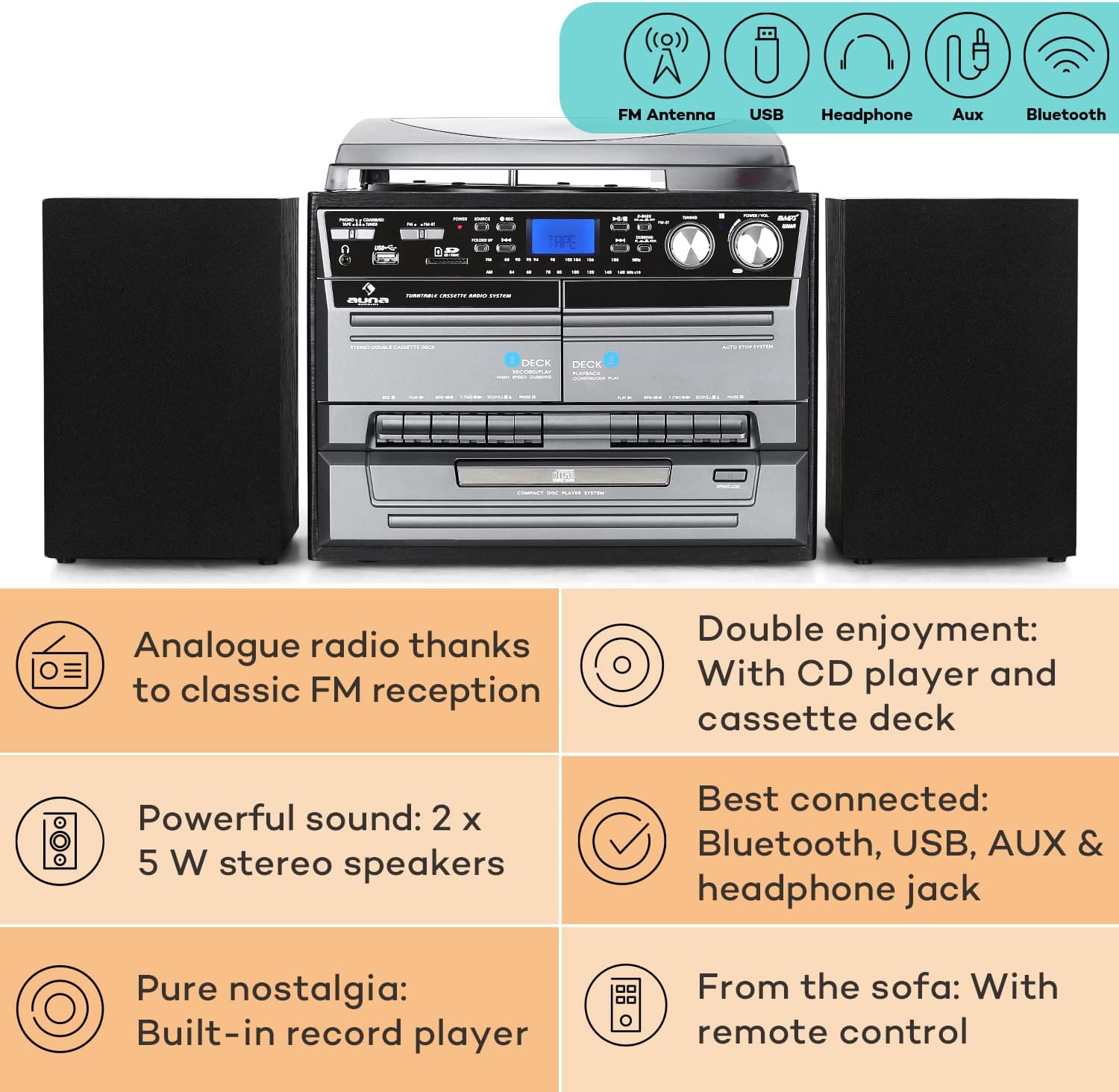
Image: Diagram highlighting key features including FM antenna, USB, Headphone, Aux, Bluetooth, Analog radio, CD player, cassette deck, powerful speakers, built-in record player, and remote control.

Image: Displays the dimensions of the main unit and speakers, along with a detailed view of the rear panel connections including Aux, USB, Headphone, and MP3.
സജ്ജമാക്കുക
- പ്ലേസ്മെൻ്റ്: പ്രധാന യൂണിറ്റ് ഒരു സ്ഥിരതയുള്ളതും നിരപ്പായതുമായ പ്രതലത്തിൽ സ്ഥാപിക്കുക. യൂണിറ്റിന് ചുറ്റും മതിയായ വായുസഞ്ചാരം ഉണ്ടെന്ന് ഉറപ്പാക്കുക.
- സ്പീക്കർ കണക്ഷൻ: Connect the two speakers to the RCA speaker output jacks on the rear of the main unit. Ensure correct polarity (red to red, black to black).
- പവർ കണക്ഷൻ: ഒരു മതിൽ ഔട്ട്ലെറ്റിൽ പവർ കോർഡ് പ്ലഗ് ചെയ്യുക.
- ആൻ്റിന: For FM radio reception, ensure the built-in FM antenna at the rear of the system is extended and positioned for optimal signal.
- പ്രാരംഭ പവർ ഓൺ: Press the Power button on the unit or remote control to turn on the system.
പ്രവർത്തന നിർദ്ദേശങ്ങൾ
1. ടേൺ ചെയ്യാവുന്ന പ്രവർത്തനം

ചിത്രം: വിശദമായത് view of the turntable with a vinyl record and the CD player tray.
- സംരക്ഷണ കവർ തുറക്കുക.
- Place a record on the turntable platter. For 45 RPM singles, place the included 45 RPM adapter on the center spindle first.
- സ്പീഡ് സെലക്ടർ സ്വിച്ച് ഉപയോഗിച്ച് ഉചിതമായ വേഗത (33 1/3, 45, അല്ലെങ്കിൽ 78 RPM) തിരഞ്ഞെടുക്കുക.
- Gently lift the tone arm using the cueing lever and position the stylus over the desired track on the record.
- Lower the tone arm slowly using the cueing lever. The record will begin to play.
- At the end of the record, the turntable will automatically stop spinning due to the auto-stop function. Manually lift the tone arm and return it to its rest.
2. സിഡി പ്ലെയർ പ്രവർത്തനം
- Press the "CD" button on the unit or remote to select CD mode.
- സിഡി ട്രേ തുറക്കാൻ "തുറക്കുക/അടയ്ക്കുക" ബട്ടൺ അമർത്തുക.
- Place a CD (label side up) into the tray and press "Open/Close" again to close the tray.
- The CD will load, and playback will usually start automatically. Use the Play/Pause, Stop, Skip (forward/backward) buttons for control.
- Functions like Repeat (single track/all), Random, and Program (to create a custom playlist) are available via the remote control.
3. കാസറ്റ് പ്ലെയർ പ്രവർത്തനം
- Press the "TAPE" button to select cassette mode.
- Press the "Eject" button on either Deck 1 or Deck 2 to open the cassette compartment.
- ഒരു കാസറ്റ് ടേപ്പ് തിരുകുക, കമ്പാർട്ട്മെൻ്റ് അടയ്ക്കുക.
- Use the Play, Fast Forward, Rewind, and Stop buttons for control.
- Hi-Speed Dubbing: To copy from Deck 1 to Deck 2, ensure a blank tape is in Deck 2. Start playback on Deck 1 and press the "Record" button on Deck 2.
4. റേഡിയോ ഓപ്പറേഷൻ (AM/FM)
- Press the "RADIO" button to select radio mode.
- Use the "Tuning" knob to manually tune to your desired FM or AM station. The frequency will be displayed on the LCD screen.
- മികച്ച സ്വീകരണത്തിനായി എഫ്എം ആന്റിന ക്രമീകരിക്കുക.
5. USB/SD Playback and Recording

Image: Illustrates wireless music streaming via Bluetooth and the easy operation of the control panel, including USB and SD card slots.
- USB പോർട്ടിലേക്ക് ഒരു USB ഫ്ലാഷ് ഡ്രൈവ് അല്ലെങ്കിൽ SD കാർഡ് സ്ലോട്ടിലേക്ക് ഒരു SD കാർഡ് ഇടുക.
- Press the "USB/SD" button to select the corresponding mode.
- സിസ്റ്റം സ്വയമേവ അനുയോജ്യമായ ഓഡിയോ കണ്ടെത്തി പ്ലേ ചെയ്യും files (MP3, WMA). Use the navigation buttons to browse folders and tracks.
- Recording from Vinyl/CD/Cassette to USB: While playing a source (e.g., vinyl record), press the "Record" button. The audio will be recorded to the connected USB drive. Ensure the USB drive has sufficient free space.
6. ബ്ലൂടൂത്ത് കണക്റ്റിവിറ്റി
- Press the "Bluetooth" button to enter Bluetooth pairing mode. The display will indicate "BT" or "PAIRING".
- നിങ്ങളുടെ സ്മാർട്ട്ഫോണിലോ, ടാബ്ലെറ്റിലോ, മറ്റ് ബ്ലൂടൂത്ത് ഉപകരണത്തിലോ, ബ്ലൂടൂത്ത് പ്രവർത്തനക്ഷമമാക്കി ലഭ്യമായ ഉപകരണങ്ങൾക്കായി തിരയുക.
- Select "Auna" (or similar name) from the list of devices. Once paired, the display will show "CONNECTED".
- You can now stream audio wirelessly from your device to the Auna stereo system.
7. AUX ഇൻപുട്ട്
- Connect an external audio device (e.g., MP3 player, smartphone) to the AUX input jack on the front or rear of the unit using a 3.5mm audio cable.
- Press the "AUX" button to select AUX mode.
- Audio from the connected device will now play through the system's speakers. Control playback from the external device.
മെയിൻ്റനൻസ്
Proper maintenance ensures the longevity and performance of your stereo system.
- യൂണിറ്റ് വൃത്തിയാക്കൽ: Wipe the exterior of the unit with a soft, dry, lint-free cloth. Do not use abrasive cleaners, waxes, or solvents.
- സ്റ്റൈലസ് വൃത്തിയാക്കൽ: Gently clean the stylus (needle) periodically with a soft brush designed for stylus cleaning, brushing from back to front. A dirty stylus can affect sound quality and damage records.
- റെക്കോർഡ് കെയർ: നിങ്ങളുടെ വിനൈൽ റെക്കോർഡുകൾ വൃത്തിയായും പൊടി രഹിതമായും സൂക്ഷിക്കുക. വളച്ചൊടിക്കൽ തടയാൻ അവ സ്ലീവുകളിൽ ലംബമായി സൂക്ഷിക്കുക.
- സിഡി/കാസറ്റ് പരിചരണം: Handle CDs by the edges. Keep cassette tapes away from strong magnetic fields.
- പൊടി കവർ: Keep the turntable dust cover closed when not in use to protect the platter and stylus.
ട്രബിൾഷൂട്ടിംഗ്
If you encounter issues with your Auna stereo system, please refer to the following common problems and solutions:
| പ്രശ്നം | സാധ്യമായ കാരണം / പരിഹാരം |
|---|---|
| ഒരു പവറും / യൂണിറ്റും ഓണാകുന്നില്ല. |
|
| സ്പീക്കറുകളിൽ നിന്ന് ശബ്ദമില്ല. |
|
| Turntable not spinning or playing. |
|
| CD player not reading disc. |
|
| മോശം റേഡിയോ സ്വീകരണം. |
|
| ബ്ലൂടൂത്ത് ജോടിയാക്കൽ പ്രശ്നങ്ങൾ. |
|
സ്പെസിഫിക്കേഷനുകൾ
| ഫീച്ചർ | വിശദാംശങ്ങൾ |
|---|---|
| മോഡലിൻ്റെ പേര് | Auna Vinyl Record Player |
| മോഡൽ നമ്പർ | MG-2500-386WE |
| ബ്രാൻഡ് | ഔന |
| കണക്റ്റിവിറ്റി ടെക്നോളജി | Bluetooth, USB, AUX, Headphone |
| ടേൺ ചെയ്യാവുന്ന വേഗത | 33 1/3, 45, 78 ആർപിഎം |
| CD Player Formats | CD, CD-R, CD-RW, MP3, WMA |
| സ്പീക്കർ ഔട്ട്പുട്ട് | 2 x 5W ആർഎംഎസ് |
| Main Unit Dimensions (WxHxD) | 32 x 29 x 29 സെ.മീ |
| സ്പീക്കർ അളവുകൾ (WxHxD) | 15 x 23 x 15 cm (per speaker) |
| പ്രധാന യൂണിറ്റ് ഭാരം | 4.3 കി.ഗ്രാം |
| സ്പീക്കർ ഭാരം | Approx. 950g per piece |
| വൈദ്യുതി വിതരണം | 230V, 50Hz |
| ഉൾപ്പെടുത്തിയ ഘടകങ്ങൾ | Turntable, 2 Speakers, Protection Cover, Remote Control, 45 RPM Adapter |
വാറൻ്റിയും പിന്തുണയും
This product comes with a standard manufacturer's warranty. For detailed warranty information, please refer to the warranty card included in your package or contact Auna customer support.
If you require technical assistance or have questions not covered in this manual, please visit the official Auna webസൈറ്റിൽ ബന്ധപ്പെടുക അല്ലെങ്കിൽ അവരുടെ ഉപഭോക്തൃ സേവന വിഭാഗവുമായി ബന്ധപ്പെടുക. കോൺടാക്റ്റ് വിശദാംശങ്ങൾ സാധാരണയായി നിർമ്മാതാവിന്റെ വെബ്സൈറ്റിൽ കാണാം. webസൈറ്റ് അല്ലെങ്കിൽ നിങ്ങളുടെ വാങ്ങൽ ഡോക്യുമെന്റേഷനിൽ.
കൂടുതൽ വിവരങ്ങൾക്ക്, നിങ്ങൾക്ക് സന്ദർശിക്കാവുന്നതാണ് AUNA Store on Amazon.