
1. ആമുഖം
This manual provides detailed instructions for the safe and proper installation and operation of your Barkan Full Motion Articulating TV Wall Mount. This mount is designed for televisions ranging from 13 to 56 inches and supports a maximum weight of 79 lbs (36 kg). It offers four movement capabilities: rotation, folding, swivel, and tilt, allowing for optimal viewകോണുകൾ.
2 സുരക്ഷാ വിവരങ്ങൾ
പ്രധാനപ്പെട്ട സുരക്ഷാ അറിയിപ്പ്: Child safety is paramount. To prevent tip-over accidents, always secure your TV to the wall using a strong and safe mount. All Barkan TV mounts include a Fall Proof system designed to prevent accidental disengagement of the screen.
- Ensure the wall structure can support the combined weight of the mount and your television.
- Use appropriate tools and follow all installation steps carefully.
- If your screen requires different screen-connection screws than those provided, obtain suitable ones from a local hardware store or contact Barkan support.
- പരമാവധി ഭാര ശേഷി 79 പൗണ്ട് (36 കിലോഗ്രാം) കവിയരുത്.
3. പാക്കേജ് ഉള്ളടക്കം
ഇൻസ്റ്റാളേഷൻ ആരംഭിക്കുന്നതിന് മുമ്പ് എല്ലാ ഘടകങ്ങളും നിലവിലുണ്ടെന്ന് ഉറപ്പാക്കുക. പാക്കേജിൽ ഇവ അടങ്ങിയിരിക്കണം:
- TV Mount Assembly
- Hardware Kit (including various screws, anchors, and spacers)
- അസംബ്ലി നിർദ്ദേശങ്ങൾ (ഈ പ്രമാണം)
If any parts are missing, please contact Barkan support.

Image: Contents of the Barkan Hardware Kit, showing various screws, anchors, and washers for wall and TV mounting.
4 സ്പെസിഫിക്കേഷനുകൾ
| മൗണ്ടിംഗ് തരം | മതിൽ മൗണ്ട് |
| ചലന തരം | ആർട്ടിക്കുലേറ്റിംഗ് (പൂർണ്ണ ചലനം) |
| അനുയോജ്യമായ സ്ക്രീൻ വലുപ്പങ്ങൾ | 13 മുതൽ 56 ഇഞ്ച് വരെ |
| പരമാവധി ലോഡ് കപ്പാസിറ്റി | 79 പൗണ്ട് (36 കി.ഗ്രാം) |
| VESA അനുയോജ്യത | 75x75, 100x100, 100x200, 200x100, 200x200, 300x300, 300x400, 400x200, 400x300, 400x400 mm (and non-VESA up to 400x400 mm) |
| ചുവരിൽ നിന്നുള്ള ഏറ്റവും കുറഞ്ഞ ദൂരം | 2.6 ഇഞ്ച് (6.5 സെ.മീ) |
| Maximum Distance from Wall | 15.9 ഇഞ്ച് (40.5 സെ.മീ) |
| ടിൽറ്റ് ആംഗിൾ | -5 ° മുതൽ +15 ° വരെ |
| സ്വിവൽ ആംഗിൾ | Up to 360° (at screen connection plate) |
| Rotation (near wall) | 180° |
| ലെവലിംഗ് അഡ്ജസ്റ്റ്മെന്റ് | ±5° |
| മെറ്റീരിയൽ | ഇരുമ്പ് |
| നിറം | കറുപ്പ് |

Image: Detailed diagram showing the dimensions, VESA patterns, tilt, swivel, and extension capabilities of the Barkan TV wall mount.
5. സജ്ജീകരണവും ഇൻസ്റ്റാളേഷനും
5.1 ആവശ്യമായ ഉപകരണങ്ങൾ
Before starting, ensure you have the following tools:
- Drill (with 1/4" - 6mm and 3/8" - 10mm bits for wood/concrete, and 5/32" - 4mm for wood studs)
- ലെവൽ
- സുരക്ഷാ ഗ്ലാസുകൾ
- Stud Finder (recommended for drywall installation)
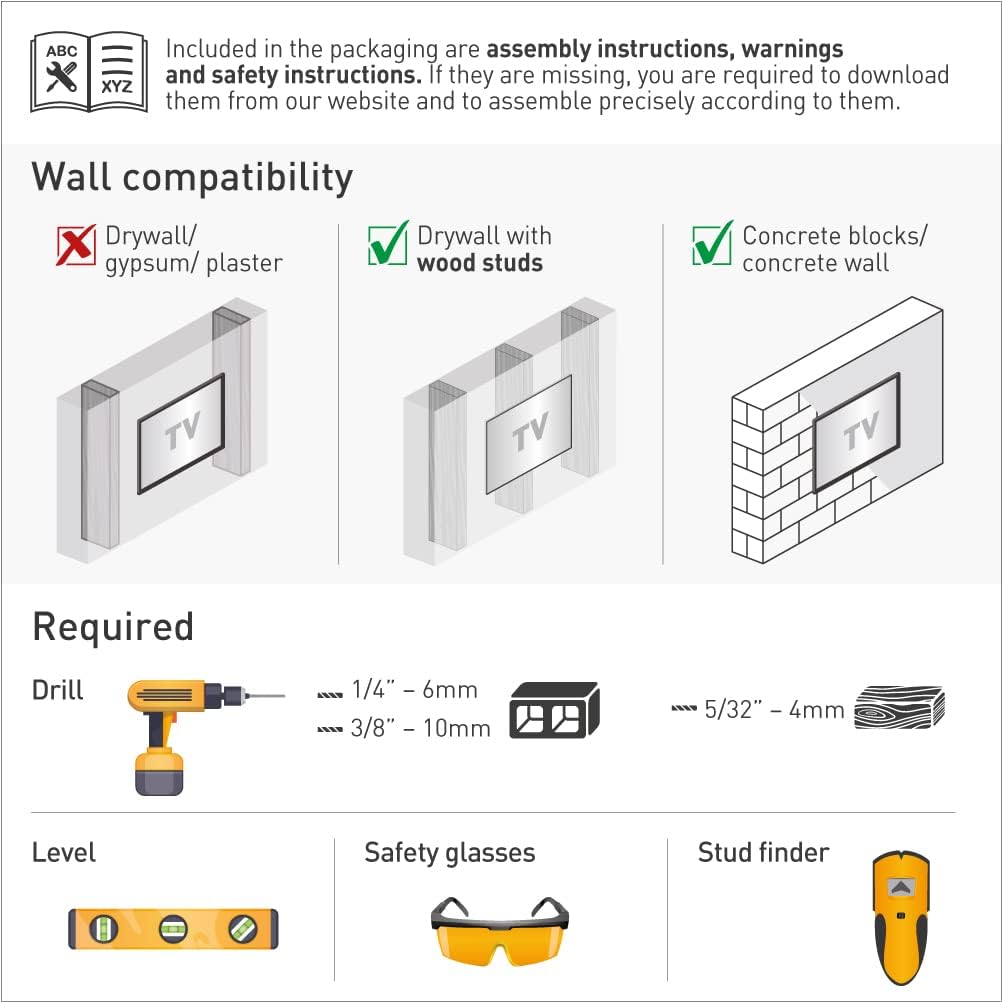
Image: Illustration of required tools (drill, level, safety glasses, stud finder) and wall compatibility types (drywall with wood studs, concrete blocks/concrete wall).
5.2 Wall Compatibility
This mount is compatible with:
- മരം സ്റ്റഡുകളുള്ള ഡ്രൈവാൾ
- Concrete blocks / Concrete wall
Note: Not compatible with drywall/gypsum/plaster walls without wood studs.
5.3 അസംബ്ലി ഘട്ടങ്ങൾ
Follow these three main steps for assembly:
- Connect the TV plate to the back of the TV: Attach the adapter plates to the rear side of your television using the appropriate screws from the hardware kit. Ensure a secure fit.
- Install the bracket on the wall: Mark the desired mounting location on the wall. Use a stud finder for wood stud installations. Drill pilot holes and securely fasten the wall bracket using the provided wall screws and anchors suitable for your wall type. Use a level to ensure the bracket is straight.
- Snap the TV onto the bracket: Carefully lift the television and align the TV plate with the wall bracket. Snap the TV onto the bracket, ensuring it is securely engaged. The Fall Proof system will help prevent accidental disengagement.

Image: Visual guide illustrating the three easy steps for installing the TV mount: connecting the TV plate, installing the wall bracket, and snapping the TV onto the bracket.
5.4 Backscreen Connection Positioning
The mount supports various VESA and non-VESA backscreen connection patterns. Refer to the diagram below to identify the correct adapter configuration for your TV. If your TV's connection points are not shown, please contact Barkan support.

Image: Diagram showing various backscreen connection positioning options in millimeters (Width x Height) for different VESA patterns, including the use of adapters.
6. പ്രവർത്തന നിർദ്ദേശങ്ങൾ
The Barkan Full Motion Articulating TV Wall Mount allows for flexible positioning of your television to achieve the best viewഅനുഭവം.
- ടിൽറ്റ്: Adjust the screen vertically from -5° to +15° by gently pushing or pulling the top or bottom edge of the TV.
- സ്വിവൽ: Rotate the screen horizontally up to 360° at the screen connection plate to change the viewing ആംഗിൾ.
- Rotation (near wall): The arm can rotate 180° near the wall, allowing for broad lateral movement.
- വിപുലീകരണം: The mount can extend from a minimum of 2.6 inches (6.5 cm) to a maximum of 15.9 inches (40.5 cm) from the wall.
- ലെവലിംഗ്: Fine-tune the horizontal level of the screen by ±5°.
To adjust, gently push or pull the TV to the desired angle. Avoid excessive force.

Image: Diagram illustrating the full motion capabilities of the mount, including tilt (0°-15°), swivel (180°), leveling (±5°), and extension (2.6" to 15.9").
7. പരിപാലനം
The Barkan TV Wall Mount requires minimal maintenance. Periodically check all screws and connections to ensure they remain tight and secure. Do not use abrasive cleaners on the mount; a soft, damp വൃത്തിയാക്കാൻ തുണി മതി.
8. പ്രശ്നപരിഹാരം
If you encounter issues during installation or operation:
- ടിവി നിലവാരമില്ലാത്തത്: Use the leveling adjustment feature to correct the horizontal alignment.
- മൗണ്ട് അസ്ഥിരമായി തോന്നുന്നു: Re-check all wall and TV connections to ensure they are securely fastened. Verify that the wall type is compatible and that appropriate anchors were used. Ensure the TV weight does not exceed the maximum capacity.
- Difficulty with screen-connection screws: If the provided screws do not fit your TV, please purchase suitable ones from a local hardware store.
For further assistance, please contact Barkan support.
9. വാറൻ്റിയും പിന്തുണയും
9.1 വാറൻ്റി
The Barkan TV Wall Mount comes with a 5 വർഷത്തെ വാറൻ്റിവാറന്റി ക്ലെയിമുകൾക്കായി നിങ്ങളുടെ വാങ്ങിയതിന്റെ തെളിവ് സൂക്ഷിക്കുക.
9.2 പിന്തുണ
For any questions, assistance, or if you are not satisfied with the product, please contact Barkan support:
- ഇമെയിൽ: sales.usa@barkanmounts.com
- Webസൈറ്റ്: https://www.barkanmounts.com/support
Our customer service experts are available to assist you.