
1. ആമുഖം
Thank you for choosing the Maclean MCE355 LED Bicycle Rear Light. This manual provides essential information for the safe and efficient use of your new bicycle light. Please read these instructions carefully before installation and operation, and retain them for future reference.

Image 1: The Maclean MCE355 LED Bicycle Rear Light mounted on a bicycle seat post, showing its bright red illumination.
2 സുരക്ഷാ വിവരങ്ങൾ
- സവാരി ചെയ്യുന്നതിന് മുമ്പ് എപ്പോഴും ലൈറ്റ് സുരക്ഷിതമായി ഘടിപ്പിച്ചിട്ടുണ്ടെന്ന് ഉറപ്പാക്കുക.
- Do not look directly into the light when it is on, as it may cause temporary vision impairment.
- Keep the light clean and free from obstructions to ensure maximum visibility.
- The light is rated IP44, meaning it is protected against splashing water from any direction. It is not designed for submersion.
- Charge the battery only with the provided USB cable and a compatible USB power source.
3. പാക്കേജ് ഉള്ളടക്കം
പാക്കേജിൽ ഇനിപ്പറയുന്ന ഇനങ്ങൾ ഉണ്ടോ എന്ന് പരിശോധിക്കുക:
- Maclean MCE355 LED Bicycle Rear Light unit
- മൌണ്ടിംഗ് ബ്രാക്കറ്റ്
- USB ചാർജിംഗ് കേബിൾ
- ഉപയോക്തൃ മാനുവൽ
4. ഉൽപ്പന്നം കഴിഞ്ഞുview
The Maclean MCE355 is a high-brightness LED bicycle rear light designed for enhanced cycling safety. It features a COB LED with 125 lumens output, an intelligent braking sensor, and multiple lighting modes.

Image 2: Key features of the MCE355 light, including brake sensing, motion detection, IP44 rating, smart daylight mode, COB LED, low battery indicator, universal mount, and extended run time.
Its compact design ensures it fits discreetly on your bicycle while providing powerful illumination.

Image 3: The compact dimensions of the MCE355 light, measuring 37mm x 37mm x 16mm, highlighting its small and portable design.
5. സജ്ജീകരണവും ഇൻസ്റ്റാളേഷനും
The Maclean MCE355 is designed for simple installation on bicycle seat posts ranging from 22.2 mm to 31.8 mm in diameter.
- മൗണ്ടിംഗ് ബ്രാക്കറ്റ് അറ്റാച്ചുചെയ്യുക: Secure the provided mounting bracket to your bicycle's seat post using the adjustable strap. Ensure it is tight and stable.
- Slide in the Light Unit: Align the grooves on the back of the light unit with the bracket and slide it down until it clicks securely into place.
- ആംഗിൾ ക്രമീകരിക്കുക: Ensure the light is facing directly backward for optimal visibility.
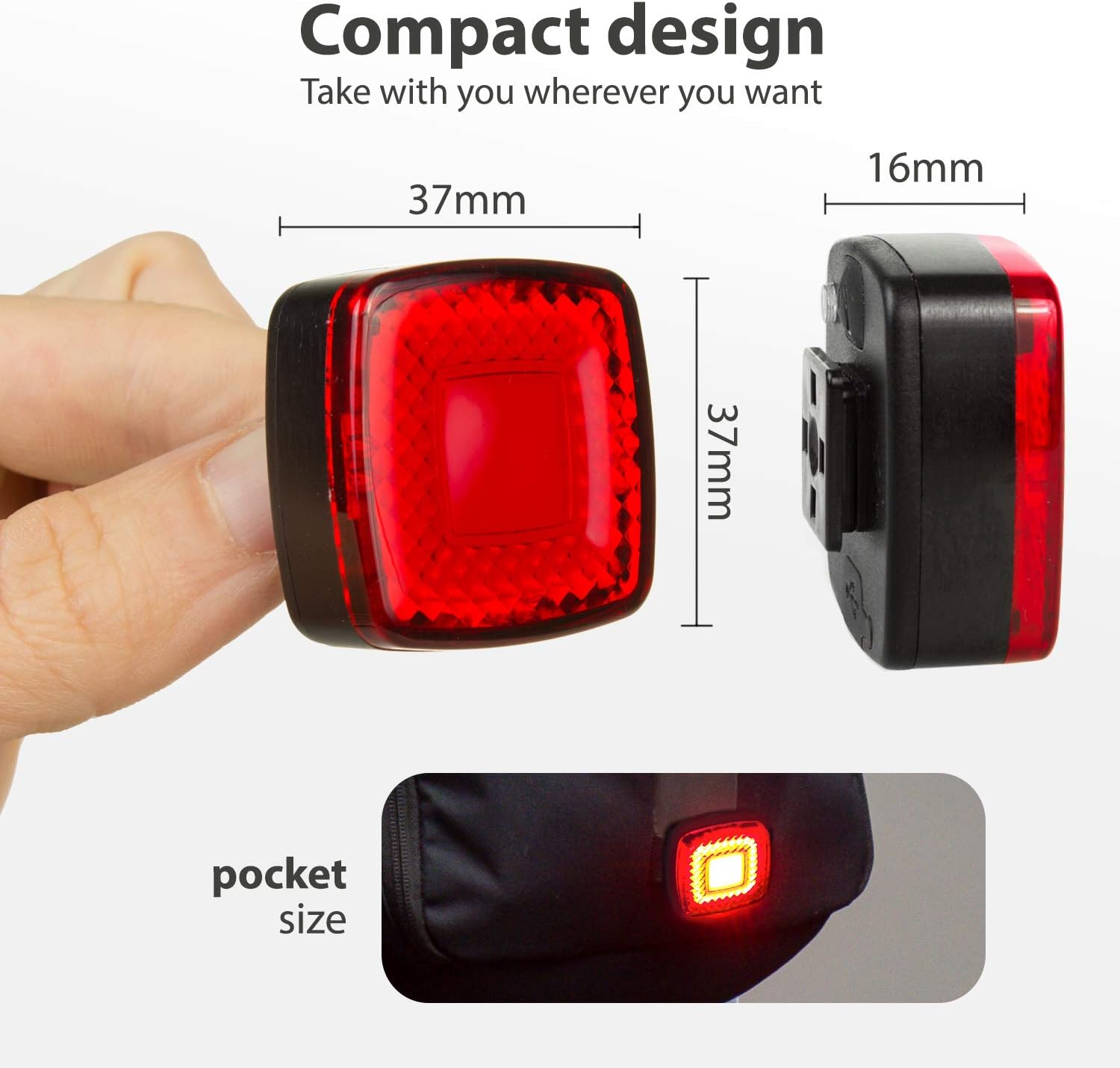
Image 4: The MCE355 light properly installed on a bicycle's seat post, ready for use.
6. പ്രവർത്തന നിർദ്ദേശങ്ങൾ
6.1 ബാറ്ററി ചാർജ് ചെയ്യുന്നു
The MCE355 features a built-in rechargeable Lithium-Ion battery. To charge:
- Locate the USB charging port on the back of the light, usually protected by a rubber cover.
- Open the rubber cover and connect the provided USB cable.
- Connect the other end of the USB cable to a standard USB power source (e.g., computer, wall adapter).
- The indicator light will show charging status. It typically takes about 3 hours for a full charge.
- A low battery indicator will alert you when the battery level is critical.
6.2. പവർ ഓൺ/ഓഫ്, മോഡ് തിരഞ്ഞെടുക്കൽ
The light has a single button for control:
- പവർ ഓൺ/ഓഫ്: Press and hold the power button for approximately 2-3 seconds to turn the light ON or OFF.
- മോഡുകൾ മാറ്റുക: With the light ON, short press the power button to cycle through the available lighting modes.

Image 5: The back of the MCE355 light, illustrating the USB charging port and the power button for operation.
6.3. ലൈറ്റിംഗ് മോഡുകൾ
The MCE355 offers three distinct lighting modes:
- സ്മാർട്ട് മോഡ്: This intelligent mode detects vibrations during riding, has a twilight sensor to adjust brightness based on ambient light, and activates the brake light function automatically.
- 100% Fixed + Brake Light: The light remains steadily on at full brightness. The intelligent brake sensor will still activate a brighter flash when braking.
- Flash + Brake Light: The light flashes continuously. The intelligent brake sensor will still activate a brighter flash when braking.
7. പരിപാലനം
- വൃത്തിയാക്കൽ: ഒരു സോഫ്റ്റ് ഉപയോഗിച്ച് ലൈറ്റ് തുടയ്ക്കുക, ഡിamp തുണി. ഉരച്ചിലുകളുള്ള ക്ലീനറുകളോ ലായകങ്ങളോ ഉപയോഗിക്കരുത്.
- സംഭരണം: Store the light in a cool, dry place when not in use. If storing for extended periods, charge the battery every 3-6 months to maintain its lifespan.
- ബാറ്ററി കെയർ: Avoid fully discharging the battery frequently. Charge it regularly to prolong its life.
8. പ്രശ്നപരിഹാരം
- ലൈറ്റ് ഓണാക്കുന്നില്ല: ബാറ്ററി ചാർജ്ജ് ചെയ്തിട്ടുണ്ടെന്ന് ഉറപ്പാക്കുക. പവർ ബട്ടൺ 2-3 സെക്കൻഡ് അമർത്തിപ്പിടിക്കുക.
- ലൈറ്റ് ചാർജ് ചെയ്യുന്നില്ല: Check the USB cable and power source. Ensure the cable is securely connected to both the light and the power source.
- Brake sensor not working: Ensure the light is securely mounted and not loose. The sensor requires a clear deceleration to activate.
- മിന്നിമറയുന്നതോ മങ്ങിയതോ ആയ വെളിച്ചം: ബാറ്ററി ചാർജ് കുറവായിരിക്കാം. ലൈറ്റ് റീചാർജ് ചെയ്യുക.
9 സ്പെസിഫിക്കേഷനുകൾ
| ഫീച്ചർ | സ്പെസിഫിക്കേഷൻ |
|---|---|
| മോഡൽ നമ്പർ | MCE355 |
| പ്രകാശ സ്രോതസ്സ് | COB LED |
| തിളങ്ങുന്ന ഫ്ലക്സ് | 125 ല്യൂമൻസ് (പരമാവധി) |
| ബാറ്ററി തരം | 1 ലിഥിയം അയോൺ (ഉൾപ്പെടുത്തിയിരിക്കുന്നു) |
| ചാർജിംഗ് | USB റീചാർജബിൾ |
| ലൈറ്റിംഗ് മോഡുകൾ | 3 (SMART, 100% Fixed, Flash) |
| ജല പ്രതിരോധം | IP44 (സ്പ്ലാഷ് പ്രൂഫ്) |
| അളവുകൾ | 37 x 37 x 16 മിമി |
| ഭാരം | ഏകദേശം 80 ഗ്രാം |
| മൗണ്ടിംഗ് തരം | Seat Post Mount (22.2mm - 31.8mm) |
10. വാറൻ്റിയും പിന്തുണയും
This Maclean MCE355 product is manufactured by Maclean. For any questions, technical support, or warranty claims, please contact your retailer or the manufacturer directly. Please retain your proof of purchase for warranty purposes.