1. ആമുഖം
This user manual provides comprehensive instructions for the installation, operation, and maintenance of the QS-WIFI-S03 Smart Wi-Fi Switch Module. This module is designed to transform traditional switches into smart Wi-Fi controlled devices, allowing for remote control of lights or compatible appliances via the "Smart Life" or "Tuya Smart" application. It supports various program options for precise timing control.
2 സുരക്ഷാ വിവരങ്ങൾ
Please read all safety warnings and installation instructions carefully before installing or operating this device. Failure to follow these instructions may result in electric shock, fire, or other injuries.
- Ensure the power supply is completely disconnected before any installation or wiring work.
- Installation should only be performed by a qualified electrician or a person with a thorough understanding of electrical systems.
- Do not exceed the maximum load rating of 2300W.
- ഈ ഉപകരണം ഇൻഡോർ ഉപയോഗത്തിനായി മാത്രം രൂപകൽപ്പന ചെയ്തിട്ടുള്ളതാണ്.
- ഉപകരണം വെള്ളം, ഈർപ്പം, ഉയർന്ന താപനില എന്നിവയിൽ നിന്ന് അകറ്റി നിർത്തുക.
- ഉപകരണം സ്വയം വേർപെടുത്താനോ നന്നാക്കാനോ ശ്രമിക്കരുത്. സേവനത്തിനായി യോഗ്യതയുള്ള ഉദ്യോഗസ്ഥരെ ബന്ധപ്പെടുക.
3. ഉൽപ്പന്നം കഴിഞ്ഞുview
3.1 പാക്കേജ് ഉള്ളടക്കം
- 1 x QS-WIFI-S03 Smart Wi-Fi Switch Module
- 1 x ഉപയോക്തൃ മാനുവൽ (ഈ പ്രമാണം)
3.2 ഉൽപ്പന്ന സവിശേഷതകൾ
- Remote control via "Smart Life" or "Tuya Smart" app.
- Scheduling and timer functions for automated control.
- Voice control compatibility with Amazon Alexa and Google Home.
- Compact design for easy integration into existing switch boxes.
- Supports 2.4GHz Wi-Fi (802.11 b/g/n).
3.3 ഘടകം തിരിച്ചറിയൽ
The QS-WIFI-S03 module features clearly labeled terminals for easy wiring and an indicator light for status feedback.

ചിത്രം 3.1: മുൻഭാഗം view of the QS-WIFI-S03 Smart Wi-Fi Switch Module, showing the Wi-Fi Switch Module label and electrical specifications.

ചിത്രം 3.2: വശം view of the module, clearly showing the input and output terminals: L (Live input), L_OUT (Load Live output), L1 (Switched Live input), L (Live input), and N (Neutral input/output).
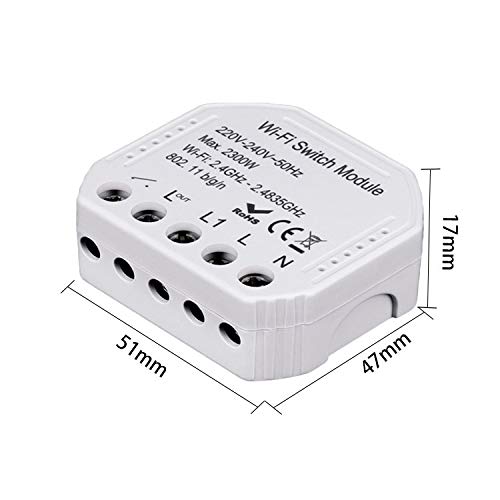
Figure 3.3: Dimensions of the QS-WIFI-S03 module, measuring approximately 51mm x 47mm x 17mm.
4. സജ്ജീകരണവും ഇൻസ്റ്റാളേഷനും
4.1 നിങ്ങൾ ആരംഭിക്കുന്നതിന് മുമ്പ്
- Ensure your Wi-Fi network is 2.4GHz. This module does not support 5GHz Wi-Fi.
- Download the "Smart Life" or "Tuya Smart" app from your smartphone's app store (available for iOS and Android).
- Have basic electrical wiring knowledge or consult a professional.
4.2 വയറിംഗ് ഡയഗ്രം
WARNING: Ensure the main power supply is turned OFF at the circuit breaker before attempting any wiring. Incorrect wiring can cause damage to the device or lead to electric shock.
The module is designed to be wired into your existing electrical circuit. The terminals are labeled as follows:
- L: Live input from the main power supply.
- N: Neutral input from the main power supply.
- L1: Switched Live input from your traditional wall switch.
- L_OUT: Live output to the load (e.g., light fixture).
- N: Neutral output to the load (shared with Neutral input).
Connect the wires according to the labels. For a single-way switch, connect the live wire from the power source to 'L', the neutral wire to 'N'. Connect the live wire from your traditional switch to 'L1'. Connect the live wire going to your light fixture or appliance to 'L_OUT' and the neutral wire to 'N'.
4.3 ആപ്പ് ഇൻസ്റ്റാളേഷനും ജോടിയാക്കലും
- അപ്ലിക്കേഷൻ ഡൗൺലോഡുചെയ്യുക: ഇതിനായി തിരയുക "Smart Life" or "Tuya Smart" in the App Store (iOS) or Google Play Store (Android) and install it.
- രജിസ്റ്റർ ചെയ്യുക/ലോഗിൻ ചെയ്യുക: ആപ്പ് തുറന്ന് ഒരു പുതിയ അക്കൗണ്ട് രജിസ്റ്റർ ചെയ്യുക അല്ലെങ്കിൽ നിലവിലുള്ള ഒരു അക്കൗണ്ട് ഉപയോഗിച്ച് ലോഗിൻ ചെയ്യുക.
- ജോടിയാക്കൽ മോഡ് നൽകുക: After wiring the module and restoring power, the indicator light on the module should blink rapidly (EZ Mode). If it doesn't, press and hold the reset button (or the connected physical switch if configured) for 5-10 seconds until it blinks rapidly.
- ഉപകരണം ചേർക്കുക: In the app, tap the "+" icon in the top right corner to add a device. Select "Electrical Switch" or "Switch (Wi-Fi)" from the device list.
- വൈഫൈയിലേക്ക് കണക്റ്റുചെയ്യുക: Confirm the indicator light is blinking rapidly. Enter your 2.4GHz Wi-Fi network name and password.
- ജോടിയാക്കൽ: The app will begin searching for the device. Once found, it will be added to your device list. You can then rename the device for easier identification.
5. ഓപ്പറേഷൻ
5.1 Basic On/Off Control
Once paired, you can control the connected appliance or light directly from the Smart Life/Tuya Smart app. Simply tap the device icon to toggle its power state (on/off).
5.2 ഷെഡ്യൂളിംഗും ടൈമറുകളും
The app allows you to set up various automation rules:
- ഷെഡ്യൂൾ: Set specific times for the device to turn on or off daily or on selected days of the week.
- ടൈമർ: Set a countdown timer for the device to turn off after a specified duration.
- പ്രചരിക്കുക: Set the device to cycle on and off repeatedly for specific intervals.
- ക്രമരഹിതം: Turn the device on or off randomly within a set time frame, useful for simulating occupancy.
5.3 വോയ്സ് കൺട്രോൾ ഇന്റഗ്രേഷൻ
The QS-WIFI-S03 module is compatible with popular voice assistants, allowing for hands-free control.
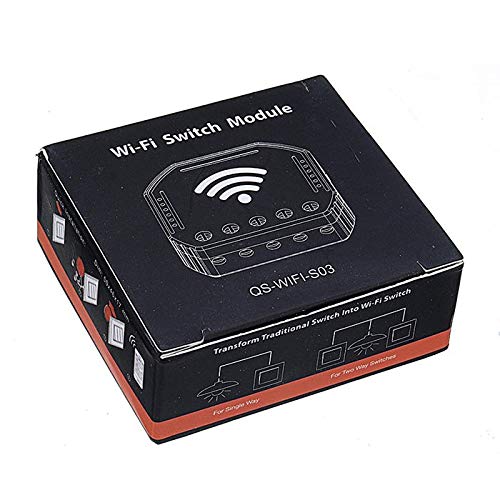
Figure 5.1: The module supports integration with Google Home and Amazon Alexa for voice control, along with schedule timer and Wi-Fi control features.
- ആമസോൺ അലക്സ: Link your Smart Life/Tuya Smart account in the Alexa app. Once linked, you can use commands like "Alexa, turn on [Device Name]" or "Alexa, turn off [Device Name]".
- ഗൂഗിൾ ഹോം: Link your Smart Life/Tuya Smart account in the Google Home app. Use commands such as "Hey Google, turn on [Device Name]" or "Hey Google, turn off [Device Name]".
6. പരിപാലനം
The QS-WIFI-S03 Smart Wi-Fi Switch Module requires minimal maintenance. Follow these guidelines to ensure optimal performance:
- വൃത്തിയാക്കൽ: Disconnect power before cleaning. Wipe the exterior with a soft, dry cloth. Do not use harsh chemicals or abrasive cleaners.
- ഫേംവെയർ അപ്ഡേറ്റുകൾ: The Smart Life/Tuya Smart app may occasionally prompt you for firmware updates. It is recommended to perform these updates to ensure the device has the latest features and security patches.
- പരിസ്ഥിതി വ്യവസ്ഥകൾ: Ensure the module is installed in a dry environment, away from direct sunlight and extreme temperatures.
7. പ്രശ്നപരിഹാരം
If you encounter issues with your QS-WIFI-S03 module, refer to the table below for common problems and solutions.
| പ്രശ്നം | സാധ്യമായ കാരണം | പരിഹാരം |
|---|---|---|
| Device not connecting to Wi-Fi / Indicator light not blinking. | Incorrect Wi-Fi password; 5GHz Wi-Fi network; Device not in pairing mode; Weak Wi-Fi signal. | Ensure correct 2.4GHz Wi-Fi password. Confirm router is 2.4GHz compatible. Press and hold reset button for 5-10 seconds until light blinks rapidly. Move device closer to router. |
| ആപ്പിൽ ഉപകരണം ഓഫ്ലൈനാണ്. | പവർ യൂtage; Wi-Fi network change; Router issues. | Check power supply to the module. Verify Wi-Fi network is active. Restart your Wi-Fi router. Re-pair the device if network settings changed. |
| Connected appliance/light not responding. | Incorrect wiring; Overload; Faulty appliance. | Turn off power and re-check wiring according to Section 4.2. Ensure load does not exceed 2300W. Test the appliance directly to confirm it is working. |
| ശബ്ദ നിയന്ത്രണം പ്രവർത്തിക്കുന്നില്ല. | Account not linked; Incorrect device name; Internet connectivity issues. | Ensure Smart Life/Tuya Smart account is correctly linked in Alexa/Google Home app. Use the exact device name configured in the app. Check internet connection. |
8 സാങ്കേതിക സവിശേഷതകൾ
| സ്പെസിഫിക്കേഷൻ | മൂല്യം |
|---|---|
| മോഡൽ | QS-WIFI-S03 |
| അളവുകൾ | 50*46*17എംഎം |
| വാല്യംtage | 220-240V എസി, 50Hz |
| പരമാവധി വാട്ട്tage | 2300W |
| വൈഫൈ സ്റ്റാൻഡേർഡ് | 2.4GHz-2.483GHz 802.11 b/g/n |
| സുരക്ഷാ തരം | WEP64/WPA-PSK/WPA2-PSK |
| ഓപ്പറേഷൻ മോഡ് | ഓൺ-ഓഫ് |
| ബന്ധപ്പെടാനുള്ള തരം | സാധാരണയായി തുറന്നിരിക്കുന്നു |
| ടെർമിനൽ തരം | സ്ക്രൂ |
| കൺട്രോളർ തരം | iOS, Android |
| നിയന്ത്രണ രീതി | ആപ്പ് |
| കണക്റ്റിവിറ്റി പ്രോട്ടോക്കോൾ | വൈഫൈ |
| നിറം | കറുപ്പ് |
| മെറ്റീരിയൽ | ചെമ്പ്, പിച്ചള, സ്റ്റെയിൻലെസ് സ്റ്റീൽ |
9. വാറൻ്റിയും പിന്തുണയും
This product comes with a standard manufacturer's warranty. Please refer to your purchase documentation for specific warranty terms and conditions.
For technical support, troubleshooting assistance, or warranty claims, please contact the retailer or manufacturer from whom you purchased the product. Keep your purchase receipt as proof of purchase.