
InFocus IN119BB
InFocus IN119BB Multimedia Projector User Manual
Model: IN119BB
ആമുഖം
This manual provides comprehensive instructions for the safe and efficient operation of your InFocus IN119BB Multimedia Projector. Please read this manual thoroughly before using the projector and retain it for future reference.
The InFocus IN119BB projector is designed for versatile use, offering a very long lamp life, high brightness, and extensive connectivity options. Its compact and lightweight design ensures ease of portability and installation.
സുരക്ഷാ വിവരങ്ങൾ
തീ, വൈദ്യുതാഘാതം അല്ലെങ്കിൽ പരിക്ക് എന്നിവ തടയാൻ ഇനിപ്പറയുന്ന സുരക്ഷാ മുൻകരുതലുകൾ എപ്പോഴും പാലിക്കുക:
- വെന്റിലേഷൻ തുറക്കൽ തടയരുത്.
- പ്രൊജക്ടറിനെ മഴയിലോ ഈർപ്പത്തിലോ തുറന്നുവിടരുത്.
- എല്ലാ സേവനങ്ങളും യോഗ്യതയുള്ള സേവന ഉദ്യോഗസ്ഥർക്ക് റഫർ ചെയ്യുക.
- എൽ ചെയ്യുമ്പോൾ പ്രൊജക്ടർ ലെൻസിലേക്ക് നേരിട്ട് നോക്കുന്നത് ഒഴിവാക്കുകamp ഓണാണ്.
- പവർ കോഡിന് ശരിയായ ഗ്രൗണ്ടിംഗ് ഉറപ്പാക്കുക.
ഉൽപ്പന്നം കഴിഞ്ഞുview
ഘടകങ്ങളും നിയന്ത്രണങ്ങളും
Familiarize yourself with the main components and controls of your InFocus IN119BB projector.

ചിത്രം 1: കോണാകൃതിയിലുള്ളത് view of the InFocus IN119BB projector, showing the lens, ventilation grilles, and top panel controls.

ചിത്രം 2: ഫ്രണ്ട് view of the InFocus IN119BB projector, highlighting the main projection lens.

ചിത്രം 3: മുകളിൽ നിന്ന് താഴേക്ക് ആംഗിൾ ചെയ്തത് view of the InFocus IN119BB projector, showing the control panel layout.

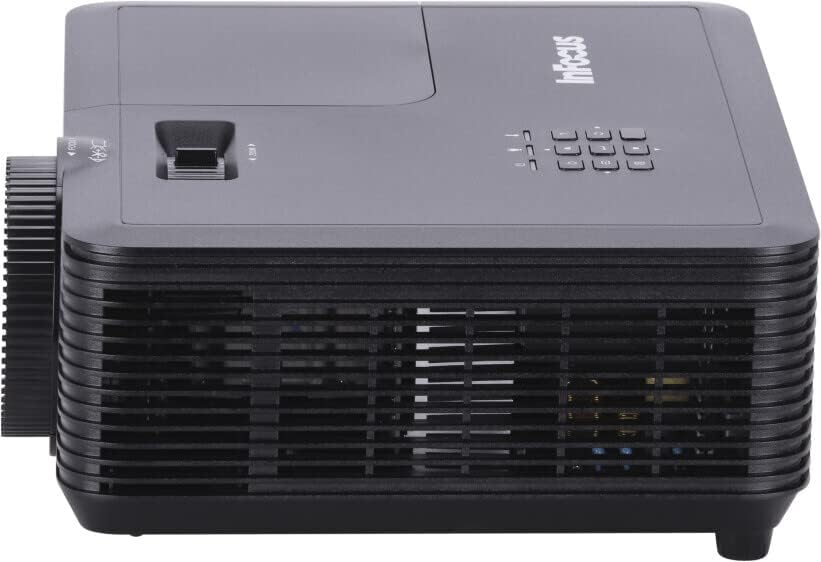
ചിത്രം 4: വശം view of the InFocus IN119BB projector, illustrating its compact profile.
ചിത്രം 5: പിൻഭാഗം view of the InFocus IN119BB projector, displaying all available input and output ports including HDMI, VGA, S-Video, and audio connections.
സജ്ജമാക്കുക
പ്ലേസ്മെൻ്റ്
Choose a stable, flat surface for the projector. Ensure adequate ventilation around the unit. For optimal image quality, position the projector perpendicular to the projection surface.
പവർ ബന്ധിപ്പിക്കുന്നു
- പ്രൊജക്ടറിന്റെ പവർ ഇൻപുട്ടിലേക്ക് പവർ കോർഡ് ബന്ധിപ്പിക്കുക.
- Plug the other end of the power cord into a grounded electrical outlet (240V recommended).
ഇൻപുട്ട് ഉറവിടങ്ങൾ ബന്ധിപ്പിക്കുന്നു
The IN119BB projector supports multiple input sources:
- എച്ച്ഡിഎംഐ: Use an HDMI cable to connect your computer, Blu-ray player, or other HDMI-enabled device to either HDMI 1 or HDMI 2 port.
- വി.ജി.എ: Connect your computer's VGA output to the VGA IN port using a VGA cable.
- എസ്-വീഡിയോ: For older video sources, connect an S-Video cable to the S-VIDEO port.
- ഓഡിയോ: Connect external audio devices to the AUDIO IN port. Audio output is available via the AUDIO OUT port.
പ്രവർത്തന നിർദ്ദേശങ്ങൾ
പവർ ചെയ്യുന്നത് ഓൺ/ഓഫ്
- To power on, press the Power button on the projector or remote control. The power indicator light will turn blue.
- To power off, press the Power button twice. The projector will enter a cooling down cycle before shutting down completely.
ചിത്രം ക്രമീകരിക്കുന്നു
- ഫോക്കസ്: ചിത്രം വ്യക്തവും വ്യക്തവുമാകുന്നതുവരെ ലെൻസിലെ ഫോക്കസ് റിംഗ് തിരിക്കുക.
- സൂം: Adjust the zoom lever next to the lens to change the image size.
- കീസ്റ്റോൺ തിരുത്തൽ: ചിത്രം ട്രപസോയിഡലായി കാണപ്പെടുന്നുവെങ്കിൽ, ചിത്രം ചതുരമാക്കാൻ OSD മെനുവിലെ കീസ്റ്റോൺ കറക്ഷൻ ഫംഗ്ഷൻ ഉപയോഗിക്കുക.
ഇൻപുട്ട് ഉറവിടം തിരഞ്ഞെടുക്കുന്നു
Press the "Source" button on the projector's control panel or remote control to cycle through available input sources (HDMI 1, HDMI 2, VGA, S-Video).
ഓൺ-സ്ക്രീൻ ഡിസ്പ്ലേ (OSD) മെനു
Press the "Menu" button to access the OSD menu. Use the arrow keys to navigate and the "Enter" button to select options. Adjust settings such as brightness, contrast, color, and aspect ratio.
മെയിൻ്റനൻസ്
Lamp മാറ്റിസ്ഥാപിക്കൽ
എൽamp life of the IN119BB is very long, but eventually, it will need replacement. When the lamp ഇൻഡിക്കേറ്റർ പ്രകാശിക്കുകയോ ചിത്രം മങ്ങുകയോ ചെയ്താൽ, l മാറ്റിസ്ഥാപിക്കേണ്ട സമയമായി.ampവിശദമായ l കാണുക.amp replacement guide in the full user manual for specific steps.
പ്രൊജക്ടർ വൃത്തിയാക്കുന്നു
- ലെൻസ്: ഒപ്റ്റിക്കൽ ലെൻസുകൾക്കായി പ്രത്യേകം രൂപകൽപ്പന ചെയ്ത മൃദുവായ, ലിന്റ് രഹിത തുണി ഉപയോഗിക്കുക. അബ്രാസീവ് ക്ലീനറുകൾ ഉപയോഗിക്കരുത്.
- Casing: പ്രൊജക്ടർ തുടയ്ക്കുക casinഗ്രാം വിത്ത് എ സോഫ്റ്റ്, ഡിamp തുണി. കഠിനമായ രാസവസ്തുക്കൾ ഉപയോഗിക്കുന്നത് ഒഴിവാക്കുക.
- എയർ ഫിൽട്ടറുകൾ: Regularly check and clean the air filters to ensure proper ventilation and prevent overheating.
ട്രബിൾഷൂട്ടിംഗ്
| പ്രശ്നം | സാധ്യമായ കാരണം | പരിഹാരം |
|---|---|---|
| ചിത്രമൊന്നും പ്രദർശിപ്പിച്ചിട്ടില്ല | Power cord disconnected; Incorrect input source selected; Lamp ഇഷ്യൂ. | Check power connection; Select correct input source; Replace lamp ആവശ്യമെങ്കിൽ. |
| ചിത്രം മങ്ങിയതാണ് | ലെൻസ് ഫോക്കസിന് പുറത്താണ്; പ്രൊജക്ടർ സ്ക്രീനിൽ നിന്ന് വളരെ അടുത്താണ്/അകലെയാണ്. | Adjust focus ring; Reposition projector. |
| പ്രൊജക്ടർ അമിതമായി ചൂടാകുന്നു | വായുസഞ്ചാരം തടസ്സപ്പെട്ടു; വൃത്തികെട്ട എയർ ഫിൽറ്റർ. | Ensure clear ventilation; Clean air filter. |
സ്പെസിഫിക്കേഷനുകൾ
| ഫീച്ചർ | വിശദാംശങ്ങൾ |
|---|---|
| മോഡൽ നമ്പർ | ഐഎൻ119ബിബി |
| ഡിസ്പ്ലേ ടെക്നോളജി | ഡി.എൽ.പി |
| നേറ്റീവ് റെസല്യൂഷൻ | 1280 x 800 (WUXGA) |
| തെളിച്ചം | 3500 ല്യൂമെൻസ് |
| കണക്റ്റിവിറ്റി | HDMI (x2), VGA In, VGA Out, S-Video, Audio In, Audio Out, RS232 |
| വൈദ്യുതി വിതരണം | 240 വി, 267 ഡബ്ല്യു |
| ഉൽപ്പന്ന അളവുകൾ (L x W x H) | 23.62 x 31.24 x 10.67 സെ.മീ |
| ഉൽപ്പന്ന ഭാരം | 2.6 കി.ഗ്രാം (5.5 പൗണ്ട്) |
| ഫോം ഫാക്ടർ | പോർട്ടബിൾ |
| ശുപാർശ ചെയ്യുന്ന ഉപയോഗം | ഹോം സിനിമ |
വാറൻ്റിയും പിന്തുണയും
For warranty information and technical support, please visit the official InFocus webസൈറ്റിൽ ബന്ധപ്പെടുക അല്ലെങ്കിൽ അവരുടെ ഉപഭോക്തൃ സേവനവുമായി ബന്ധപ്പെടുക. വാങ്ങിയതിന്റെ തെളിവായി നിങ്ങളുടെ വാങ്ങൽ രസീത് സൂക്ഷിക്കുക.
ഓൺലൈൻ പിന്തുണ: www.infocus.com/support
Ask a question about this manual
Ask about setup, troubleshooting, compatibility, parts, safety, or missing instructions. Manuals+ will review the question and use this page’s manual context to help answer it.