
1 പ്രധാനപ്പെട്ട സുരക്ഷാ വിവരങ്ങൾ
Please read all instructions carefully before using the Better Angel Electronic Acupuncture Pen Massager Machine. Retain this manual for future reference.
- Consult a healthcare professional before use if you have any pre-existing medical conditions, are pregnant, or have a pacemaker.
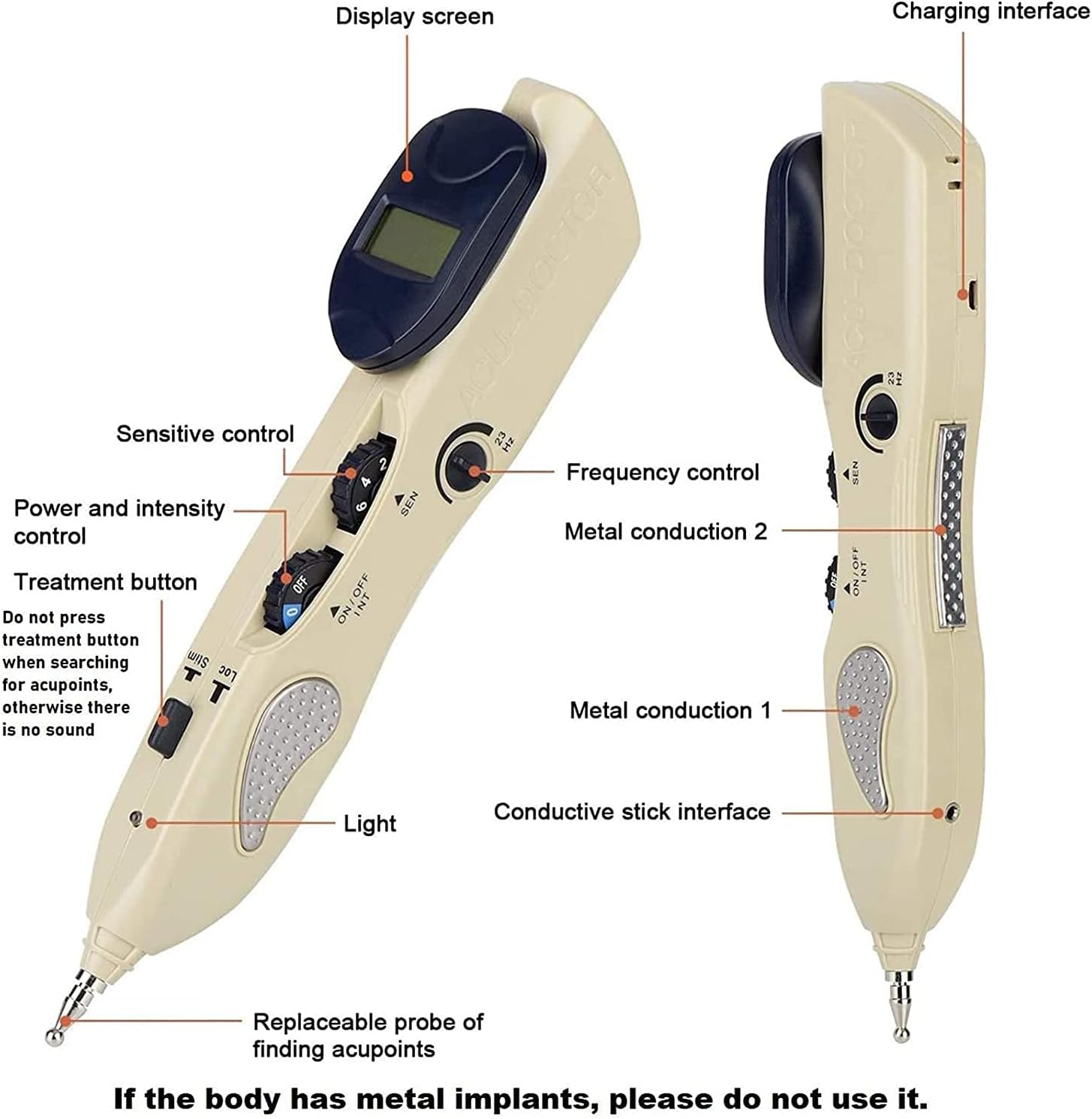
- Do not use this device if you have metal implants in your body.
- Do not use on broken skin, open wounds, or areas with skin conditions.
- കുട്ടികൾക്ക് ലഭ്യമാകാതെ സൂക്ഷിക്കുക.
- ഉപകരണം വെള്ളത്തിലോ മറ്റ് ദ്രാവകങ്ങളിലോ മുക്കരുത്.
- ഈ മാനുവലിൽ നിർദ്ദേശിച്ചിരിക്കുന്നതുപോലെ മാത്രം ഉപയോഗിക്കുക.
Legal Disclaimer: Statements regarding dietary supplements have not been evaluated by the FDA and are not intended to diagnose, treat, cure, or prevent any disease or health condition. This device is not intended to replace professional medical advice or treatment.
2. ഉൽപ്പന്നം കഴിഞ്ഞുview
The Better Angel Electronic Acupuncture Pen is designed to provide targeted massage and acupoint stimulation. It features adjustable intensity and sensitivity settings, along with various massage heads for different applications.

2.1 പ്രധാന സവിശേഷതകൾ
- Acupoint detection for precise targeting.
- Adjustable intensity and sensitivity levels (1-10).
- Multiple interchangeable massage heads for varied applications.
- Rechargeable lithium battery for convenience.
- Digital display for feedback.

3. ഘടകങ്ങളും നിയന്ത്രണങ്ങളും
Familiarize yourself with the different parts of your acupuncture pen:
- ഡിസ്പ്ലേ സ്ക്രീൻ: Shows numerical values for acupoint detection and intensity.
- ചാർജിംഗ് ഇൻ്റർഫേസ്: ചാർജിംഗ് കേബിൾ ബന്ധിപ്പിക്കുന്നതിന്.
- Sensitive Control (SEN): Adjusts the sensitivity for acupoint detection.
- Power and Intensity Control (ON/OFF INT): Turns the device on/off and adjusts the stimulation intensity.
- Frequency Control (Hz): Adjusts the pulse frequency.
- ചികിത്സ ബട്ടൺ: Activates the pulse when an acupoint is found.
- വെളിച്ചം: ഇൻഡിക്കേറ്റർ ലൈറ്റ്.
- Metal Conduction Points: Areas for user contact to complete the circuit.
- മാറ്റിസ്ഥാപിക്കാവുന്ന അന്വേഷണം: The tip for finding acupoints and applying stimulation.
3.1 മസാജ് ഹെഡ്സ്
The device comes with three interchangeable massage heads:
- Dome Type Massage Head: Primarily used for facial massage.
- 5mm Ball Massage Head: Generally used for body massage.
- 3mm Ball Massage Head: Suitable for smaller areas of the body.
4. സജ്ജീകരണം
4.1 ഉപകരണം ചാർജ് ചെയ്യുന്നു
- Locate the charging interface on the device.
- Connect the provided charging cable to the device and a suitable power source.
- Allow the device to charge fully before first use. The digital display may indicate charging status.
4.2 മസാജ് ഹെഡുകൾ ഘടിപ്പിക്കൽ
- Select the desired massage head (Dome, 5mm Ball, or 3mm Ball).
- Gently screw the chosen head onto the replaceable probe at the tip of the pen until secure.
5. പ്രവർത്തന നിർദ്ദേശങ്ങൾ
5.1 General Usage Steps
- ക്രമീകരണങ്ങൾ ക്രമീകരിക്കുക: Before beginning, adjust the intensity (ON/OFF INT), sensitivity (SEN), and frequency (Hz) to a low setting. Gradually increase as needed for comfort.
- ശരിയായ പിടി: Hold the pen with your thumb in contact with the metal patch on the side of the pen. This completes the electrical circuit.
- Acupoint Search: Slide the acupuncture pen along the skin. When an acupoint is detected, the warning light will flash, and a beeping sound will occur. The digital display will show a higher value, indicating closer proximity to an acupoint.
- Apply Massage: Once an acupoint is located, press the pen tip onto the point and press the treatment button to initiate the pulse massage.

5.2 Acupoint Detection
The device utilizes meridian low resistance characteristics to locate acupoints. The digital display provides a numerical value; a larger value indicates closer proximity to an acupoint.

5.3 Intensity and Sensitivity Adjustment
The intensity and sensitivity can be adjusted from 1 to 10 levels. Start with lower settings and gradually increase to a comfortable level. Personal preferences and the area of application may require different settings.
5.4 ഉൽപ്പന്ന പ്രദർശന വീഡിയോ
6. പരിപാലനവും പരിചരണവും
- വൃത്തിയാക്കൽ: Wipe the device and massage heads with a soft, damp cloth after each use. Do not use abrasive cleaners or immerse in water.
- സംഭരണം: ഉപകരണം തണുത്തതും വരണ്ടതുമായ സ്ഥലത്ത് സൂക്ഷിക്കുക, നേരിട്ടുള്ള സൂര്യപ്രകാശത്തിൽ നിന്നും തീവ്രമായ താപനിലയിൽ നിന്നും അകറ്റി നിർത്തുക.
- ബാറ്ററി: Recharge the device regularly, even if not in frequent use, to maintain battery health.
7. പ്രശ്നപരിഹാരം
| ഇഷ്യൂ | സാധ്യമായ കാരണം | പരിഹാരം |
|---|---|---|
| No pulse felt or weak pulse | Low intensity setting; improper contact; low battery. | Increase intensity; ensure thumb is on metal patch and probe is firmly on skin; recharge device. |
| ഉപകരണം ഓണാക്കുന്നില്ല | Low battery; power switch off. | Recharge device; ensure ON/OFF INT dial is turned to an intensity level. |
| Acupoint detection not working | Low sensitivity setting; dry skin. | Increase sensitivity (SEN dial); apply a small amount of conductive gel or water to the skin. |
8 സ്പെസിഫിക്കേഷനുകൾ
| ഫീച്ചർ | വിശദാംശങ്ങൾ |
|---|---|
| മോഡൽ നമ്പർ | 1 |
| ഉൽപ്പന്ന അളവുകൾ | 10.23 x 4.3 x 1.95 ഇഞ്ച് |
| ഭാരം | 2.25 പൗണ്ട് |
| നിർമ്മാതാവ് | ബെറ്റർ എയ്ഞ്ചൽ |
| പവർ ഉറവിടം | റീചാർജ് ചെയ്യാവുന്ന ലിഥിയം ബാറ്ററി |
9. വാറൻ്റിയും പിന്തുണയും
For warranty information or technical support, please refer to the product packaging or contact the manufacturer directly. Contact details are typically provided with your purchase documentation.