
1. ഉൽപ്പന്നം കഴിഞ്ഞുview
The Yanzeo YZ2002 is a compact and lightweight 1D laser barcode scanner designed for portability and ease of integration into various business processes. Weighing only 30 grams (1.1 ounces) and measuring 2.36" x 1.2" x 0.6", it fits easily into a pocket, making it ideal for mobile use in environments such as bookstores, online stores, retail outlets, and warehouses.
This scanner supports multiple connection methods and advanced scanning technology, ensuring efficient and reliable barcode data capture. It is equipped with a rechargeable battery for extended operation.

Image 1.1: The Yanzeo YZ2002 barcode scanner, showcasing its small, pocket-friendly design.
2. പാക്കേജ് ഉള്ളടക്കം
പാക്കേജിൽ എല്ലാ ഇനങ്ങളും ഉണ്ടെന്ന് ദയവായി പരിശോധിക്കുക:
- Yanzeo YZ2002 Barcode Scanner
- യുഎസ്ബി കേബിൾ (ചാർജിംഗിനും വയർ കണക്ഷനും)
- സ്ട്രാപ്പ്
- ദ്രുത ആരംഭ കാർഡ്
3. ഉൽപ്പന്ന സവിശേഷതകൾ
3.1. Super Mini Portable Design
The YZ2002 is exceptionally lightweight at 30g (1.1 oz) and compact (2.36" x 1.2" x 0.6"), making it highly portable for various applications. Its small form factor ensures it can be carried conveniently in a pocket or attached with the included strap.
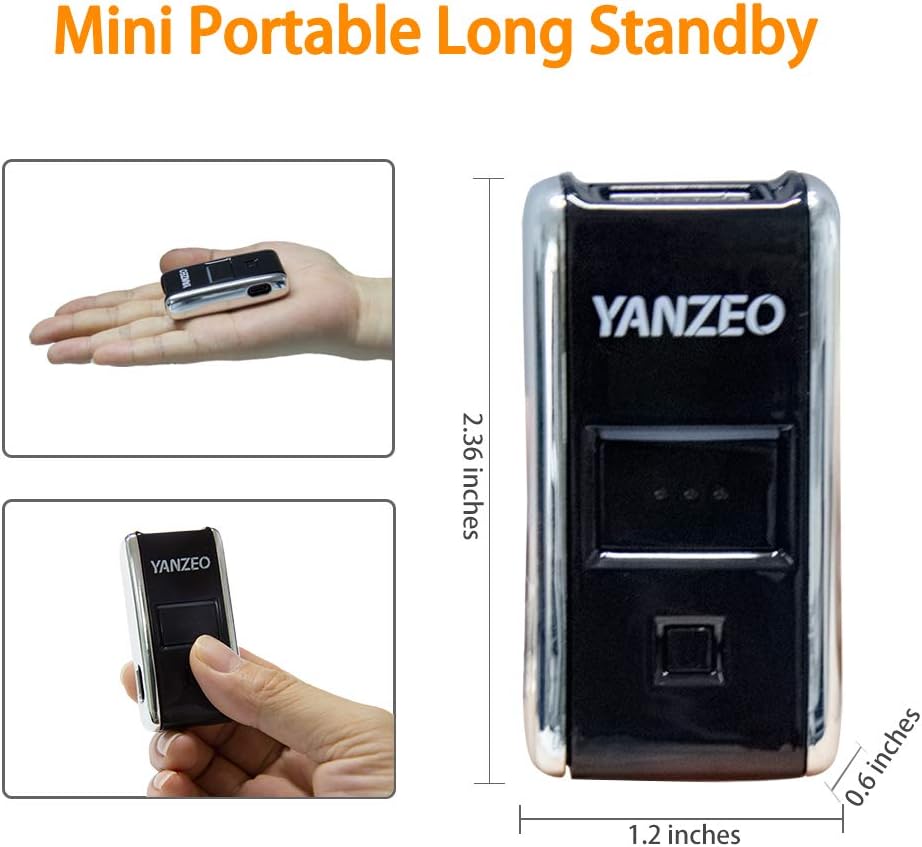
Image 3.1: Dimensions and portability of the Yanzeo YZ2002 scanner.
3.2. Versatile 3-in-1 Connection Methods
The scanner offers three flexible connection options to suit different operational needs:
- 2.4G വയർലെസ് കണക്ഷൻ: Provides a barrier-free transmission distance of up to 30m (98 feet) using the included USB dongle.
- ബ്ലൂടൂത്ത് കണക്ഷൻ: Supports Bluetooth 4.1 with a barrier-free transmission distance of up to 50m (164 feet). It offers flexibility with both HID and SPP Bluetooth profiles.
- USB വയർഡ് കണക്ഷൻ: Direct connection via USB cable for reliable data transfer and simultaneous charging.

ചിത്രം 3.2: കഴിഞ്ഞുview of the 3-in-1 connection options.
3.3. Advanced 1D Scan Technology
The Yanzeo YZ2002 efficiently captures various 1D barcodes, including UPC/EAN, Code39, Interleaved 2 of 5, Code93, Code 128, Codabar, Industry25, and Matrix25. Its super decoding function allows scanning of damaged, distorted, colorful, and reflective barcodes, including those displayed on screens.

Image 3.3: Scanning a digital barcode on a screen.
3.4. High Compatibility and Battery Life
This Bluetooth scanner is compatible with a wide range of devices and operating systems, including laptops, PCs, POS systems, smartphones, tablets, iPhones, and iPads. It works seamlessly with Windows XP/7/8/10, Mac OS, Linux, and Windows Mobile.
The built-in 650mAh rechargeable battery provides up to 5 hours of continuous operation on a 2-hour full charge.

Image 3.4: Device and OS compatibility of the scanner.
3.5. Multiple Configuration Options
The scanner supports two primary usage modes:
- തൽക്ഷണ അപ്ലോഡ് മോഡ്: Scanned data is immediately sent to the connected device.
- സ്റ്റോറേജ് മോഡ്: Scanned data is saved in the scanner's internal memory (up to 15,000 barcodes). To upload stored data, connect the scanner via USB and follow the instructions in the quick start guide for data transfer.
Additional customizable options include sound and vibration alerts (on/off) and custom non-display/addition settings.

Image 3.5: Illustration of Upload/Storage Modes.
4. സജ്ജീകരണം
4.1. സ്കാനർ ചാർജ് ചെയ്യുന്നു
Before first use, fully charge the scanner. Connect the scanner to a USB power source (e.g., computer USB port, USB wall adapter) using the provided USB cable. The charging indicator light will show the charging status.
4.2. സ്കാനർ ബന്ധിപ്പിക്കുന്നു
The Yanzeo YZ2002 offers three connection methods:
- USB വയർഡ് കണക്ഷൻ:
Connect the scanner directly to your computer's USB port using the USB cable. The scanner will be recognized as a keyboard input device, and scanned data will appear wherever your cursor is positioned.
- 2.4G വയർലെസ് കണക്ഷൻ:
- നിങ്ങളുടെ കമ്പ്യൂട്ടറിൽ ലഭ്യമായ ഒരു USB പോർട്ടിലേക്ക് 2.4G USB ഡോംഗിൾ ചേർക്കുക.
- സ്കാനർ ഓണാക്കുക. അത് ഡോംഗിളുമായി യാന്ത്രികമായി ജോടിയാക്കണം.
- A successful connection is indicated by a specific sound or light pattern (refer to the quick start guide for details).
- ബ്ലൂടൂത്ത് കണക്ഷൻ:
The scanner supports both HID (Human Interface Device) and SPP (Serial Port Profile) Bluetooth modes. HID mode is generally plug-and-play, while SPP mode may require specific driver installation or application support.
- Ensure your host device (computer, smartphone, tablet) has Bluetooth enabled.
- സ്കാനർ ഓണാക്കുക.
- Scan the "Bluetooth Pairing" barcode from the quick start guide (if provided) or enter pairing mode as per the guide.
- On your host device, search for Bluetooth devices and select "Yanzeo YZ2002" (or similar name) to pair.
- ജോടിയാക്കൽ പ്രക്രിയ പൂർത്തിയാക്കാൻ ഏതെങ്കിലും ഓൺ-സ്ക്രീൻ നിർദ്ദേശങ്ങൾ പാലിക്കുക.
5. പ്രവർത്തന നിർദ്ദേശങ്ങൾ
5.1. ബാർകോഡുകൾ സ്കാൻ ചെയ്യുന്നു
To scan a barcode, point the scanner's laser beam at the center of the barcode. Press the scan button. A successful scan is typically indicated by a beep or vibration. Ensure the barcode is within the scanner's reading range and properly illuminated.
5.2. Switching Between Instant Upload and Storage Mode
The scanner can operate in two data transmission modes. To switch between them, scan the corresponding configuration barcodes provided in the quick start guide or full manual:
- തൽക്ഷണ അപ്ലോഡ് മോഡ്: Scanned data is immediately sent to the connected device.
- സ്റ്റോറേജ് മോഡ്: Scanned data is saved in the scanner's internal memory (up to 15,000 barcodes). To upload stored data, connect the scanner via USB and follow the instructions in the quick start guide for data transfer.
5.3. ശബ്ദ, വൈബ്രേഷൻ ക്രമീകരണങ്ങൾ
The scanner provides audible beeps and/or vibrations to confirm successful scans. Refer to the quick start guide for barcodes to enable or disable these feedback options.
6. പരിപാലനം
- വൃത്തിയാക്കൽ: Use a soft, dry cloth to clean the scanner's exterior. Do not use abrasive cleaners or solvents. Keep the scanning window clean to ensure optimal performance.
- സംഭരണം: സ്കാനർ നേരിട്ട് സൂര്യപ്രകാശം ഏൽക്കാത്തതും ഉയർന്ന താപനില ഏൽക്കാത്തതുമായ ഒരു തണുത്ത, വരണ്ട സ്ഥലത്ത് സൂക്ഷിക്കുക.
- ബാറ്ററി കെയർ: ബാറ്ററി ലൈഫ് വർദ്ധിപ്പിക്കാൻ, ബാറ്ററി ഇടയ്ക്കിടെ പൂർണ്ണമായും ഡിസ്ചാർജ് ചെയ്യുന്നത് ഒഴിവാക്കുക. ദീർഘനേരം സൂക്ഷിക്കുകയാണെങ്കിൽ, ബാറ്ററി ഏകദേശം 50% വരെ ചാർജ് ചെയ്യുക, കുറച്ച് മാസങ്ങൾ കൂടുമ്പോൾ റീചാർജ് ചെയ്യുക.
7. പ്രശ്നപരിഹാരം
| പ്രശ്നം | സാധ്യമായ കാരണം | പരിഹാരം |
|---|---|---|
| സ്കാനർ ഓണാക്കുന്നില്ല. | കുറഞ്ഞ ബാറ്ററി. | കുറഞ്ഞത് 2 മണിക്കൂറെങ്കിലും സ്കാനർ ചാർജ് ചെയ്യുക. |
| സ്കാനർ Bluetooth/2.4G വഴി കണക്റ്റ് ചെയ്യുന്നില്ല. | Not paired, out of range, or incorrect mode. | Ensure scanner is in pairing mode, within range, and try re-pairing. Verify correct connection mode (HID/SPP). |
| സ്കാനർ ബാർകോഡുകൾ വായിക്കുന്നില്ല. | Barcode damaged, poor lighting, incorrect barcode type, dirty scanning window. | Ensure barcode is clear and well-lit. Clean scanning window. Check if the barcode type is supported. |
| സ്കാൻ ചെയ്ത ഡാറ്റ ഉപകരണത്തിൽ ദൃശ്യമാകുന്നില്ല. | Not connected, in storage mode, or application issue. | Confirm connection. Switch to Instant Upload Mode. Ensure cursor is in a text field. |
8 സ്പെസിഫിക്കേഷനുകൾ
| ബ്രാൻഡ് | യാൻസിയോ |
| മോഡൽ നമ്പർ | YZ2002 |
| ഉൽപ്പന്ന അളവുകൾ | 9 x 3.8 x 2.7 സെ.മീ (ഏകദേശം 3.54 x 1.5 x 1.06 ഇഞ്ച്) |
| ഇനത്തിൻ്റെ ഭാരം | 181 ഗ്രാം (ഏകദേശം 6.38 ഔൺസ്) |
| കണക്റ്റിവിറ്റി ടെക്നോളജി | USB Cable, 2.4G Wireless, Bluetooth 4.1 |
| പവർ ഉറവിടം | ബാറ്ററി പവർ |
| ബാറ്ററി തരം | 1 ലിഥിയം അയോൺ ബാറ്ററി (ഉൾപ്പെടുത്തിയിരിക്കുന്നു) |
| ബാറ്ററി ശേഷി | 650mAh |
| അനുയോജ്യമായ ഉപകരണങ്ങൾ | Smartphones, Tablets, Laptops, PCs, POS systems |
| പിന്തുണയ്ക്കുന്ന OS | Windows XP/7/8/10, Mac OS, Linux, Windows Mobile |
| പിന്തുണയ്ക്കുന്ന ബാർകോഡുകൾ | UPC/EAN, Code39, Interleaved 2 of 5, Code93, Code 128, Codabar, Industry25, Matrix25 |
9. വാറൻ്റിയും പിന്തുണയും
വാറന്റി വിവരങ്ങൾ, സാങ്കേതിക പിന്തുണ അല്ലെങ്കിൽ സേവന അന്വേഷണങ്ങൾ എന്നിവയ്ക്കായി, ദയവായി നിങ്ങളുടെ റീട്ടെയിലറെയോ നിർമ്മാതാവിനെയോ നേരിട്ട് ബന്ധപ്പെടുക. വാങ്ങിയതിന്റെ തെളിവായി നിങ്ങളുടെ വാങ്ങൽ രസീത് സൂക്ഷിക്കുക.