
1. ഓവർview
The Doro 7080 is a user-friendly flip phone designed for ease of use, combining classic phone functionality with modern smart features. It allows for easy communication through calls, messages, and popular applications like WhatsApp and Facebook, making it ideal for staying connected with family and friends.

Figure 1.1: Doro 7080 in charging cradle.
Key features include a clear external display for caller identification, a 5MP camera for capturing moments, and a dedicated assistance button for emergencies. Its robust design and intuitive interface ensure a reliable and straightforward mobile experience.
2. സജ്ജീകരണം
2.1. സിം കാർഡും മെമ്മറി കാർഡും ചേർക്കൽ
The Doro 7080 uses a Nano SIM card (4FF). It also supports a Micro SD card up to 128 GB for additional storage.
- Open the phone's back cover and remove the battery.
- Locate the SIM card slot and gently insert your Nano SIM card with the gold contacts facing down, ensuring it clicks into place.
- If using, insert the Micro SD card into its designated slot.
- ബാറ്ററി വീണ്ടും തിരുകുക, പിൻ കവർ മാറ്റിസ്ഥാപിക്കുക.
2.2. പ്രാരംഭ ചാർജിംഗ്
Before first use, fully charge your Doro 7080. The phone comes with a Type-C charger and a convenient charging cradle.
- Connect the Type-C charger cable to the phone's charging port or place the phone securely in the charging cradle.
- ഒരു മതിൽ ഔട്ട്ലെറ്റിൽ ചാർജർ പ്ലഗ് ചെയ്യുക.
- The battery indicator on the screen will show charging progress. Allow the phone to charge completely before disconnecting.

Figure 2.1: Charging cradle for Doro 7080.
2.3. First-Time Activation
Upon powering on for the first time, the Doro 7080 may guide you through an initial setup process, potentially utilizing the EVA (Ecouter, Voir, Appeler) assistant for simplified guidance.
3. പ്രവർത്തന നിർദ്ദേശങ്ങൾ
3.1. കോളുകൾ ചെയ്യലും സ്വീകരിക്കലും
To make a call, open the flip, dial the number using the keypad, and press the green call button. To answer an incoming call, simply open the flip or press the green call button. The external display shows the caller's name and number, allowing you to identify callers without opening the phone.
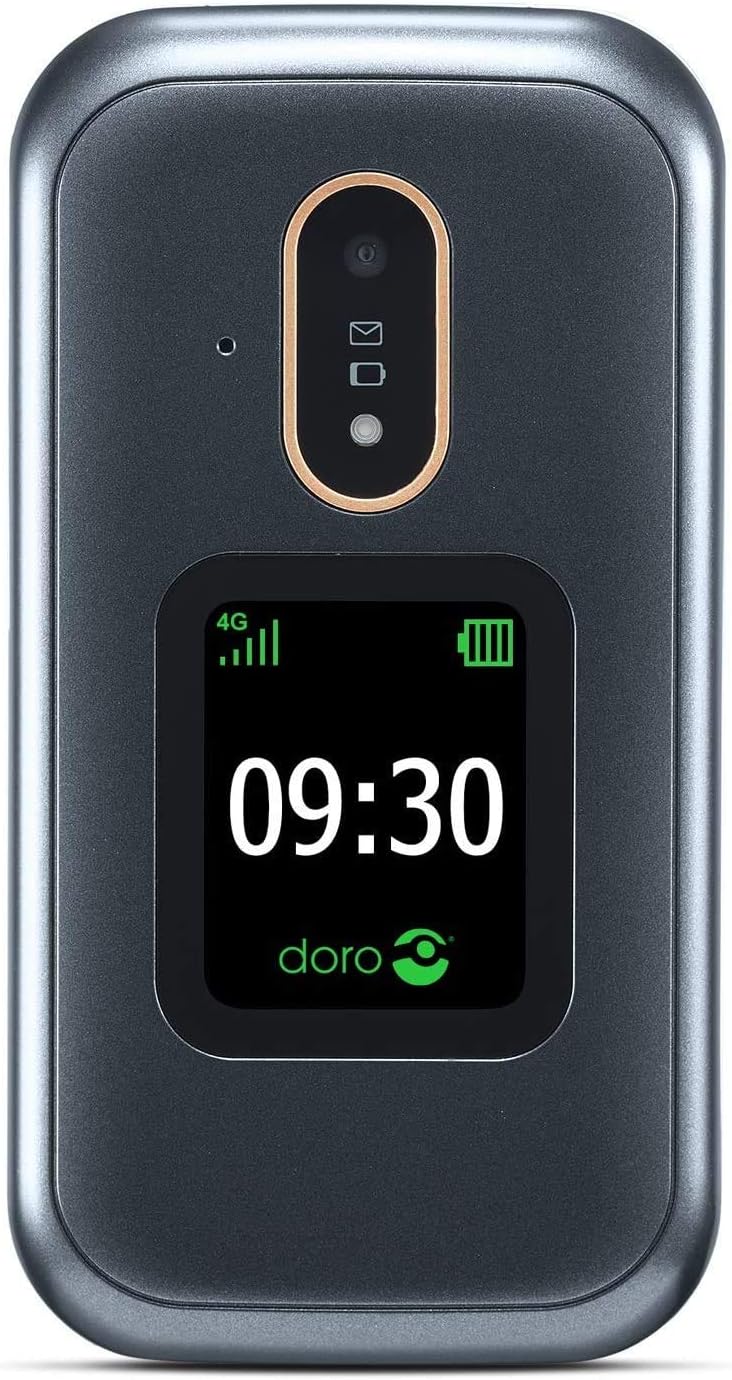
Figure 3.1: External display of Doro 7080.
3.2. സന്ദേശമയയ്ക്കൽ
Navigate to the 'Messages' application from the main menu. You can compose new text messages or read received messages. The intuitive input system assists with typing.
3.3. Using WhatsApp and Facebook
The Doro 7080 supports WhatsApp and Facebook applications, accessible via Wi-Fi or 4G network. This allows for easy communication, including video calls through WhatsApp using the front camera.
3.4. ക്യാമറ പ്രവർത്തനം
The phone features a 5MP main camera for capturing photos and a front camera for video calls. Access the camera from the main menu to take pictures or record videos.
3.5. Response by Doro and Assistance Button
The dedicated assistance button on the back of the Doro 7080, when pressed, alerts pre-configured contacts in the Response by Doro application. It sends your location via SMS and initiates an automatic call in speakerphone mode. Caregivers can also remotely manage phone settings and view the user's location via the Response by Doro app.

Figure 3.2: Response by Doro feature icon.
3.6. Sound and Accessibility
The Doro 7080 features HD Voice technology for clear conversations, even in noisy environments. It is also compatible with hearing aids (HAC level M4/T4).
3.7. മറ്റ് പ്രവർത്തനങ്ങൾ
- ടോർച്ച്: Activate the integrated torch for illumination.
- ബ്ലൂടൂത്ത്: Connect to compatible Bluetooth devices.
- വിഷ്വൽ റിംഗർ: A visual indicator alerts you to incoming calls.
- ഇൻ്റർനെറ്റും ഇമെയിലും: Access the internet and manage emails through the phone's browser and email client.
- Priority Contacts: Set up a list of 10 priority contacts for quick access.
4 പ്രധാന സവിശേഷതകൾ
The Doro 7080 is equipped with a range of features designed to enhance usability and connectivity:
- ബാഹ്യ പ്രദർശനം: Shows caller ID, time, and notifications without opening the flip.
- അപേക്ഷകൾ: Pre-installed WhatsApp and Facebook for social connectivity.
- കണക്റ്റിവിറ്റി: 4G, Wi-Fi, and Bluetooth for versatile connection options.
- ക്യാമറ: 5MP main camera and front camera for photos and video calls.
- ശബ്ദ നിലവാരം: HD Voice for clear audio and Hearing Aid Compatibility (HAC M4/T4).
- അടിയന്തര സവിശേഷതകൾ: Dedicated assistance button and 'Response by Doro' application for enhanced safety.
- ഉപയോക്തൃ ഇൻ്റർഫേസ്: Simplified, action-based interface (EVA) with different display modes for improved readability.
- സംഭരണം: Supports Nano SIM and Micro SD cards up to 128 GB.
- ബാറ്ററി: 1350mAh Li-ion battery providing up to 6 hours talk time and 280 hours standby time. Includes Type-C charger and charging cradle.
- അധിക ഉപകരണങ്ങൾ: Integrated torch and visual ringer indicator.

Figure 4.1: Doro 7080 with feature highlights.
5. പരിപാലനം
5.1. നിങ്ങളുടെ ഫോൺ വൃത്തിയാക്കൽ
To maintain the phone's appearance and functionality, regularly clean it with a soft, dry, lint-free cloth. Avoid using harsh chemicals, cleaning solvents, or strong detergents.
5.2. ബാറ്ററി പരിചരണം
To prolong battery life, avoid exposing the phone to extreme temperatures. Charge the battery regularly, but avoid overcharging or letting it fully discharge frequently. Use only Doro-approved chargers and accessories.

Figure 5.1: Doro phone battery.
5.3. സോഫ്റ്റ്വെയർ അപ്ഡേറ്റുകൾ
Periodically check for software updates to ensure your phone has the latest features and security enhancements. Updates can typically be found in the phone's settings menu under 'System' or 'About phone'.
6. പ്രശ്നപരിഹാരം
നിങ്ങളുടെ ഡോറോ 7080-ൽ നിങ്ങൾ നേരിട്ടേക്കാവുന്ന സാധാരണ പ്രശ്നങ്ങളെ ഈ വിഭാഗം അഭിസംബോധന ചെയ്യുന്നു.
| പ്രശ്നം | സാധ്യമായ പരിഹാരം |
|---|---|
| ഫോൺ ഓണാക്കുന്നില്ല | Ensure the battery is charged. Connect the charger and wait a few minutes before attempting to power on. Check if the battery is correctly inserted. |
| നെറ്റ്വർക്ക് സിഗ്നൽ ഇല്ല | Check if the SIM card is correctly inserted. Move to an area with better network coverage. Restart the phone. Contact your network provider if the issue persists. |
| കോളുകൾ വിളിക്കാനോ സ്വീകരിക്കാനോ കഴിയില്ല | Verify network signal. Ensure call barring is not active. Check if the number is correct. Restart the phone. |
| Sound issues (low volume, no sound) | Adjust the volume settings. Ensure the phone is not in silent or vibrate mode. Clean the speaker and microphone openings. |
| Applications not working (e.g., WhatsApp) | Ensure you have an active internet connection (Wi-Fi or 4G). Check for app updates. Restart the application or the phone. |
| Phone freezes or is unresponsive | Remove the battery, wait a few seconds, and reinsert it to perform a hard reset. If the issue persists, consider a factory reset (back up data first). |
ഈ പരിഹാരങ്ങൾ പരീക്ഷിച്ചതിനുശേഷവും പ്രശ്നം നിലനിൽക്കുകയാണെങ്കിൽ, കൂടുതൽ സഹായത്തിനായി വാറന്റി & പിന്തുണ വിഭാഗം പരിശോധിക്കുക.
7 സ്പെസിഫിക്കേഷനുകൾ
Detailed technical specifications for the Doro 7080:
| ഫീച്ചർ | വിശദാംശങ്ങൾ |
|---|---|
| മോഡലിൻ്റെ പേര് | ഡോറോ 7080 |
| മോഡൽ നമ്പർ | 7957 |
| ഓപ്പറേറ്റിംഗ് സിസ്റ്റം | ഡോറോസ് |
| ഫോം ഫാക്ടർ | Clamshell (Flip Phone) |
| നിറം | Graphite/White (Grey) |
| അളവുകൾ (L x W x H) | 10.9 x 5.7 x 2.1 സെ.മീ |
| ഭാരം | 380 ഗ്രാം |
| Internal Display Resolution | 240 x 320 പിക്സലുകൾ |
| റാം | 512 MB |
| ആന്തരിക സംഭരണ ശേഷി | 128 ജിബി (മൈക്രോ എസ്ഡി വഴി വികസിപ്പിക്കാം) |
| സിം കാർഡ് തരം | നാനോ സിം (4FF) |
| സെല്ലുലാർ ടെക്നോളജി | LTE (4G) |
| വയർലെസ് കമ്മ്യൂണിക്കേഷൻ | ബ്ലൂടൂത്ത്, വൈഫൈ |
| ജിപിഎസ് | അതെ |
| പ്രധാന ക്യാമറ | 5 എം.പി |
| മുൻ ക്യാമറ | അതെ |
| ഓഡിയോ ജാക്ക് | 3.5 മി.മീ |
| ബാറ്ററി തരം | 1350mAh ലി-അയോൺ |
| സംസാര സമയം | 6 മണിക്കൂർ വരെ |
| സ്റ്റാൻഡ്ബൈ സമയം | 280 മണിക്കൂർ വരെ |
| ചാർജർ തരം | USB Type-C, Charging Cradle included |
8. വാറണ്ടിയും പിന്തുണയും
8.1. ഉൽപ്പന്ന വാറൻ്റി
The Doro 7080 typically comes with a 2 വർഷത്തെ വാറൻ്റി വാങ്ങിയ തീയതി മുതൽ. സാധാരണ ഉപയോഗത്തിലുള്ള നിർമ്മാണ വൈകല്യങ്ങളും മെറ്റീരിയൽ തകരാറുകളും ഈ വാറന്റി ഉൾക്കൊള്ളുന്നു. വാറന്റി ക്ലെയിമുകൾക്കായി നിങ്ങളുടെ വാങ്ങിയതിന്റെ തെളിവ് സൂക്ഷിക്കുക.
8.2. ഉപഭോക്തൃ പിന്തുണ
For technical assistance, troubleshooting beyond this manual, or warranty inquiries, please contact Doro customer support. Refer to the official Doro website or the documentation included with your product for specific contact details and support channels in your region.